The Lingma enterprise knowledge base lets you connect to your own storage services to meet your data security and sensitivity requirements. This topic shows you how to switch to your own storage service.
Applicable edition | Enterprise Dedicated Edition |
Background information
Lingma administrators and organization-wide global administrators (for the Enterprise Dedicated Edition) can switch the knowledge base's storage from the built-in Lingma service to a custom storage service. You can make this change on the Knowledge Base page of the Lingma console.
Prerequisites
Network requirements:
If your storage service supports public network access, the Lingma Enterprise Dedicated Edition can connect to it directly. For enhanced security, configure an IP address whitelist to control access.
If your storage service does not support public network access, configure a Virtual Private Cloud (VPC) between the Lingma Enterprise Dedicated Edition and your storage service, and enable reverse access to allow Lingma to retrieve resources from your storage service.
Prepare your storage services:
Object Storage Service (OSS): For more information, see Alibaba Cloud OSS guide.
Compatible products
Alibaba Cloud OSS, Amazon S3, Tencent Cloud COS, Huawei Cloud OBS, open-source MinIO
Required permissions
The authorized account must have the following permissions:
List objects in a bucket (
List): List all objects in the bucket.Read object content (
Read): Read the content of objects in the bucket.Upload new objects (
Put): Upload new objects to the bucket.Delete objects (
Delete): Delete objects from the bucket.
Storage class
Standard (non-cold archive)
Version
All versions are compatible.
Storage capacity
At least 10 GB (can be expanded later based on usage).
Vector database: For more information, see Alibaba Cloud Elasticsearch configuration guide.
Compatible products
Elasticsearch Enterprise Edition, Elasticsearch open-source edition
Version
V8.9 or later
Required permissions
The authorized account must have the following permissions:
Create index (
create_index): Create a new index. If the create index request includes an alias, themanagepermission is also required.Write documents (
write,create_doc): Perform all write operations on documents, including indexing, updating, deleting, bulk operations, and updating mappings.Read documents (
read): Perform read-only operations, includingcount,explain,get,mget,scripts,search, andscroll.Delete documents (
delete): Delete documents from an index.Read access to
create_index,read,delete, andindex: Ensures the user can perform these specific operations.
CPU requirements
Minimum: 4-core 8 GB
Recommended: 8-core 16 GB
Optimal: 16-core 32 GBStorage capacity
At least 300 GB (can be expanded later based on usage).
Configure an IP address whitelist (optional)
We recommend adding the egress IP address of your Lingma instance to the IP address whitelist of your Elasticsearch instance. To obtain the egress IP address for your instance, submit a ticket.
How it works
The enterprise knowledge base uses two types of storage: an OSS and a vector database. The OSS stores uploaded files (such as documents or code packages), while the vector database stores the data after it has been chunked and vectorized.
Lingma supports migrating both OSS and the vector database to maximize the security and privacy of your knowledge base data.
Configuration: In the Alibaba Cloud Management Console, a Lingma administrator or an enterprise administrator configures public or private network access. They then configure the storage service migration in the Lingma console.
Usage: After an administrator uploads a knowledge base data file, the migration configuration takes effect. Lingma saves the file to your OSS and the vector data to your vector database.
Procedure
Log on to the Alibaba Cloud Management Console and configure network access for Lingma Enterprise Dedicated Edition based on your requirements.
Public network access
If your storage service supports public network access, you can configure it for the Lingma Enterprise Dedicated Edition. You can also add an IP address whitelist to control access for enhanced security.
Private network access
If your storage service does not support public network access, configure a VPC to enable communication between it and the Lingma Enterprise Dedicated Edition, and enable reverse access to allow Lingma to retrieve resources from your storage service.
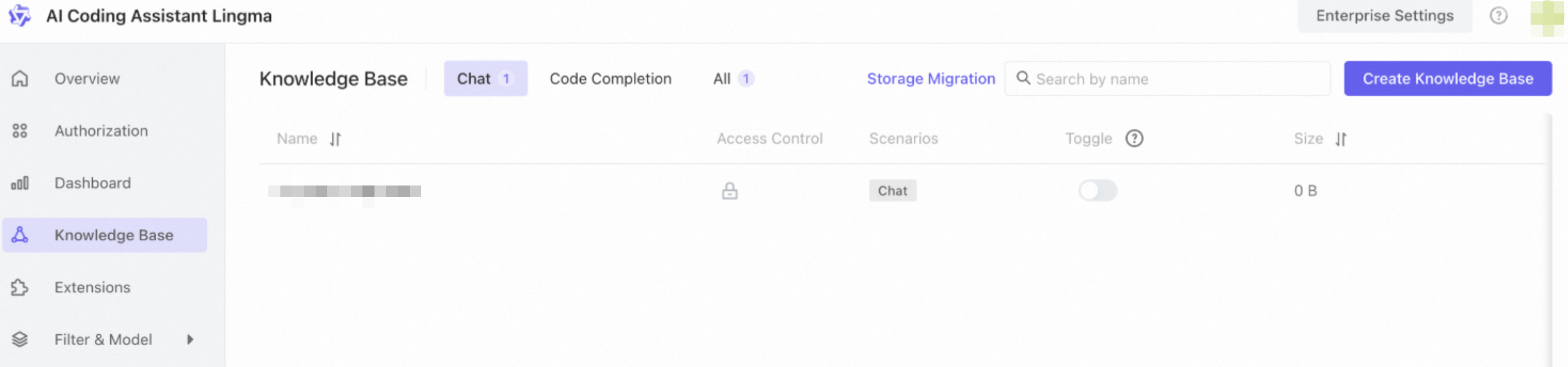
Log on to the Lingma enterprise console. On the Knowledge Base page, click Storage Migration.
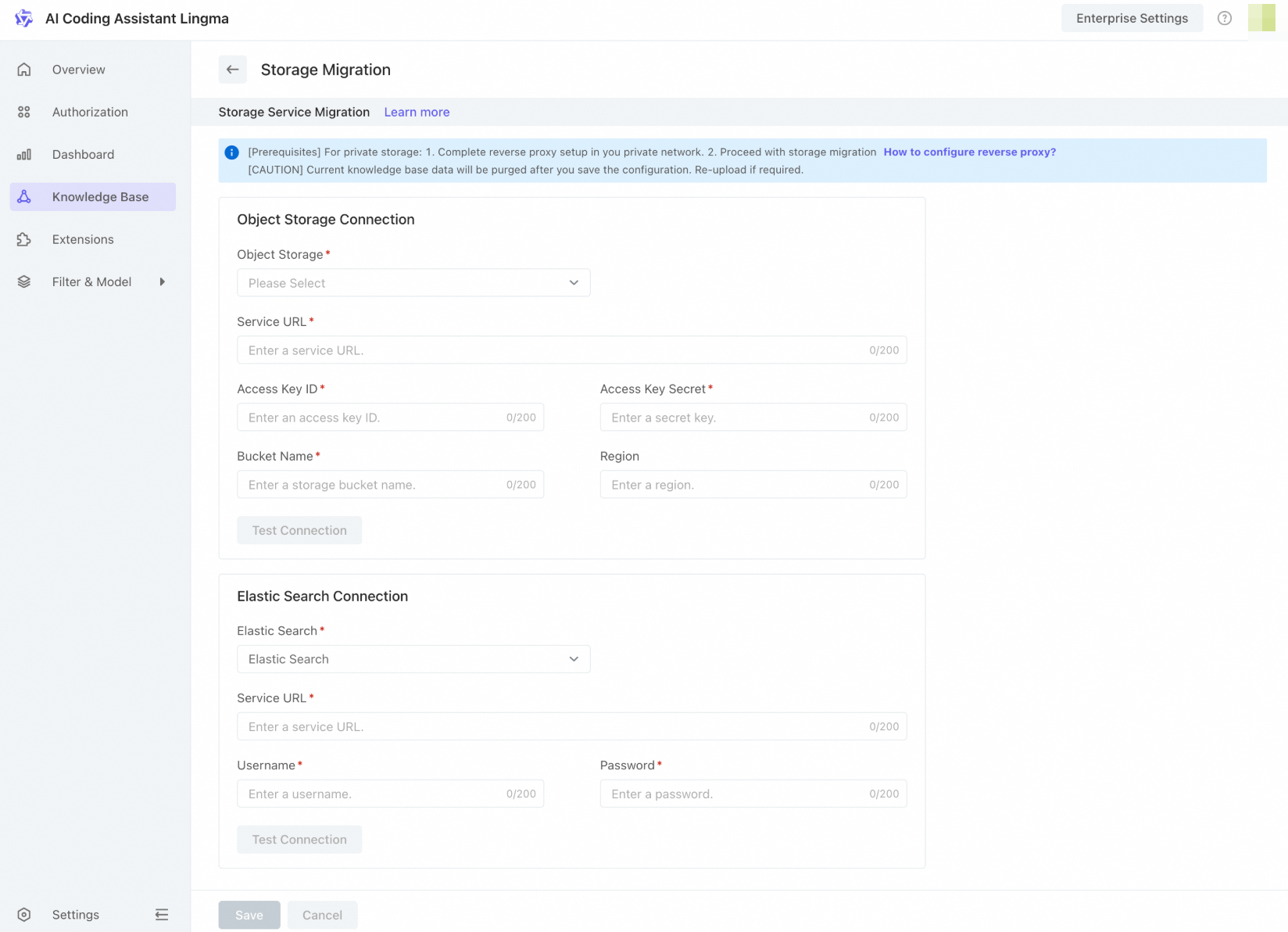
On the configuration page, configure the connections for your storage services, including OSS and the vector database. After entering the required information, click Test Connection. If the connection is successful, click Save. A success message confirms the configuration.
 Important
The new configuration takes effect immediately after you click Save. Lingma will permanently delete all content in the Lingma-provided knowledge base, and the knowledge base in the Lingma enterprise management console will be empty.
Once the switch is complete, you cannot reverse this action in the enterprise management console. To switch back to the built-in Lingma storage service, submit a ticket.
After the service switch is complete, when you upload data to the knowledge base, Lingma saves the knowledge data to the OSS you configured.
FAQ
What should I do if I can't upload files after switching to my own storage service?
If you cannot upload files to the knowledge base after switching to your own storage service, the connection to your service may be down. Go to the Knowledge Base page and verify the storage connection.