You can add an Object Storage Service (OSS) data source for LindormTable to read data stored in OSS. To import data stored in OSS to a Lindorm wide table, you must first add an OSS data source. This topic describes how to add an OSS data source.
Prerequisites
Lindorm Tunnel Service (LTS) is activated. For more information, see Purchase the LTS service and log on to the LTS web UI
The IP address of your client is added to the whitelist of your Lindorm instance. For more information, see Configure whitelists.
Procedure
Log on to the LTS web UI. For more information, see Purchase the LTS service and log on to the LTS web UI.
In the left-side navigation pane, choose .
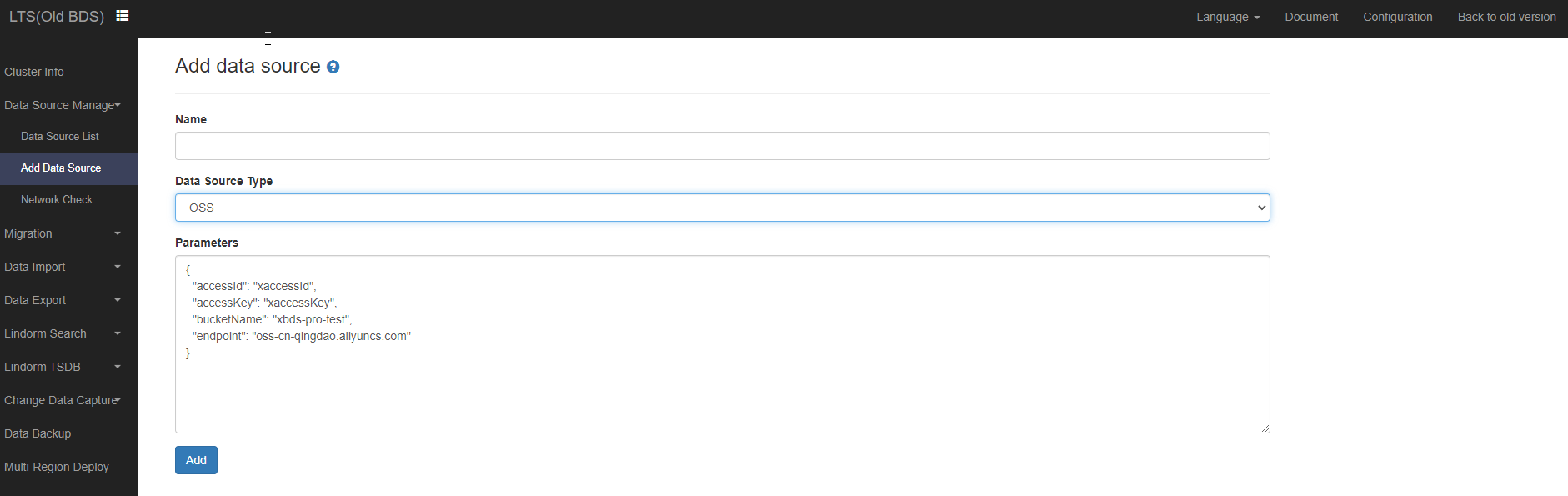
On the Add data source page, configure the following parameters:
Name: Enter the name of the data source.
Data Source Type: Select OSS.
Parameters: Specify parameters in the following format:
{
  "accessId": "xaccessId",
  "accessKey": "xaccessKey",
  "bucketName": "xbds-pro-test",
  "endpoint": "oss-cn-qingdao-internal.aliyuncs.com"
}
The following table describes the parameters in the preceding code.
Parameter
Description
accessId
The AccessKey ID of your Alibaba Cloud account or RAM user used to access data stored in OSS. For information about how to obtain the AccessKey ID and AccessKey secret of your Alibaba Cloud account or RAM user, see Create an AccessKey pair.
accessKey
The AccessKey secret of your Alibaba Cloud account or RAM user used to access data stored in OSS.
bucketName
The name of the OSS bucket that is used as the data source.
endpoint
The endpoint that you use to access the region in which the bucket is located over the private network.
Click Add.