All Products
Search
Document Center

Intelligent Media Management:Live transcoding

Last Updated:Jun 16, 2025

Live transcoding is a real-time transcoding feature of Intelligent Media Management (IMM) designed to meet the needs of online video streaming. This topic describes the benefits and usage of live transcoding.

Overview

Unlike media transcoding, which requires the entire video to be transcoded before playback can begin, live transcoding processes only the necessary video segments and allows playback to start immediately after the original video file is uploaded. Live transcoding offers the following benefits:

  • Instant playback during transcoding and no buffering

  • Optimized transcoding and smooth playback with scrubbing completed in seconds

  • On-demand transcoding, re-transcoding in case of deletion of transcoded files, and reduced transcoding and storage costs

  • Custom transcoding with dozens of custom transcoding parameters

  • Good compatibility with more than 300 audio and video formats

Note

Live transcoding does not support anonymous playback.

Usage process

  1. Upload a video file to Object Storage Service (OSS).

  2. Call the GenerateVideoPlaylist operation to create a playlist and use the signature feature of OSS to sign the playlist.

  3. Use a player to obtain the playlist and to start playback. Video playback automatically triggers live transcoding.

image

Scenarios

  • Play videos stored in network drives: Live transcoding allows videos in network drives to be instantly played upon request on clients at resolutions that best suit actual network conditions. This ensures real-time playback and provides good video compatibility across devices. Live transcoding also reduces storage costs because videos in network drives are not transcoded if the videos are not requested.

  • Preview and play videos on social media platforms: Live transcoding allows users on instant messaging and social media platforms to immediately play received videos. This improves the timeliness of communications. In addition, when users play videos in chat history that remain unwatched for an extended period of time, they can still be played instantly even if TS objects generated for the videos are regularly cleared to reduce storage usage.

  • Share video content on forums and blogging platforms: Live transcoding provides users on forums and blogging platforms with a smooth, device-compatible video viewing experience. It allows users to immediately play shared videos at the resolution that best suits their network conditions.

Benefits

The following table describes the benefits of live transcoding in detail.

Benefit

Description

Standardization

  • Live transcoding supports the HTTP Live Streaming (HLS) protocol.

  • Live transcoding supports media playlists and master playlists.

  • Live transcoding enables playback of videos with multiple video streams, audio streams, and subtitle streams.

  • Live transcoding supports mainstream HLS players.

  • Live transcoding supports more than 300 mainstream audio and video formats.

Cost-effectiveness

  • Videos and video segments that are not played are not transcoded, which reduces transcoding overhead.

  • Transcoded video segments can be deleted to reduce storage usage. Playing videos whose transcoded video files or segments have been deleted triggers transcoding again, which helps avoid affecting the online playback experience.

High efficiency

  • IMM adopts a large server cluster and therefore supports large numbers of live transcoding tasks.

  • Videos can be converted into video streams with different resolutions and bitrates to ensure smooth playback in different network conditions.

  • Viewers can play videos immediately when playlists are generated, without the need to wait for videos to be entirely transcoded.

  • The video header segment size is adaptive, making video loading more efficient.

  • Intelligent pre-transcoding is supported.

Supported audio and video formats

The live transcoding feature supports virtually all audio and video formats, encompassing over 300 different types. The following table describes some common audio and video formats supported by live transcoding.

Input video formats

Mainstream formats, such as AVI, MOV, FLV, MKV, WebM, MPEG, WMV, RM, VOB, and TS

Input audio formats

Mainstream formats, such as MP3, WAV, AAC, FLAC, and WMA

Output container format

ts

Prerequisites

  1. An AccessKey pair is created and obtained. For more information, see Create an AccessKey pair.

  2. The relevant objects are uploaded to an OSS bucket. For more information, see Get started by using the OSS console.

  3. IMM is activated and an IMM project is created. For more information, see Activate IMM and Create a project.

Note

You can also create a project by calling the CreateProject operation. For more information, see CreateProject.

You can call the ListProjects operation to query existing projects in a specific region. For more information, see ListProjects.

  1. The RAM user is granted the permissions required to use live transcoding. For more information, see Permissions.

  2. The OSS bucket is bound to the IMM project. For more information about how to bind an OSS bucket to an IMM project in the OSS console or by using the IMM API, see Get started and AttachOSSBucket.

  3. If hotlink protection is configured for the bucket that stores source videos or destination videos, a hotlink protection policy that allows requests with an empty Referer field is configured for the bucket. For more information, see Configure a Referer whitelist or blacklist to prevent other websites from linking to your OSS objects.

  4. If your player needs to initiate cross-origin requests to the bucket that stores destination videos, make sure that cross-origin access to the bucket is allowed from your player. For more information, see CORS.

Examples

Use media playlists

Transcoding task

  • Source video

    • Video format: AVI

    • Video URI: oss://your-oss-bucket-name/test.avi

  • Destination video

    • Segment duration: 10 seconds

    • Pre-transcoded video length: 36 seconds

    • Video stream format: H.264

    • Video resolution: 1280 × 720

    • Frame rate: 25 fps

    • Video bitrate: 2 Mbit/s

    • Audio stream format: AAC

    • Audio bitrate: 128 Kbit/s

    • Path prefix of the destination object: oss://your-oss-bucket-name/output/media

Step 1: Generate a playlist

Note

For more information about how to generate a playlist, see GenerateVideoPlaylist.

  • Sample request

    {
      "ProjectName": "test-project",
      "SourceURI": "oss://your-oss-bucket-name/test.avi",
      "Targets": [
        {
          "Audio": {
            "TranscodeAudio": {
              "Codec": "aac",
              "Bitrate": 128000,
              "SampleRate": 44100
            }
          },
          "Duration": 10,
          "InitialSegments": [
            2,
            2,
            2
          ],
          "InitialTranscode": 36,
          "URI": "oss://your-oss-bucket-name/output/media",
          "Video": {
            "TranscodeVideo": {
              "Codec": "h264",
              "Bitrate": 2400000,
              "FrameRate": 25,
              "Resolution": "1280x",
              "ScaleType": "fit"
            }
          }
        }
      ]
    }
  • Sample response

    {
      "RequestId": "********-3ADC-576A-BD1E-************",
      "VideoPlaylist": [
        {
          "FrameRate": "25",
          "Resolution": "1280x720",
          "Token": "3d8ca7d6b3**********4b3cb69fe3bf",
          "URI": "oss://your-oss-bucket-name/output/media.m3u8"
        }
      ]
    }
    
  • Sample code

    # -*- coding: utf-8 -*-
    
    import json
    
    from alibabacloud_imm20200930 import models as imm_20200930_models
    from alibabacloud_imm20200930.client import Client as imm20200930Client
    from alibabacloud_tea_openapi import models as open_api_models
    
    
    class Sample:
        def __init__(self):
            pass
    
        @staticmethod
        def create_client(
                access_key_id: str,
                access_key_secret: str,
        ) -> imm20200930Client:
            """
            Use the AccessKey ID and AccessKey secret to initialize the account Client. 
            @param access_key_id:
            @param access_key_secret:
            @return: Client
            @throws Exception
            """
            config = open_api_models.Config(
                # Provide your AccessKey ID. 
                access_key_id=access_key_id,
                # Provide your AccessKey secret. 
                access_key_secret=access_key_secret
            )
            # Specify the IMM endpoint. 
            config.endpoint = f'imm.cn-hangzhou.aliyuncs.com'
            return imm20200930Client(config)
    
        @staticmethod
        def main() -> None:
            # Provide your AccessKey ID and AccessKey secret. We recommend that you obtain the AccessKey ID and AccessKey secret from the configuration. 
            imm_access_key_id = "yourAccessKeyId"
            imm_access_key_secret = "yourAccessKeySecret"
    
            # Specify the name of the project. 
            project_name = "test-project"
    
            # Specify the OSS URI of the source video. 
            source_uri = "oss://your-oss-bucket-name/test.avi"
    
            # Specify the URI of the destination object. 
            target_uri = "oss://your-oss-bucket-name/output/media"
    
            # Initialize the client. 
            client = Sample.create_client(imm_access_key_id, imm_access_key_secret)
    
            # Create a destination video. 
            target = imm_20200930_models.GenerateVideoPlaylistRequestTargets(
                audio=imm_20200930_models.TargetAudio(
                    transcode_audio=imm_20200930_models.TargetAudioTranscodeAudio(
                        codec="aac",
                        bitrate=128000,
                        sample_rate=44100,
                    )
                ),
                duration=10,
                initial_segments=[2, 2, 2],
                initial_transcode=36,
                uri=target_uri,
                video=imm_20200930_models.TargetVideo(
                    transcode_video=imm_20200930_models.TargetVideoTranscodeVideo(
                        codec="h264",
                        bitrate=2400000,
                        frame_rate=25,
                        resolution="1280x",
                        scale_type="fit",
                    )
                ),
            )
    
            # Create an API request. 
            req = imm_20200930_models.GenerateVideoPlaylistRequest(
                project_name=project_name,
                source_uri=source_uri,
                targets=[target]
            )
    
            # Print the request parameters and values. 
            print(json.dumps(req.to_map(), indent=4))
    
            # Initiate a request.
            response = client.generate_video_playlist(req)
    
            # Print the response. 
            print(json.dumps(response.body.to_map(), indent=4))
    
    
    if __name__ == '__main__':
        Sample.main()
    
    package main
    
    import (
    	"fmt"
    
    	openapi "github.com/alibabacloud-go/darabonba-openapi/v2/client"
    	imm "github.com/alibabacloud-go/imm-20200930/v2/client"
    	"github.com/alibabacloud-go/tea/tea"
    )
    
    func main() {
    	// Initialize the IMM client. 
    	immClient, err := imm.NewClient(&openapi.Config{
    		RegionId:        tea.String("cn-hangzhou"),            // Specify the ID of the region in which the project resides. 
    		AccessKeyId:     tea.String("your_access_key_id"),     // Provide the AccessKey ID of the RAM user. 
    		AccessKeySecret: tea.String("your_access_key_secret"), // Provide the AccessKey secret of the RAM user. 
    	})
    	if err != nil {
    		// Handle errors. 
    		panic(err)
    	}
    
    	// Specify the name of the project. 
    	projectName := "test-project"
    
    	// Specify the OSS URI of the source video. 
    	sourceUri := "oss://your-oss-bucket-name/test.avi"
    
    	// Specify the URI of the destination object. 
    	targetUri := "oss://your-oss-bucket-name/output/media"
    
    	target := &imm.GenerateVideoPlaylistRequestTargets{
    		Audio: &imm.TargetAudio{
    			TranscodeAudio: &imm.TargetAudioTranscodeAudio{
    				Bitrate:    tea.Int32(98304),
    				Codec:      tea.String("aac"),
    				SampleRate: tea.Int32(44100),
    			},
    		},
    		Duration:         tea.Float32(10),
    		InitialSegments:  []*float32{tea.Float32(2), tea.Float32(2), tea.Float32(2)},
    		InitialTranscode: tea.Float32(36),
    		URI:              tea.String(targetUri),
    		Video: &imm.TargetVideo{
    			TranscodeVideo: &imm.TargetVideoTranscodeVideo{
    				Codec:      tea.String("h264"),
    				Bitrate:    tea.Int32(2400000),
    				FrameRate:  tea.Float32(25),
    				Resolution: tea.String("1280x"),
    				ScaleType:  tea.String("fit"),
    			},
    		},
    	}
    
    	// Create an API request. 
    	req := &imm.GenerateVideoPlaylistRequest{
    		ProjectName: tea.String(projectName),
    		SourceURI:   tea.String(sourceUri),
    		Targets:     []*imm.GenerateVideoPlaylistRequestTargets{target},
    	}
    
    	// Initiate the request.
    	res, err := immClient.GenerateVideoPlaylist(req)
    	if err != nil {
    		panic(err)
    	}
    
    	// Print the response. 
    	fmt.Println("Response:", *res.Body)
    }
    // This file is auto-generated, don't edit it. Thanks.
    package com.aliyun.sample;
    
    import com.aliyun.tea.*;
    
    public class Sample {
    
        /**
         * <b>description</b> :
         * <p>Use your AccessKey ID and AccessKey secret to initialize the client.</p>
         * @return Client
         * 
         * @throws Exception
         */
        public static com.aliyun.teaopenapi.Client createClient() throws Exception {
            // If the project code is leaked, the AccessKey pair may be leaked and the security of all resources within your account may be compromised. The following sample code is provided only for reference. 
            // For enhanced security, we recommend that you use temporary access credentials issued by Security Token Service (STS). For more information, see https://www.alibabacloud.com/help/en/sdk/developer-reference/v2-manage-access-credentials. 
            com.aliyun.teaopenapi.models.Config config = new com.aliyun.teaopenapi.models.Config()
                    // Required. Make sure that the ALIBABA_CLOUD_ACCESS_KEY_ID environment variable is configured. 
                    .setAccessKeyId(System.getenv("ALIBABA_CLOUD_ACCESS_KEY_ID"))
                    // Required. Make sure that the ALIBABA_CLOUD_ACCESS_KEY_SECRET environment variable is configured. 
                    .setAccessKeySecret(System.getenv("ALIBABA_CLOUD_ACCESS_KEY_SECRET"));
            // For a list of IMM endpoints for supported regions, visit https://api.alibabacloud.com/product/imm.
            config.endpoint = "imm.cn-beijing.aliyuncs.com";
            return new com.aliyun.teaopenapi.Client(config);
        }
    
        /**
         * <b>description</b> :
         * <p>Parameters and return value</p>
         * 
         * @param path string Path parameters
         * @return OpenApi.Params
         */
        public static com.aliyun.teaopenapi.models.Params createApiInfo() throws Exception {
            com.aliyun.teaopenapi.models.Params params = new com.aliyun.teaopenapi.models.Params()
                    // The operation that you want to perform.
                    .setAction("GenerateVideoPlaylist")
                    // The version number of the operation.
                    .setVersion("2020-09-30")
                    // The protocol.
                    .setProtocol("HTTPS")
                    // The HTTP method of the operation.
                    .setMethod("POST")
                    .setAuthType("AK")
                    .setStyle("RPC")
                    // The path of the operation.
                    .setPathname("/")
                    // The format of the request body.
                    .setReqBodyType("json")
                    // The format of the response body.
                    .setBodyType("json");
            return params;
        }
    
        public static void main(String[] args_) throws Exception {
            java.util.List<String> args = java.util.Arrays.asList(args_);
            com.aliyun.teaopenapi.Client client = Sample.createClient();
            com.aliyun.teaopenapi.models.Params params = Sample.createApiInfo();
            // query params
            java.util.Map<String, Object> queries = new java.util.HashMap<>();
            queries.put("ProjectName", "test-project");
            queries.put("SourceURI", "oss://your-oss-bucket-name/test.avi");
            queries.put("Targets", "[{\"Video\":{\"TranscodeVideo\":{\"Codec\":\"h264\",\"Bitrate\":128000,\"FrameRate\":25,\"Resolution\":\"1280x\"}},\"Audio\":{\"TranscodeAudio\":{\"SampleRate\":44100,\"Codec\":\"aac\",\"Bitrate\":2400000}},\"Duration\":10,\"InitialSegments\":[2,2,2],\"InitialTranscode\":36,\"URI\":\"oss://your-oss-bucket-name/output/media\"}]");
            // runtime options
            com.aliyun.teautil.models.RuntimeOptions runtime = new com.aliyun.teautil.models.RuntimeOptions();
            com.aliyun.teaopenapi.models.OpenApiRequest request = new com.aliyun.teaopenapi.models.OpenApiRequest()
                    .setQuery(com.aliyun.openapiutil.Client.query(queries));
            // Write your code to display the response of the operation if necessary.
            // The response is of the MAP type, which contains the response body, response headers, and HTTP status code. 
            client.callApi(params, request, runtime);
        }
    }

Step 2: Sign the playlist

# -*- coding: utf-8 -*-
import os
import oss2
from oss2.credentials import EnvironmentVariableCredentialsProvider
# Obtain access credentials from environment variables. Before you run the sample code, you must configure the environment variables. 
auth = oss2.ProviderAuthV4(EnvironmentVariableCredentialsProvider())
# Specify the endpoint for the region in which the bucket is located.  
endpoint = 'yourEndpoint'
# Specify the ID of the region in which the bucket is located. Example: cn-hangzhou. 
region = 'cn-hangzhou'
# Specify the name of the bucket in which the generated playlist is stored. 
bucket_name = 'your-oss-bucket-name'
# Specify the name of the playlist. 
key = 'output/media.m3u8'

# Specify the bucket instance. You must use the bucket instance to call all object-related methods. 
bucket = oss2.Bucket(auth, endpoint, bucket_name, region=region) 
# Specify hls/sign,live_1 in the x-oss-process operation. 
params = {}
params.update({oss2.Bucket.PROCESS: 'hls/sign,live_1'})

# Sign the URL. 
url = bucket.sign_url('GET', key, 7200, params=params, slash_safe=True)

# The generated URL can be directly used in an HLS player for playback. 
print(url)
# In this example, the URL is http://your-oss-bucket-name.yourendpoint/output/media.m3u8?x-oss-process=hls%2Fsign%2Clive_1&x-oss-signature-version=OSS2&x-oss-expires=1683619052&x-oss-access-key-id=yourAccessKeyId&x-oss-signature=4Lja6Sgb7zXWzY9R9QTRe4FxI240fApDavp%2BSMj3ufg%3D
package main

import (
	"fmt"
	"github.com/aliyun/aliyun-oss-go-sdk/oss"
	"net/http"
	"net/url"
	"os"
	"strings"
)

func main() {
	// Obtain access credentials from environment variables. Before you run the sample code, you must configure the environment variables. 
	provider, err := oss.NewEnvironmentVariableCredentialsProvider()
	if err != nil {
		fmt.Println("Error:", err)
		os.Exit(-1)
	}
	// Create an OSSClient instance. 
	// Specify the endpoint of the region in which the bucket is located. For example, if the bucket is located in the China (Hangzhou) region, set the endpoint to https://oss-cn-hangzhou.aliyuncs.com.  
	// Specify the endpoint of the region in which the bucket is located. 
	client, err := oss.New("yourEndpoint", "", "", oss.SetCredentialsProvider(&provider), oss.AuthVersion(oss.AuthV4), oss.Region("yourRegion"))
	if err != nil {
		fmt.Println("Error:", err)
		os.Exit(-1)
	}

	// Specify the name of the bucket. In this example, the bucket name is your-oss-bucket-name. 
	bucket, err := client.Bucket("your-oss-bucket-name")
	if err != nil {
		fmt.Println("Error:", err)
		os.Exit(-1)
	}

	// Use hls/sign to sign the playlist. The "hls/sign,live_1" string specifies live transcoding. 
	// Specify the full path of the M3U8 object. In this example, the path is output/media.m3u8. 
	// Specify the validity period of the signature. In this example, the validity period is set to 7,200 seconds (2 hours). 
	signedURL, err := bucket.SignURL("output/media.m3u8", http.MethodGet, 7200, oss.Process("hls/sign,live_1"))
	if err != nil {
		fmt.Println("Error:", err)
		os.Exit(-1)
	}

	// Convert the URL to a URL that can be used by a video player for video playback. 
	rawUrl, err := url.Parse(signedURL)
	if err != nil {
		fmt.Println("Error:", err)
		os.Exit(-1)
	}
	rawUrl.RawPath = strings.Replace(rawUrl.RawPath, "%2F", "/", -1)

	// Print the signed URL. 
	fmt.Println(rawUrl.String())

	// The signed URL can be directly used in an HLS player for playback. 
	//http://your-oss-bucket-name.yourEndpoint/output/media.m3u8?x-oss-access-key-id=yourAccessKeyId&x-oss-expires=1683618084&x-oss-process=hls%2Fsign%2Clive_1&x-oss-signature=%2BqTZ0R04Ft065gdyoP6f9yJdd1UXi%2F8eoxd9c9Stl2g%3D&x-oss-signature-version=OSS2

}
package com.aliyun.sample;
import com.aliyun.oss.*;
import com.aliyun.oss.common.auth.*;
import com.aliyun.oss.common.comm.SignVersion;
import com.aliyun.oss.model.GeneratePresignedUrlRequest;
import java.net.URL;
import java.util.Date;
public class demo {
    public static void main(String[] args) throws Throwable {
        // In this example, the endpoint of the China (Beijing) region is used. Specify your actual endpoint. 
        String endpoint = "https://oss-cn-beijing.aliyuncs.com";
        String region = "cn-beijing";
        // Obtain access credentials from environment variables. Before you run the sample code, make sure that the OSS_ACCESS_KEY_ID and OSS_ACCESS_KEY_SECRET environment variables are configured. 
        com.aliyun.teaopenapi.models.Config config = new com.aliyun.teaopenapi.models.Config()
                // Required. Make sure that the ALIBABA_CLOUD_ACCESS_KEY_ID environment variable is configured. 
                .setAccessKeyId(System.getenv("ALIBABA_CLOUD_ACCESS_KEY_ID"))
                // Required. Make sure that the ALIBABA_CLOUD_ACCESS_KEY_SECRET environment variable is configured. 
                .setAccessKeySecret(System.getenv("ALIBABA_CLOUD_ACCESS_KEY_SECRET"));
        EnvironmentVariableCredentialsProvider credentialsProvider = CredentialsProviderFactory.newEnvironmentVariableCredentialsProvider();
        // Specify the name of the bucket. Example: examplebucket. 
        String bucketName = "test-project";
        // Specify the full path of the object. Example: exampleobject.txt. Do not include the bucket name in the full path of the object. 
        String objectKey = "output/media.m3u8";
        // Create an OSSClient instance. 
        ClientBuilderConfiguration clientBuilderConfiguration = new ClientBuilderConfiguration();
        clientBuilderConfiguration.setSignatureVersion(SignVersion.V4);
        OSS ossClient = OSSClientBuilder.create()
                .endpoint(endpoint)
                .credentialsProvider(credentialsProvider)
                .clientConfiguration(clientBuilderConfiguration)
                .region(region)
                .build();
        // Specify the validity period of the URL.
        Date expiration = new Date(new Date().getTime() + 7200 * 1000); // In this example, the validity period is set to 2 hours.
        GeneratePresignedUrlRequest request=new GeneratePresignedUrlRequest(bucketName, objectKey, HttpMethod.GET);
        request.setExpiration(expiration);
        request.setProcess("hls/sign,live_1");
        // Generate the signed URL.
        URL signedUrl = ossClient.generatePresignedUrl(request);

        // Display the signed URL.
        System.out.println(signedUrl);
        // Shut down the client.


        // Shut down the OSSClient instance. 
        ossClient.shutdown();         
        try {
            // Specify the validity period of the signed URL. Unit: milliseconds. In this example, the validity period is set to 1 hour. 
            URL url = ossClient.generatePresignedUrl(bucketName, objectKey, expiration);
            System.out.println(url);
        } catch (OSSException oe) {
            System.out.println("Caught an OSSException, which means your request made it to OSS, "
                    + "but was rejected with an error response for some reason.");
            System.out.println("Error Message:" + oe.getErrorMessage());
            System.out.println("Error Code:" + oe.getErrorCode());
            System.out.println("Request ID:" + oe.getRequestId());
            System.out.println("Host ID:" + oe.getHostId());
        } catch (ClientException ce) {
            System.out.println("Caught an ClientException, which means the client encountered "
                    + "a serious internal problem while trying to communicate with OSS, "
                    + "such as not being able to access the network.");
            System.out.println("Error Message:" + ce.getMessage());
        } finally {
            if (ossClient != null) {
                ossClient.shutdown();
            }
        }
    }
}

Step 3: Play the video

You can directly use the signed URL that is generated in Step 2: Sign the playlist in an HLS player to play the video.

  • Play the video in Safari on a Mac

    The Safari player on Mac supports HLS playback. You can directly copy the signed URL and paste it into the address bar of Safari to play the video.

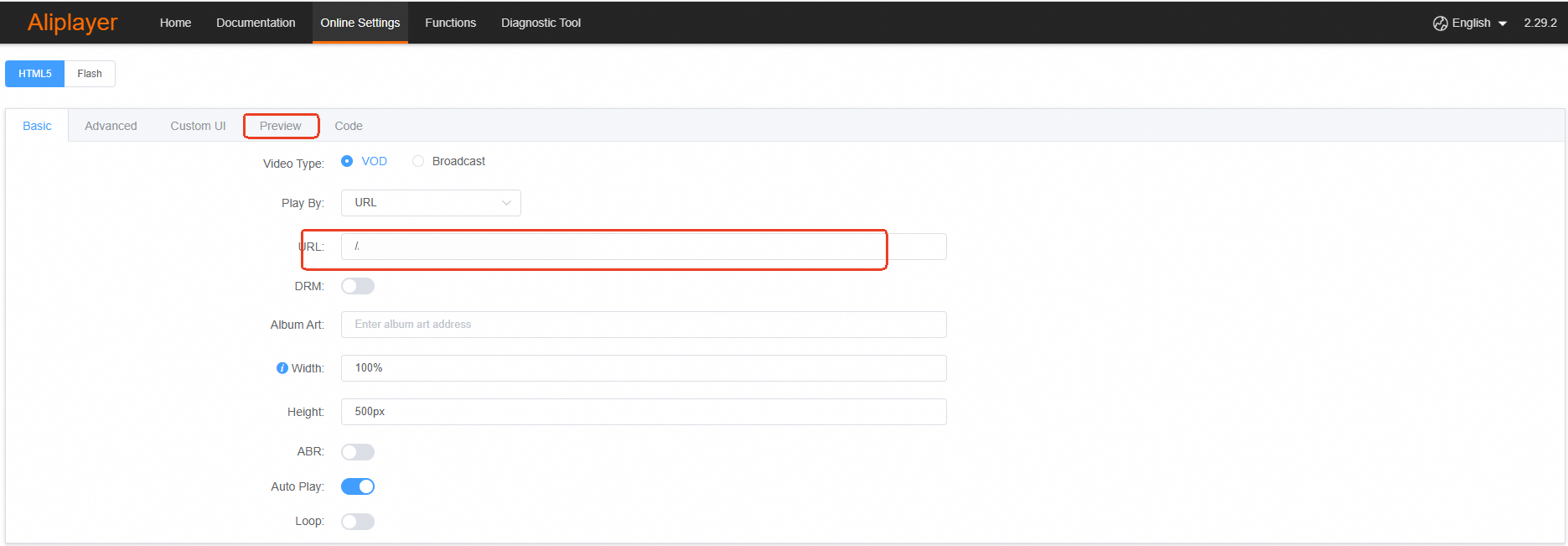
  • Play the video in ApsaraVideo Player for Web

    Open ApsaraVideo Player for Web. Copy the signed URL and paste it into the URL field.

    Note

    You can also integrate ApsaraVideo Player SDKs into your application to directly play the video in your application. For more information, see Overview.
    image

  • Play the video in another HLS-compatible player

    Copy the signed URL and paste it into the player to play the video.

Use master playlists

Transcoding task

  • Source video

    • Video format: AVI

    • Video URI: oss://your-oss-bucket-name/test.avi

  • Master playlist URI: oss://your-oss-bucket-name/output/master.m3u8

  • Destination video 1

    • Segment duration: 10 seconds

    • Pre-transcoded video length: 36 seconds

    • Video stream format: H.264

    • Video resolution: 1920 × 1080

    • Frame rate: 25 fps

    • Audio stream format: AAC

    • Audio bitrate: 128 Kbit/s

    • Path prefix of the destination object: oss://your-oss-bucket-name/output/1080p/1080p

  • Destination video 2

    • Segment duration: 10 seconds

    • Pre-transcoded video length: 36 seconds

    • Video stream format: H.264

    • Video resolution: 1280 × 720

    • Frame rate: 25 fps

    • Audio stream format: AAC

    • Audio bitrate: 96 Kbit/s

    • Path prefix of the destination object: oss://your-oss-bucket-name/output/720p/720p

  • Destination video 3

    • Segment duration: 10 seconds

    • Pre-transcoded video length: 36 seconds

    • Video stream format: H.264

    • Video resolution: 720 × 540

    • Frame rate: 25 fps

    • Audio stream format: AAC

    • Audio bitrate: 64 Kbit/s

    • Path prefix of the destination object: oss://your-oss-bucket-name/output/540p/540p

Step 1: Generate a playlist

  • Sample request

    {
      "MasterURI": "oss://your-oss-bucket-name/output/master.m3u8",
      "ProjectName": "test-project",
      "SourceSubtitles": [],
      "SourceURI": "oss://your-oss-bucket-name/test.avi",
      "Targets": [
        {
          "Audio": {
            "TranscodeAudio": {
              "Bitrate": 131072,
              "Codec": "aac",
              "SampleRate": 44100
            }
          },
          "Duration": 10,
          "InitialSegments": [
            2,
            2,
            2
          ],
          "InitialTranscode": 36,
          "URI": "oss://your-oss-bucket-name/output/1080p/1080p",
          "Video": {
            "TranscodeVideo": {
              "CRF": 26,
              "Codec": "h264",
              "FrameRate": 25,
              "Resolution": "1920x",
              "ScaleType": "fit"
            }
          }
        },
        {
          "Audio": {
            "TranscodeAudio": {
              "Bitrate": 98304,
              "Codec": "aac",
              "SampleRate": 44100
            }
          },
          "Duration": 10,
          "InitialSegments": [
            2,
            2,
            2
          ],
          "InitialTranscode": 36,
          "URI": "oss://your-oss-bucket-name/output/720p/720p",
          "Video": {
            "TranscodeVideo": {
              "CRF": 26,
              "Codec": "h264",
              "FrameRate": 25,
              "Resolution": "1280x",
              "ScaleType": "fit"
            }
          }
        },
        {
          "Audio": {
            "TranscodeAudio": {
              "Bitrate": 65536,
              "Codec": "aac",
              "SampleRate": 44100
            }
          },
          "Duration": 10,
          "InitialSegments": [
            2,
            2,
            2
          ],
          "InitialTranscode": 36,
          "URI": "oss://your-oss-bucket-name/output/540p/540p",
          "Video": {
            "TranscodeVideo": {
              "CRF": 26,
              "Codec": "h264",
              "FrameRate": 25,
              "Resolution": "720x",
              "ScaleType": "fit"
            }
          }
        }
      ]
    }
    
  • Sample response

    {
      "Duration": 60.085,
      "MasterURI": "oss://your-oss-bucket-name/output/master.m3u8",
      "RequestId": "********-3ADC-576A-BD1E-************",
      "Token": "1deb790e****************231a6f9d",
      "VideoPlaylist": [
        {
          "FrameRate": "25",
          "Resolution": "720x406",
          "Token": "8bcd9bc0****************67a65f48",
          "URI": "oss://your-oss-bucket-name/output/540p/540p.m3u8"
        },
        {
          "FrameRate": "25",
          "Resolution": "1280x720",
          "Token": "89ca4337****************cd031957",
          "URI": "oss://your-oss-bucket-name/output/720p/720p.m3u8"
        },
        {
          "FrameRate": "25",
          "Resolution": "1920x1080",
          "Token": "11fb1afb****************4f3683fc",
          "URI": "oss://your-oss-bucket-name/output/1080p/1080p.m3u8"
        }
      ]
    }
  • Sample code

    # -*- coding: utf-8 -*-
    
    import json
    
    from alibabacloud_imm20200930 import models as imm_20200930_models
    from alibabacloud_imm20200930.client import Client as imm20200930Client
    from alibabacloud_tea_openapi import models as open_api_models
    
    
    class Sample:
        def __init__(self):
            pass
    
        @staticmethod
        def create_client(
                access_key_id: str,
                access_key_secret: str,
        ) -> imm20200930Client:
            """
            Use the AccessKey ID and AccessKey secret to initialize the account Client. 
            @param access_key_id:
            @param access_key_secret:
            @return: Client
            @throws Exception
            """
            config = open_api_models.Config(
                # Provide your AccessKey ID. 
                access_key_id=access_key_id,
                # Provide your AccessKey secret. 
                access_key_secret=access_key_secret
            )
            # Specify the IMM endpoint. 
            config.endpoint = f'imm.cn-hangzhou.aliyuncs.com'
            return imm20200930Client(config)
    
        @staticmethod
        def main() -> None:
            # Provide your AccessKey ID and AccessKey secret. We recommend that you obtain the AccessKey ID and AccessKey secret from the configuration. 
            imm_access_key_id = "yourAccessKeyId"
            imm_access_key_secret = "yourAccessKeySecret"
    
            # Specify the name of the project. 
            project_name = "test-project"
    
            # Specify the OSS URI of the source video. 
            source_uri = "oss://your-oss-bucket-name/test.avi"
    
            # Specify the URI of the destination object. 
            target_uri_prefix = "oss://your-oss-bucket-name/output"
            master_uri = f"{target_uri_prefix}/master.m3u8"
            target_1080p_uri = f"{target_uri_prefix}/1080p/1080p"
            target_720p_uri = f"{target_uri_prefix}/720p/720p"
            target_540p_uri = f"{target_uri_prefix}/540p/540p"
    
            # Initialize the client. 
            client = Sample.create_client(imm_access_key_id, imm_access_key_secret)
    
            # Create a 1080p video. 
            target_1080p = imm_20200930_models.GenerateVideoPlaylistRequestTargets(
                audio=imm_20200930_models.TargetAudio(
                    transcode_audio=imm_20200930_models.TargetAudioTranscodeAudio(
                        codec="aac",
                        bitrate=131072,
                        sample_rate=44100,
                    )
                ),
                duration=10,
                initial_segments=[2, 2, 2],
                initial_transcode=36,
                uri=target_1080p_uri,
                video=imm_20200930_models.TargetVideo(
                    transcode_video=imm_20200930_models.TargetVideoTranscodeVideo(
                        codec="h264",
                        crf=26,
                        frame_rate=25,
                        resolution="1920x",
                        scale_type="fit",
                    )
                ),
            )
    
            # Create a 720p video. 
            target_720p = imm_20200930_models.GenerateVideoPlaylistRequestTargets(
                audio=imm_20200930_models.TargetAudio(
                    transcode_audio=imm_20200930_models.TargetAudioTranscodeAudio(
                        codec="aac",
                        bitrate=98304,
                        sample_rate=44100,
                    )
                ),
                duration=10,
                initial_segments=[2, 2, 2],
                initial_transcode=36,
                uri=target_720p_uri,
                video=imm_20200930_models.TargetVideo(
                    transcode_video=imm_20200930_models.TargetVideoTranscodeVideo(
                        codec="h264",
                        crf=26,
                        frame_rate=25,
                        resolution="1280x",
                        scale_type="fit",
                    )
                ),
            )
    
            # Create a 540p video 
            target_540p = imm_20200930_models.GenerateVideoPlaylistRequestTargets(
                audio=imm_20200930_models.TargetAudio(
                    transcode_audio=imm_20200930_models.TargetAudioTranscodeAudio(
                        codec="aac",
                        bitrate=65536,
                        sample_rate=44100,
                    )
                ),
                duration=10,
                initial_segments=[2, 2, 2],
                initial_transcode=36,
                uri=target_540p_uri,
                video=imm_20200930_models.TargetVideo(
                    transcode_video=imm_20200930_models.TargetVideoTranscodeVideo(
                        codec="h264",
                        crf=26,
                        frame_rate=25,
                        resolution="720x",
                        scale_type="fit",
                    )
                ),
            )
    
            # Create an API request. 
            req = imm_20200930_models.GenerateVideoPlaylistRequest(
                project_name=project_name,
                source_uri=source_uri,
                master_uri=master_uri,
                targets=[target_1080p, target_720p, target_540p]
            )
    
            # Print the request parameters and values. 
            print(json.dumps(req.to_map(), indent=4))
    
            # Initiate a request.
            response = client.generate_video_playlist(req)
    
            # Print the response. 
            print(json.dumps(response.body.to_map(), indent=4))
    
    
    if __name__ == '__main__':
        Sample.main()
    
    package main
    
    import (
    	"fmt"
    
    	openapi "github.com/alibabacloud-go/darabonba-openapi/v2/client"
    	imm "github.com/alibabacloud-go/imm-20200930/v2/client"
    	"github.com/alibabacloud-go/tea/tea"
    )
    
    func main() {
    	// Initialize the IMM client. 
    	immClient, err := imm.NewClient(&openapi.Config{
    		RegionId:        tea.String("cn-hangzhou"),            // Specify the ID of the region in which the project resides. 
    		AccessKeyId:     tea.String("your_access_key_id"),     // Provide the AccessKey ID of the RAM user. 
    		AccessKeySecret: tea.String("your_access_key_secret"), // Provide the AccessKey secret of the RAM user. 
    	})
    	if err != nil {
    		// Handle errors. 
    		panic(err)
    	}
    
    	// Specify the name of the project. 
    	projectName := "test-project"
    
    	// Specify the OSS URI of the source video. 
    	sourceUri := "oss://your-oss-bucket-name/test.avi"
    
    	// Specify the URI of the destination object. 
    	targetURIPrefix := "oss://your-oss-bucket-name/output"
    	masterURI := targetURIPrefix + "/master.m3u8"
    	target1080pURI := targetURIPrefix + "/1080p/1080p"
    	target720pURI := targetURIPrefix + "/720p/720p"
    	target540pURI := targetURIPrefix + "/540p/540p"
    
    	target1080p := &imm.GenerateVideoPlaylistRequestTargets{
    		Audio: &imm.TargetAudio{
    			TranscodeAudio: &imm.TargetAudioTranscodeAudio{
    				Bitrate:    tea.Int32(131072),
    				Codec:      tea.String("aac"),
    				SampleRate: tea.Int32(44100),
    			},
    		},
    		Duration:         tea.Float32(10),
    		InitialSegments:  []*float32{tea.Float32(2), tea.Float32(2), tea.Float32(2)},
    		InitialTranscode: tea.Float32(36),
    		URI:              tea.String(target1080pURI),
    		Video: &imm.TargetVideo{
    			TranscodeVideo: &imm.TargetVideoTranscodeVideo{
    				Codec:      tea.String("h264"),
    				CRF:        tea.Float32(26),
    				FrameRate:  tea.Float32(25),
    				Resolution: tea.String("1920x"),
    				ScaleType:  tea.String("fit"),
    			},
    		},
    	}
    
    	target720p := &imm.GenerateVideoPlaylistRequestTargets{
    		Audio: &imm.TargetAudio{
    			TranscodeAudio: &imm.TargetAudioTranscodeAudio{
    				Bitrate:    tea.Int32(98304),
    				Codec:      tea.String("aac"),
    				SampleRate: tea.Int32(44100),
    			},
    		},
    		Duration:         tea.Float32(10),
    		InitialSegments:  []*float32{tea.Float32(2), tea.Float32(2), tea.Float32(2)},
    		InitialTranscode: tea.Float32(36),
    		URI:              tea.String(target720pURI),
    		Video: &imm.TargetVideo{
    			TranscodeVideo: &imm.TargetVideoTranscodeVideo{
    				Codec:      tea.String("h264"),
    				CRF:        tea.Float32(26),
    				FrameRate:  tea.Float32(25),
    				Resolution: tea.String("1280x"),
    				ScaleType:  tea.String("fit"),
    			},
    		},
    	}
    
    	target540p := &imm.GenerateVideoPlaylistRequestTargets{
    		Audio: &imm.TargetAudio{
    			TranscodeAudio: &imm.TargetAudioTranscodeAudio{
    				Bitrate:    tea.Int32(65536),
    				Codec:      tea.String("aac"),
    				SampleRate: tea.Int32(44100),
    			},
    		},
    		Duration:         tea.Float32(10),
    		InitialSegments:  []*float32{tea.Float32(2), tea.Float32(2), tea.Float32(2)},
    		InitialTranscode: tea.Float32(36),
    		URI:              tea.String(target540pURI),
    		Video: &imm.TargetVideo{
    			TranscodeVideo: &imm.TargetVideoTranscodeVideo{
    				Codec:      tea.String("h264"),
    				CRF:        tea.Float32(26),
    				FrameRate:  tea.Float32(25),
    				Resolution: tea.String("720x"),
    				ScaleType:  tea.String("fit"),
    			},
    		},
    	}
    
    	// Create an API request. 
    	req := &imm.GenerateVideoPlaylistRequest{
    		ProjectName: tea.String(projectName),
    		SourceURI:   tea.String(sourceUri),
    		MasterURI:   tea.String(masterURI),
    		Targets:     []*imm.GenerateVideoPlaylistRequestTargets{target1080p, target720p, target540p},
    	}
    
    	// Initiate the request.
    	res, err := immClient.GenerateVideoPlaylist(req)
    	if err != nil {
    		panic(err)
    	}
    
    	// Print the response. 
    	fmt.Println("Response:", *res.Body)
    }
    

Step 2: Sign the playlist

Sign the master playlist in the same way you sign the media playlist. For more information, see Step 2: Sign the playlist.

Step 3: Play the video

For more information about how to play the video, see Step 3: Play the video.

FAQ

Do I need a custom player to play videos transcoded by using live transcoding?

No, you do not. Live transcoding supports the HLS protocol. You can use HLS-compatible video players and browsers, such as ApsaraVideo Player for Web and Safari, to play videos transcoded by using live transcoding.

What destination objects does live transcoding produce?

Live transcoding produces M3U8 and TS objects in the specified path. M3U8 objects are immediately produced.

If you specify a pre-transcoding length, TS objects are asynchronously generated for the specified length and asynchronous on-demand transcoding is triggered on parts for which pre-transcoding is not specified. If the video has never been played, no TS objects are generated for the video part that is not covered by pre-transcoding. For example, if you play the video from the 15th minute, transcoding also starts only from the 15th minute. The following content provides sample output objects:

.
├── outobjprefix.m3u8
├── outobjprefix-c280f054328fcde47c1732a8f2915009-0.ts
├── outobjprefix-c280f054328fcde47c1732a8f2915009-1.ts
├── outobjprefix-c280f054328fcde47c1732a8f2915009-2.ts
├── outobjprefix-c280f054328fcde47c1732a8f2915009-3.ts

Can I play a video whose TS objects have been deleted?

Yes, you can play the video even if some or all TS objects are deleted. However, make sure that the video and M3U8 object are not deleted. This is because a request for the M3U8 playlist triggers the regeneration of TS objects. This mechanism allows you to delete TS objects generated for videos that remain unwatched for an extended period of time to reduce storage costs without affecting future playback performance.

Does live transcoding support M3U8 playlists that are not created from live transcoding?

No, live transcoding does not support M3U8 playlists that are not created from live transcoding.

Can I use Alibaba Cloud CDN to accelerate live transcoding?

Yes, you can. For more information, see Use Alibaba Cloud CDN together with live transcoding to accelerate video playback.