Hologres V2.0 introduces a new elastic, high-availability (HA) instance type. This instance type divides computing resources into different virtual warehouses, called Virtual Warehouses, to better support HA deployments. This topic describes how to use virtual warehouses.
Background
Virtual warehouses support multiple scenarios, such as read/write splitting, resource isolation, and service isolation. They provide core capabilities including resource isolation and elasticity. For more information about the virtual warehouse architecture, see Compute group instance architecture.
Precautions
Only Hologres V2.0.4 and later support virtual warehouse instances. If your instance is earlier than V2.0.4, see Common errors during upgrade preparation or join the Hologres DingTalk group to provide feedback. For more information, see How do I get more online support?.
Create a virtual warehouse instance
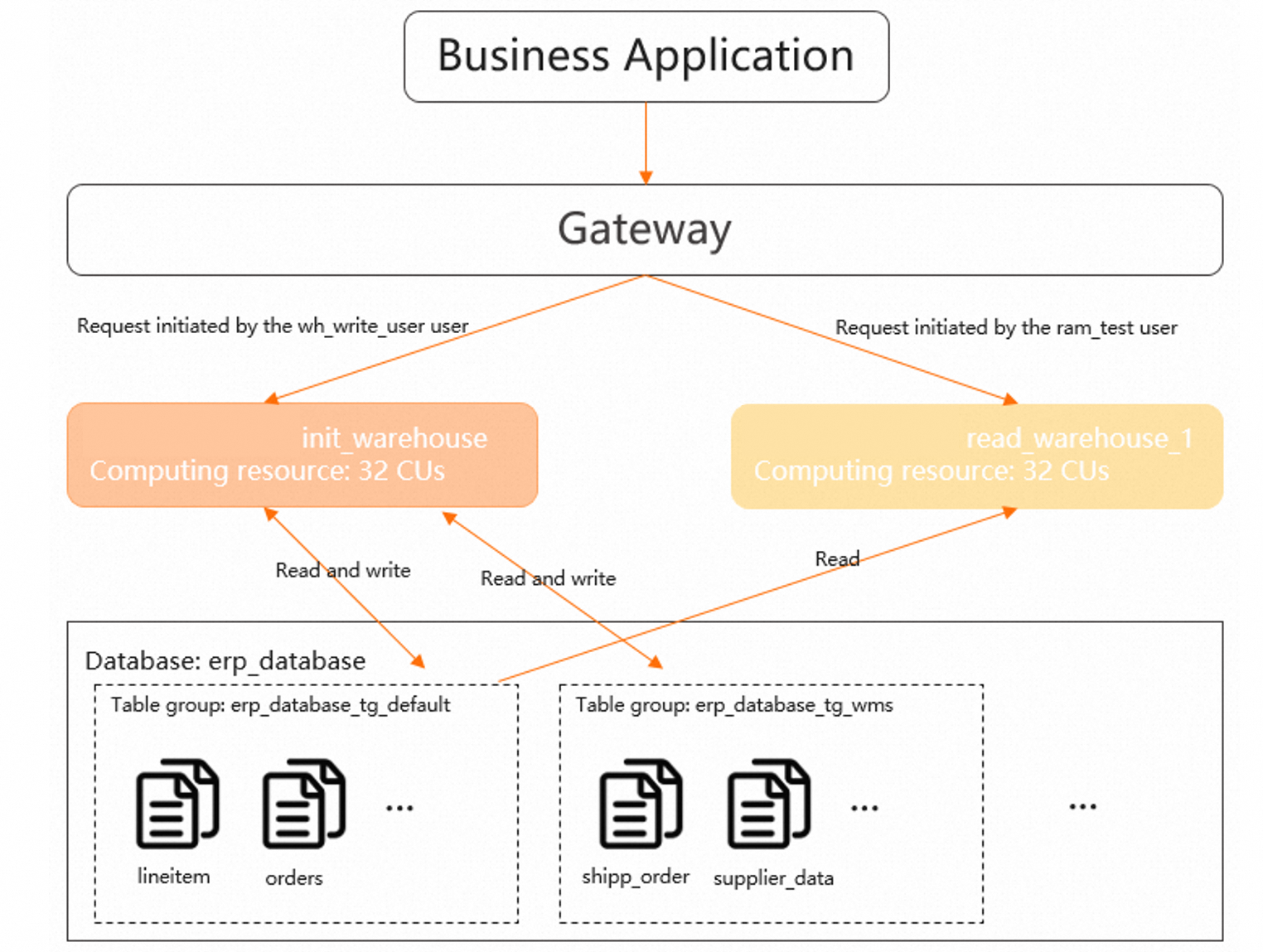
This section shows how to create a new virtual warehouse named read_warehouse_1 to implement read/write splitting. The init_warehouse virtual warehouse is used to write data, and the read_warehouse_1 virtual warehouse is used for service queries.
Create a database
Log on to HoloWeb as a superuser and create a database named
erp_database. For more information, see Create a database.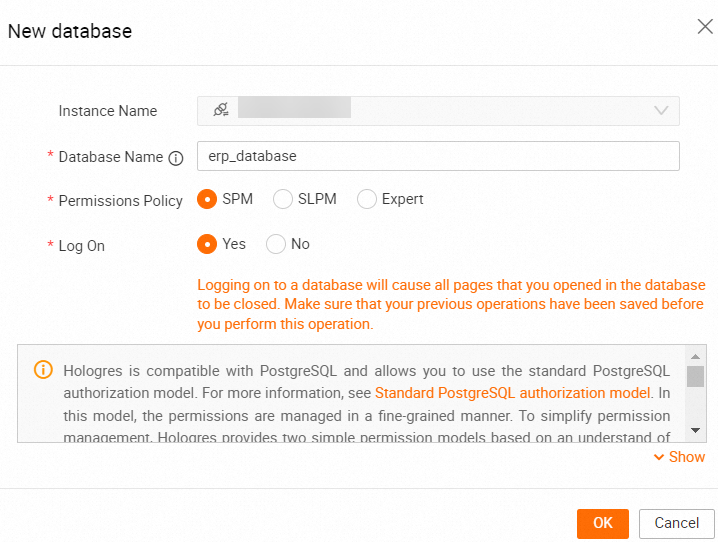
After you log on to the database, run the following SQL statements to import sample data.
DROP FOREIGN TABLE IF EXISTS odps_customer_10g;
DROP FOREIGN TABLE IF EXISTS odps_lineitem_10g;
DROP FOREIGN TABLE IF EXISTS odps_nation_10g;
DROP FOREIGN TABLE IF EXISTS odps_orders_10g;
DROP FOREIGN TABLE IF EXISTS odps_part_10g;
DROP FOREIGN TABLE IF EXISTS odps_partsupp_10g;
DROP FOREIGN TABLE IF EXISTS odps_region_10g;
DROP FOREIGN TABLE IF EXISTS odps_supplier_10g;


IMPORT FOREIGN SCHEMA "MAXCOMPUTE_PUBLIC_DATA#default" LIMIT to
(
    odps_customer_10g,
    odps_lineitem_10g,
    odps_nation_10g,
    odps_orders_10g,
    odps_part_10g,
    odps_partsupp_10g,
    odps_region_10g,
    odps_supplier_10g
)
FROM SERVER odps_server INTO public OPTIONS(if_table_exist'error',if_unsupported_type'error');

DROP TABLE IF EXISTS LINEITEM;

BEGIN;
CREATE TABLE LINEITEM
(
    L_ORDERKEY      BIGINT      NOT NULL,
    L_PARTKEY       INT         NOT NULL,
    L_SUPPKEY       INT         NOT NULL,
    L_LINENUMBER    INT         NOT NULL,
    L_QUANTITY      DECIMAL(15,2) NOT NULL,
    L_EXTENDEDPRICE DECIMAL(15,2) NOT NULL,
    L_DISCOUNT      DECIMAL(15,2) NOT NULL,
    L_TAX           DECIMAL(15,2) NOT NULL,
    L_RETURNFLAG    TEXT        NOT NULL,
    L_LINESTATUS    TEXT        NOT NULL,
    L_SHIPDATE      TIMESTAMPTZ NOT NULL,
    L_COMMITDATE    TIMESTAMPTZ NOT NULL,
    L_RECEIPTDATE   TIMESTAMPTZ NOT NULL,
    L_SHIPINSTRUCT  TEXT        NOT NULL,
    L_SHIPMODE      TEXT        NOT NULL,
    L_COMMENT       TEXT        NOT NULL,
    PRIMARY KEY (L_ORDERKEY,L_LINENUMBER)
);
CALL set_table_property('LINEITEM', 'clustering_key', 'L_SHIPDATE,L_ORDERKEY');
CALL set_table_property('LINEITEM', 'segment_key', 'L_SHIPDATE');
CALL set_table_property('LINEITEM', 'distribution_key', 'L_ORDERKEY');
CALL set_table_property('LINEITEM', 'bitmap_columns', 'L_ORDERKEY,L_PARTKEY,L_SUPPKEY,L_LINENUMBER,L_RETURNFLAG,L_LINESTATUS,L_SHIPINSTRUCT,L_SHIPMODE,L_COMMENT');
CALL set_table_property('LINEITEM', 'dictionary_encoding_columns', 'L_RETURNFLAG,L_LINESTATUS,L_SHIPINSTRUCT,L_SHIPMODE,L_COMMENT');
CALL set_table_property('LINEITEM', 'time_to_live_in_seconds', '31536000');
COMMIT;

DROP TABLE IF EXISTS ORDERS;

BEGIN;
CREATE TABLE ORDERS
(
    O_ORDERKEY      BIGINT      NOT NULL PRIMARY KEY,
    O_CUSTKEY       INT         NOT NULL,
    O_ORDERSTATUS   TEXT        NOT NULL,
    O_TOTALPRICE    DECIMAL(15,2) NOT NULL,
    O_ORDERDATE     timestamptz NOT NULL,
    O_ORDERPRIORITY TEXT        NOT NULL,
    O_CLERK         TEXT        NOT NULL,
    O_SHIPPRIORITY  INT         NOT NULL,
    O_COMMENT       TEXT        NOT NULL
);
CALL set_table_property('ORDERS', 'segment_key', 'O_ORDERDATE');
CALL set_table_property('ORDERS', 'distribution_key', 'O_ORDERKEY');
CALL set_table_property('ORDERS', 'bitmap_columns', 'O_ORDERKEY,O_CUSTKEY,O_ORDERSTATUS,O_ORDERPRIORITY,O_CLERK,O_SHIPPRIORITY,O_COMMENT');
CALL set_table_property('ORDERS', 'dictionary_encoding_columns', 'O_ORDERSTATUS,O_ORDERPRIORITY,O_CLERK,O_COMMENT');
CALL set_table_property('ORDERS', 'time_to_live_in_seconds', '31536000');
COMMIT;

DROP TABLE IF EXISTS PARTSUPP;

BEGIN;
CREATE TABLE PARTSUPP
(
    PS_PARTKEY    INT    NOT NULL,
    PS_SUPPKEY    INT    NOT NULL,
    PS_AVAILQTY   INT    NOT NULL,
    PS_SUPPLYCOST DECIMAL(15,2) NOT NULL,
    PS_COMMENT    TEXT   NOT NULL,
    PRIMARY KEY(PS_PARTKEY,PS_SUPPKEY)
);
CALL set_table_property('PARTSUPP', 'distribution_key', 'PS_PARTKEY');
CALL set_table_property('PARTSUPP', 'colocate_with', 'LINEITEM');
CALL set_table_property('PARTSUPP', 'bitmap_columns', 'PS_PARTKEY,PS_SUPPKEY,PS_AVAILQTY,PS_COMMENT');
CALL set_table_property('PARTSUPP', 'dictionary_encoding_columns', 'PS_COMMENT');
CALL set_table_property('PARTSUPP', 'time_to_live_in_seconds', '31536000');
COMMIT;

DROP TABLE IF EXISTS PART;

BEGIN;
CREATE TABLE PART
(
    P_PARTKEY     INT    NOT NULL PRIMARY KEY,
    P_NAME        TEXT   NOT NULL,
    P_MFGR        TEXT   NOT NULL,
    P_BRAND       TEXT   NOT NULL,
    P_TYPE        TEXT   NOT NULL,
    P_SIZE        INT    NOT NULL,
    P_CONTAINER   TEXT   NOT NULL,
    P_RETAILPRICE DECIMAL(15,2) NOT NULL,
    P_COMMENT     TEXT   NOT NULL
);
CALL set_table_property('PART', 'distribution_key', 'P_PARTKEY');
CALL set_table_property('PART', 'bitmap_columns', 'P_PARTKEY,P_SIZE,P_NAME,P_MFGR,P_BRAND,P_TYPE,P_CONTAINER,P_COMMENT');
CALL set_table_property('PART', 'dictionary_encoding_columns', 'P_NAME,P_MFGR,P_BRAND,P_TYPE,P_CONTAINER,P_COMMENT');
CALL set_table_property('PART', 'time_to_live_in_seconds', '31536000');
COMMIT;


DROP TABLE IF EXISTS CUSTOMER;
BEGIN;
CREATE TABLE CUSTOMER
(
    C_CUSTKEY    INT    NOT NULL PRIMARY KEY,
    C_NAME       TEXT   NOT NULL,
    C_ADDRESS    TEXT   NOT NULL,
    C_NATIONKEY  INT    NOT NULL,
    C_PHONE      TEXT   NOT NULL,
    C_ACCTBAL    DECIMAL(15,2) NOT NULL,
    C_MKTSEGMENT TEXT   NOT NULL,
    C_COMMENT    TEXT   NOT NULL
);
CALL set_table_property('CUSTOMER', 'distribution_key', 'C_CUSTKEY');
CALL set_table_property('CUSTOMER', 'bitmap_columns', 'C_CUSTKEY,C_NATIONKEY,C_NAME,C_ADDRESS,C_PHONE,C_MKTSEGMENT,C_COMMENT');
CALL set_table_property('CUSTOMER', 'dictionary_encoding_columns', 'C_NAME,C_ADDRESS,C_PHONE,C_MKTSEGMENT,C_COMMENT');
CALL set_table_property('CUSTOMER', 'time_to_live_in_seconds', '31536000');
COMMIT;

DROP TABLE IF EXISTS SUPPLIER;

BEGIN;
CREATE TABLE SUPPLIER
(
    S_SUPPKEY   INT    NOT NULL PRIMARY KEY,
    S_NAME      TEXT   NOT NULL,
    S_ADDRESS   TEXT   NOT NULL,
    S_NATIONKEY INT    NOT NULL,
    S_PHONE     TEXT   NOT NULL,
    S_ACCTBAL   DECIMAL(15,2) NOT NULL,
    S_COMMENT   TEXT   NOT NULL
);
CALL set_table_property('SUPPLIER', 'distribution_key', 'S_SUPPKEY');
CALL set_table_property('SUPPLIER', 'bitmap_columns', 'S_SUPPKEY,S_NAME,S_ADDRESS,S_NATIONKEY,S_PHONE,S_COMMENT');
CALL set_table_property('SUPPLIER', 'dictionary_encoding_columns', 'S_NAME,S_ADDRESS,S_PHONE,S_COMMENT');
CALL set_table_property('SUPPLIER', 'time_to_live_in_seconds', '31536000');
COMMIT;

DROP TABLE IF EXISTS NATION;

BEGIN;
CREATE TABLE NATION(
  N_NATIONKEY INT NOT NULL PRIMARY KEY,
  N_NAME text NOT NULL,
  N_REGIONKEY INT NOT NULL,
  N_COMMENT text NOT NULL
);
CALL set_table_property('NATION', 'distribution_key', 'N_NATIONKEY');
CALL set_table_property('NATION', 'bitmap_columns', 'N_NATIONKEY,N_NAME,N_REGIONKEY,N_COMMENT');
CALL set_table_property('NATION', 'dictionary_encoding_columns', 'N_NAME,N_COMMENT');
CALL set_table_property('NATION', 'time_to_live_in_seconds', '31536000');
COMMIT;

DROP TABLE IF EXISTS REGION;

BEGIN;
CREATE TABLE REGION
(
    R_REGIONKEY INT  NOT NULL PRIMARY KEY,
    R_NAME      TEXT NOT NULL,
    R_COMMENT   TEXT
);
CALL set_table_property('REGION', 'distribution_key', 'R_REGIONKEY');
CALL set_table_property('REGION', 'bitmap_columns', 'R_REGIONKEY,R_NAME,R_COMMENT');
CALL set_table_property('REGION', 'dictionary_encoding_columns', 'R_NAME,R_COMMENT');
CALL set_table_property('REGION', 'time_to_live_in_seconds', '31536000');
COMMIT;

INSERT INTO public.customer SELECT * FROM public.odps_customer_10g ;
INSERT INTO public.lineitem SELECT * FROM public.odps_lineitem_10g ;
INSERT INTO public.nation SELECT * FROM public.odps_nation_10g ;
INSERT INTO public.orders SELECT * FROM public.odps_orders_10g ;
INSERT INTO public.part SELECT * FROM public.odps_part_10g ;
INSERT INTO public.partsupp SELECT * FROM public.odps_partsupp_10g ;
INSERT INTO public.region SELECT * FROM public.odps_region_10g ;
INSERT INTO public.supplier SELECT * FROM public.odps_supplier_10g ;

vacuum nation;
vacuum region;
vacuum supplier;
vacuum customer;
vacuum part;
vacuum partsupp;
vacuum orders;
vacuum lineitem;

analyze nation;
analyze region;
analyze lineitem;
analyze orders;
analyze customer;
analyze part;
analyze partsupp;
analyze supplier;
analyze lineitem (l_orderkey,l_partkey,l_suppkey);
analyze orders (o_custkey);
analyze partsupp(ps_partkey,ps_suppkey);
Create a virtual warehouse
Log on to the Hologres console and go to the details page of the target instance.
In the navigation pane on the left, click Virtual Warehouse Management and go to the Virtual Warehouse Resource Management tab. On this tab, you can view the list of existing virtual warehouses.
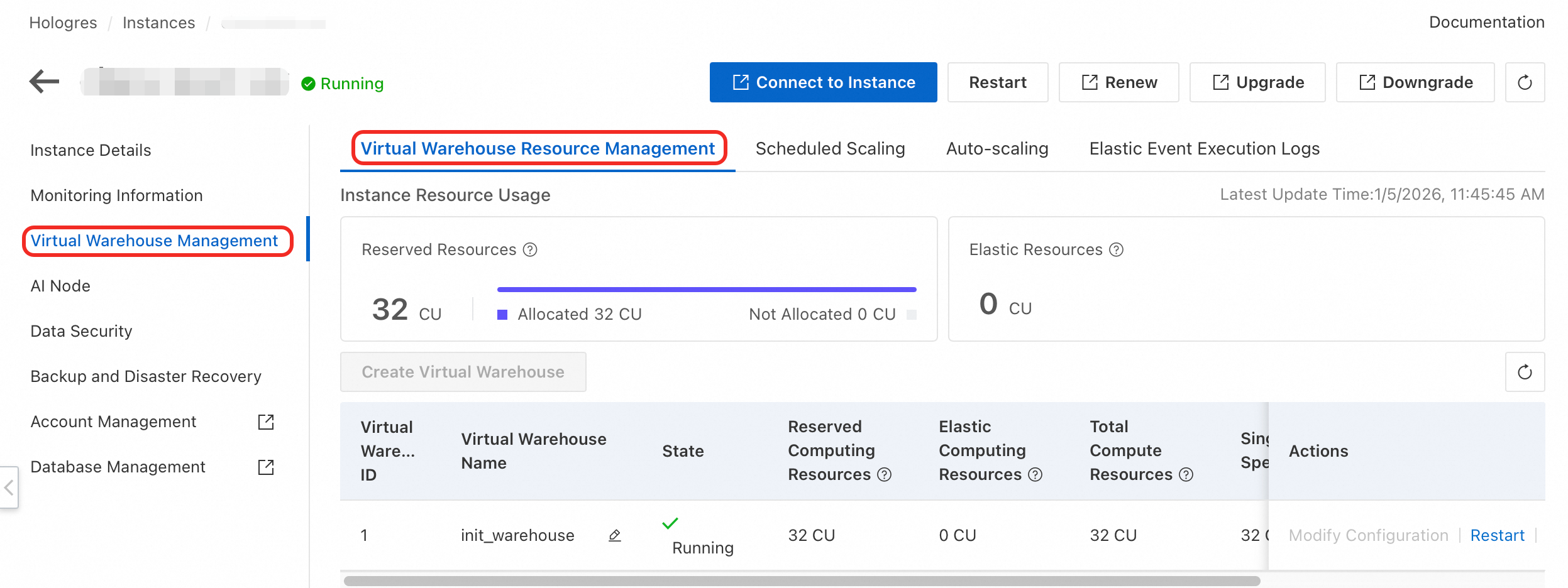
Click Create Virtual Warehouse. In the Add virtual warehouse dialog box, enter a Virtual Warehouse Name and select Virtual Warehouse Resource.
In this scenario, a virtual warehouse named
read_warehouse_1is created: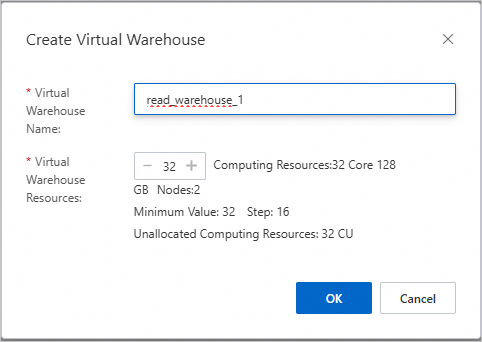
Click OK to complete the creation.
On the Virtual Warehouse Management page, view the status of the virtual warehouse. When the value in the Status column is Running, the virtual warehouse is created.

Load data into the virtual warehouse
A table group is a data container in Hologres. By default, a new virtual warehouse cannot access any table groups. To use a virtual warehouse to query data, you must first grant the virtual warehouse permissions on the required table groups.
View the table groups in the current database.
Run the following SQL statement to view the table groups in the current database:
SELECT tablegroup_name
FROM hologres.hg_table_group_properties
GROUP BY tablegroup_name;
The following figure shows a sample result:
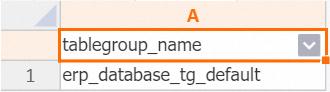
This indicates that the current database has only one table group.
Load a table group for the virtual warehouse.
You need to use read_warehouse_1 to query data in the erp_database_tg_default table group. To do this, run the following SQL statement to load erp_database_tg_default for the read_warehouse_1 virtual warehouse:
CALL hg_table_group_load_to_warehouse('erp_database.erp_database_tg_default', 'read_warehouse_1', 1);View the table groups loaded for the virtual warehouse.
SELECT * FROM hologres.hg_warehouse_table_groups;The following figure shows a sample result:

This indicates that read_warehouse_1 has loaded data from the erp_database_tg_default table group.
Set user permissions
By default, unauthorized users cannot access a new virtual warehouse. To allow other accounts to access the virtual warehouse, you must grant them permissions. The following example shows how to grant the ram_test Resource Access Management (RAM) user permissions to access the read_warehouse_1 virtual warehouse:
View the virtual warehouse permissions of the user.
SELECT * FROM hologres.hg_warehouse_users;View information about the user's default virtual warehouse.
SELECT * FROM hologres.hg_user_default_warehouse;Add a user to the instance.
On the Users page in HoloWeb, add the RAM user to the Hologres instance. For more information, see User management.
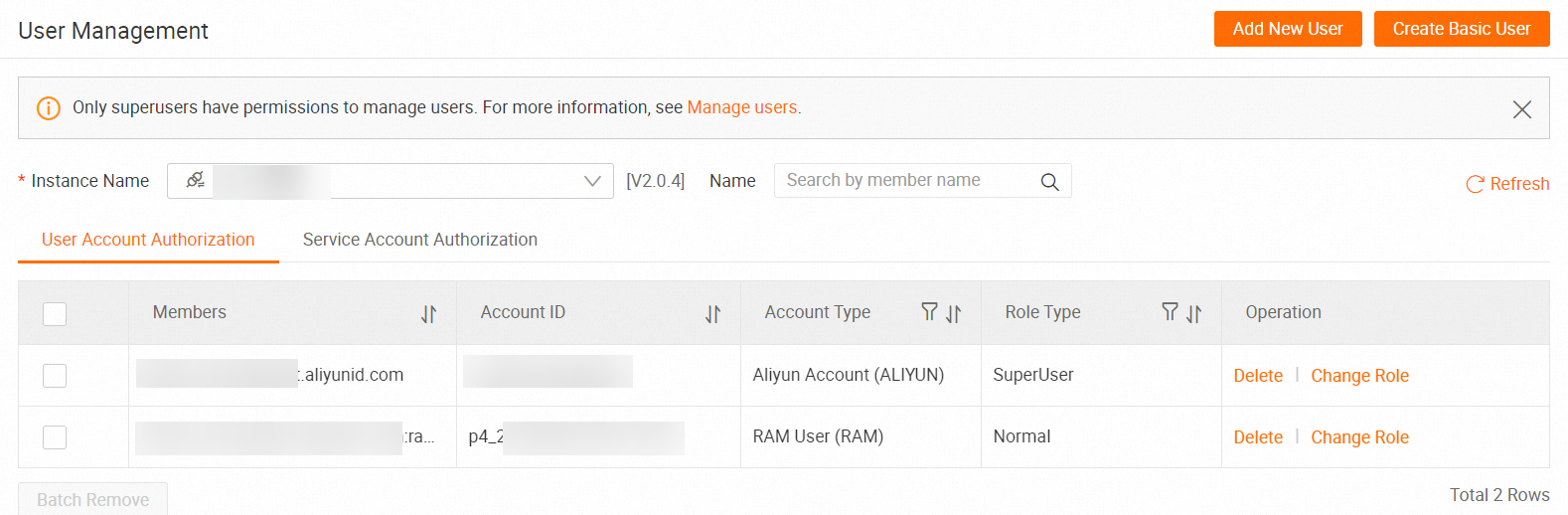
Grant the
ram_testuser query permissions on theerp_databasedatabase.On the DB Authorization page in HoloWeb, grant the
ram_testuser query permissions on the database. For more information, see Quick Start for granting permissions to a RAM user.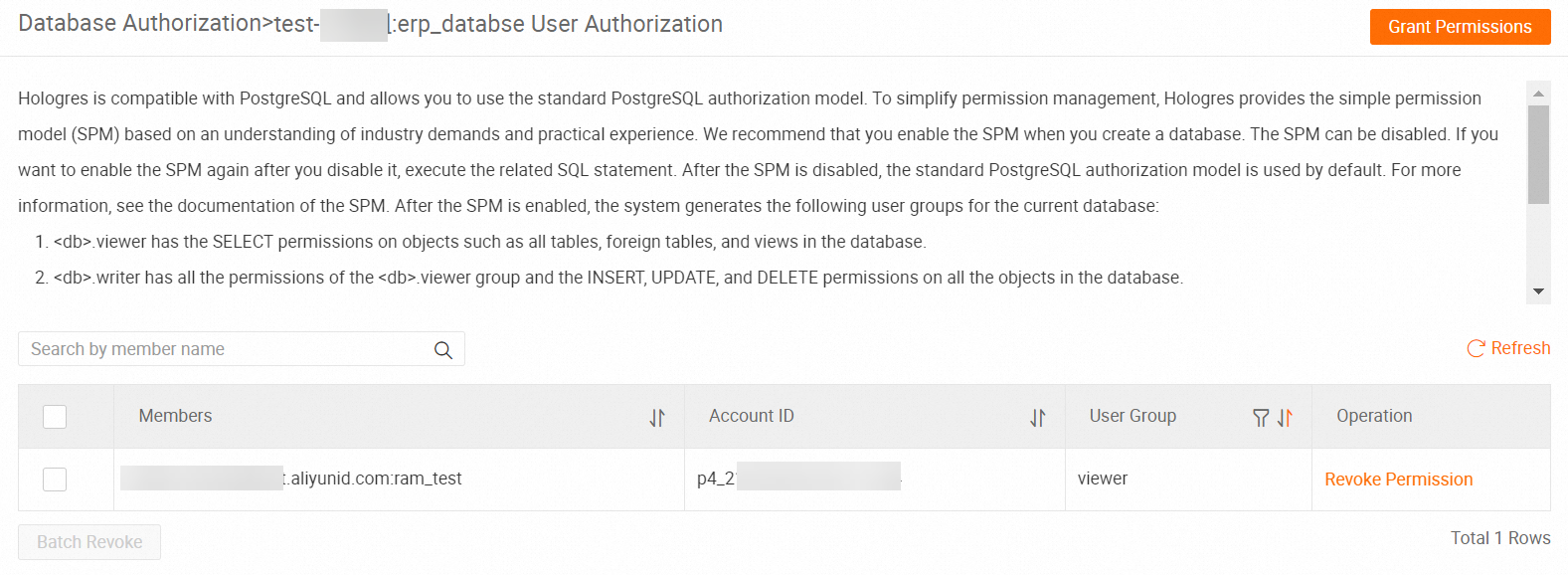
Grant the
ram_testuser permissions on the read_warehouse_1 virtual warehouse.CALL hg_grant_warehouse_access_privilege ('read_warehouse_1', 'p4_2xxxxxxxxxxxxxxx');For a description of the parameters, see Authorize a user to use a virtual warehouse.
Set the read_warehouse_1 virtual warehouse as the default virtual warehouse for the
ram_testuser.To implement read/write splitting, the
ram_testuser must connect to Hologres and use the resources of read_warehouse_1 instead of init_warehouse. To do this, run the following command to set the default virtual warehouse forram_testto read_warehouse_1:CALL hg_set_user_default_warehouse('p4_2xxxxxxxxxxxxxxx', 'read_warehouse_1');View the virtual warehouse that the current account is using.
When you connect to the instance as the
ram_testuser, run the following command to verify that the read_warehouse_1 virtual warehouse is used:SELECT current_warehouse();
Switch traffic between virtual warehouses
After you create the new read_warehouse_1 virtual warehouse, you may find that it is faulty. If this happens, you need to switch the traffic of the ram_test account to the init_warehouse virtual warehouse.
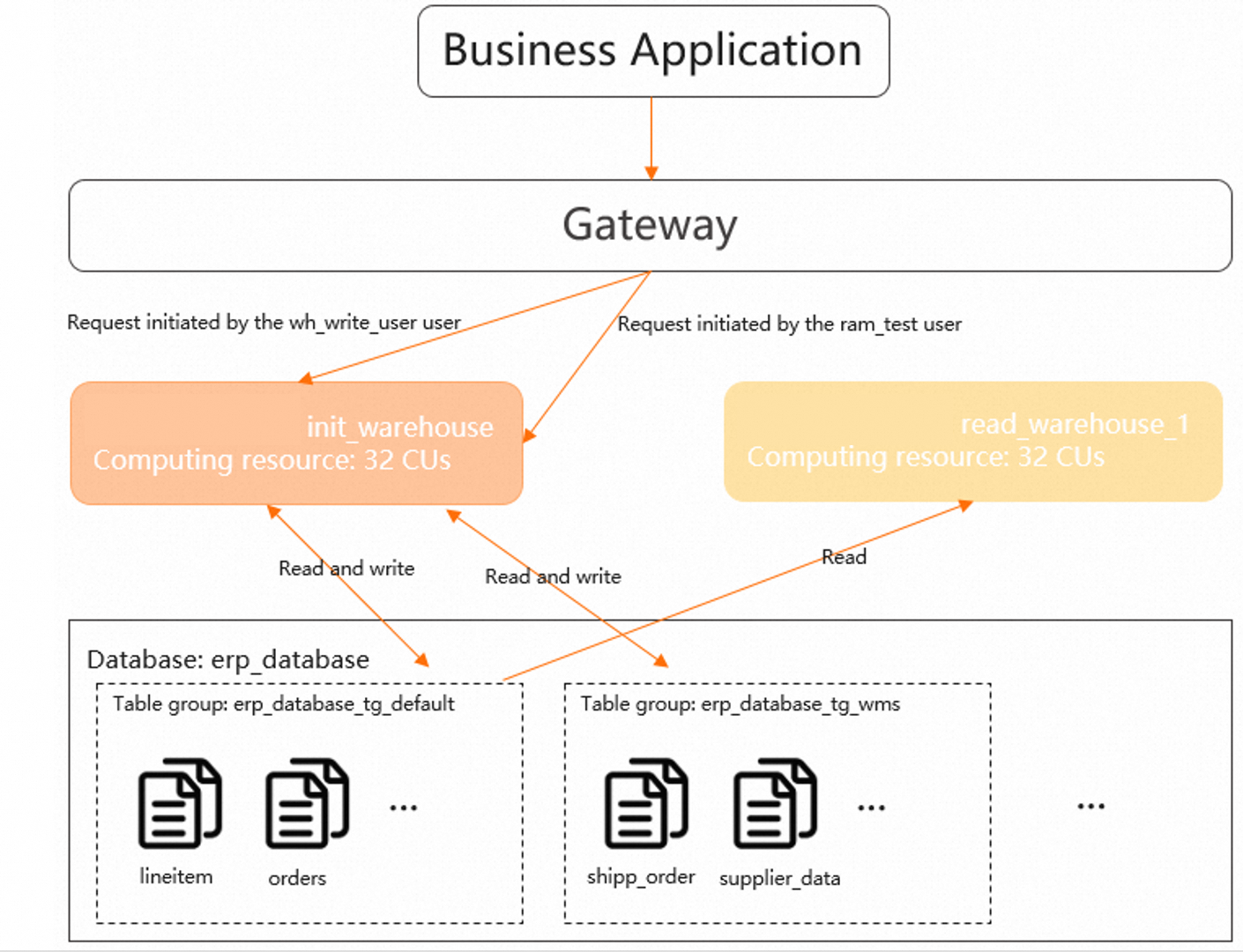
The traffic switch takes effect only after a reconnection. Make sure your application that connects to Hologres has a reconnection mechanism.
When you connect to Hologres, use its automatic routing logic. Do not specify the virtual warehouse name in the connection string.
Grant the
ram_testuser permissions on the init_warehouse virtual warehouse.If you have not granted permissions for init_warehouse to
ram_test, run the following command to grant permissions on the init_warehouse virtual warehouse to theram_testuser. This allows theram_testuser to use the resources of init_warehouse.CALL hg_grant_warehouse_access_privilege('init_warehouse', 'p4_2xxxxxxxxxxxxxxx');Set the init_warehouse virtual warehouse as the default virtual warehouse for the
ram_testuser.Run the following command to set the default virtual warehouse for the
ram_testuser to init_warehouse. After this is set, new connections from the user to the instance use the resources of the init_warehouse virtual warehouse.CALL hg_set_user_default_warehouse('p4_2xxxxxxxxxxxxxxx', 'init_warehouse');Disconnect all user connections that are not on the default virtual warehouse.
SELECT hg_kill_non_default_warehouse_connections();After you reconnect, the new default virtual warehouse is used to connect to the instance.