Hologres provides a data masking feature that lets you define masking rules at the column level. When enabled, queries involving sensitive information return masked results, enhancing the protection of sensitive and private data. This topic describes how to enable, query, and delete data masking in Hologres.
Background information
The big data era has introduced technologies such as big data, cloud computing, and artificial intelligence, enabling deep data mining and analysis to unlock the immense value within large datasets. However, this also poses challenges in protecting sensitive and private information.
Hologres data masking lets you configure masking policies at both the user and column levels. When a query involves sensitive data, the results are automatically masked. This enables efficient data sharing, mining, and analysis while ensuring sensitive and private information remains unidentifiable, thereby improving data protection.
Version comparison
Starting from V3.1, Hologres has optimized its data masking behavior. The following table compares features in V3.1 and later versions with those in earlier versions to help you use data masking effectively.
|
Feature |
V3.1 and later |
V3.0 and earlier |
|
Masking for non-TEXT fields |
Supports setting default masking policies for types such as INT, FLOAT, and arrays. This takes effect only when the masking policy is set to a default value. For more information, see Default value. |
Not supported. However, you can bypass masking using CAST TEXT. This is not recommended. |
|
View |
Results are masked. |
Results are not masked. This is not recommended. |
|
Masked fields in JOIN or WHERE clauses |
The result is empty. |
Results are not masked. This is not recommended. |
|
Flink consumes binary logs of masked fields |
|
|
|
MaxCompute directly reads masked fields |
Prohibits directly reading masked Hologres fields from MaxCompute. |
Reading is supported. This is not recommended. |
Preparations
Before using data masking, a Superuser must enable the following parameters at the database level.
-- Executed by a superuser
CREATE EXTENSION IF NOT EXISTS hg_anon;
ALTER DATABASE <current_db> SET hg_anon_enable = on;
After running the preceding code, the system uses the data masking behavior corresponding to the Hologres instance version. You can also select a masking behavior as needed:
-
If the data masking behavior in V3.1 or later has significant bugs that cause unexpected results, you can use the following parameter to roll back to the behavior of V3.0 and earlier versions.
CALL hologres.set_hg_anon_version(1); -
Instances of V3.0 and earlier do not support the set_hg_anon_version stored procedure. If an instance that has used the masking feature is upgraded to V3.1, you can run the following command to enable the V3.1 masking feature. Otherwise, the system continues to use the old masking feature.
CALL hologres.set_hg_anon_version(2);Note-
If the statement runs successfully, the data masking behavior of V3.1 and later is enabled.
-
If the statement fails with the error log
"Error: not safe to upgrade to hg_anon version 2", the feature failed to enable. This is because masking is set for a non-TEXT/VARCHAR/CHAR column type in the current DB, and the masking results for V3.1 and later are not as expected. You need to correct the masking behavior.
-
Limits
-
Importing data from tables and columns with masking rules to tables and columns without masking rules is not supported. The related error message is as follows.
Error: ERROR: The insert table has not set SECURITY LABEL -
UNION and DISTINCT queries on tables with masking rules are not supported. The related error message is as follows.
Error: ERROR: UNION is not support on security item -
Data masking can affect query performance. The impact depends on the masking method and data volume. Performance may decrease by 10% to 20%. In extreme scenarios, performance may decrease by several times.
-
Setting masking rules for foreign tables is not supported.
Data masking
Set masking rules
Hologres supports setting data masking for target columns or target users. Before setting data masking, you must enable the data masking GUC parameter. For more information, see Preparations.
-
Syntax
-
Set a masking policy for a column
To mask data in multiple columns, run this statement multiple times.
SECURITY LABEL FOR hg_anon ON COLUMN <tablename>.<col_name> IS <label_name>/'default_value'; -
Set a masking policy for a user
SECURITY LABEL FOR hg_anon ON ROLE <user_name> IS '[<label_name>|all]:[masked|unmasked]';
-
-
Parameter description
Parameter
Description
hg_anon
`hg_anon` is an extension function encapsulated within Hologres. You must call this extension function to enable the data masking feature.
tablename
The name of the table that contains the column to be masked.
col_name
The name of the column to be masked.
label_name
A preset masking function in the system. You can run
SHOW hg_anon_labels;to view the `label_name` set for the current database.user_name
The account ID. You can obtain it from the User Information page.
masked|unmasked
-
masked: Use data masking.
-
unmasked: Do not use data masking.
The following table describes the preset label_name values.
Data type
label_name
Masking policy
Masking type
Description
Masking example
TEXT
name
name
mask
Name masking.
-
Before: Li Hua; After: * Hua.
-
Before: Wang Xiaoqiang; After: ** Qiang.
email
email
mask
Email address masking.
Before: lihu***@alibaba.com; After: lih***@alibaba.com.
ip
ip
mask
IP address masking.
Before: 1.2.3.4; After: 1.*.*.*.
id
id
mask
ID card number masking.
Before: 110345188812011234; After: 1****************4.
phone
phone
mask
Phone number masking.
Before: 1390000****; After: *********34.
bank_id
bank_id
mask
Bank card or credit card account masking.
Before: 2349867902834701928; After: ***************1928.
hash
md5
hash
Use the MD5 algorithm for masking.
Before: Wenyi West Road, Hangzhou, Zhejiang; After: dbf894b409d4a2ef17dfd9c7fdcafcd8.
first_mask
first_mask
mask
A `first_mask` rule is defined to display only the first character.
Before: 123456789; After: 1********.
Types such as INT and FLOAT
Default
default_value
default_value
Mask with a default value.
Note-
If the `label_name` does not exist when you set data masking, the system falls back to default value masking.
-
This is supported only in Hologres V3.1 and later.
The mapping between data types and default masked values is as follows:
-
TEXT/VARCHAR/CHAR: ***
-
BOOLEAN: false
-
INT8/INT4/INT2: 0
-
TIMESTAMPTZ/TIMESTAMP: 2000-01-01 00:00:00
-
FLOAT8/FLOAT4/DECIMAL/NUMERIC: 0.0
-
MONEY: 0
-
DATE: 2000-01-01
-
TIME/TIMETZ: current time
-
UUID: 00000000-0000-0000-0000-000000000000
-
View set masking rules
-
View masking set for a column
-- View masking set for a column SELECT c.relname, a.attname, provider, label FROM pg_seclabel s JOIN pg_class c ON s.objoid = c.oid JOIN pg_attribute a ON s.objoid = a.attrelid AND s.objsubid = a.attnum; -
View masking set for a user
-- View masking rules set for a user
SELECT
    usename,
    label
FROM
    pg_shseclabel s
    INNER JOIN pg_catalog.pg_user u ON s.objoid = u.usesysid;
Modify custom masking rules
If the set masking rules do not meet your needs, you can customize them by modifying the hg_anon_lables GUC parameter.
-
Syntax
-- label_name is your custom name, and method is a built-in Hologres method.
ALTER DATABASE <db_name> SET hg_anon_labels = '[
{"label": <label_name1>, "method":<method1>},
{"label": <label_name2>, "method":<method2>},
...  ]';
After running the
ALTER DATABASEcommand, the change does not take effect in the current connection. You must establish a new connection. You can use the following command to check if the setting has taken effect.SHOW hg_anon_enable;
-
Example
ALTER DATABASE test_db SET hg_anon_labels = '[
{"label":"ip", "method":{"desensType":"mask", "type":"ip"}},
{"label":"email", "method":{"desensType":"mask", "type":"email"}},
{"label":"name", "method":{"desensType":"mask", "type":"name"}},
{"label":"first_mask", "method":{"desensType":"mask", "type":"user_define", "before":1, "after":0}},
{"label":"hash", "method":{"desensType":"hash", "type":"md5", "salt":""}}]';
Parameter description:
Masking item
Masking content description
Masking result example
{"desensType":"mask", "type":"ip"}
IP address masking.
192.*.*.*
{"desensType":"mask", "type":"email"}
Email address masking.
abc***@example.net
{"desensType":"mask", "type":"name"}
Name masking.
*Five
{"desensType":"hash", "type":"md5", "salt":""}
Hash masking.
e086aa137fa19f67d27b39d0eca186103228f322c9c98a125554a24f875f0f7e
{"label":"first_mask", "method":{"desensType":"mask", "type":"user_define", "before":1, "after":0}}{"label":"last_mask", "method":{"desensType":"mask", "type":"user_define", "before":0, "after":1}}
Custom content masking.
None
Usage examples
Sample data
Prepare a data source. You can also use your own business data.
-- Create a database
CREATE DATABASE hg_anon_demo;
-- Create a sample data table
DROP TABLE IF EXISTS personal_basic_information;
CREATE TABLE personal_basic_information
(
    name TEXT
    ,email TEXT
    ,ip TEXT
    ,id TEXT
    ,phone TEXT
    ,bank_id TEXT);
-- Insert sample data
INSERT INTO personal_basic_information(name,email,ip,id,phone,bank_id) VALUES
('Zhang San','jiaxi***@alibaba-inc.com','127.0.0.1','142732199104050022','18157161223','4514610803067088'),
('Li Si','wb-hy583***@antgroup.com','127.0.0.1','510622198412248000','15757121834','6252470010027800'),
('Li Xiaoyao','wb-hy583***@antgroup.com','172.21.4.234','511025198812271696','18215451832','6252470010027800');
Set a masking rule for a column
-- Create the hg_anon extension function.
CREATE EXTENSION IF NOT EXISTS hg_anon;

-- Enable the data masking feature for the hg_anon_demo database.
ALTER DATABASE hg_anon_demo SET hg_anon_enable = on;

-- Set the masking rule for each column.
SECURITY LABEL FOR hg_anon ON COLUMN personal_basic_information.name IS 'name';
SECURITY LABEL FOR hg_anon ON COLUMN personal_basic_information.id IS 'id';
SECURITY LABEL FOR hg_anon ON COLUMN personal_basic_information.phone IS 'phone';
SECURITY LABEL FOR hg_anon ON COLUMN personal_basic_information.email IS 'email';
SECURITY LABEL FOR hg_anon ON COLUMN personal_basic_information.bank_id IS 'bank_id';
SECURITY LABEL FOR hg_anon ON COLUMN personal_basic_information.ip IS 'ip';
After establishing a new connection, use the following command to view the masked results.
SELECT * FROM personal_basic_information;The following result is returned.
name |         email          |      ip      |         id         |    phone    |     bank_id
------+------------------------+--------------+--------------------+-------------+------------------
 * Si  | wb-***@antgroup.com    | 127.*.*.*    | 5****************0 | *********34 | ************7800
 ** Yao | wb-***@antgroup.com    | 172.**.*.*** | 5****************6 | *********32 | ************7800
 * San  | jia***@alibaba-inc.com | 127.*.*.*    | 1****************2 | *********23 | ************7088
(3 rows)
Cancel masking for a column
SECURITY LABEL FOR hg_anon ON COLUMN personal_basic_information.name IS null;
SECURITY LABEL FOR hg_anon ON COLUMN personal_basic_information.id IS null;
Use the following command to view the result after canceling masking for a column.
SELECT name,id FROM personal_basic_information;The following result is returned.
SELECT name,id FROM personal_basic_information;
  name  |         id
--------+--------------------
 Li Si   | 510622198412248000
 Li Xiaoyao | 511025198812271696
 Zhang San   | 142732199104050022
(3 rows)
Cancel masking rules for a user
-- Cancel all masking for the BASIC$test account.
SECURITY LABEL FOR hg_anon ON ROLE "BASIC$test" IS 'all:unmasked';
Use the following command to view the result after canceling masking for a user.
SELECT * FROM personal_basic_information;The following result is returned.
  name  |          email           |      ip      |         id         |    phone    |     bank_id
--------+--------------------------+--------------+--------------------+-------------+------------------
 Li Si   | wb-hy583***@antgroup.com | 127.0.0.1    | 510622198412248000 | 15757121834 | 6252470010027800
 Li Xiaoyao | wb-hy583***@antgroup.com | 172.21.4.234 | 511025198812271696 | 18215451832 | 6252470010027800
 Zhang San   | jiaxi***@alibaba-inc.com | 127.0.0.1    | 142732199104050022 | 18157161223 | 4514610803067088
(3 rows)
Set masking for a JOIN column
-- Example of setting masking for a JOIN column
CREATE TABLE tbl1 (
    id text
);
INSERT INTO tbl1
    VALUES ('142732199102290022');

-- The id column of the personal_basic_information table is already masked.
SELECT * FROM personal_basic_information a JOIN tbl1 b ON a.id = b.id;
The following result is returned.
name | email | ip | id | phone | bank_id | id
------+-------+----+----+-------+---------+----
(0 rows)
Use Data Security Guard for data masking
You can set masking rules manually or use Data Security Guard for data masking.
-
Limits
-
Only Hologres V1.1 and later support using Data Security Guard for data masking.
NoteIf your instance is earlier than V1.1, please see Common upgrade preparation errors or provide feedback in the Hologres DingTalk group. For more information, see How do I get more online support?.
-
To detect sensitive data, Data Security Guard sets a rule to not mask data for the root account.
-
Currently, at 9:00:00 every day, Data Security Guard samples data, identifies sensitive data, and sets masking rules for the identified sensitive data columns.
-
Currently, Hologres supports data masking using Data Security Guard in the following regions: China (Beijing), China (Zhangjiakou), China (Shanghai), China (Hangzhou), China (Shenzhen), China (Hong Kong), Singapore, Germany (Frankfurt), Malaysia (Kuala Lumpur), Indonesia (Jakarta), and US (Silicon Valley).
-
-
Usage
-
Enable the masking feature.
The data masking feature is disabled by default. A user with Superuser permissions must run the following command in the corresponding database to enable it.
-- Install the data masking EXTENSION
CREATE EXTENSION IF NOT EXISTS hg_anon;
-- Enable the data masking feature for the specified database. It is disabled by default.
ALTER DATABASE <db_name> SET hg_anon_enable = on;
db_name is the database for which you want to enable data masking.
Important-
hg_anon_enableis a GUC. The change does not take effect in the current connection after you run the ALTER DATABASE command. -
You can use the following SQL statement to check if the setting has taken effect.
SHOW hg_anon_enable;
-
-
Set the database for masking.
-
Log on to the Data Security Guard console. For more information, see Go to Data Security Guard.
-
In the navigation pane on the left, click to go to the Data Identification Rules page.
-
On the Sensitive Data Identification page, create a data identification rule. For more information, see Data identification rules.
-
In the navigation pane on the left, click Data Masking Management to go to the Data Masking Management page.
-
In the Masking Scenario drop-down list, select Hologres display masking (hologres_display_desense_code), and click Select Database to Mask on the right.
-
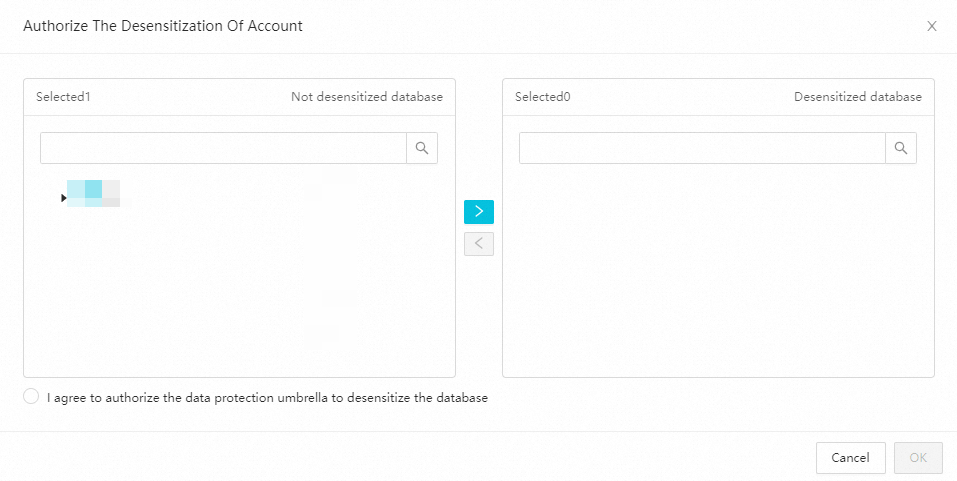
In the Authorize Account for Masking dialog box, select the database to be masked from the Unmasked Databases list to move it to the Masked Databases list. Select I agree to authorize Data Security Guard to mask this database, and click OK.
-
On the Data Masking Management page, click New Masking Rule in the upper-right corner. For more information, see Data masking management. The system will then mask the database you set.
-
-
FAQ
Data is not masked after following the usage examples
-
Symptom: After following the usage examples, you find that the queried data is not masked.
-
Possible causes:
-
A rule is set to not mask data for some users.
-
No masking labels are set.
-
-
Solutions:
-
Run the following SQL command to check if a rule is set to not mask data for some users.
SELECT
  usename,
  label
FROM pg_shseclabel s
INNER JOIN pg_catalog.pg_user u on s.objoid = u.usesysid;
By default, the query result of this SQL statement is empty, which means data must be masked for all users. If the result is not empty, set the users for data masking.
-
Use the following SQL statement to check the set masking labels.
SHOW hg_anon_labels;If the result does not contain labels such as ip, run the following SQL command to set masking labels.
ALTER DATABASE compress_test SET hg_anon_labels = '[
{"label":"ip", "method":{"desensType":"mask", "type":"ip"}},
{"label":"email", "method":{"desensType":"mask", "type":"email"}},
{"label":"name", "method":{"desensType":"mask", "type":"name"}},
{"label":"id", "method":{"desensType":"mask", "type":"id"}},
{"label":"phone", "method":{"desensType":"mask", "type":"phone"}},
{"label":"bank_id", "method":{"desensType":"mask", "type":"bank_id"}},
{"label":"hash", "method":{"desensType":"hash", "type":"md5", "salt":""}},
{"label":"first_mask", "method":{"desensType":"mask", "type":"user_define", "before":1, "after":0}}
]';
For the rules that correspond to the preceding labels, see Details of preset label_name.
-