The Hologres data lake acceleration service is built on Alibaba Cloud Data Lake Formation (DLF) and Object Storage Service (OSS). It provides flexible data access, analytics, and efficient data processing capabilities to significantly accelerate queries and analysis of OSS data lakes.
Background information
As digital transformation accelerates, data volumes are growing rapidly, posing significant challenges to traditional data analytics in terms of cost, scale, and data diversity. Hologres, in collaboration with DLF and OSS, offers a data lakehouse architecture for data lake acceleration. This architecture helps businesses achieve low-cost storage for massive amounts of data, unified metadata management, and efficient data analytics and insights.
Hologres seamlessly integrates with DLF and OSS. Using foreign tables, you can directly accelerate read and write operations on data in formats such as Hudi, Delta, Paimon, ORC, Parquet, CSV, and SequenceFile stored in OSS without moving the data. Foreign tables only map fields and do not store data. This reduces development and operations costs, breaks down data silos, and enables business insights. Hologres supports two modes: dedicated instances (exclusive resources) and shared Serverless clusters (pay-as-you-go). For more information, see Purchase a Hologres instance.
The following table describes the Alibaba Cloud services involved in the real-time data lake solution.
|
Service |
Description |
Related links |
|
Alibaba Cloud Data Lake Formation (DLF) |
A fully managed service that helps you quickly build data lakes and lakehouses in the cloud. DLF provides unified metadata management, unified permission and security management, convenient data ingestion, and one-click data exploration for cloud data lakes. |
|
|
Alibaba Cloud Object Storage Service (OSS) |
DLF uses OSS as the unified storage for cloud data lakes. OSS is a massive, secure, low-cost, and highly reliable cloud storage service suitable for storing any type of file. It provides 99.9999999999% (twelve 9s) data durability and has become the de facto standard for data lake storage. |
|
|
The OSS-HDFS service, also known as JindoFS, is a cloud-native data lake storage solution. Compared with native OSS storage, OSS-HDFS seamlessly integrates with Hadoop ecosystem compute engines and performs better in typical offline extract, transform, and load (ETL) scenarios that use Hive and Spark. It is fully compatible with the Hadoop Distributed File System (HDFS) interface and provides full POSIX support, which better meets the needs of data lake computing scenarios in big data and AI. |
Notes
Hologres shared clusters do not store data. They only support querying OSS data lakes using foreign tables.
Preparations
This topic uses the China (Shanghai) region as an example to demonstrate how to activate OSS, DLF, and Hologres.
-
Activate OSS and prepare test data.
-
Go to the OSS activation page and follow the on-screen instructions to activate the service.
NoteAfter you activate the OSS service, the default billing method is pay-as-you-go. To lower your OSS usage costs, we recommend that you purchase a resource plan.
-
Log on to the OSS console and create a bucket. For more information, see Quick start in the console.
-
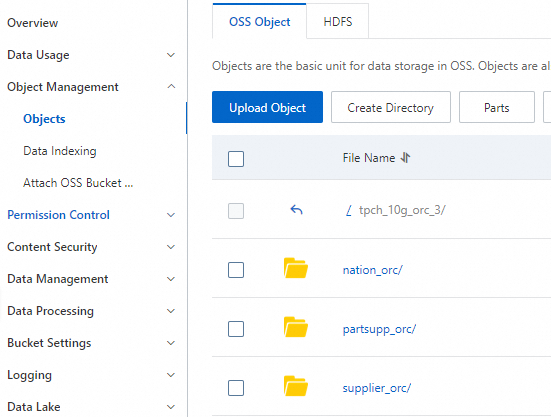
Upload the tpch_10g_orc_3.zip test data to a folder in the bucket.
 Note
Note-
After you upload the test data files, manually delete any files such as
.DS_Store. -
For faster downloads, this package contains only the nation_orc, supplier_orc, and partsupp_orc data tables required for this topic.
-
-
-
Activate DLF and import the OSS test data.
-
Go to the DLF activation page.
-
Log on to the Data Lake Formation console. On the Metadata Management page, click Create Database. For more information, see Databases, tables, and functions.
This topic uses the creation of a database named
mydatabaseas an example. -
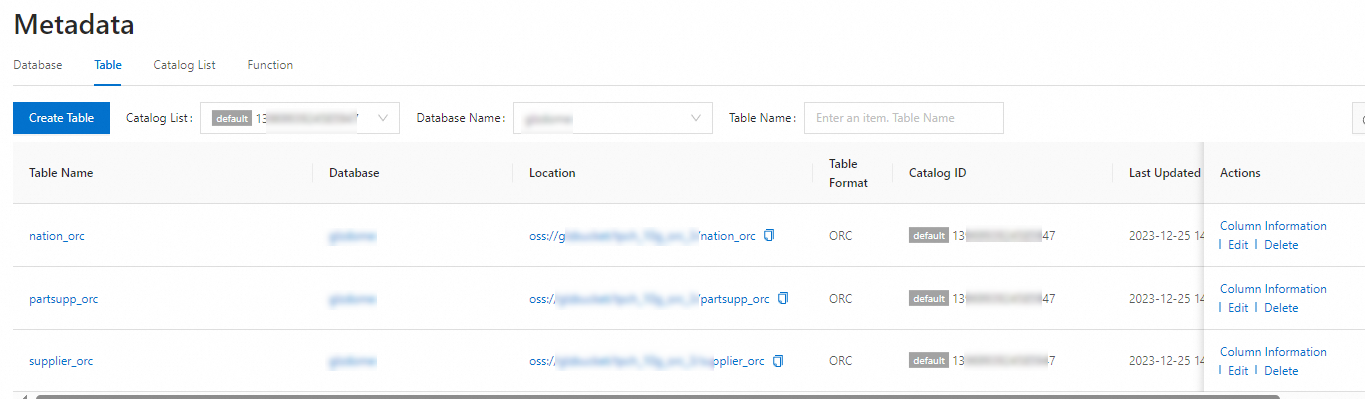
On the Metadata Crawling page, create a metadata crawling job to import the OSS test data. For more information, see Metadata crawling.
After the job is complete, you can view the data on the Tables tab of the Metadata Management page.
-
-
Activate Hologres and purchase a Hologres instance. For more information, see Purchase a Hologres instance.
NoteIf you are a new user, you can apply for a free trial of Hologres on the Alibaba Cloud Free Trial page.
Step 1: Configure the environment
-
Enable the data lake acceleration feature for your Hologres instance.
Go to the Hologres instance list. In the Actions column of the target instance, click Data Lake Acceleration and confirm the action. The Hologres instance restarts after you enable this feature.
-
Log on to the Hologres instance and create a database. For more information, see Connect to HoloWeb and run a query.
-
(Optional) Create an extension. This topic uses
dlf_fdwas an example.NoteThis extension is created by default in Hologres V2.1 and later, so you do not need to perform this operation. You can go to the Hologres instance list and check your instance version on the Instance Details page.
CREATE EXTENSION IF NOT EXISTS dlf_fdw;NoteRun the preceding statement as a superuser in the SQL Editor in HoloWeb to create the extension. This operation applies to the entire database and needs to be performed only once for each database. For more information about how to grant permissions to a Hologres account, see Grant permissions to a service account.
-
Run the following statement to create a foreign server named
dlf_serverand configure its endpoint information. This ensures normal access between Hologres, DLF, and OSS. For more information about how to create a foreign server and its parameters, see Create a foreign server.-- Create a foreign server. The China (Shanghai) region is used as an example. CREATE SERVER IF NOT EXISTS dlf_server FOREIGN data wrapper dlf_fdw options ( dlf_region 'cn-shanghai', dlf_endpoint 'dlf-share.cn-shanghai.aliyuncs.com', oss_endpoint 'oss-cn-shanghai-internal.aliyuncs.com');
Step 2: Query the OSS data lake using a Hologres foreign table
A Hologres foreign table stores the mapping to data in an OSS data lake. The data itself is stored in the OSS data lake and does not occupy Hologres storage space. Query performance is typically in the range of seconds to minutes.
-
Create a Hologres foreign table and map the OSS data lake data to it.
-- This topic uses mydatabase as an example. When you create the schema, replace mydatabase with the name of your custom database in DLF Metadata Management. IMPORT FOREIGN SCHEMA mydatabase LIMIT TO ( nation_orc, supplier_orc, partsupp_orc ) FROM SERVER dlf_server INTO public options (if_table_exist 'update'); -
Query the data.
After the foreign table is created, you can directly query it to read data from OSS. The following is a sample statement.
-- TPCH Q11 query statement
select
        ps_partkey,
        sum(ps_supplycost * ps_availqty) as value
from
        partsupp_orc,
        supplier_orc,
        nation_orc
where
        ps_suppkey = s_suppkey
        and s_nationkey = n_nationkey
        and RTRIM(n_name) = 'EGYPT'
group by
        ps_partkey having
                sum(ps_supplycost * ps_availqty) > (
                        select
                                sum(ps_supplycost * ps_availqty) * 0.000001
                        from
                                partsupp_orc,
                                supplier_orc,
                                nation_orc
                        where
                                ps_suppkey = s_suppkey
                                and s_nationkey = n_nationkey
                                and RTRIM(n_name) = 'EGYPT'
                )
order by
        value desc;
Step 3: (Optional) Query the OSS data lake using a Hologres internal table
To query data using a Hologres internal table, you must import data from the OSS data lake into Hologres. The data is stored in Hologres, which provides better query performance and higher data processing capabilities. For more information about storage fees, see Billing overview.
-
In Hologres, create an internal table that has the same schema as the foreign table. The following is an example.
-- Create the nation table DROP TABLE IF EXISTS NATION; BEGIN; CREATE TABLE NATION ( N_NATIONKEY int NOT NULL PRIMARY KEY, N_NAME text NOT NULL, N_REGIONKEY int NOT NULL, N_COMMENT text NOT NULL ); CALL set_table_property ('NATION', 'distribution_key', 'N_NATIONKEY'); CALL set_table_property ('NATION', 'bitmap_columns', ''); CALL set_table_property ('NATION', 'dictionary_encoding_columns', ''); COMMIT; -- Create the supplier table DROP TABLE IF EXISTS SUPPLIER; BEGIN; CREATE TABLE SUPPLIER ( S_SUPPKEY int NOT NULL PRIMARY KEY, S_NAME text NOT NULL, S_ADDRESS text NOT NULL, S_NATIONKEY int NOT NULL, S_PHONE text NOT NULL, S_ACCTBAL DECIMAL(15, 2) NOT NULL, S_COMMENT text NOT NULL ); CALL set_table_property ('SUPPLIER', 'distribution_key', 'S_SUPPKEY'); CALL set_table_property ('SUPPLIER', 'bitmap_columns', 'S_NATIONKEY'); CALL set_table_property ('SUPPLIER', 'dictionary_encoding_columns', ''); COMMIT; -- Create the partsupp table DROP TABLE IF EXISTS PARTSUPP; BEGIN; CREATE TABLE PARTSUPP ( PS_PARTKEY int NOT NULL, PS_SUPPKEY int NOT NULL, PS_AVAILQTY int NOT NULL, PS_SUPPLYCOST DECIMAL(15, 2) NOT NULL, PS_COMMENT text NOT NULL, PRIMARY KEY (PS_PARTKEY, PS_SUPPKEY) ); CALL set_table_property ('PARTSUPP', 'distribution_key', 'PS_PARTKEY'); CALL set_table_property ('PARTSUPP', 'bitmap_columns', 'ps_availqty'); CALL set_table_property ('PARTSUPP', 'dictionary_encoding_columns', ''); COMMIT; -
Synchronize data from the Hologres foreign table to the Hologres internal table.
--- Import data from the Hologres foreign table to the internal table. INSERT INTO nation SELECT * FROM nation_orc; INSERT INTO supplier SELECT * FROM supplier_orc; INSERT INTO partsupp SELECT * FROM partsupp_orc; -
Query the data in the Hologres internal table.
-- TPCH Q11 query statement
select
        ps_partkey,
        sum(ps_supplycost * ps_availqty) as value
from
        partsupp,
        supplier,
        nation
where
        ps_suppkey = s_suppkey
        and s_nationkey = n_nationkey
        and RTRIM(n_name) = 'EGYPT'
group by
        ps_partkey having
                sum(ps_supplycost * ps_availqty) > (
                        select
                                sum(ps_supplycost * ps_availqty) * 0.000001
                        from
                                partsupp,
                                supplier,
                                nation
                        where
                                ps_suppkey = s_suppkey
                                and s_nationkey = n_nationkey
                                and RTRIM(n_name) = 'EGYPT'
                )
order by
        value desc;
FAQ
When I create a Hologres foreign table, the error message ERROR: babysitter not ready,req:name:"HiveAccess" is returned.
-
Cause: The data lake acceleration feature is not enabled.
-
Solution: Go to the Hologres instance list. In the Actions column of the target instance, click Data Lake Acceleration and confirm the action to enable the feature.
References
The preceding content provides a tutorial example. For a complete description of the data lake feature, see Accelerate access to OSS data lakes based on DLF.