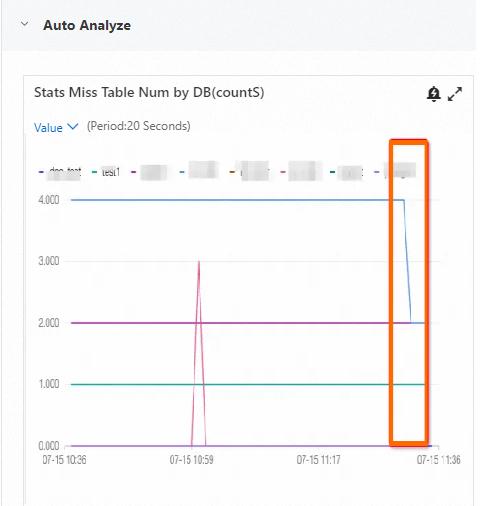
This topic describes a Hologres view that lists tables with missing statistics information. It explains how to query the view to retrieve details and counts of these tables. You can perform manual data governance on these tables and then query the view again to observe changes in the metric.
Use this information to:
-
Identify tables with missing statistics information. Missing statistics can lead to poor execution plans, such as an incorrect join order that causes large-table shuffles, slow queries, or out-of-memory (OOM) errors.
-
You can view the specific table names for the Number of tables missing DB statistics monitoring metric in Hologres.
-
Selectively run manual ANALYZE operations on tables that are missing statistics.
Limits
-
Your Hologres instance version must be V2.2.15 or later.
-
You can view tables only in schemas for which your account has SCHEMA USAGE or higher permission.
-
The view shows only Hologres non-partitioned tables, partitioned tables, foreign tables, and materialized views. Other table types are not shown in the view and are not included in the monitoring metric.
Fields
The following table describes the fields in the HOLOGRES_STATISTIC.HG_STATS_MISSING view.
|
Field |
Data type |
Description |
|
schemaname |
TEXT |
Schema name |
|
tablename |
TEXT |
Table name |
|
nattrs |
INTEGER |
Number of columns |
|
tablekind |
TEXT |
Table type (for example, internal table, foreign table) |
|
fdwname |
TEXT |
Foreign data wrapper name for foreign tables |
|
autovacuum_enabled |
TEXT |
Indicates whether Auto Analyze is enabled. Note
This field is supported in Hologres V3.1 and later. |
|
reason |
TEXT |
Reason why statistics are missing. Use this to decide your next step. Note
This field is supported in Hologres V3.1 and later. |
Examples
To check which databases have tables missing statistics—as shown in the Number of tables missing DB statistics monitoring metric—log on to the Hologres Management Console. In the left navigation pane, click Instances. On the product page of your target instance, in the left navigation pane, click Monitoring Information to view the metrics.
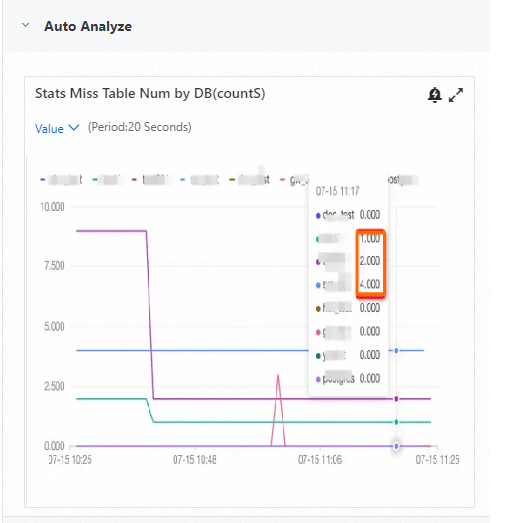
For example, run the following query to list tables with missing statistics in the current database.
SELECT * FROM hologres_statistic.hg_stats_missing;The following is the result.
schemaname |     tablename     | nattrs |     tablekind     | fdwname
------------+-------------------+--------+-------------------+---------
 public     | spatialxxxxx      |      5 | table             |
 public     | smtxxx            |      4 | foreign table     | oss_fdw
 public     | smtxxxxx          |      4 | foreign table     | oss_fdw
 public     | view_xxxxxx       |     14 | materialized view |
(4 rows)
Now, manually run ANALYZE on a table that is missing statistics to collect its statistics information.
ANALYZE spatialxxxxx;Return to the monitoring page. You will see a decrease in the Number of tables missing DB statistics metric.