The CREATE TABLE LIKE statement creates a table with a schema that is identical to the result of a SELECT query. This topic describes how to use the CREATE TABLE LIKE statement.
Limits
-
In Hologres V0.9 and earlier, the
CREATE TABLE LIKEstatement copies only the table schema. It does not copy table properties, such as primary keys or indexes. You can check your instance version on the instance product page in the Hologres console. -
In Hologres V0.10 and later, you can use the
CREATE TABLE LIKEstatement to copy both the table schema and table properties, such as primary keys and indexes. To do this, you must set a Grand Unified Configuration (GUC) parameter by running the following command. After you enable this parameter,CREATE TABLE LIKEsupports copying a table only when you use theSELECT * FROM <table_name>syntax. Other syntaxes, such asSELECT <column_1>, <column_2> FROM <table_name>, are not supported.set hg_experimental_enable_create_table_like_properties=true; -
A table created using the
CREATE TABLE LIKEstatement does not automatically synchronize data from the source table. -
Each target column in the query statement must have a unique alias. Otherwise, the statement to create the table generates columns with the same name, which results in an execution error. For example:
CALL hg_create_table_like('new_table', 'select *, 1 as c, ''a'' as c from src_table'); ERROR: column "c" specified more than once CONTEXT: SQL statement "create table new_table ( "a" integer, "b" text, "c" integer, "c" text );" PL/pgSQL function hg_create_table_like(text,text) line 22 at EXECUTE -
The
CREATE TABLE LIKEstatement supports copying column comments and binary logging (Binlog) properties. It does not support copying table comments or dynamic partition properties. The ability to copy table comments is available in Hologres V3.0.33 and later.
Standard tables
-
Syntax
In Hologres, the syntax of the
CREATE TABLE LIKEstatement for a standard table is as follows:-- Copy a standard table without its properties. CALL hg_create_table_like('new_table_name', 'select_query'); -- Copy a table and its properties. set hg_experimental_enable_create_table_like_properties=true;-- A switch parameter at the session level. CALL hg_create_table_like('new_table_name', 'select * from old_table_name');NoteWhen you call the hg_create_table_like function, the system creates a table named new_table_name based on the schema of the select_query result. No data is inserted.
-
Parameter Description
-
new_table_name: The name of the table to create. You cannot create a foreign table. This parameter supports only fixed strings. String concatenation or function-generated strings are not supported.
-
select_query: The query SQL statement, specified as a string. If the SQL statement is exactly
select * from tablename,CREATE TABLE LIKEautomatically copies all properties of the source table, including the primary key and indexes. If the SQL statement contains multiple single quotation marks, you can enclose the SQL statement with $$ symbols. This lets you rewrite the statement as$$query_sql$$to automatically escape the single quotation marks. This method is recommended because it is easier to use. The syntax is as follows:CALL HG_CREATE_TABLE_LIKE ('table_name', $$query_sql$$ [, 'partition_clause']) -
old_table_name: The name of the source table to copy.
-
-
Examples
Assume that the following source table exists in Hologres:
BEGIN;
CREATE TABLE public.src_table (
 "a" int8 NOT NULL,
 "b" text NOT NULL,
PRIMARY KEY (a)
);
CALL SET_TABLE_PROPERTY('public.src_table', 'orientation', 'column');
CALL SET_TABLE_PROPERTY('public.src_table', 'bitmap_columns', 'b');
CALL SET_TABLE_PROPERTY('public.src_table', 'dictionary_encoding_columns', 'b:auto');
CALL SET_TABLE_PROPERTY('public.src_table', 'time_to_live_in_seconds', '3153600000');
CALL SET_TABLE_PROPERTY('public.src_table', 'distribution_key', 'a');
CALL SET_TABLE_PROPERTY('public.src_table', 'storage_format', 'segment');
COMMIT;
The following examples show how to use
CREATE TABLE LIKEin Hologres:-
Create a table with the same schema and properties as the source table.
-- Copy the table and its properties. set hg_experimental_enable_create_table_like_properties=true; CALL hg_create_table_like('new_table', 'select * from src_table'); -
Create a table by adding a field based on the source table.
-- Add a field c that is the same as the field b.
CALL hg_create_table_like('holo_table_1', $$select *, "b" as c from src_table$$);
-
Partitioned tables
-
Syntax
In Hologres, the syntax of the
CREATE TABLE LIKEstatement for a partitioned table is as follows:-- Copy a partitioned table without its properties. CALL hg_create_table_like('new_table_name', 'select_query', 'partition_clause'); -
Parameter Description
-
new_table_name: The name of the table to create. You cannot create a foreign table. This parameter supports only fixed strings. String concatenation or function-generated strings are not supported.
-
select_query: The query SQL statement, specified as a string. If the SQL statement is exactly
select * from tablename,CREATE TABLE LIKEautomatically copies all properties of the source table, including the primary key and indexes. If the SQL statement contains multiple single quotation marks, you can enclose the SQL statement with $$ symbols. This lets you rewrite the statement as$$query_sql$$to automatically escape the single quotation marks. This method is recommended because it is easier to use. The syntax is as follows:CALL HG_CREATE_TABLE_LIKE ('table_name', $$query_sql$$ [, 'partition_clause']) -
partition_clause: The clause that defines the partitions. You can use this parameter to specify the partition key. Child partition tables are not created automatically. You must create them manually.
-
-
Examples
Assume that the following source table exists in Hologres:
BEGIN;
CREATE TABLE public.src_table (
 "a" int8 NOT NULL,
 "b" text NOT NULL,
PRIMARY KEY (a)
);
CALL SET_TABLE_PROPERTY('public.src_table', 'orientation', 'column');
CALL SET_TABLE_PROPERTY('public.src_table', 'bitmap_columns', 'b');
CALL SET_TABLE_PROPERTY('public.src_table', 'dictionary_encoding_columns', 'b:auto');
CALL SET_TABLE_PROPERTY('public.src_table', 'time_to_live_in_seconds', '3153600000');
CALL SET_TABLE_PROPERTY('public.src_table', 'distribution_key', 'a');
CALL SET_TABLE_PROPERTY('public.src_table', 'storage_format', 'segment');
COMMIT;
The following example shows how to create a partitioned table using
CREATE TABLE LIKEin Hologres:-
Create a partitioned table.
-- Add a field named ds and set the table as a partitioned table that is partitioned by ds. CALL hg_create_table_like('new_table', $$select *, "b" as ds from src_table$$, 'partition by list(ds)'); -
Create child partition tables for the partitioned table.
create table new_table_child_20201213 partition of new_table for values in('20201213');-- Use 20201213 as the partition value.
create table new_table_child_20201214 partition of new_table for values in('20201214');-- Use 20201214 as the partition value.
-
Copy a table using the HoloWeb UI
HoloWeb provides a user interface (UI) that you can use to copy tables without writing SQL commands. To do so, perform the following steps:
-
Go to the HoloWeb page. For more information, see Connect to HoloWeb and run a query.
-
In the top menu bar of the HoloWeb page, click Metadata Management.
-
In the Logged-in Instances list in the navigation pane on the left side of the Metadata Management page, right-click the table that you want to copy and select Replicate Table Schema.
-
On the Replicate Table Schema tab, configure the following parameters.
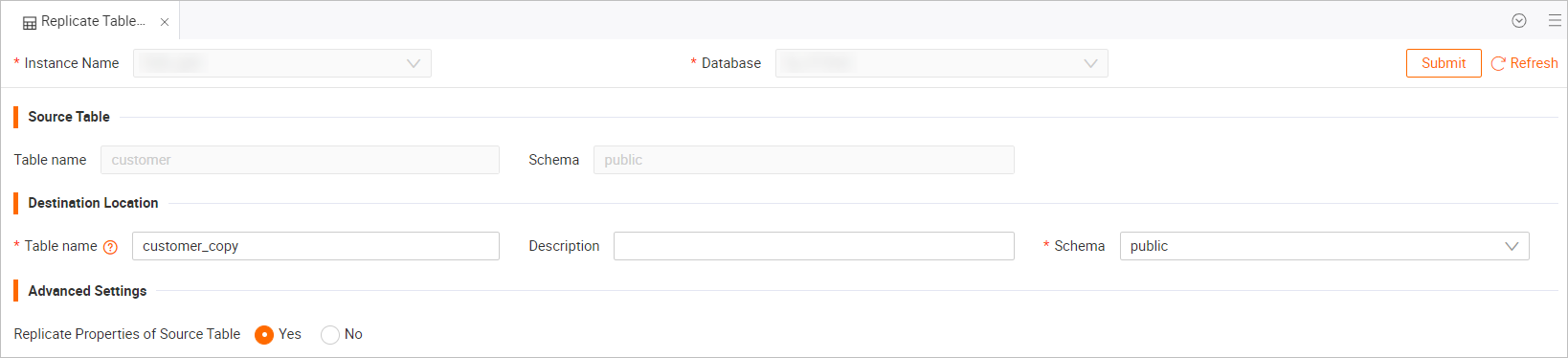
Category
Parameter
Description
Target Location
Table Name
The name of the target table. You can specify a custom name. The default name is <source_table_name>_copy.
Description
The description of the target table. This parameter is optional.
Schema
The schema where the target table resides. The default value is public.
Advanced Options
Synchronize source table properties
Specifies whether to synchronize the properties of the source table to the target table.
NoteOnly instances of Hologres V0.10 and later support the synchronization of source table properties. If your instance is earlier than V0.10, select No or upgrade your instance.
-
In the upper-right corner, click Submit to copy the table.