This guide demonstrates how to use Alibaba Cloud Logstash to ingest data from Azure Event Hubs and synchronize it to an Elasticsearch cluster.
Prerequisites
Alibaba Cloud Elasticsearch cluster created.
This example uses version 7.10.
Auto indexing enabled in the Elasticsearch cluster's YML settings.
This allows Logstash to create the destination index automatically. See Configure YML parameters.
Alibaba Cloud Logstash instance created.
This example uses version 7.4.
A NAT Gateway with SNAT rules is configured for the Logstash VPC.
This allows Logstash (in a VPC) and Azure Event Hubs (on the public network) to communicate. See Configure NAT Gateway for Internet data transmission.
Azure Event Hubs environment prepared:
An active Event Hub namespace and instance.
A Connection String (Primary Key) and a Blob Storage account for offset tracking (checkpointing).
Step 1: Create and configure the Logstash pipeline
Go to the Logstash Clusters page.
Navigate to the target cluster.
In the top navigation bar, select the region where the cluster resides.
On the Logstash Clusters page, find the cluster and click its ID.
In the left navigation menu, click Pipelines.
Click Create Pipeline.
On the Create page, enter a pipeline ID and paste the following code to Config Settings:
input {
  azure_event_hubs {
     event_hub_connections => ["Endpoint=sb://abc-****.****.cn/;SharedAccessKeyName=gem-****-es-consumer;SharedAccessKey=******;EntityPath=xxxxxx"]
     initial_position => "beginning"
     threads => 2
     decorate_events => true
     consumer_group => "group-kl"
     storage_connection => "DefaultEndpointsProtocol=https;AccountName=xxxxx;AccountKey=*******;EndpointSuffix=core.****.cn"
     storage_container => "lettie_container"
   }
}
filter {

}
output {
  elasticsearch {
    hosts => ["es-cn-tl****5r50005adob.elasticsearch.aliyuncs.com:9200"]
    index => "test-log"
    password => "xxxxxx"
    user => "elastic"
  }
}
Parameters
Category
Parameter
Description
Azure
event_hub_connections
The connection string for your hub. Includes the
EntityPath(Hub name). For more information, see event_hub_connections.NoteThe event_hub_connections parameter is defined for each event hub. Other parameters are shared among all event hubs.
initial_position
The position from which to read data in an event hub. Valid values: beginning (default), end, and look_back. For more information, see initial_position.
threads
The total number of threads for event processing. For more information, see threads.
decorate_events
Specifies whether to synchronize the metadata of the event hubs. The metadata includes the event hub name, consumer_group, processor_host, partition, offset, sequence, timestamp, and event_size. For more information, see decorate_events.
consumer_group
Use a dedicated group for Logstash. Multiple Logstash nodes in this group will share the load. For more information, see consumer_group.
storage_connection
Connection string for Azure Blob Storage. This persists offsets so Logstash can resume where it left off after a restart. For more information, see storage_connection.
storage_container
The name of the storage container used to persist offsets and allow multiple Logstash nodes to work together. For more information, see storage_container.
NoteTo avoid overwriting offsets, use different storage_container names. If the same data is written to different services, you must set this parameter to different names.
Elasticsearch
hosts
Your Elasticsearch endpoint. Set the value to
http://<Alibaba Cloud Elasticsearch instance ID>.elasticsearch.aliyuncs.com:9200.index
The target index name in Elasticsearch.
user
The username to access Elasticsearch. Default:
elastic.password
The password for the Elasticsearch user.
For more information, see Logstash configuration files.
Click Next and configure the pipeline parameters.
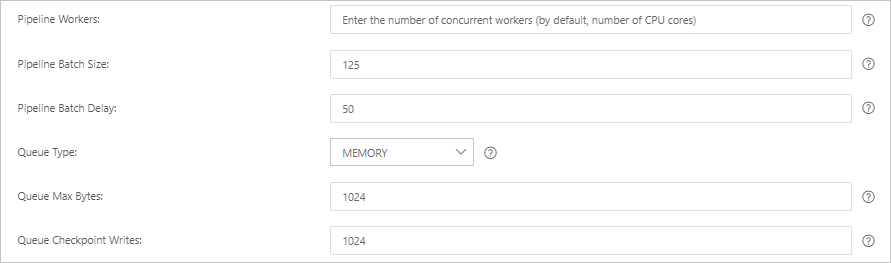
Parameter
Description
Pipeline Workers
The number of worker threads to run the filter and output stages of the pipeline in parallel. If events are backlogged or the CPU is not saturated, consider increasing the number of threads to better use CPU processing power. Default value: The number of CPU cores of the instance.
Pipeline Batch Size
The maximum number of events that a single worker thread can collect from the input before trying to execute the filter and output. A larger batch size can cause higher memory overhead. You can increase the JVM heap size by setting the LS_HEAP_SIZE variable to use this value effectively. Default value: 125.
Pipeline Batch Delay
The duration in milliseconds to wait for each event before dispatching a small batch to a pipeline worker thread. Default value: 50 ms.
Queue Type
The internal queuing model for event buffering. Valid values:
MEMORY: Default. A traditional in-memory queue.
PERSISTED: A disk-based ACKed queue (persistent queue).
Queue Max Bytes
The maximum amount of data that the queue can store, in
MB. The value must be an integer from1to2<sup>53</sup>-1. The default value is1024 MB.NoteEnsure that this value is smaller than the total disk capacity.
Queue Checkpoint Writes
When the persistent queue is enabled, this is the maximum number of events that can be written before a checkpoint is forced. A value of 0 means no limit. Default value: 1024.
WarningDeploying or updating a pipeline triggers a Logstash cluster restart. Ensure this aligns with your maintenance window.
Click Save or Save and Deploy.
Save: Saves the pipeline configuration in Logstash. The configuration does not take effect until it is deployed. After saving, you are returned to the Pipelines page. Click Deploy Now in the Actions column to restart the instance and apply the configuration.
Save and Deploy: Saves and deploys the configuration. This restarts the instance and applies the configuration.
Step 3: Verify data synchronization
Log on to the Kibana console of your Elasticsearch cluster and go to the Kibana homepage.
In the left navigation menu, click Dev tools.
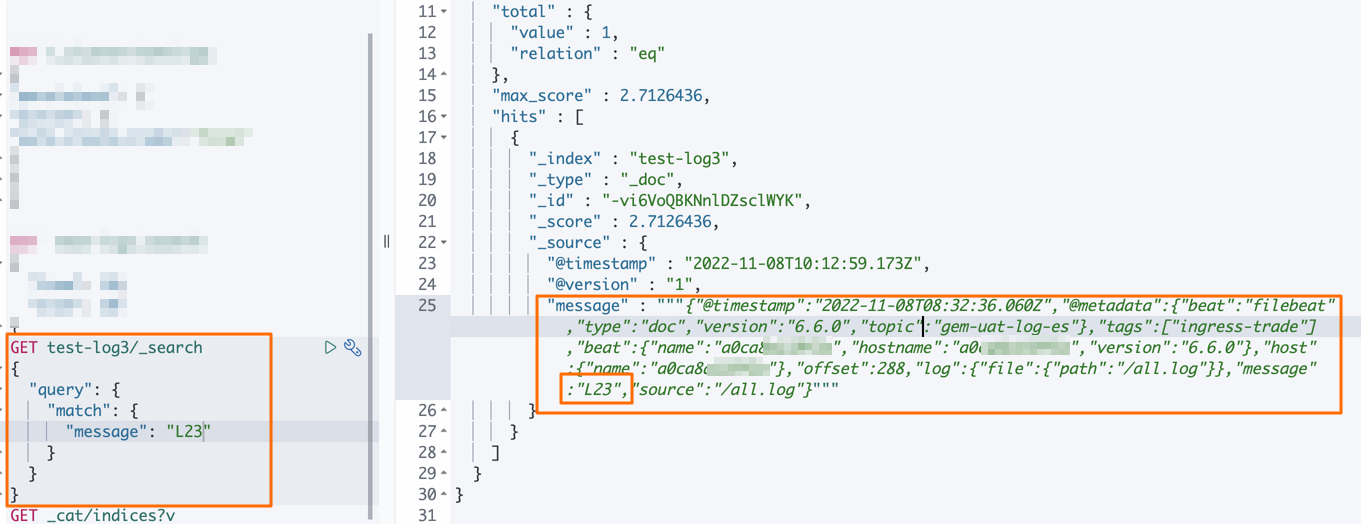
In the Console, run the following command to verify data is flowing:
GET test-log3/_search
{
  "query":{
    "match":{
      "message":"L23"
     }
   }
}
Expected result: