By default, EMR Hadoop clusters store job logs in the Hadoop Distributed File System (HDFS). When a pay-as-you-go cluster is released, HDFS is destroyed along with it — and all job logs are permanently lost. To preserve logs for troubleshooting after a cluster is released, redirect YARN container logs, MapReduce job history, and Spark event logs to JindoFS (JindoFileSystem) or Object Storage Service (OSS) at cluster creation time.
EMR clusters support the pay-as-you-go and subscription billing methods to meet different needs.
Prerequisites
Before you begin, ensure that you have:
-
An OSS bucket to store logs
-
(For JindoFS) A JindoFS namespace backed by OSS
How log storage works
YARN aggregates all container logs for a job into a single file per node and writes them to the configured remote log directory when the application finishes. The yarn.nodemanager.remote-app-log-dir parameter controls this destination.
MapReduce uses the Job History Server to archive completed job metadata. The server writes completed job logs to mapreduce.jobhistory.done-dir and buffers in-progress records to mapreduce.jobhistory.intermediate-done-dir.
Spark uses the Spark History Server to replay job execution. It reads event logs from the path set in spark_eventlog_dir.
Configuration reference
The following tables list the parameters for each storage backend. Apply all parameters as custom software configurations at cluster creation.
JindoFS
Set these parameters in the bigboot configuration file:
| Parameter | Description | Example value |
|---|---|---|
jfs.namespaces |
Namespaces supported by JindoFS. Separate multiple namespaces with commas. | emr-jfs |
jfs.namespaces.emr-jfs.oss.uri |
OSS storage backend for the emr-jfs namespace. |
oss://oss-bucket/oss-dir |
jfs.namespaces.emr-jfs.mode |
Storage mode for the emr-jfs namespace. JindoFS supports block mode and cache mode. |
block |
YARN container logs and MapReduce job history
| Configuration file | Parameter | Description | Example value |
|---|---|---|---|
yarn-site |
yarn.nodemanager.remote-app-log-dir |
Remote directory where YARN aggregates and stores container logs after an application finishes. The log aggregation feature of YARN is enabled by default. | jfs://emr-jfs/emr-cluster-log/yarn-apps-logs or oss://${oss-bucket}/emr-cluster-log/yarn-apps-logs |
mapred-site |
mapreduce.jobhistory.done-dir |
Directory where the Job History Server stores logs of completed Hadoop jobs. | jfs://emr-jfs/emr-cluster-log/jobhistory/done or oss://${oss-bucket}/emr-cluster-log/jobhistory/done |
mapred-site |
mapreduce.jobhistory.intermediate-done-dir |
Directory where the Job History Server buffers logs of Hadoop jobs not yet archived. | jfs://emr-jfs/emr-cluster-log/jobhistory/done_intermediate or oss://${oss-bucket}/emr-cluster-log/jobhistory/done_intermediate |
Spark History Server
| Configuration file | Parameter | Description | Example value |
|---|---|---|---|
spark-defaults |
spark_eventlog_dir |
Directory where the Spark History Server stores the logs of Spark jobs. | jfs://emr-jfs/emr-cluster-log/spark-history or oss://${oss-bucket}/emr-cluster-log/spark-history |
Apply the configuration at cluster creation
Pass the configuration as custom software configurations when creating an EMR cluster. The console provides a Custom Software Configuration field for this JSON input, as shown in the following figure.
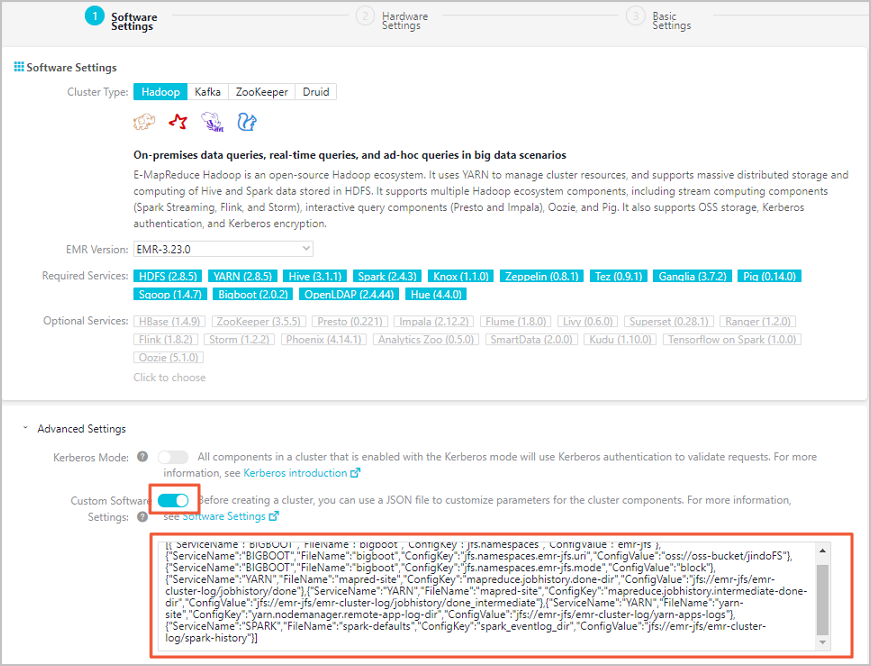
Store logs in JindoFS
Replace oss-bucket and the directory paths with your actual OSS bucket and preferred paths:
[
  {
    "ServiceName": "BIGBOOT",
    "FileName": "bigboot",
    "ConfigKey": "jfs.namespaces",
    "ConfigValue": "emr-jfs"
  },
  {
    "ServiceName": "BIGBOOT",
    "FileName": "bigboot",
    "ConfigKey": "jfs.namespaces.emr-jfs.oss.uri",
    "ConfigValue": "oss://oss-bucket/jindoFS"
  },
  {
    "ServiceName": "BIGBOOT",
    "FileName": "bigboot",
    "ConfigKey": "jfs.namespaces.emr-jfs.mode",
    "ConfigValue": "block"
  },
  {
    "ServiceName": "YARN",
    "FileName": "mapred-site",
    "ConfigKey": "mapreduce.jobhistory.done-dir",
    "ConfigValue": "jfs://emr-jfs/emr-cluster-log/jobhistory/done"
  },
  {
    "ServiceName": "YARN",
    "FileName": "mapred-site",
    "ConfigKey": "mapreduce.jobhistory.intermediate-done-dir",
    "ConfigValue": "jfs://emr-jfs/emr-cluster-log/jobhistory/done_intermediate"
  },
  {
    "ServiceName": "YARN",
    "FileName": "yarn-site",
    "ConfigKey": "yarn.nodemanager.remote-app-log-dir",
    "ConfigValue": "jfs://emr-jfs/emr-cluster-log/yarn-apps-logs"
  },
  {
    "ServiceName": "SPARK",
    "FileName": "spark-defaults",
    "ConfigKey": "spark_eventlog_dir",
    "ConfigValue": "jfs://emr-jfs/emr-cluster-log/spark-history"
  }
]
Store logs in OSS
Replace oss_bucket and the directory paths with your actual OSS bucket and preferred paths:
[
  {
    "ServiceName": "YARN",
    "FileName": "mapred-site",
    "ConfigKey": "mapreduce.jobhistory.done-dir",
    "ConfigValue": "oss://oss_bucket/emr-cluster-log/jobhistory/done"
  },
  {
    "ServiceName": "YARN",
    "FileName": "mapred-site",
    "ConfigKey": "mapreduce.jobhistory.intermediate-done-dir",
    "ConfigValue": "oss://oss_bucket/emr-cluster-log/jobhistory/done_intermediate"
  },
  {
    "ServiceName": "YARN",
    "FileName": "yarn-site",
    "ConfigKey": "yarn.nodemanager.remote-app-log-dir",
    "ConfigValue": "oss://oss_bucket/emr-cluster-log/yarn-apps-logs"
  },
  {
    "ServiceName": "SPARK",
    "FileName": "spark-defaults",
    "ConfigKey": "spark_eventlog_dir",
    "ConfigValue": "oss://oss_bucket/emr-cluster-log/spark-history"
  }
]
Where to find logs after the cluster is released
After the cluster is released, access logs directly from OSS at the paths you configured:
| Log type | OSS path |
|---|---|
| YARN container logs | oss://<oss-bucket>/emr-cluster-log/yarn-apps-logs/ |
| MapReduce completed job logs | oss://<oss-bucket>/emr-cluster-log/jobhistory/done/ |
| MapReduce in-progress job logs | oss://<oss-bucket>/emr-cluster-log/jobhistory/done_intermediate/ |
| Spark event logs | oss://<oss-bucket>/emr-cluster-log/spark-history/ |