Resource Advisor provides resource diagnostics and analytics capabilities to help you manage resources in an intelligent manner. This topic describes how to view the diagnostic information about resources on the Resource Advisor page.
Procedure
Resource Advisor provides the resource diagnostics feature to analyze resource creation failures, generate resource alerts, send important notifications, and recommend actionable solutions based on resource diagnostic results to ensure that you obtain access to required resources at the earliest opportunity.
In the top navigation bar, select the region and resource group of the resource that you want to manage.

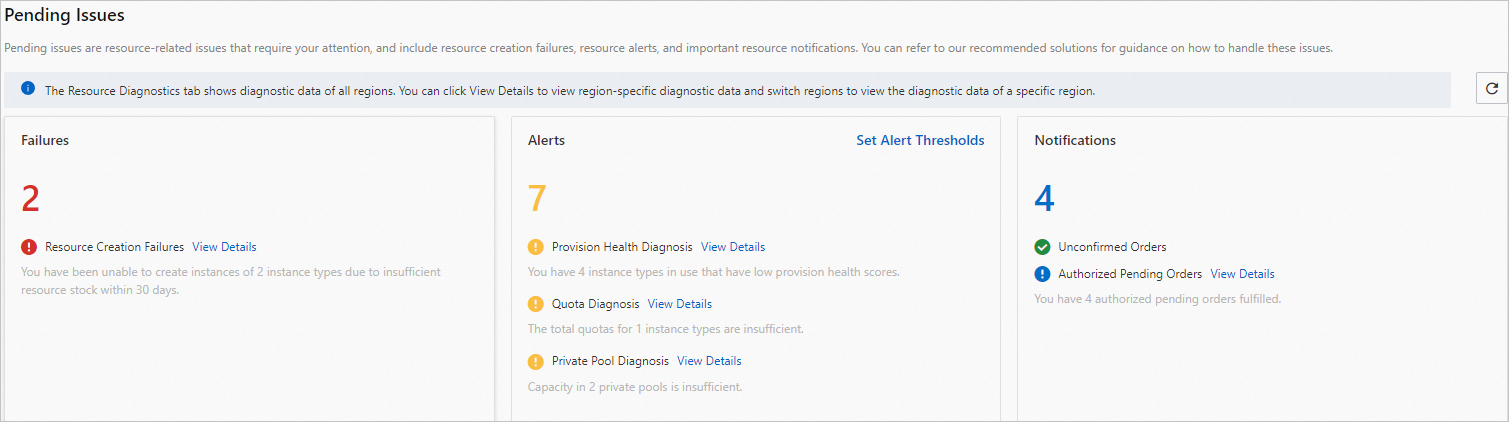
On the Pending Issues page, view failures, alerts, and notifications.
Failures: In the Failures section, click View Details to the right of Resource Creation Failures to view the details of resource creation failures and the corresponding solutions. For more information, see View the details of resource creation failures.
Alerts:
View alerts. In the Alerts section, click View Details to the right of Provision Health Diagnosis, Quota Diagnosis, or Private Pool Diagnosis to view the details of alerts and the corresponding solutions.
Configure alert thresholds. In the Alerts section, click Set Alert Thresholds. In the Set Alert Thresholds dialog box, follow the on-screen instructions to configure thresholds in the Quota Threshold, Provision Health Thresholds, and Private Pool Thresholds sections and click OK.
Notifications: In the Notifications section, click View Details to the right of Unconfirmed Orders or Authorized Pending Orders to view the details of notifications and the corresponding solutions.