This topic describes how to use Data Transmission Service (DTS) to implement two-way synchronization between PolarDB for PostgreSQL clusters.
Prerequisites
You have created the source and destination PolarDB for PostgreSQL clusters. For more information, see Create a database cluster.
NoteFor the versions supported by the source and destination databases, see Overview of synchronization solutions.
We recommend that the destination PolarDB for PostgreSQL cluster has the same specifications as the source PolarDB for PostgreSQL cluster.
A database has been created in the target PolarDB for PostgreSQL cluster to receive data. For more information, see Database Management.
The
wal_levelparameter for both the source and target PolarDB for PostgreSQL clusters is set tological. For more information, see Set cluster parameters.
Notes
During schema synchronization, DTS synchronizes foreign keys from the source database to the destination database.
During full data synchronization and incremental data synchronization, DTS temporarily disables constraint checks and foreign key cascade operations at the session level. Data inconsistency may occur if cascade update or delete operations are performed on the source database while the task is running.
Type | Description |
Source database limits |
|
Other limits |
|
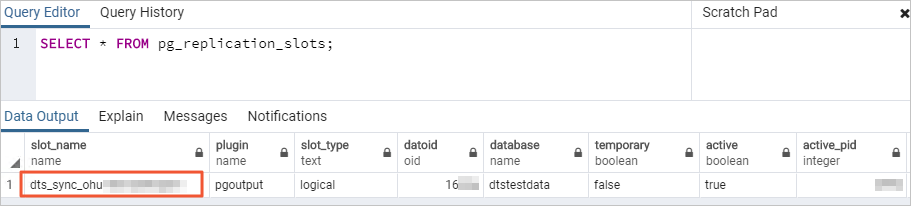
Billing
Synchronization type | Pricing |
Schema synchronization and full data synchronization | Free of charge. |
Incremental data synchronization | Charged. For more information, see Billing overview. |
Supported conflict detection
To ensure data consistency, make sure that data records with the same primary key, business primary key, or unique key are updated in only one of the database instances in the two-way synchronization. If data records are updated on both database instances, DTS the system will apply the conflict resolution policy configured in the task.
DTS checks and fixes conflicts to maximize the stability of two-way synchronization tasks. DTS can detect the following types of conflicts:
-
Uniqueness conflicts caused by INSERT operations
In two-way synchronization, if records with the same primary key are inserted into both database instances simultaneously (or in close succession), a uniqueness constraint conflict will be triggered. When the INSERT statement is synchronized to the peer instance, it will fail because a record with the same primary key value already exists.
-
Mismatched records in UPDATE operations
-
If the records to be updated do not exist in the destination instance, DTS converts the UPDATE operation into an INSERT operation. However, uniqueness conflicts may occur.
-
The record to be updated by an UPDATE operation causes a primary key or unique key conflict.
-
-
Non-existent records to be deleted
The records to be deleted do not exist in the destination instance. In this case, DTS ignores the DELETE operation regardless of the conflict resolution policy that you specify.
-
Due to time differences and latency, DTS cannot guarantee 100% conflict prevention. To ensure consistency, update records with the same primary or unique key on only one database instance at a time.
-
DTS provides various conflict resolution strategies for the aforementioned data conflicts, which you can select while configuring two-way data synchronization.
Supported objects to be synchronized
SCHEMA, TABLE
NoteThis includes PRIMARY KEY, UNIQUE KEY, FOREIGN KEY, DATATYPE (built-in data types), and DEFAULT CONSTRAINT.
VIEW, PROCEDURE (PostgreSQL 11 or later), FUNCTION, RULE, SEQUENCE, EXTENSION, TRIGGER, AGGREGATE, INDEX, OPERATOR, DOMAIN
Supported SQL operations
Data Definition Language (DDL) operations can be synchronized only in the forward task, from the source database to the destination database. DDL operations are not supported in the reverse task, from the destination database to the source database, and are automatically filtered.
Operation type | SQL statement |
DML | INSERT, UPDATE, and DELETE |
DDL |
Important
|
Database account permissions
Database | Required permissions | Account creation and authorization |
Source and destination PolarDB for PostgreSQL clusters | A privileged account that is the owner of the database. |
Procedure
Go to the data synchronization task list page in the destination region. You can do this in one of two ways.
DTS console
Log on to the DTS console.
In the navigation pane on the left, click Data Synchronization.
In the upper-left corner of the page, select the region where the synchronization instance is located.
DMS console
NoteThe actual steps may vary depending on the mode and layout of the DMS console. For more information, see Simple mode console and Customize the layout and style of the DMS console.
Log on to the DMS console.
In the top menu bar, choose .
To the right of Data Synchronization Tasks, select the region of the synchronization instance.
Click Create Task to open the task configuration page.
Configure the source and destination databases.
Category
Configuration
Description
None
Task Name
DTS automatically generates a task name. We recommend that you specify a descriptive name for easy identification. The name does not need to be unique.
Source Database
Select Existing Connection
Select the registered database instance with DTS from the drop-down list. The database information below is automatically configured.
NoteIn the DMS console, this configuration item is Select a DMS database instance.
If you have not registered the database instance or do not need to use a registered instance, manually configure the database information below.
Database Type
Select PolarDB for PostgreSQL.
Access Method
Select Alibaba Cloud Instance.
Instance Region
Select the region where the source PolarDB for PostgreSQL cluster resides.
Replicate Data Across Alibaba Cloud Accounts
For this example, select No, as the database instance belongs to the current Alibaba Cloud account.
Instance ID
Select the ID of the source PolarDB for PostgreSQL cluster.
Database Name
Enter the name of the database that contains the objects to be synchronized in the source PolarDB for PostgreSQL cluster.
Database Account
Enter the database account of the source PolarDB for PostgreSQL cluster. For information about the permission requirements, see Database account permissions.
Database Password
Enter the password for the specified database account.
Destination Database
Select Existing Connection
Select the registered database instance with DTS from the drop-down list. The database information below is automatically configured.
NoteIn the DMS console, this configuration item is Select a DMS database instance.
If you have not registered the database instance or do not need to use a registered instance, manually configure the database information below.
Database Type
Select PolarDB for PostgreSQL.
Access Method
Select Alibaba Cloud Instance.
Instance Region
Select the region where the destination PolarDB for PostgreSQL cluster resides.
Instance ID
Select the ID of the destination PolarDB for PostgreSQL cluster.
Database Name
Enter the name of the database that is used to receive data in the destination PolarDB for PostgreSQL cluster.
Database Account
Enter the database account of the destination PolarDB for PostgreSQL cluster. For information about the permission requirements, see Database account permissions.
Database Password
Enter the password for the specified database account.
After you complete the configuration, click Test Connectivity and Proceed at the bottom of the page.
NoteEnsure that the IP address blocks of the DTS service are added to the security settings of the source and destination databases, either automatically or manually, to allow access from DTS servers. For more information, see Add the IP address whitelist of DTS servers.
Configure the task objects.
On the Configure Objects page, specify the objects to synchronize.
Configuration
Description
Synchronization Types
DTS always selects Incremental Data Synchronization. By default, you must also select Schema Synchronization and Full Data Synchronization. After the precheck, DTS initializes the destination cluster with the full data of the selected source objects, which serves as the baseline for subsequent incremental synchronization.
Synchronization Topology
Select Two-way Synchronization.
Exclude DDL Operations
If you select Yes, DDL operations are not synchronized.
Select No: synchronize DDL operations.
ImportantTo ensure the stability of the two-way synchronization link, you can select whether to synchronize DDL operations only for the forward task (from the source database to the destination database). DDL operations are automatically filtered out in the reverse task (from the destination database to the source database).
Global Conflict Resolution Policy
Select a conflict resolution policy as needed.
TaskFailed (Fail and report an error upon conflict)
The task will error out and stop if a conflict occurs. The task enters a failed state and requires manual intervention for recovery.
Ignore (Keep the existing record in the destination instance)
The system skips the conflicting statement and continues the synchronization. The existing record in the destination instance is retained.
Overwrite (Overwrite the conflicting record in the destination instance)
If a conflict occurs, the system overwrites the conflicting record in the destination instance with the data from the source.
NoteFor information about the supported conflict types, see Supported conflict detection.
If the synchronization task is paused or restarted and a delay occurs, these policies do not take effect. The data in the destination is overwritten by default.
Processing Mode of Conflicting Tables
Precheck and Report Errors: Checks for tables with the same names in the destination database. If any tables with the same names are found, an error is reported during the precheck and the data synchronization task does not start. Otherwise, the precheck is successful.
NoteIf you cannot delete or rename the table with the same name in the destination database, you can map it to a different name in the destination. For more information, see Database Table Column Name Mapping.
Ignore Errors and Proceed: Skips the check for tables with the same name in the destination database.
WarningSelecting Ignore Errors and Proceed may cause data inconsistency and put your business at risk. For example:
If the table schemas are consistent and a record in the destination database has the same primary key or unique key value as a record in the source database:
During full data synchronization, DTS retains the destination record and skips the source record.
During incremental synchronization, DTS overwrites the destination record with the source record.
If the table schemas are inconsistent, data initialization may fail. This can result in only partial data synchronization or a complete synchronization failure. Use with caution.
Capitalization of Object Names in Destination Instance
Configure the case-sensitivity policy for database, table, and column names in the destination instance. By default, the DTS default policy is selected. You can also choose to use the default policy of the source or destination database. For more information, see Case policy for destination object names.
Source Objects
In the Source Objects box, click the objects, and then click
 to move them to the Selected Objects box.Note
You can select schemas or tables as synchronization objects. If you select tables as synchronization objects, other objects, such as views, triggers, and stored procedures, are not synchronized to the destination database.
If a table to be synchronized contains SERIAL data type, and you select Schema Synchronization as the Synchronization Types, we recommend that you also select Sequence or entire schema synchronization.
Selected Objects
To change the name of a synchronization object in the destination instance, right-click the synchronization object in Selected Objects and edit its name. For more information, see Library, Table, and Column Name Mapping.
To remove a selected synchronization object, click the object in the Selected Objects box and click
 to move it to the Source Objects box.
NoteIf you use the object name mapping feature, other objects that depend on the mapped object may fail to be synchronized.
To set a WHERE clause to filter data, right-click the table to be synchronized in the Selected Objects box and set the filter condition in the dialog box that appears. For more information, see Set a filter condition.
To select the SQL operations for incremental synchronization, right-click the object to be synchronized in the Selected Objects box and select the desired SQL operations in the dialog box that appears.
Click Next: Advanced Settings.
Configuration
Description
Dedicated Cluster for Task Scheduling
By default, DTS uses a shared cluster for tasks, so you do not need to make a selection. For greater task stability, you can purchase a dedicated cluster to run the DTS synchronization task. For more information, see What is a DTS dedicated cluster?.
Retry Time for Failed Connections
If the connection to the source or destination database fails after the synchronization task starts, DTS reports an error and immediately begins to retry the connection. The default retry duration is 720 minutes. You can customize the retry time to a value from 10 to 1,440 minutes. We recommend a duration of 30 minutes or more. If the connection is restored within this period, the task resumes automatically. Otherwise, the task fails.
NoteIf multiple DTS instances (e.g., Instance A and B) share a source or destination, DTS uses the shortest configured retry duration (e.g., 30 minutes for A, 60 for B, so 30 minutes is used) for all instances.
DTS charges for task runtime during connection retries. Set a custom duration based on your business needs, or release the DTS instance promptly after you release the source/destination instances.
Retry Time for Other Issues
If a non-connection issue (e.g., a DDL or DML execution error) occurs, DTS reports an error and immediately retries the operation. The default retry duration is 10 minutes. You can also customize the retry time to a value from 1 to 1,440 minutes. We recommend a duration of 10 minutes or more. If the related operations succeed within the set retry time, the synchronization task automatically resumes. Otherwise, the task fails.
ImportantThe value of Retry Time for Other Issues must be less than that of Retry Time for Failed Connections.
Enable Throttling for Full Data Synchronization
During full data synchronization, DTS consumes read and write resources from the source and destination databases, which can increase their load. To mitigate pressure on the destination database, you can limit the migration rate by setting Queries per second (QPS) to the source database, RPS of Full Data Migration, and Data migration speed for full migration (MB/s).
NoteThis parameter is available only if Synchronization Types is set to Full Data Synchronization.
You can also adjust the rate of full data synchronization when the synchronization instance is running.
Enable Throttling for Incremental Data Synchronization
You can also limit the incremental synchronization rate to reduce pressure on the destination database by setting RPS of Incremental Data Synchronization and Data synchronization speed for incremental synchronization (MB/s).
Environment Tag
You can select an environment tag to identify the instance based on your needs. In this example, no tag is selected.
Configure ETL
Choose whether to enable the extract, transform, and load (ETL) feature. For more information, see What is ETL? Valid values:
-
Yes: Enables the ETL feature. Enter data processing statements in the code editor. For more information, see Configure ETL in a data migration or data synchronization task.
-
No: Disables the ETL feature.
Monitoring and Alerting
Choose whether to set up alerts. If the synchronization fails or the latency exceeds the specified threshold, DTS sends a notification to the alert contacts.
No: No alerts are configured.
Yes: Configures alerts. You must also set the alert threshold and alert notifications. For more information, see Configure monitoring and alerting during task configuration.
Click Data Verification to configure a data verification task.
To use the data verification feature, see Configure data verification.
Save the task and perform a precheck.
To view the parameters for configuring this instance via an API operation, hover over the Next: Save Task Settings and Precheck button and click Preview OpenAPI parameters in the tooltip.
If you have finished viewing the API parameters, click Next: Save Task Settings and Precheck at the bottom of the page.
NoteBefore a synchronization task starts, DTS performs a precheck. You can start the task only if the precheck passes.
If the precheck fails, click View Details next to the failed item, fix the issue as prompted, and then rerun the precheck.
If the precheck generates warnings:
For non-ignorable warning, click View Details next to the item, fix the issue as prompted, and run the precheck again.
For ignorable warnings, you can bypass them by clicking Confirm Alert Details, then Ignore, and then OK. Finally, click Precheck Again to skip the warning and run the precheck again. Ignoring precheck warnings may lead to data inconsistencies and other business risks. Proceed with caution.
Purchase the instance.
When the Success Rate reaches 100%, click Next: Purchase Instance.
On the Purchase page, select the billing method and link specifications for the data synchronization instance. For more information, see the following table.
Category
Parameter
Description
New Instance Class
Billing Method
Subscription: You pay upfront for a specific duration. This is cost-effective for long-term, continuous tasks.
Pay-as-you-go: You are billed hourly for actual usage. This is ideal for short-term or test tasks, as you can release the instance at any time to save costs.
Resource Group Settings
The resource group to which the instance belongs. The default is default resource group. For more information, see What is Resource Management?.
Instance Class
DTS offers synchronization specifications at different performance levels that affect the synchronization rate. Select a specification based on your business requirements. For more information, see Data synchronization link specifications.
Subscription Duration
In subscription mode, select the duration and quantity of the instance. Monthly options range from 1 to 9 months. Yearly options include 1, 2, 3, or 5 years.
NoteThis option appears only when the billing method is Subscription.
Read and select the checkbox for Data Transmission Service (Pay-as-you-go) Service Terms.
Click Buy and Start, and then click OK in the OK dialog box.
You can monitor the task progress on the data synchronization page.
Configure the reverse synchronization task.
Wait for the initial synchronization of the forward task to complete until the Status is Running.
In the Actions column of the reverse task, click Configure Task.
Configure the reverse synchronization task by following Step 3 to Step 6.
ImportantWhen you configure the reverse synchronization task, you must select the correct source and destination instances. The source instance in the reverse task is the destination instance in the forward task. The destination instance in the reverse task is the source instance in the forward task. You must also carefully confirm that the instance information, such as the database name, account, and password, is consistent.
The Instance Region of the source and destination databases cannot be modified for the reverse synchronization task. Fewer parameters are available for configuration compared to the forward synchronization task. Configure the parameters that are displayed in the console.
The Processing Mode of Conflicting Tables for the reverse synchronization task does not check for tables that are synchronized to the destination instance by the forward synchronization task.
The reverse synchronization task does not support synchronizing objects that are not in the Selected Objects list of the forward task.
We recommend that you do not use the mapping feature when you configure the reverse task. Otherwise, data inconsistency may occur.
When Success Rate is 100%, click Back.
After the reverse synchronization task is configured, wait until the Status of both synchronization tasks is Running. The configuration of two-way data synchronization is complete.