Scenarios
Public authoritative DNS logs provide clear insights into Alibaba Cloud DNS (DNS) requests for internal domain names, which helps enterprises efficiently audit user behavior on internal networks and identify potential security risks at the earliest opportunity.
What is a public authoritative DNS logs?
The public authoritative DNS logs record DNS response logs for all subdomains of a specific domain name. The recorded information includes the protocol of the request, UID of domain name, source IP addresses, destination IP addresses (addresses of the DNS servers), queried domain names, record types, and response results. The public authoritative DNS log feature is integrated with Log Audit Service of Simple Log Service (SLS). You can enable the public authoritative DNS log feature to quickly and easily collect, manage, query, and analyze public authoritative DNS logs across accounts and regions in a centralized manner.
Enable the audit logs for public DNS resolution logs
To use SLS log storage, you must enable the DNS traffic analysis feature for specific domain names first in the Cloud DNS product console. For more information, see Enable or disable the DNS traffic analysis feature for domain names. If you disable the DNS traffic analysis feature for the domain name, the SLS system does not collect or store DNS logs for the domain name.
Log on to the SLS Console.
In the Log Application section, select the Audit & Security tab, and then click Log Audit Service (New Version).
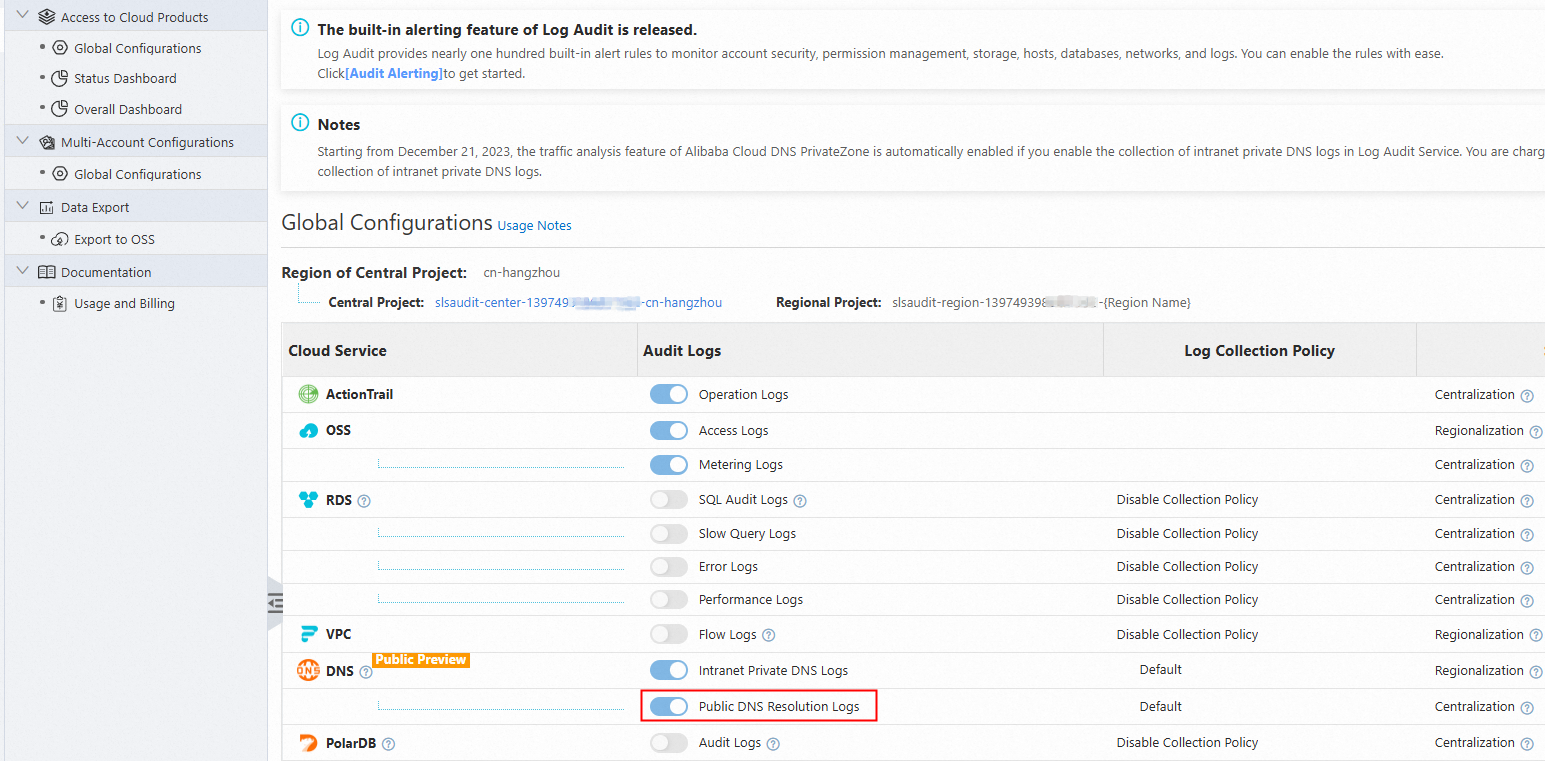
On the Global Configurations page, enable the Audit Logs for Public DNS Resolution Logs and select a region from the Region of Central Project drop-down list. In this example, cn-hangzhou is selected. For more information, see Enable and manage log collection.
How to view public authoritative DNS logs?
Log on to the Simple Log Service console.
Select a previously created project from the Projects column.
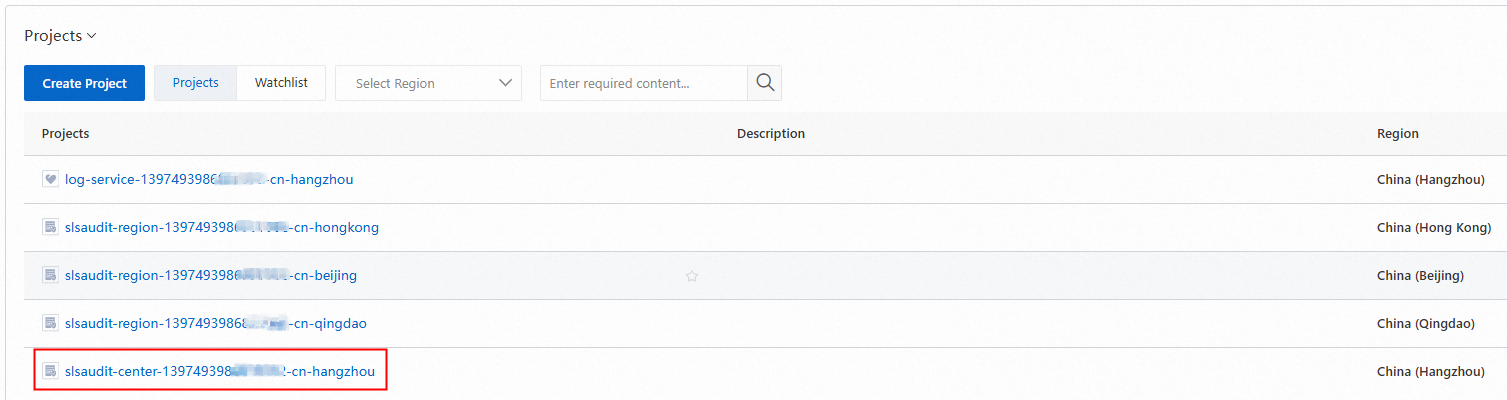
In the Logstores list, click dns_log to view DNS logs.
Parameters of public authoritative DNS logs
Parameter | Description | Example |
additional_rrset | The additional resource records, which indicate the auxiliary data that a DNS server provides for improving the efficiency of DNS resolution process and excludes DNS query results. | Json array: ["mail.example.com. 3600 IN A 93.184.XX.XX"] |
answer_rrset | The resource records in the response, which indicate the messages returned by a DNS server based on query requests. | Json array: ["cloud-example.com. 600 MX 15 mx3.qiye.aliyun.com.", "cloud-example.com. 600 MX 10 mx2.qiye.aliyun.com."] |
authority_rrset | The DNS records in the built-in authoritative module, which indicate the information of other DNS servers that can response to the query when the requested domain name information cannot be directly provided by the response server. | Json array: ["example.com. 172800 IN NS ns1.example.com. example.com. 172800 IN NS ns2.example.com." ] |
dns_msg_flags |
| QR RD AA |
dns_msg_id | The ID of the DNS message, which is the unique identifier of the DNS request. | 55346 |
dst_addr | The destination IP address of a response message, which indicates the egress IP addresses of a local DNS server. | 61.240.XX.XX |
dst_port | The destination port of a response message, which indicates the port of a local DNS server. | 52322 |
edns | Extension mechanisms for DNS (EDNS) is an extension mechanisms for DNS protocol that allows additional information to be carried in DNS requests and responses. With EDNS, DNS supports larger packets, richer error codes, and other extended features. UDP: User Datagram Protocol (UDP), which indicates the maximum size (in bytes) of UDP data packet that a sender can process. This enables the client and server to transmit more data based on the larger size. flag: An 8-bit flag field located in the CLIENT_SUBNET: The information about client subnet. | UDP: 1400 flags: DO CLIENT_SUBNET: 124.163.XX.XX/24/24 |
query_name | The queried domain name. | www.example.com. |
query_type | The type of the queried DNS record. Valid values: A, AAAA, CNAME, TXT, and MX. | A |
rcode | HTTP status codes:
| 0 |
region_id | The region ID of the machine where the logs are collected. | cn-shanghai |
rt | The response latency, which indicates the interval between request receiving and responding in each authoritative DNS. It does not refer to the interval between the time when the terminal sends the request and the time when the terminal receives a response. | 0ms |
src_addr | The source IP address of a response, which is the address from which an authoritative DNS server receives the response. | 8.212.XX.XX |
src_port | The source port of a response, which is the port from which an authoritative DNS server receives the response. | 53 |
transport | The transmission protocol. | UDP |
user_id | The ID of the Alibaba Cloud account. | 139749398683**** |
value | The value part in the RRset of an answer_rrset field. | Json array: ["mx3.qiye.aliyun.com." ,"mx2.qiye.aliyun.com."] |
view_name | The name of the line hit by DNS requests. | DEFAULT |
wild_len | The length of the wildcard domain name that is hit. | 25 |
z_name | The Authoritative Zones to which the queried domain name belongs. | cloud-example.com |