To configure scheduling dependencies, you must set dependencies between nodes using the output name of a parent node. This topic describes how to configure inputs and outputs for scheduling dependencies.
Configure inputs for the current node
You can configure inputs for the current node in one of two ways:
Use the auto-parsing feature to parse node dependencies from your code.
To manually set the node dependency, enter the parent node's output name as the output name of the current node.
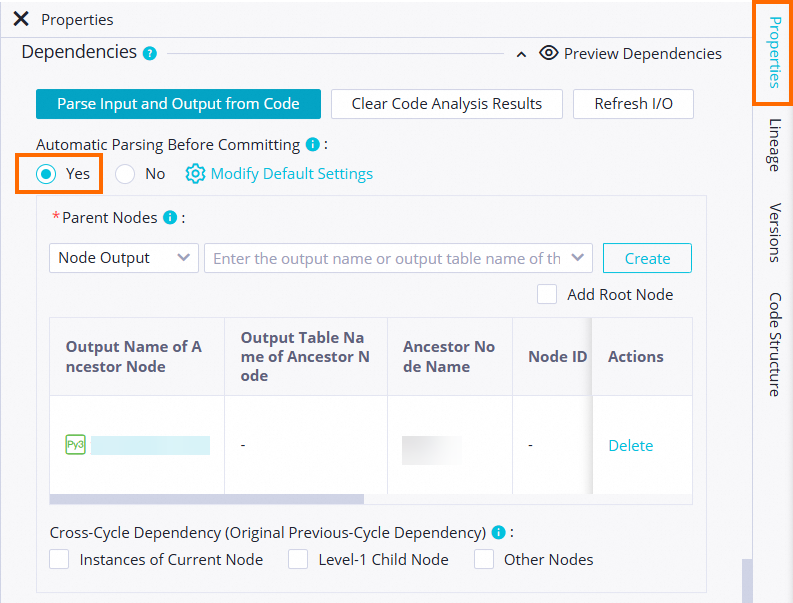
When you manually enter an ancestor node, enter the parent node's output name as the output name of the current node. If the parent node's node name is different from its output name, make sure to enter the correct output name.
When you configure an ancestor node, you can check whether its dependency is valid. If the dependency of an auto-parsed ancestor node is invalid, check if the Parent Node ID column contains a value.
Configuring a node dependency sets a dependency between two nodes. You can set a valid dependency only for a node that exists.
Invalid upstream dependencies
An invalid upstream dependency usually occurs in one of the following two situations:
The parent node does not exist.
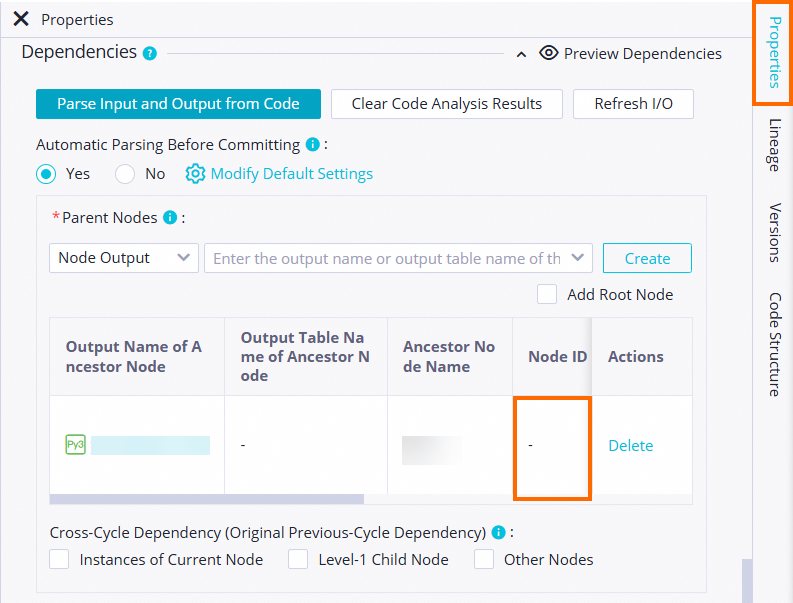
The output of the parent node does not exist.

An upstream dependency is invalid if the parsed output name of the parent node does not exist. This can happen because no node generates the ancestor table, or because the output configuration of the node that generates the table is incorrect.
You can resolve this issue in one of the following two ways:
Check whether the table has output tasks.
Find the output name of the node that generates the table. Then, manually enter this output name for the dependent ancestor node.
When you manually enter an ancestor node, use the parent node's output name for the output name of the current node. If the parent node's name is different from its output name, you must enter the correct output name.
For example, the output name of ancestor node A is A1. Descendant node B depends on node A. In this case, you can enter A1 in the input field for the dependent ancestor node and click the plus sign (+) on the right.
Configure an upstream dependency
If your table does not have an upstream dependency, click Use Workspace Root Node to add one.
Configure the output of the current node
You can use the same name for the node name, the output name of the current node, and the output table name. This practice lets you efficiently configure the output of the current node.
You can quickly identify which table the node operates on.
You can quickly determine the impact scope of a failed task.
If the output of the current node follows the three-names-in-one rule, the accuracy of automatic parsing for task dependencies improves.
Auto-parsing
Auto Parse: Automatically parses scheduling dependencies from code.
The auto-parsing feature works by retrieving the table name from the code. It then uses the table name to parse the corresponding node that generates the output.
The following is the code for the type node.
INSERT OVERWRITE TABLE pm_table_a SELECT * FROM project_b_name.pm_table_b ;The following dependency is parsed.
pm_table_ais automatically parsed as the output of the current node.project_b_name.pmtable_bis automatically parsed as the parent node's output name.
DataWorks automatically parses the dependencies. In this case, the current node depends on the node in project_b_name that generates pm_table_b. The current node generates pm_table_a. Therefore, the output name of the parent node is project_b_name.pm_table_b, and the output name of the current node is project_name.pm_table_a. In this example, the workspace name is test_pm_01.
Select No if you do not want to use the dependency parsed from the code.
Tables that are considered temporary, such as those with names starting with t_, are not parsed as scheduling dependencies. You can configure your project to specify which tables are treated as temporary tables.
If a table in the code is both an output table and a referenced table, it is parsed only as an output table.
If a table in the code is referenced or generated multiple times, only one scheduling dependency is parsed.
By default, table names that start with t_ are automatically parsed as temporary tables. If a table that starts with t_ is not a temporary table, contact your project administrator to change this setting on the Workspace Configurations page.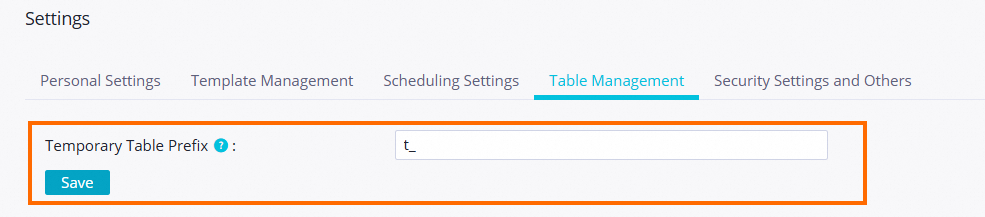
Delete the input or output of a table
In Data Studio, you may use static tables. Data is uploaded to these tables from local files. This static data does not have a node that generates it.
When you configure dependencies, you must delete the input for static tables. A table is considered static, and not a temporary table, if its name does not have the t_ prefix.
In your code, you can right-click the table name and select Delete Input.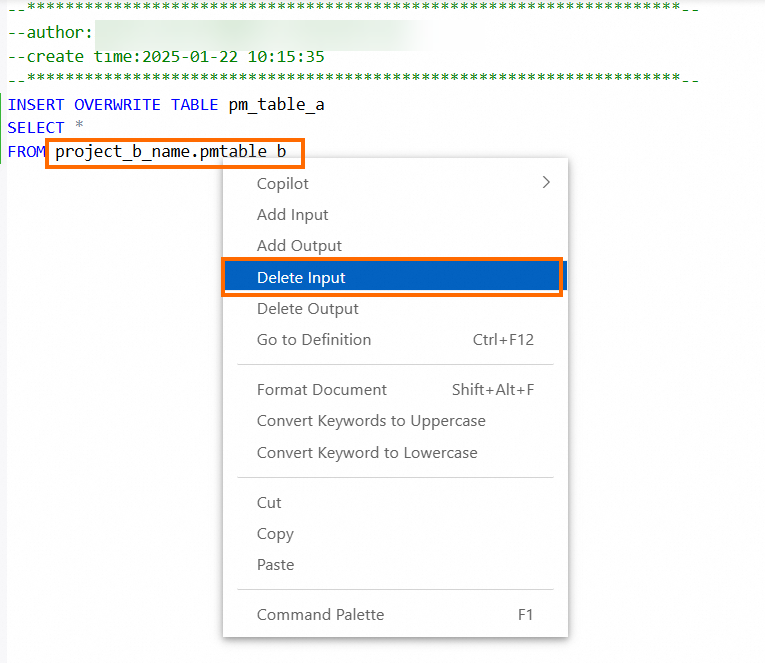
If you upgraded from DataWorks V1.0 to DataWorks V2.0, the default output for the current node of your migrated DataWorks tasks is workspace_name.node_name.