This topic describes how to use a merge request to distribute data. The title widget sends a request to the ticker board and multi-line text widgets.
Scenarios
Data of multiple components can be obtained at a time through APIs or SQL data sources, and then distributed to reduce the number of data requests.
Procedure
- Log on to the DataV console.
Select a visualization application and click Edit to go to the Canvas Editor page.
Add the Title, Multi-line Text, and Number Tickler widgets to the canvas.
Select the ticker board and clear the Title Name, Prefix Content, and Suffix Content fields.
Move the Title widget outside the canvas and modify static data.
NoteThe Title widget is used only to request data. It is placed outside the canvas and is not displayed on the dashboard when you preview and publish the widget.
[{
  "num": "123",
  "text": "This is a text box widget",
  "value": "The widget for receiving data"
}]
Select all widgets and right-click Export to Blueprint Editor.
Add a sequence execution node to connect the component.
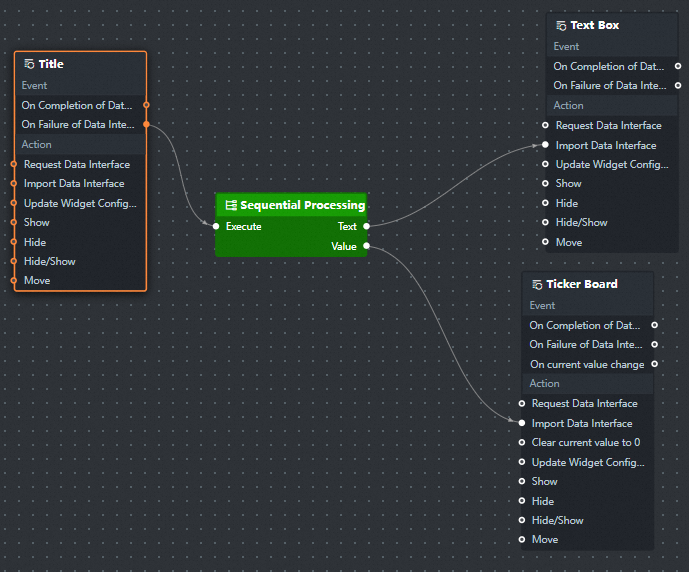
Configure the processing method of the sequence execution node.
Take text data
return [{value: data[0].text}];Flip data
return [{value: data[0].num}];
Click the
 icon in the upper-right corner to preview the results.