Container Compute Service (ACS) provides a serverless, out-of-the-box experience, freeing you from managing the underlying hardware or GPU node configurations. With its simple deployment and pay-as-you-go billing model, ACS is ideal for Large Language Model (LLM) inference tasks and significantly reduces inference costs. The DeepSeek-R1 model's vast parameter count makes it too large to load or run efficiently on a single GPU. Therefore, a distributed deployment across two or more container instances is recommended to run inference on such large models, improve throughput, and ensure performance. This topic describes how to use ACS to deploy a production-ready, full-capability, distributed DeepSeek-R1 inference service.
Background
DeepSeek-R1
vLLM
ACS
LeaderWorkerSet (LWS)
Fluid
Solution overview
Model partitioning
The DeepSeek-R1 model has 671 billion parameters. A single GPU typically has a maximum of 96 GiB of memory and cannot load the entire model. Therefore, the model must be partitioned. This topic uses a distributed deployment on two GPU container instances, adopting a partitioning strategy of pipeline parallelism (PP=2) and tensor parallelism (TP=8). The model partitioning is shown in the following figure.
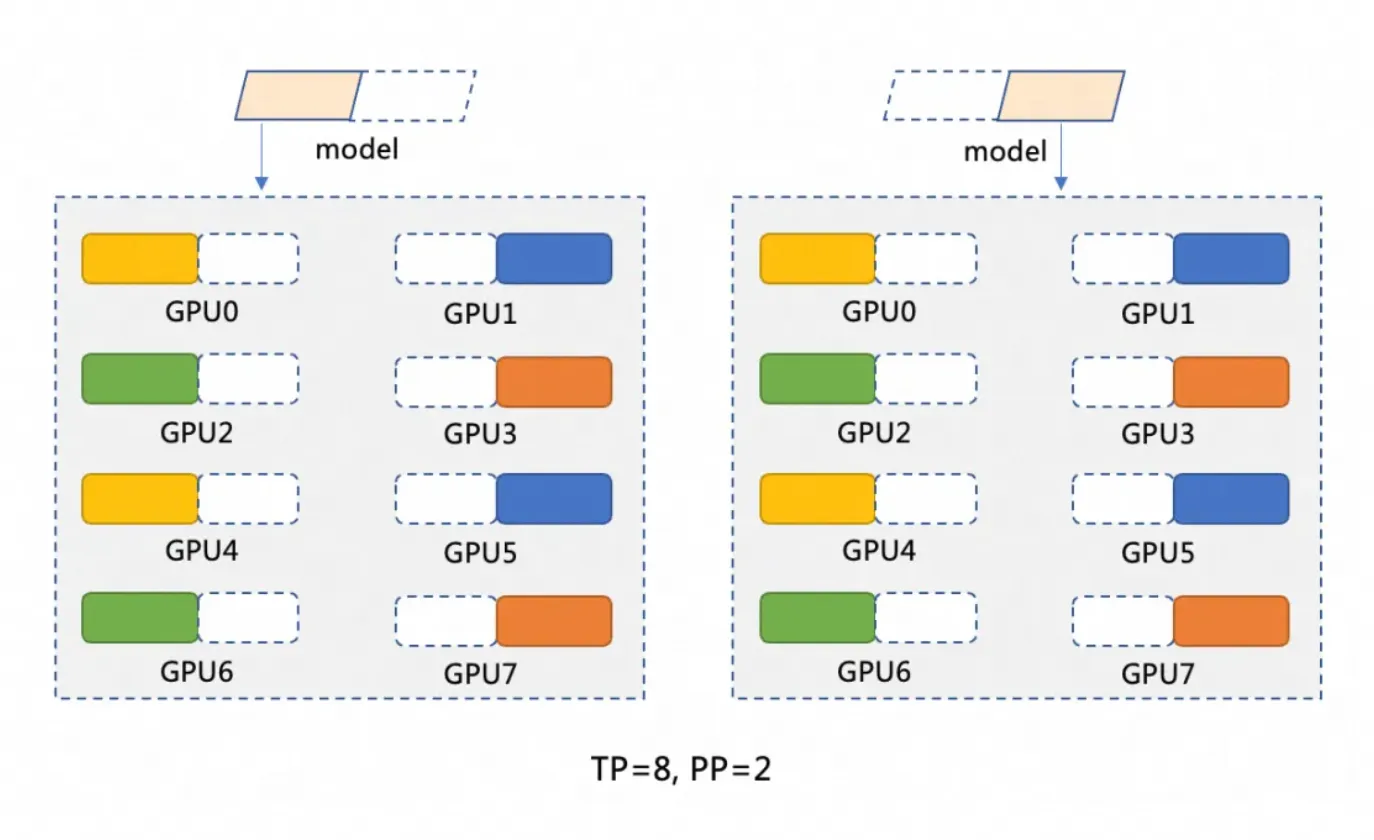
Pipeline parallelism (PP=2) partitions the model into two stages, with each stage running on a separate GPU container instance. For example, a model M can be partitioned into M1 and M2. M1 processes the input on the first instance and passes the intermediate results to M2 for subsequent operations on the second instance.
Tensor parallelism (TP=8) distributes the computational operations within each stage of the model (such as M1 and M2) across 8 GPUs. For example, in the M1 stage, when input data arrives, it is split into 8 parts and processed simultaneously on 8 GPUs. Each GPU processes a small portion of the data, and the results are then combined.
Distributed deployment architecture
This solution uses ACS to deploy a distributed, full-capability DeepSeek-R1 inference service via vLLM and Ray. It employs LWS to manage the Leader-Worker deployment and Fluid for distributed caching to accelerate model loading. vLLM runs on two 8-GPU Pods, each functioning as a Ray Group (Head and Workers) to improve throughput. Note that architecture changes affect YAML variables like tensor-parallel-size and LWS_GROUP_SIZE.

Prerequisites
When you first use Container Compute Service (ACS), you must assign the default role to the account. Only after you complete the authorization can ACS call other services, such as ECS, OSS, NAS, CPFS, and SLB, create clusters, and save logs. For more information, see Get started with Container Compute Service.
GPU instance specifications and cost estimation
For a dual-instance or multi-instance deployment on ACS, a single instance with 96 GiB of GPU memory is recommended: GPU: 8 cards (96 GiB memory per card), CPU: 64 vCPUs, Memory: 512 GiB. Refer to the Recommended instance types and GPU-accelerated compute instance types to select a suitable instance type. To calculate ACS GPU instance costs, see Billing.
ACS GPU instance specifications also follow the ACS pod specification normalization logic.
By default, ACS Pods provide 30 GiB of free temporary storage (EphemeralStorage). The inference image
registry-cn-hangzhou.ack.aliyuncs.com/ack-demo/vllm:v0.7.2used in this topic occupies about 9.5 GiB. If this storage size does not meet your needs, you can customize it. For more information, see Increase the size of temporary storage space.
Procedure
Step 1: Prepare the DeepSeek-R1 model files
Due to their massive parameter counts, LLMs require significant disk space for model files. We recommend that you create a NAS or OSS volume for persistent storage of model files. This topic uses OSS as an example.
Downloading and uploading model files can be slow. You can submit a ticket to quickly copy the model files to your OSS bucket.
Run the following commands to download the DeepSeek-R1 model from ModelScope.
NoteMake sure you have the git-lfs plugin installed. Install it by running
yum install git-lfsorapt-get install git-lfs. For more installation methods, see Install git-lfs.git lfs install GIT_LFS_SKIP_SMUDGE=1 git clone https://www.modelscope.cn/deepseek-ai/DeepSeek-R1.git cd DeepSeek-R1/ git lfs pullCreate a directory in OSS and upload the model to OSS.
NoteFor more information about how to install and use ossutil, see Install ossutil.
ossutil mkdir oss://<your-bucket-name>/models/DeepSeek-R1
ossutil cp -r ./DeepSeek-R1 oss://<your-bucket-name>/models/DeepSeek-R1
After storing the model in OSS, you have two ways to load it.
Directly mount the model by using a PVC and PV: This method is best for smaller models and applications without strict requirements for pod startup or model loading speed.
Console
The following table describes the basic configuration of an example PV:
Configuration item
Description
Volume type
OSS
Name
llm-model
Access certificate
Configure the AccessKey ID and AccessKey secret for accessing OSS.
Bucket ID
Select the OSS bucket created in the previous step.
OSS Path
Select the path where the model is located, such as /models/DeepSeek-R1.
The following table describes the basic configuration of an example PVC:
Configuration item
Description
Persistent Volume Claim (PVC) type
OSS
Name
llm-model
Allocation mode
Select an existing volume.
Existing volume
Click the Select an existing PV link and select the created PV.
kubectl
The following YAML is an example:
apiVersion: v1
kind: Secret
metadata:
  name: oss-secret
stringData:
  akId: <your-oss-ak> # The AccessKey ID for accessing OSS.
  akSecret: <your-oss-sk> # The AccessKey secret for accessing OSS.
---
apiVersion: v1
kind: PersistentVolume
metadata:
  name: llm-model
  labels:
    alicloud-pvname: llm-model
spec:
  capacity:
    storage: 30Gi
  accessModes:
    - ReadOnlyMany
  persistentVolumeReclaimPolicy: Retain
  csi:
    driver: ossplugin.csi.alibabacloud.com
    volumeHandle: llm-model
    nodePublishSecretRef:
      name: oss-secret
      namespace: default
    volumeAttributes:
      bucket: <your-bucket-name> # The bucket name.
      url: <your-bucket-endpoint> # The endpoint, such as oss-cn-hangzhou-internal.aliyuncs.com.
      otherOpts: "-o umask=022 -o max_stat_cache_size=0 -o allow_other"
      path: <your-model-path> # In this example, /models/DeepSeek-R1/.
---
apiVersion: v1
kind: PersistentVolumeClaim
metadata:
  name: llm-model
spec:
  accessModes:
    - ReadOnlyMany
  resources:
    requests:
      storage: 30Gi
  selector:
    matchLabels:
      alicloud-pvname: llm-model
Accelerate model loading by using Fluid: This method is suitable for larger models and applications with requirements for pod startup and model loading speed. For more information, see Use Fluid to accelerate data access.
In the ACS App Marketplace, install the ack-fluid component by using Helm. The component version must be 1.0.11-* or later. For more information, see Use Helm to create an application.
You can enable privileged mode for the ACS Pod by submitting a ticket.
Create a Secret to access OSS.
apiVersion: v1
kind: Secret
metadata:
  name: mysecret
stringData:
  fs.oss.accessKeyId: xxx
  fs.oss.accessKeySecret: xxx
In the preceding code,
fs.oss.accessKeyIdandfs.oss.accessKeySecretare the AccessKey ID and AccessKey Secret used to access the OSS bucket.Create a Dataset and a JindoRuntime.
apiVersion: data.fluid.io/v1alpha1
kind: Dataset
metadata:
  name: deepseek
spec:
  mounts:
    - mountPoint:  oss://<your-bucket-name>       # Replace <your-bucket-name> with the actual value.
      options:
        fs.oss.endpoint: <your-bucket-endpoint>    # Replace <your-bucket-endpoint> with the actual value.
      name: deepseek
      path: "/"
      encryptOptions:
        - name: fs.oss.accessKeyId
          valueFrom:
            secretKeyRef:
              name: mysecret
              key: fs.oss.accessKeyId
        - name: fs.oss.accessKeySecret
          valueFrom:
            secretKeyRef:
              name: mysecret
              key: fs.oss.accessKeySecret
---
apiVersion: data.fluid.io/v1alpha1
kind: JindoRuntime
metadata:
  name: deepseek
spec:
  replicas: 16    # Adjust as needed.
  master:
    podMetadata:
      labels:
        alibabacloud.com/compute-class: performance
        alibabacloud.com/compute-qos: default
  worker:
    podMetadata:
      labels:
        alibabacloud.com/compute-class: performance
        alibabacloud.com/compute-qos: default
      annotations:
        kubernetes.io/resource-type: serverless
    resources:
      requests:
        cpu: 16
        memory: 128Gi
      limits:
        cpu: 16
        memory: 128Gi
  tieredstore:
    levels:
      - mediumtype: MEM
        path: /dev/shm
        volumeType: emptyDir
        ## Adjust as needed.
        quota: 128Gi
        high: "0.99"
        low: "0.95"
After the resources are created, run the
kubectl get pod | grep jindocommand to check if the pods are in theRunningstate. Expected output:deepseek-jindofs-master-0 1/1 Running 0 3m29s deepseek-jindofs-worker-0 1/1 Running 0 2m52s deepseek-jindofs-worker-1 1/1 Running 0 2m52s ...Cache the model by creating a DataLoad.
apiVersion: data.fluid.io/v1alpha1
kind: DataLoad
metadata:
  name: deepseek
spec:
  dataset:
    name: deepseek
    namespace: default
  loadMetadata: true
Run the following command to check the cache status.
kubectl get dataloadExpected output:
NAME       DATASET    PHASE       AGE     DURATION
deepseek   deepseek   Executing   4m30s   Unfinished
A
PHASEofExecutingindicates that the process is ongoing. Wait for about 20 minutes and run the command again. If the status changes toComplete, the caching is successful. Use the commandkubectl logs $(kubectl get pods --selector=job-name=deepseek-loader-job -o jsonpath='{.items[0].metadata.name}') | grep progressto get the job name and view the logs to check the progress.Run the following command to check the Dataset resource.
kubectl get datasetsExpected output:
NAME       UFS TOTAL SIZE   CACHED    CACHE CAPACITY   CACHED PERCENTAGE   PHASE   AGE
deepseek   1.25TiB          1.25TiB   2.00TiB          100.0%              Bound   21h
Step 2: Deploy the model by using ACS GPU compute
In the ACS App Marketplace, install the lws component by using Helm. For more information, see Use Helm to create an application.
Deploy the model by using a LeaderWorkerSet.
NoteReplace
alibabacloud.com/gpu-model-series: <example-model>in the YAML file with a specific GPU model supported by ACS. For a list of currently supported GPU models, consult your account manager or submit a ticket.Compared to TCP/IP, high-performance RDMA networking features zero-copy and kernel bypass to avoid data copying and frequent context switching. These features result in lower latency, higher throughput, and lower CPU usage. ACS supports the use of RDMA by configuring the label
alibabacloud.com/hpn-type: "rdma"in the YAML file. For a list of GPU models that support RDMA, consult your account manager or submit a ticket.If you use Fluid to load the model, you must change the
claimNameof both PVCs to the name of the Fluid Dataset.Different distributed deployment architectures will affect the values of variables such as
tensor-parallel-sizeandLWS_GROUP_SIZEin the YAML file.
Standard deployment
apiVersion: leaderworkerset.x-k8s.io/v1
kind: LeaderWorkerSet
metadata:
  name: deepseek-r1-671b-fp8-distrubution
spec:
  replicas: 1
  leaderWorkerTemplate:
    size: 2 # The total number of leaders and workers.
    restartPolicy: RecreateGroupOnPodRestart
    leaderTemplate:
      metadata:
        labels:
          role: leader
          alibabacloud.com/compute-class: gpu  # Specify the GPU type.
          alibabacloud.com/compute-qos: default # Specify the ACS QoS level.
          alibabacloud.com/gpu-model-series: <example-model> ## Specify the GPU model.
      spec:
        volumes:
          - name: llm-model
            persistentVolumeClaim:
              ## If you use Fluid, enter the Fluid dataset name here, for example: deepseek
              claimName: llm-model
          - name: shm
            emptyDir:
              medium: Memory
              sizeLimit: 32Gi
        containers:
          - name: deepseek-r1-671b-leader
            image: registry-cn-hangzhou.ack.aliyuncs.com/ack-demo/vllm:v0.7.2
            env:
              - name: NCCL_SOCKET_IFNAME # Specify the network interface card.
                value: eth0
            command:
              - sh
              - -c
              - "/vllm-workspace/ray_init.sh leader --ray_cluster_size=$(LWS_GROUP_SIZE);vllm serve /models/DeepSeek-R1/ --port 8000 --trust-remote-code --served-model-name ds --max-model-len 2048 --gpu-memory-utilization 0.95 --tensor-parallel-size 8 --pipeline-parallel-size 2 --enforce-eager"
# Set tensor-parallel-size to the total number of cards in each leader and worker pod.
            resources:
              limits:
                nvidia.com/gpu: "8"
                cpu: "64"
                memory: 512G
              requests:
                nvidia.com/gpu: "8"
                cpu: "64"
                memory: 512G
            ports:
              - containerPort: 8000
            volumeMounts:
              - mountPath: /models/DeepSeek-R1
                name: llm-model
              - mountPath: /dev/shm
                name: shm
    workerTemplate:
      metadata:
        labels:
          alibabacloud.com/compute-class: gpu  # Specify the GPU type.
          alibabacloud.com/compute-qos: default # Specify the ACS QoS level.
          alibabacloud.com/gpu-model-series: <example-model> ## Specify the GPU model.
      spec:
        volumes:
          - name: llm-model
            persistentVolumeClaim:
              ## If you use Fluid, enter the Fluid dataset name here, for example: deepseek
              claimName: llm-model
          - name: shm
            emptyDir:
              medium: Memory
              sizeLimit: 32Gi
        containers:
          - name: deepseek-r1-671b-worker
            image: registry-cn-hangzhou.ack.aliyuncs.com/ack-demo/vllm:v0.7.2
            env:
              - name: NCCL_SOCKET_IFNAME # Specify the network interface card.
                value: eth0
            command:
              - sh
              - -c
              - "/vllm-workspace/ray_init.sh worker --ray_address=$(LWS_LEADER_ADDRESS)"
            resources:
              limits:
                nvidia.com/gpu: "8"
                cpu: "64"
                memory: 512G
              requests:
                nvidia.com/gpu: "8"
                cpu: "64"
                memory: 512G
            ports:
              - containerPort: 8000
            volumeMounts:
              - mountPath: /models/DeepSeek-R1
                name: llm-model
              - mountPath: /dev/shm
                name: shm
RDMA acceleration
When using an open-source base image (such as vLLM), add the following environment variables to the YAML file:
Name
Value
NCCL_SOCKET_IFNAME
eth0
NCCL_IB_TC
136
NCCL_IB_SL
5
NCCL_IB_GID_INDEX
3
NCCL_DEBUG
INFO
NCCL_IB_HCA
mlx5
NCCL_NET_PLUGIN
none
apiVersion: leaderworkerset.x-k8s.io/v1
kind: LeaderWorkerSet
metadata:
  name: deepseek-r1-671b-fp8-distrubution
spec:
  replicas: 1
  leaderWorkerTemplate:
    size: 2 # The total number of leaders and workers.
    restartPolicy: RecreateGroupOnPodRestart
    leaderTemplate:
      metadata:
        labels:
          role: leader
          alibabacloud.com/compute-class: gpu  # Specify the GPU type.
          alibabacloud.com/compute-qos: default # Specify the ACS QoS level.
          alibabacloud.com/gpu-model-series: <example-model> ## Specify the GPU model.
          # Specify that the application runs in a high-performance RDMA network. Submit a ticket for a list of supported GPU models.
          alibabacloud.com/hpn-type: "rdma"
      spec:
        volumes:
          - name: llm-model
            persistentVolumeClaim:
              ## If you use Fluid, enter the Fluid dataset name here, for example: deepseek
              claimName: llm-model
          - name: shm
            emptyDir:
              medium: Memory
              sizeLimit: 32Gi
        containers:
          - name: deepseek-r1-671b-leader
            image: registry-cn-hangzhou.ack.aliyuncs.com/ack-demo/vllm:v0.7.2
            env:
              - name: NCCL_SOCKET_IFNAME # Specify the network interface card.
                value: eth0
              - name: NCCL_IB_TC
                value: "136"
              - name: NCCL_IB_SL
                value: "5"
              - name: NCCL_IB_GID_INDEX
                value: "3"
              - name: NCCL_DEBUG
                value: "INFO"
              - name: NCCL_IB_HCA
                value: "mlx5"
              - name: NCCL_NET_PLUGIN
                value: "none"
            command:
              - sh
              - -c
              - "/vllm-workspace/ray_init.sh leader --ray_cluster_size=$(LWS_GROUP_SIZE);vllm serve /models/DeepSeek-R1/ --port 8000 --trust-remote-code --served-model-name ds --max-model-len 2048 --gpu-memory-utilization 0.95 --tensor-parallel-size 8 --pipeline-parallel-size 2 --enforce-eager"
# Set tensor-parallel-size to the total number of cards in each leader and worker pod.
            resources:
              limits:
                nvidia.com/gpu: "8"
                cpu: "64"
                memory: 512G
              requests:
                nvidia.com/gpu: "8"
                cpu: "64"
                memory: 512G
            ports:
              - containerPort: 8000
            volumeMounts:
              - mountPath: /models/DeepSeek-R1
                name: llm-model
              - mountPath: /dev/shm
                name: shm
    workerTemplate:
      metadata:
        labels:
          alibabacloud.com/compute-class: gpu  # Specify the GPU type.
          alibabacloud.com/compute-qos: default # Specify the ACS QoS level.
          alibabacloud.com/gpu-model-series: <example-model> ## Specify the GPU model.
          # Specify that the application runs in a high-performance RDMA network. Submit a ticket for a list of supported GPU models.
          alibabacloud.com/hpn-type: "rdma"
      spec:
        volumes:
          - name: llm-model
            persistentVolumeClaim:
              ## If you use Fluid, enter the Fluid dataset name here, for example: deepseek
              claimName: llm-model
          - name: shm
            emptyDir:
              medium: Memory
              sizeLimit: 32Gi
        containers:
          - name: deepseek-r1-671b-worker
            image: registry-cn-hangzhou.ack.aliyuncs.com/ack-demo/vllm:v0.7.2
            env:
              - name: NCCL_SOCKET_IFNAME # Specify the network interface card.
                value: eth0
              - name: NCCL_IB_TC
                value: "136"
              - name: NCCL_IB_SL
                value: "5"
              - name: NCCL_IB_GID_INDEX
                value: "3"
              - name: NCCL_DEBUG
                value: "INFO"
              - name: NCCL_IB_HCA
                value: "mlx5"
              - name: NCCL_NET_PLUGIN
                value: "none"
            command:
              - sh
              - -c
              - "/vllm-workspace/ray_init.sh worker --ray_address=$(LWS_LEADER_ADDRESS)"
            resources:
              limits:
                nvidia.com/gpu: "8"
                cpu: "64"
                memory: 512G
              requests:
                nvidia.com/gpu: "8"
                cpu: "64"
                memory: 512G
            ports:
              - containerPort: 8000
            volumeMounts:
              - mountPath: /models/DeepSeek-R1
                name: llm-model
              - mountPath: /dev/shm
                name: shm
Expose the inference service by using a Service.
apiVersion: v1
kind: Service
metadata:
  name: ds-leader
spec:
  ports:
    - name: http
      port: 8000
      protocol: TCP
      targetPort: 8000
  selector:
    leaderworkerset.sigs.k8s.io/name: deepseek-r1-671b-fp8-distrubution
    role: leader
  type: ClusterIP
Step 3: Verify the inference service
Use
kubectl port-forwardto establish port forwarding between the inference service and your local environment.NoteThe port forwarding established by
kubectl port-forwardis not suitable for production due to its lack of reliability, security, and scalability. Therefore, use it only for development and debugging. For more information about production-ready networking solutions in Kubernetes clusters, see Ingress management.kubectl port-forward svc/ds-leader 8000:8000Expected output:
Forwarding from 127.0.0.1:8000 -> 8000
Forwarding from [::1]:8000 -> 8000
Send an inference request to the model.
curl http://localhost:8000/v1/chat/completions \
  -H "Content-Type: application/json" \
  -d '{
    "model": "ds",
    "messages": [
      {
        "role": "system",
        "content": "You are a friendly AI assistant."
      },
      {
        "role": "user",
        "content": "Tell me about deep learning."
      }
    ],
    "max_tokens": 1024,
    "temperature": 0.7,
    "top_p": 0.9,
    "seed": 10
  }'
Expected output:
{"id":"chatcmpl-4bc78b66e2a4439f8362bd434a60be57","object":"chat.completion","created":1739501401,"model":"ds","choices":[{"index":0,"message":{"role":"assistant","reasoning_content":null,"content":"Okay, the user wants me to explain deep learning. I need to think about how to answer this well. First, I need to clarify the basic definition of deep learning. It's a branch of machine learning, right? Then I should compare it with traditional machine learning methods to explain its advantages, such as automatic feature extraction. I might need to mention neural networks, especially the structure of deep neural networks with multiple hidden layers.\n\nNext, I should talk about the core components of deep learning, such as activation functions, loss functions, and optimizers. The user might not be familiar with these terms, so I should briefly explain the role of each part. For example, ReLU as an activation function, Adam as an optimizer, and examples like the cross-entropy loss function.\n\nThen, for application areas, computer vision and natural language processing are common. I should provide some practical examples like image recognition and machine translation to make it easier for the user to understand. For industry applications, like healthcare and finance, the user might be interested in these real-world use cases.\n\nI also need to mention popular frameworks like TensorFlow and PyTorch, which make deep learning easier to implement. The importance of hardware acceleration, such as GPUs, is also key to explaining why deep learning is advancing so quickly.\n\nI should also discuss the challenges and limitations of deep learning, such as data dependency, high computational resource requirements, and poor interpretability. This will give the user a balanced view of its pros and cons. I might also mention future development directions, like efficient training algorithms and research into interpretability.\n\nThe user probably wants to understand the basic concepts of deep learning. They might have some technical background but not in-depth knowledge. They likely want to quickly grasp the key points and applications, so the answer needs to be well-structured and focused, without getting too deep into technical details but also not being too brief. I need to balance professionalism with ease of understanding.\n\nI should avoid using too much jargon, or explain terms when I use them, such as 'neural network' or 'convolutional neural network'. The user could be a student or a newcomer to the field, so I should use plain language. I should also use examples to connect the concepts to real-world applications to make them more memorable.\n\nI also need to be clear about the relationship between deep learning and machine learning, explaining that deep learning is a subset of machine learning but operates at a deeper level to handle more complex problems. I might also mention the backpropagation algorithm as one of the key training techniques.\n\nFinally, I'll provide a summary that emphasizes the impact and potential of deep learning and its future directions. This will give the user a comprehensive understanding. I'll double-check if I've missed any important points, like common model architectures such as CNNs and RNNs, which I should briefly mention to show the diversity.\n\nSometimes users are interested in the principles, but it's better to keep it concise here, focusing on an overview rather than in-depth technical details. I need to ensure the answer flows logically, starting from the definition, then moving to core components, applications, frameworks, challenges, and future directions. That structure seems reasonable.\n</think>\n\nDeep learning is a branch of machine learning that aims to simulate the human brain's learning process by building multi-layer neural networks (known as 'deep' networks). By automatically learning complex features and patterns from large amounts of data, it is widely used in fields such as image recognition, speech processing, and natural language processing.\n\n### Core concepts\n1. **Artificial Neural Network (ANN)**:\n - Consists of an input layer, multiple hidden layers, and an output layer, with each layer containing multiple neurons.\n - Processes information by simulating the activation and transmission of signals between neurons.\n\n2. **Automatic feature extraction**:\n - Traditional machine learning relies on manually designed features. Deep learning, through its multi-layer networks, automatically extracts abstract features from data, such as edges and shapes from pixels in an image.\n\n3. **Key components**:\n - **Activation function** (such as ReLU, Sigmoid): Introduces non-linearity, enhancing the model's expressive power.\n - **Loss function** (such as cross-entropy, mean squared error): Measures the difference between the predicted output and the actual value.\n - **Optimizer** (such as SGD, Adam): Optimizes the network's parameters through backward propagation to minimize the loss.\n\n---\n\n### Typical models\n- **Convolutional Neural Network (CNN)**: \n Designed specifically for images, it uses convolutional kernels to extract spatial features. Classic models include ResNet and VGG.\n- **Recurrent Neural Network (RNN)**: \n Processes sequential data like text and speech by introducing a memory mechanism. Improved versions include LSTM and GRU.\n- **Transformer**: \n Based on a self-attention mechanism, it has significantly improved performance in natural language processing tasks. Examples include the BERT and GPT series.\n\n---\n\n### Application scenarios\n- **Computer vision**: Facial recognition, medical imaging analysis (such as detecting lesions in lung CT scans).\n- **Natural language processing**: Intelligent chatbots, document summary generation, and translation (such as DeepL).\n- **Speech technology**: Voice assistants (such as Siri) and real-time caption generation.\n- **Reinforcement learning**: Game AI (AlphaGo) and robot control.\n\n---\n\n### Advantages and challenges\n- **Advantages**:\n - Automatically learns complex features, reducing the need for manual intervention.\n - Far outperforms traditional methods when given large amounts of data and high computing power.\n- **Challenges**:\n - Relies on massive amounts of labeled data (for example, tens of thousands of labeled medical images).\n - High model training costs (for example, training GPT-3 cost over ten million USD).\n - Its 'black box' nature leads to poor interpretability, limiting its application in high-risk fields like medicine.\n\n---\n\n### Tools and trends\n- **Mainstream frameworks**: TensorFlow (friendly for industrial deployment) and PyTorch (preferred for research).\n- **Research directions**:\n - Lightweight models (such as MobileNet for mobile devices).\n - Self-supervised learning (to reduce dependency on labeled data).\n - Enhanced interpretability (such as visualizing the model's decision-making basis).\n\nDeep learning is pushing the boundaries of artificial intelligence. From generative AI (such as Stable Diffusion generating images) to autonomous driving, it continues to transform the technology ecosystem. Future developments may bring breakthroughs in reducing computational costs, improving efficiency, and enhancing interpretability.","tool_calls":[]},"logprobs":null,"finish_reason":"stop","stop_reason":null}],"usage":{"prompt_tokens":17,"total_tokens":1131,"completion_tokens":1114,"prompt_tokens_details":null},"prompt_logprobs":null}
References
Container Compute Service (ACS) is integrated into Container Service for Kubernetes. This allows you to use the computing power of ACS in ACK Pro clusters. For more information about using ACS GPU compute power in ACK, see Use the computing power of ACS in ACK Pro clusters.
For more information about deploying DeepSeek in ACK, see the following topics:
For more information about DeepSeek R1 and V3, see the following topics:
The AI container image of ACS is dedicated to GPU-accelerated containers in ACS clusters. For more information about the release notes of this image, see ACS AI container image release history.