Before creating your cluster, plan its size, network feature requirements, and Virtual Private Cloud (VPC) configuration—including the VPC itself and vSwitches. Also plan cluster-specific network settings, such as the container network interface (CNI) plug-in, pod CIDR block, and service CIDR block. This ensures efficient use of network resources and accommodates future business growth. This topic explains how to plan the network architecture for an ACK managed cluster in an Alibaba Cloud VPC environment.
Network scale planning
Region and zone
VPC count
vSwitch count
Cluster size
Network connectivity planning
Single cluster in a single VPC
When you create a VPC, its CIDR block is fixed. When you create a cluster, assign a new CIDR block for pods and services. This block must not overlap with the VPC’s CIDR block to avoid conflicts between cluster and VPC network traffic.

Multiple clusters in a single VPC
You can create multiple clusters in one VPC.
The VPC CIDR block is fixed at creation. Each cluster must use non-overlapping CIDR blocks for the VPC, services, and pods.
Pod CIDR blocks across clusters must not overlap. Service CIDR blocks—virtual networks—may overlap.
In the default Flannel mode, pod packets route through the VPC. The ACK managed cluster automatically adds routes to each pod CIDR block in the VPC route table.
In this setup, clusters have partial connectivity. Pods in one cluster can directly access pods and ECS instances in another cluster. However, they cannot access internal services in the other cluster—such as ClusterIP services, which are only accessible inside their own cluster. To expose services, use LoadBalancer services or Ingress.

Multi-cluster inter-VPC connectivity
Plan inter-VPC connectivity for clusters in the following scenarios.
Multi-region deployment
A VPC is a regional resource and does not support cross-region deployment. For multi-region systems, use multiple VPCs and clusters. Connect VPCs across regions using VPC peering connections, VPN Gateway, or Cloud Enterprise Network (CEN).

Isolation of multiple business systems
If multiple business systems in one region require strict isolation via VPC—for example, production and staging environments with different security and deployment needs—deploy production and staging clusters in separate VPCs. This provides better logical isolation and security. Connect VPCs in the same region using VPC peering connections, VPN Gateway, or Cloud Enterprise Network (CEN).

Building large-scale business systems
If your architecture is complex and many services and teams need independent VPCs to manage their own clusters and resources, plan multiple VPCs and clusters. This improves flexibility and manageability.

To avoid routing errors caused by IP conflicts in multi-cluster inter-VPC setups, follow these network planning rules for new clusters:
Do not overlap with any VPC CIDR block.
Do not overlap with any other cluster’s CIDR block.
Do not overlap with any other cluster’s pod CIDR block.
Do not overlap with any other cluster’s service CIDR block.
Cloud cluster to on-premises data center connectivity
Similar to multi-cluster inter-VPC connectivity, some VPC CIDR blocks may route to your on-premises data center (IDC). Pod addresses must not overlap with those routed CIDR blocks. If your IDC needs to access pod addresses, configure routes in the virtual border router (VBR) on the IDC side.

Container network plug-in planning
The ACK managed cluster supports two container network interface (CNI) plug-ins: Terway and Flannel. Your choice affects supported features and network configuration. For example, Terway supports NetworkPolicy for policy-based network control, whereas Flannel does not. Terway assigns pod IPs from the VPC, while Flannel uses a virtual CIDR block.
You install the container network plug-in when you create the cluster. You cannot change it after cluster creation. Choose the plug-in that matches your network feature requirements.
Feature planning
Feature | Terway | Flannel |
NetworkPolicy (network policy) | Supports network policies in ACK clusters. | Not supported. |
IPv4/IPv6 dual-stack | Supports IPv6 Internet bandwidth for pods. | Not supported. Note ACK uses a modified version of the Flannel plug-in optimized for Alibaba Cloud. It does not track upstream open source changes. For Flannel update history, see Flannel. |
Fixed pod IP | Supports fixed pod IPs with dedicated vSwitches and security groups. | Not supported. |
Pod-bound EIP | Supports attaching dedicated elastic IP addresses (EIPs) to pods. | Not supported. |
Inter-cluster Access | Supported. Pods in different clusters can communicate if their security groups allow the required ports. | Not supported. |
For a detailed comparison of Terway and Flannel features, see Terway vs. Flannel container network plug-ins.
CIDR block planning
Terway network mode
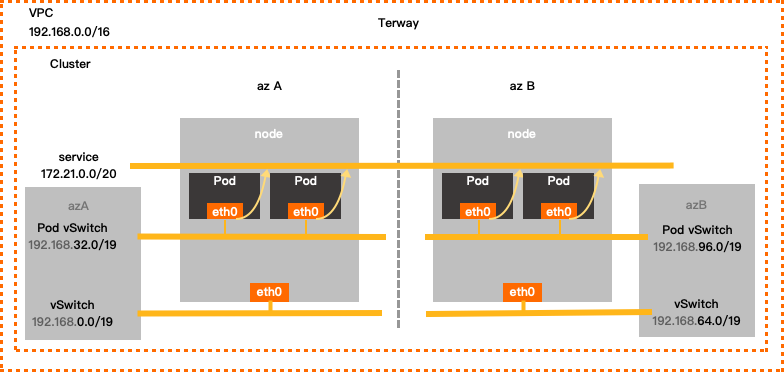
Terway configuration example
TerwaySingle-zone configuration
VPC CIDR block
vSwitch CIDR block
Pod vSwitch CIDR block
Service CIDR block
Maximum assignable pod IPs
192.168.0.0/16
Zone I
192.168.0.0/19
192.168.32.0/19
172.21.0.0/20
8192
Terway multi-zone configuration
VPC CIDR block
vSwitch CIDR block
Pod vSwitch CIDR block
Service CIDR block
Maximum assignable pod IPs
192.168.0.0/16
Zone I 192.168.0.0/19
192.168.32.0/19
172.21.0.0/20
8192
Zone J 192.168.64.0/19
192.168.96.0/19
When configuring Terway, set the following parameters and observe these notes:
Virtual Private Cloud
Use one of these RFC-standard private CIDR blocks—or a subnet—as your VPC’s primary IPv4 CIDR block: 192.168.0.0/16, 172.16.0.0/12, or 10.0.0.0/8. Valid mask lengths range from /8 to /28 (varies by block). Example:
192.168.0.0/16.NoteTo use a public IP range for your VPC CIDR block, request the
ack.white_list/supportVPCWithPublicIPRangesquota in the Quota Center.For multi-VPC or hybrid cloud deployments (VPC + on-premises data center), use subnets of RFC-standard private CIDR blocks. Keep the mask length at /16 or shorter. Ensure no CIDR block overlaps between VPCs or between VPCs and your data center.
VPCs assign IPv6 CIDR blocks automatically when you enable IPv6. To use IPv6 for containers, choose the Terway plug-in.
vSwitch
vSwitches host ECS instances and handle node-to-node traffic. When you create a vSwitch, its CIDR block must be a subset of the VPC CIDR block (same or smaller, never larger). When configuring:
ECS instances in the vSwitch get IPs from this CIDR block. Choose a vSwitch with enough IP addresses.
You can create multiple vSwitches in one VPC, but their CIDR blocks must not overlap.
The vSwitch and its corresponding pod vSwitch must be in the same zone.
Pod vSwitch
This vSwitch assigns pod IPs and handles pod traffic. A pod is a Kubernetes concept. Each pod has one IP. When you create the vSwitch, its CIDR block must be a subset of the VPC CIDR block. When configuring:
In Terway mode, pods get IPs from this vSwitch CIDR block. Choose a vSwitch with enough IP addresses.
This CIDR block must not overlap with the service CIDR block.
Service CIDR block
ImportantYou cannot modify the service CIDR block after creation.
In Kubernetes, each Service of type ClusterIP is assigned a unique IP address. When you configure the CIDR block for these addresses, note the following:
Service IPs work only inside the Kubernetes cluster. They are not reachable from outside.
The service CIDR block must not overlap with the vSwitch CIDR block.
The service CIDR block must not overlap with the pod vSwitch CIDR block.
Service IPv6 CIDR block
After enabling IPv6 dual-stack, configure an IPv6 CIDR block for services. When configuring:
Use a Unique Local Address (ULA) in the fc00::/7 range. The prefix length must be between /112 and /120.
Match the number of usable addresses in the service CIDR block.
Flannel network mode
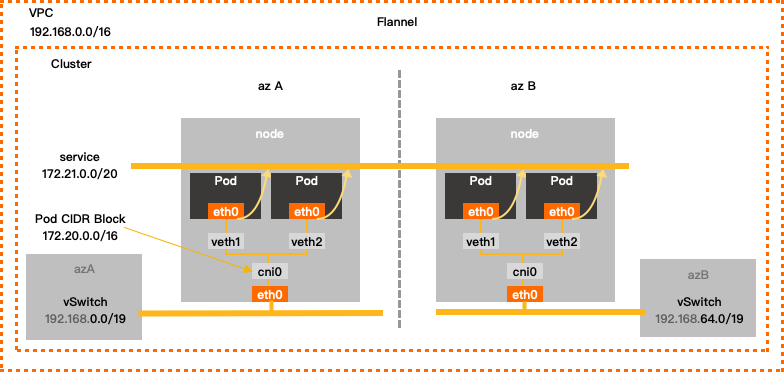
Flannel CIDR block configuration example
VPC CIDR block | vSwitch CIDR block | Container CIDR block | Service CIDR block | Maximum assignable pod IPs |
192.168.0.0/16 | 192.168.0.0/24 | 172.20.0.0/16 | 172.21.0.0/20 | 65536 |
When configuring Flannel, set the following parameters and observe these notes:
Virtual Private Cloud
Use one of these RFC-standard private CIDR blocks—or a subnet—as your VPC’s primary IPv4 CIDR block: 192.168.0.0/16, 172.16.0.0/12, or 10.0.0.0/8. Valid mask lengths range from /8 to /28 (varies by block). Example:
192.168.0.0/16.NoteTo use a public IP range for your VPC CIDR block, request the
ack.white_list/supportVPCWithPublicIPRangesquota in the Quota Center.For multi-VPC or hybrid cloud deployments (VPC + on-premises data center), use subnets of RFC-standard private CIDR blocks. Keep the mask length at /16 or shorter. Ensure no CIDR block overlaps between VPCs or between VPCs and your data center.
VPCs assign IPv6 CIDR blocks automatically when you enable IPv6. To use IPv6 for containers, choose the Terway plug-in.
vSwitch
vSwitches host ECS instances and handle node-to-node traffic. When you create a vSwitch, its CIDR block must be a subset of the VPC CIDR block (same or smaller, never larger). When configuring:
ECS instances in the vSwitch get IPs from this CIDR block.
You can create multiple vSwitches in one VPC, but their CIDR blocks must not overlap.
Container CIDR block
ImportantYou cannot modify the container CIDR block after creation.
This CIDR block assigns pod IPs and handles pod traffic. A pod is a Kubernetes concept. Each pod has one IP. When configuring:
This is a virtual CIDR block—not tied to a vSwitch.
This CIDR block must not overlap with the vSwitch CIDR block.
This CIDR block must not overlap with the service CIDR block.
For example, if your VPC CIDR block is 172.16.0.0/12, do not use 172.16.0.0/16 or 172.17.0.0/16 for your container CIDR block. These fall within 172.16.0.0/12.
Service CIDR block
ImportantYou cannot modify the service CIDR block after creation.
A service is a Kubernetes concept. The service CIDR block defines the IP range for ClusterIP-type services. Each service gets one IP. When configuring:
Service IPs work only inside the Kubernetes cluster. They are not reachable from outside.
The service CIDR block must not overlap with the vSwitch CIDR block.
The service CIDR block must not overlap with the container CIDR block.