After a CloudSSO user logs on to the CloudSSO user portal, the CloudSSO user can assume a Resource Access Management (RAM) role to access the accounts in a resource directory. The CloudSSO user can also use a Security Token Service (STS) token to access the resources of the accounts in a resource directory by using Alibaba Cloud CLI or SDKs. This topic describes how to obtain an STS token of a CloudSSO user.
Usage notes
Permissions provided by STS tokens
After you assign the access permissions on an account in your resource directory to a Cloud SSO user or user group by using an access configuration, the access configuration is provisioned for the account and serves as a RAM role of the account. The RAM role can be assumed only by the CloudSSO users that you specify and the trust policy of the RAM role cannot be modified.
The permissions provided by STS tokens are the same as those of the RAM role, which are the permissions defined in the access configuration.
For more information about access configurations, see Overview.
Validity period of an STS Token
The STS tokens obtained by using the RAM role-based logon are temporary credentials. You can specify a validity period for an STS token. The token automatically becomes invalid when it expires. You can specify the validity period for an STS token by configuring the Session Duration parameter when you create an access configuration. For more information, see Create an access configuration and Modify the basic information about an access configuration.
Obtain an STS token
A CloudSSO user can log on to the CloudSSO user portal to obtain an STS token. Alternatively, the CloudSSO user can also obtain an STS token by using the acs-sso command of CLI. The STS tokens obtained by using the preceding two methods are of the same type. For more information about how to use Alibaba Cloud CLI to access CloudSSO, see Use Alibaba Cloud CLI to access CloudSSO and Alibaba Cloud resources.
This section describes how to log on to the CloudSSO user portal to obtain an STS token.
Log on to the CloudSSO user portal as a CloudSSO user.
The CloudSSO user obtains the user logon URL of the CloudSSO user portal from the CloudSSO administrator.
For more information, see the Step 1: Obtain the URL of the CloudSSO user portal section of the "Log on to the CloudSSO user portal and access Alibaba Cloud resources" topic.
The CloudSSO user logs on to the CloudSSO user portal by using a username and password or single sign-on (SSO).
For more information, see the Step 2: Log on to the CloudSSO user portal section of the "Log on to the CloudSSO user portal and access Alibaba Cloud resources" topic.
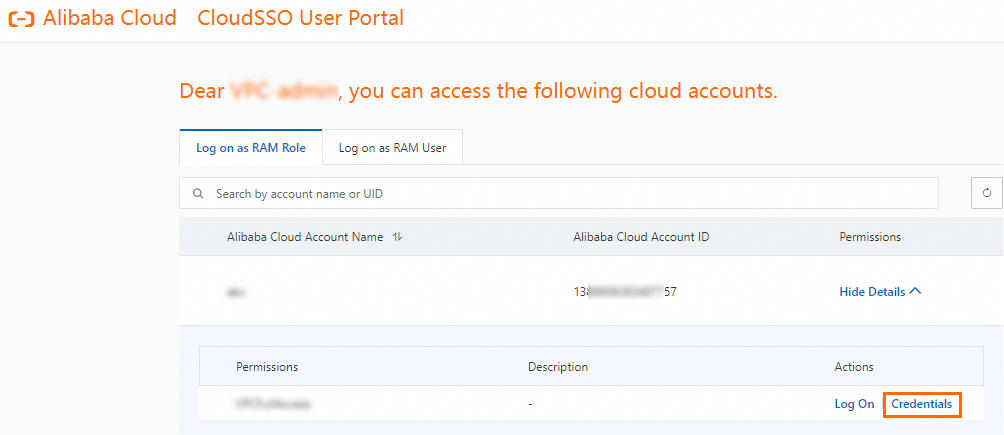
On the Log on as RAM Role tab, find the desired account in your resource directory and click Show Details in the Permissions column.
Find the access configuration that you want to use and click Credentials in the Actions column.
NoteA new STS token is generated each time you click Credentials. You can use an STS token within its validity period regardless of whether the STS token is the latest one.
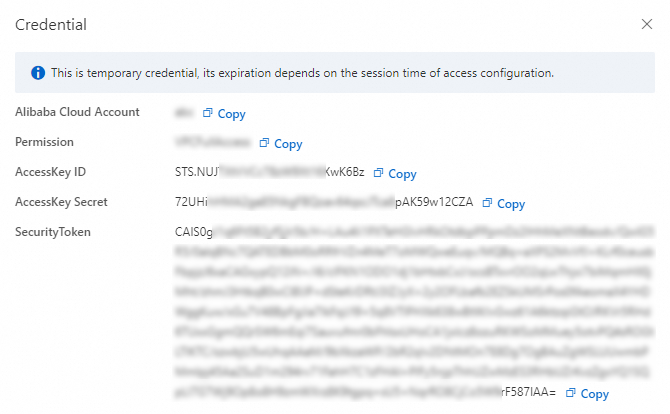
Complete the security verification as prompted.
View and copy the STS token.
What to do next
You can use an STS token to access Alibaba Cloud resources by using Alibaba Cloud CLI or SDKs.
For more information about how to configure an STS token, see the Configure a credential of the STS token type section of the "Configure a credential in interactive mode (fast)" topic and the Method 3: Use an STS token section of the "Manage access credentials" topic.