When one service in a microservices call chain starts failing or responding slowly, the failure can cascade through dependent services and bring down the entire system. Circuit breaking stops this by monitoring request outcomes on each route and automatically rejecting requests to a failing service, giving it time to recover.
Service Mesh (ASM) provides route-level circuit breaking for east-west (service-to-service) traffic through the ASMCircuitBreaker CustomResourceDefinition (CRD). You can configure two types of circuit breaking rules:
Error rate-based -- Triggers when the percentage of failed responses on a route exceeds a threshold within a time window.
Slow request-based -- Triggers when too many requests exceed a response time threshold within a time window.
How circuit breaking works
Each ASM sidecar proxy independently tracks request outcomes for its own traffic. The circuit operates in two states:
Closed (normal): Traffic flows freely. The proxy monitors the error rate or slow request count within a sliding time window.
Open (tripped): When a threshold is exceeded, the proxy rejects all subsequent requests on that route and returns a configurable custom response (status code, body, and headers). After the break duration expires, the circuit closes and the proxy resumes forwarding requests.
Because each proxy evaluates thresholds independently, different proxies may trip at slightly different times for the same faulty upstream service.
Circuit breaking rules are scoped to individual routes. Rules on different routes operate independently and do not affect each other.
Prerequisites
Before you begin, make sure that you have:
An ASM instance of Enterprise Edition or Ultimate Edition, version V1.14.3 or later. See Create an ASM instance
The sample applications
sleepandhttpbindeployed in the data plane cluster. See Deploy the HTTPBin application and Deploy the sleep service
Step 1: Create request path routing between sleep and httpbin
Before configuring circuit breaking, create a VirtualService that defines named routes between the sleep (downstream) and httpbin (upstream) services. The circuit breaking rules target these named routes.
Log on to the ASM console. In the left-side navigation pane, choose Service Mesh > Mesh Management.
Create a virtual service using one of the following methods:
ASM console
On the Mesh Management page, click the name of the ASM instance. In the left-side navigation pane, choose Traffic Management Center > VirtualService. Click Create.
Select a namespace from the Namespace drop-down list and enter a name in the Name field. In the Gateways section, turn on the switch next to Apply To All Sidecars.
In the Hosts section, click Add Host to add the httpbin service.
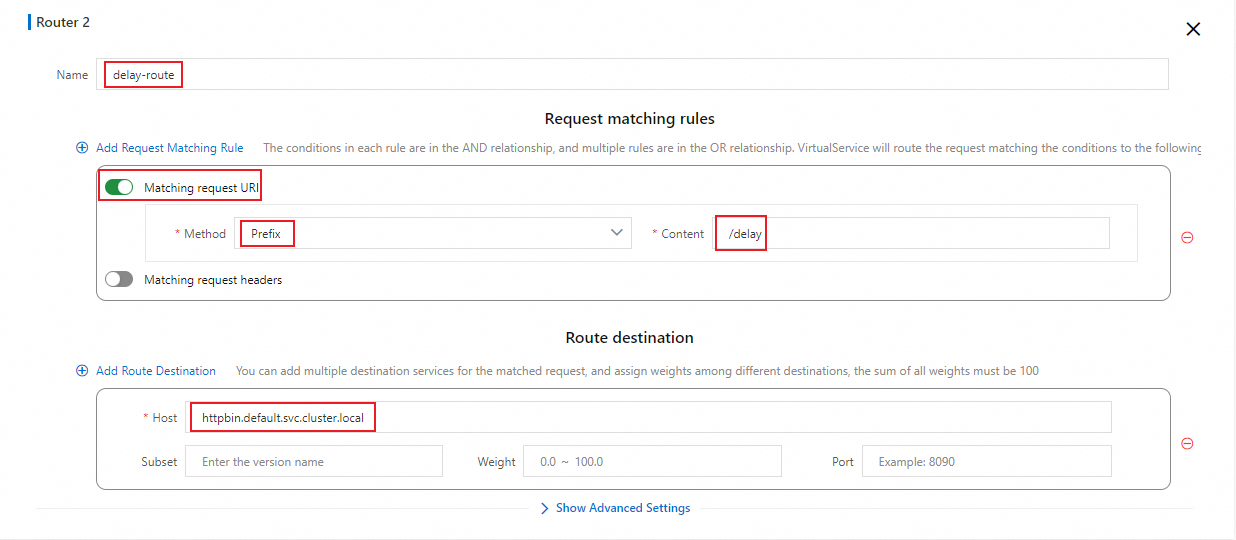
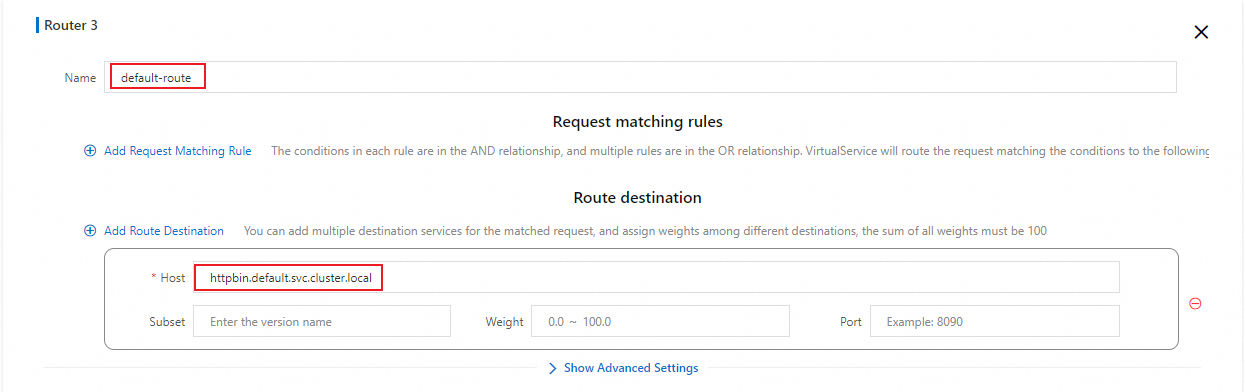
In the HTTP Route section, click Add Route and configure the parameters as shown in the following figures.

YAML
On the Mesh Management page, click the name of the ASM instance. In the left-side navigation pane, choose Traffic Management Center > VirtualService. Click Create from YAML.
Paste the following YAML into the code editor and click Create.
This VirtualService defines three named routes:
| Request path | Match type | Route name | Behavior |
|---|---|---|---|
/status/500 | Exact match | error-route | Always returns HTTP 500. |
/delay/* | Prefix match | delay-route | Returns HTTP 200 after a specified delay. See delay. |
/* | Any path | default-route | Default route for all other paths. |
Step 2: Configure circuit breaking rules
Error rate-based circuit breaking
Error rate-based circuit breaking triggers when the server response error rate on a route exceeds a configured threshold within a time window. Use this type when your upstream service returns an elevated rate of 5xx errors.
Log on to the ASM console. In the left-side navigation pane, choose Service Mesh > Mesh Management.
On the Mesh Management page, click the name of the ASM instance. In the left-side navigation pane, choose Traffic Management Center > Circuit Breaking and Degradation.
Click Create, paste the following YAML into the code editor, and click Create.
The following table describes each parameter:
| Parameter | Description |
|---|---|
workloadSelector.labels | Selects the downstream service workload whose sidecar proxy enforces the circuit breaking rule. app: sleep targets the sleep service. |
break_duration | How long the circuit stays open before the proxy resumes forwarding requests. Set to 60s in this example. |
window_size | The sliding time window for evaluating the error rate. Set to 10s. |
error_percent.value | The error rate threshold (percentage) that triggers circuit breaking. Set to 60 -- circuit breaking trips if more than 60% of requests fail within the time window. |
min_request_amount | The minimum number of requests in the time window before circuit breaking can activate. Set to 5 to prevent false triggers from small sample sizes. |
custom_response | The response returned to callers while the circuit is open. body: error break!. header_to_add: x-envoy-overload: 'true'. status_code: 499. |
match.vhost.name | The domain name of the upstream service. Set to httpbin.default.svc.cluster.local. |
match.vhost.port | The service port of the upstream service. Set to 8000. |
match.vhost.route.name_match | The route name from the VirtualService. Set to error-route to apply this rule only to the /status/500 path. |
Verify error rate-based circuit breaking
Connect to the ACK cluster with kubectl and send 100 requests to the
error-routepath:
for i in {1..100}; do kubectl exec -it deploy/sleep -- curl httpbin:8000/status/500 -I | grep 'HTTP'; echo ''; sleep 0.1; done;Expected output:
The first five requests return HTTP 500 from httpbin. Starting from the sixth request, circuit breaking activates and the proxy returns HTTP 499 with the custom response body. The circuit stays open for 60 seconds.
While circuit breaking is active on
error-route, verify that other routes remain unaffected:
for i in {1..100}; do kubectl exec -it deploy/sleep -- curl httpbin:8000/status/503 -I | grep 'HTTP'; echo ''; sleep 0.1; done;Expected output:
Requests to other paths pass through normally. Circuit breaking rules are scoped to the route specified in match.vhost.route.name_match.
Slow request-based circuit breaking
Slow request-based circuit breaking triggers when too many requests take longer than a configured response time threshold within a time window. Use this type when your upstream service experiences latency spikes rather than outright errors.
Log on to the ASM console. In the left-side navigation pane, choose Service Mesh > Mesh Management.
On the Mesh Management page, click the name of the ASM instance. In the left-side navigation pane, choose Traffic Management Center > Circuit Breaking and Degradation.
Click Create, paste the following YAML into the code editor, and click Create.
The following table describes the parameters specific to slow request-based circuit breaking. For shared parameters (
workloadSelector.labels,break_duration,window_size,min_request_amount,custom_response,match.vhost), see the error rate-based parameter reference.
| Parameter | Description |
|---|---|
slow_request_rt | The response time threshold that defines a slow request. Set to 0.5s -- any request that takes longer than 0.5 seconds counts as slow. |
max_slow_requests | The maximum number of slow requests allowed in the time window before circuit breaking trips. Set to 5. |
custom_response.status_code | Set to 498 in this example to distinguish slow request-based circuit breaking from error rate-based circuit breaking (which uses 499). |
match.vhost.route.name_match | Set to delay-route to apply this rule to the /delay/* path, where you can control the response delay. |
Verify slow request-based circuit breaking
Send requests to the
delay-routepath with a 1-second delay, exceeding the 0.5sslow_request_rtthreshold:
for i in {1..100}; do kubectl exec -it deploy/sleep -- curl httpbin:8000/delay/1 -I | grep 'HTTP'; echo ''; sleep 0.1; done;Expected output:
The first five requests succeed with HTTP 200 but each takes over 0.5 seconds, counting as slow requests. Starting from the sixth request, circuit breaking activates and returns HTTP 498. The circuit stays open for 60 seconds.
While slow request-based circuit breaking is active on
delay-route, verify that error rate-based circuit breaking onerror-routeworks independently:
for i in {1..100}; do kubectl exec -it deploy/sleep -- curl httpbin:8000/status/500 -I | grep 'HTTP'; echo ''; sleep 0.1; done;Expected output:
Circuit breaking rules on different routes operate independently. You can configure separate rules for routes with different traffic characteristics.
ASMCircuitBreaker parameter reference
The following table consolidates all available parameters for the ASMCircuitBreaker CRD.
| Parameter | Type | Description |
|---|---|---|
workloadSelector.labels | Map | Labels that select the downstream workload whose sidecar proxy enforces the rule. |
match.vhost.name | String | Domain name of the upstream service (e.g., httpbin.default.svc.cluster.local). |
match.vhost.port | Integer | Service port of the upstream service. |
match.vhost.route.name_match | String | The VirtualService route name this rule applies to. |
breaker_config.window_size | Duration | Sliding time window for evaluating thresholds (e.g., 10s). |
breaker_config.min_request_amount | Integer | Minimum number of requests in the window before circuit breaking can activate. Prevents false triggers from low traffic. |
breaker_config.break_duration | Duration | How long the circuit stays open before the proxy resumes forwarding (e.g., 60s). |
breaker_config.error_percent.value | Integer | Error rate threshold (%) for error rate-based circuit breaking. |
breaker_config.slow_request_rt | Duration | Response time threshold for slow request-based circuit breaking (e.g., 0.5s). |
breaker_config.max_slow_requests | Integer | Maximum slow requests in the window before circuit breaking trips. |
breaker_config.custom_response.status_code | Integer | HTTP status code returned while the circuit is open. |
breaker_config.custom_response.body | String | Response body returned while the circuit is open. |
breaker_config.custom_response.header_to_add | Map | Headers added to the response while the circuit is open. |
Monitor circuit breaking metrics
For ASM instances V1.22.6.28 and later, ASMCircuitBreaker exposes the following Prometheus metric:
| Metric | Type | Description |
|---|---|---|
envoy_asm_circuit_breaker_total_broken_requests | Counter | Total number of requests rejected by circuit breaking. |
To enable metric collection:
Configure
proxyStatsMatcherfor the sidecar proxy. Select Regular Expression Match and set the value to.*circuit_breaker.*. See proxyStatsMatcher.Redeploy the httpbin service to apply the new proxy configuration. See Redeploy workloads.
Configure circuit breaking rules and trigger circuit breaking again by repeating Step 1 and Step 2.
Query the circuit breaking metrics:
kubectl exec -it deploy/httpbin -c istio-proxy -- curl localhost:15090/stats/prometheus|grep asm_circuit_breakerExpected output:
# TYPE envoy_asm_circuit_breaker_total_broken_requests counter
envoy_asm_circuit_breaker_total_broken_requests{cluster="outbound|8000||httpbin.default.svc.cluster.local",uuid="af7cf7ad-67e8-49c5-b5fe-xxxxxxxxx"} 1430
# TYPE envoy_total_asm_circuit_breakers gauge
envoy_total_asm_circuit_breakers{} 1
Set up Prometheus alerts for circuit breaking
After metric collection is enabled, configure Prometheus alerts to get notified when circuit breaking occurs. The following example uses Managed Service for Prometheus.
Connect the data plane cluster to the Alibaba Cloud ASM component in Managed Service for Prometheus, or upgrade the component to the latest version to start collecting circuit breaking metrics. See Component management.
If you already collect ASM metrics with a self-managed Prometheus instance, skip this step. See Monitor ASM instances by using a self-managed Prometheus instance.
Create an alert rule for circuit breaking events. See Use a custom PromQL statement to create an alert rule. Configure the following key parameters:
| Parameter | Example | Description |
|---|---|---|
| Custom PromQL statement | (sum by(cluster, namespace) (increase(envoy_asm_circuit_breaker_total_broken_requests[1m]))) > 0 | Counts requests rejected by circuit breaking in the last minute, grouped by namespace and service. Fires when the count exceeds 0. |
| Alert message | Service-level circuit breaking occurred. Namespace: {{$labels.namespace}}, Service that triggers circuit breaking: {{$labels.cluster}}. The number of requests that are rejected due to circuit breaking within the current one minute: {{ $value }} | Includes the namespace, the service that triggered circuit breaking, and the rejection count. |