By default, pods in an ASM instance can reach any external endpoint. An egress gateway gives you a single exit point for all outbound traffic, where you can enforce security policies, log external requests, and gain full observability -- without changing application code.
This topic configures the underlying ASM resources (ServiceEntry, Gateway, VirtualService) that redirect outbound requests to the egress gateway. The setup is more involved than the declarative approach. Read Use ASMEgressTrafficPolicy to manage egress traffic first -- it covers a simpler, CRD-based method. Use the manual approach below only when ASMEgressTrafficPolicy does not meet your requirements.
When to use an egress gateway
Centralized security control -- Apply security policies at one exit point instead of configuring every sidecar.
Observability -- Capture access logs for all outbound traffic in one place for monitoring and troubleshooting.
Traffic routing -- Route and manage all outbound traffic through a single, controlled gateway.
How it works
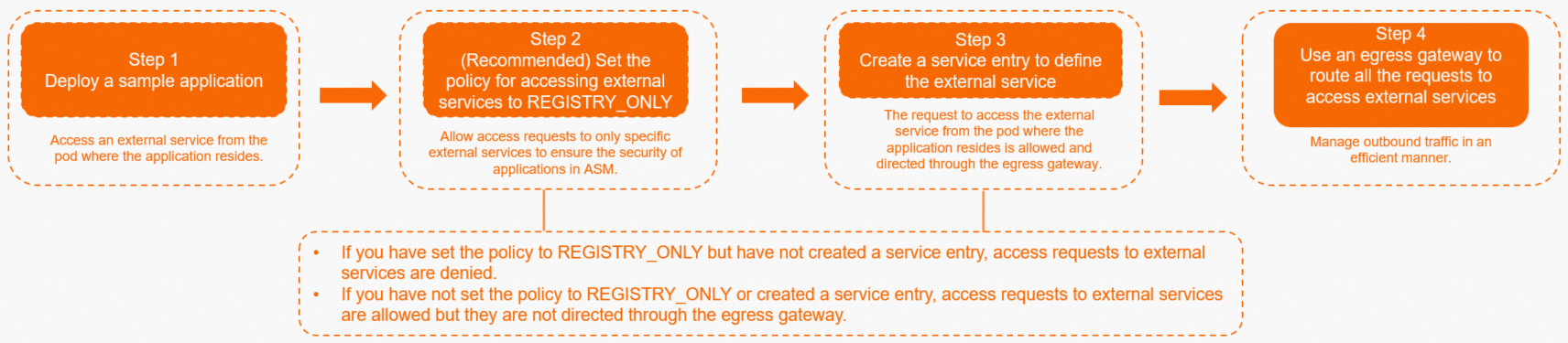
A ServiceEntry registers the external host (for example,
aliyun.com) in the mesh's service registry.A VirtualService with two route rules directs traffic from the sidecar to the egress gateway, then from the egress gateway to the external host.
An Istio Gateway on the egress gateway accepts the inbound traffic on the designated port.
All outbound requests from application pods flow through the egress gateway, where security policies are enforced before the traffic leaves the mesh.
Prerequisites
Before you begin, make sure that you have:
kubectl configured to connect to the ACK cluster -- see Obtain the kubeconfig file of a cluster
Step 1: Deploy a sample application
Deploy the sleep application -- a minimal pod with curl -- to test outbound connectivity throughout this tutorial.
Save the following YAML as
sleep.yaml:Apply the manifest:
kubectl apply -f sleep.yamlVerify outbound connectivity: Replace
<sleep-pod-name>with the actual pod name. To find it, runkubectl get pod -n default. Expected output: A301confirms the pod can reachaliyun.com. The web server redirects HTTP to HTTPS -- this is expected.kubectl exec -it <sleep-pod-name> -- curl -I aliyun.comHTTP/1.1 301 Moved Permanently server: envoy ... location: https://aliyun.com/
By default, ASM uses the ALLOW_ANY outbound traffic policy, which lets pods reach any external host. Under this policy, ASM cannot enforce access control or provide observability capabilities for external services. The next step switches to REGISTRY_ONLY so that only registered external services are reachable.
Step 2 (optional): Switch the outbound traffic policy to REGISTRY_ONLY
The REGISTRY_ONLY policy blocks access to any external host without a ServiceEntry. Sidecar proxies deny unregistered outbound traffic, providing stronger security than the default ALLOW_ANY policy.
If you enable
REGISTRY_ONLYwithout creating a ServiceEntry, all external access is blocked.If you keep
ALLOW_ANYwithout a ServiceEntry, pods can reach external services, but traffic does not flow through the egress gateway.
Log on to the ASM console.
In the left-side navigation pane, choose Service Mesh > Mesh Management.
On the Mesh Management page, click the name of the ASM instance.
In the left-side navigation pane, choose Data Plane Component Management > Sidecar Proxy Setting.
On the Sidecar Proxy Setting page, click the global tab, click Outbound Traffic Policy, set External Access Policy to REGISTRY_ONLY, and then click Update Settings.
Verify that external access is blocked: Expected output: A
502confirms that the sidecar proxy is blocking access to unregistered external hosts.kubectl exec -it <sleep-pod-name> -- curl -I aliyun.comHTTP/1.1 502 Bad Gateway server: envoy
Step 3: Create a ServiceEntry for the external service
A ServiceEntry registers an external host in the mesh's service registry so that sidecar proxies recognize and route traffic to it.
Log on to the ASM console.
In the left-side navigation pane, choose Service Mesh > Mesh Management.
On the Mesh Management page, click the name of the ASM instance.
In the left-side navigation pane, choose Cluster & Workload Management > External Service(ServiceEntry).
Click Create from YAML.
Select the namespace where the sleep application resides, select Access mesh external services for Template, paste the following YAML, and click Create:
   apiVersion: networking.istio.io/v1beta1
   kind: ServiceEntry
   metadata:
     name: external-svc-http
   spec:
     hosts:
     - aliyun.com
     location: MESH_EXTERNAL
     ports:
     - number: 80
       name: http
       protocol: HTTP
     resolution: DNS
Verify that the pod can reach the external service: A
301confirms thataliyun.comis registered in the service registry. At this point, the pod still sends requests directly to the external service -- traffic does not yet pass through the egress gateway.kubectl exec -it <sleep-pod-name> -- curl -I aliyun.com
Step 4: Route traffic through the egress gateway
With the ServiceEntry in place, configure an Istio Gateway and a VirtualService to route all traffic to aliyun.com through the egress gateway.
4a. Create the egress gateway
Create an egress gateway that accepts HTTP traffic on port 80.
For detailed instructions, see Create an egress gateway.
4b. Create an Istio Gateway
Create an Istio Gateway that binds to the egress gateway and listens on port 80 for traffic to aliyun.com.
For detailed instructions, see Manage Istio gateways.

4c. Create a VirtualService
The VirtualService defines two route rules:
mesh to egress gateway -- Sidecars redirect outbound traffic to the egress gateway service.
egress gateway to external host -- The egress gateway forwards traffic to the actual external service.
Create a VirtualService with the following YAML. For detailed instructions, see Manage virtual services.
4d. Verify the configuration
Send a request from the sleep pod: A
301confirms the external service is reachable. Traffic now flows through the egress gateway instead of directly from the pod.kubectl exec -it <sleep-pod-name> -- curl -I aliyun.comCheck the egress gateway access logs to confirm the request passed through it: Replace
<egress-gateway-pod-name>with the name of the egress gateway pod in theistio-systemnamespace. Expected output (JSON format): Thedownstream_remote_addressfield shows the sleep pod's IP address, confirming the request originated from the application and was routed through the egress gateway.NoteIf the egress gateway has multiple replicas, check logs on each replica to find the access record.
If you have enabled access logging, you can also view records in the Simple Log Service console.
kubectl -n istio-system logs <egress-gateway-pod-name> -c istio-proxy | grep aliyun.com | tail -n 1{ "downstream_remote_address": "10.34.0.140:47942", "upstream_host": "106.11.XXX.XX:80", "upstream_cluster": "outbound|80||aliyun.com", "response_code": 301, "method": "HEAD", "authority": "aliyun.com", ... }
Cleanup
To remove the resources created in this tutorial, run:
kubectl delete -f sleep.yamlAlso delete the following resources from the ASM console:
ServiceEntry:
external-svc-httpVirtualService:
egressgateway-vsThe Istio Gateway created in step 4b
The egress gateway created in step 4a
If you changed the outbound traffic policy to REGISTRY_ONLY, revert it to ALLOW_ANY if your environment requires open external access.
See also
Use ASMEgressTrafficPolicy to manage egress traffic -- A simpler, CRD-based approach to egress traffic management