ApsaraMQ for RabbitMQ supports two billing methods: subscription and serverless (pay-as-you-go). Billable items and billing rules differ by billing method. Select a billing method based on your traffic volume and expected duration of use.
Instance types and billing methods
ApsaraMQ for RabbitMQ provides the following instance types and billing methods. For information about the feature differences among instance types, see Instance types.
|
Billing method |
Instance type |
When to use |
Fee estimation |
|
Subscription |
Professional Edition, Enterprise Edition, Enterprise Platinum Edition |
Large, steady traffic that requires long-term capacity. Pay upfront to reserve resources at a discounted rate. |
The buy page of subscription instances
|
|
Serverless (pay-as-you-go) |
Pay-by-provisioned-capacity-and-elastic-traffic, Pay-by-messaging-request |
Variable or unpredictable traffic. Pay only for actual usage with no upfront resource reservation. |
Price calculator for serverless instances
|
Supported regions
Serverless instances are available only in specific regions. For more information, see Supported regions.
Billable items
Billable items differ between subscription and serverless instances.
Subscription instances
The following diagram shows the billable items for subscription instances. For details, see Billing of subscription instances.

Serverless instances
The following diagram shows the billable items for serverless instances. For details, see Billing of serverless instances.

Instance expiration
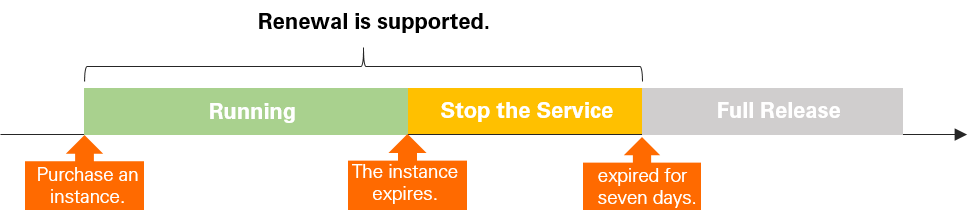
Professional Edition, Enterprise Edition, and Enterprise Platinum Edition instances use the subscription billing method. The following diagram describes the instance lifecycle before and after expiration.
-
Before expiration
The instance runs as expected.
-
Within 7 days after expiration
The instance is frozen:
-
Messages cannot be sent or received.
-
The ApsaraMQ for RabbitMQ console cannot be used.
-
API operations cannot be called.
Metadata for virtual hosts (vhosts), exchanges, and queues is temporarily retained.
To restore service, renew the instance during this period. After renewal, the instance resumes normal operation. For more information, see Renew an instance.
-
-
More than 7 days after expiration
If you do not renew the instance within 7 days after expiration, the instance is released. Metadata and message data are deleted and cannot be restored.
To use ApsaraMQ for RabbitMQ again, purchase a new instance. The new instance has a different ID and endpoint from the original instance.