This topic provides an overview of the system notification management feature.
Background
Included with Alibaba Mail, the primary administrator postmaster account is designed for daily operational management rather than regular email correspondence. It is designated to receive system alerts, updates, and notifications. Given its infrequent use in office settings, there is a risk that notifications may not be promptly relayed to the administrator. Moreover, with a capacity limit of 5MB, exceeding this threshold could lead to missed notifications, adversely affecting the email management.
Solution
To mitigate these issues, Alibaba Mail offers the system notification management feature, allowing administrators to designate other email accounts within the same domain to receive notifications. Once configured, these accounts will receive copies of all system notifications originally sent to the postmaster account.
Steps
1. Log on to the email management background with the postmaster account and select Tools -System Notification Management;
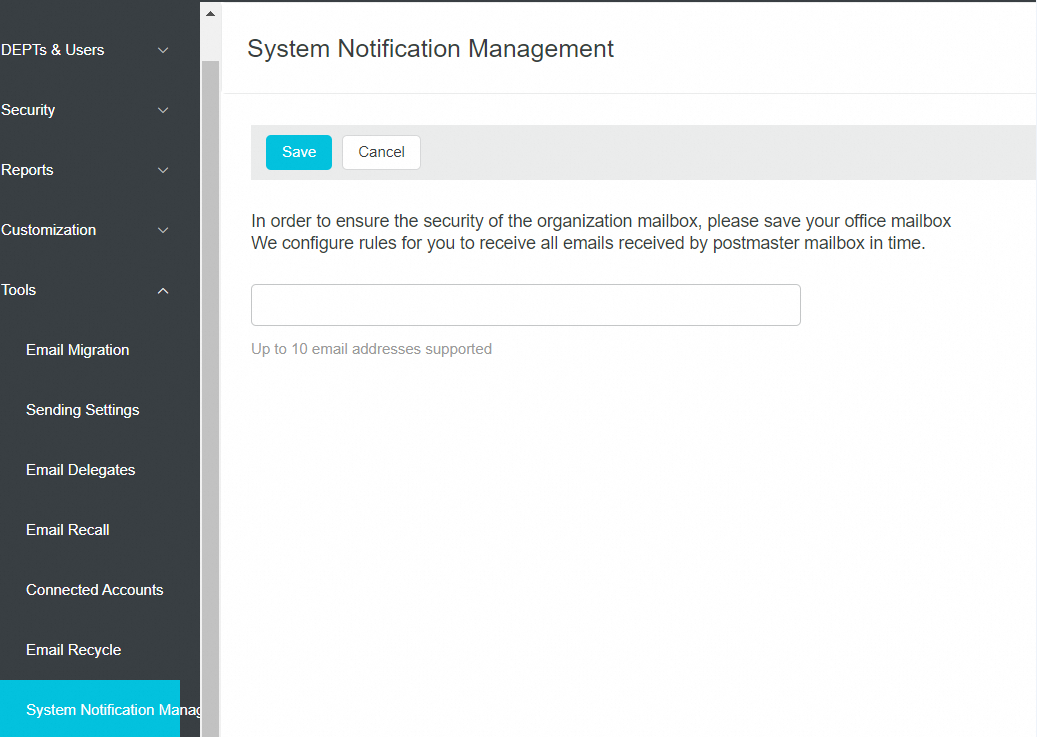
2. Enter the desired email accounts, with the option to set multiple accounts. After entering the accounts, click Save.
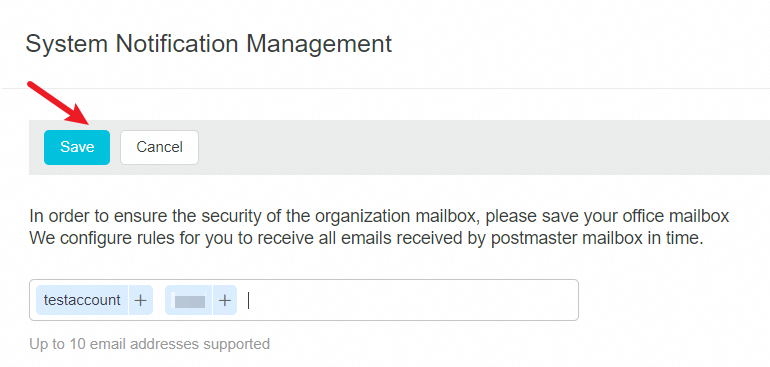
Note: A maximum of 10 email accounts can be configured, and external domain accounts are not supported.
Access to the system notification management page is exclusive to the postmaster account.