Step 1: Verify cross-cluster communication
Two clusters in the same VPC communicate by default when both use advanced security groups. If either cluster uses a basic security group, or if the two security groups cannot communicate, configure security group rules to allow traffic between them. For more information, see Manage security group rules.
Step 2: Add the clusters to the ASM instance and create a serverless ingress gateway
Add both clusters to the ASM instance, then create a serverless ingress gateway.
-
Add the two clusters to the ASM instance. For more information, see Add a cluster to an ASM instance.
-
Create a serverless ingress gateway with the following YAML configuration. For more information, see Create an ingress gateway.
Serverless ingress gateway YAML
apiVersion: istio.alibabacloud.com/v1beta1
kind: IstioGateway
metadata:
  annotations:
    asm.alibabacloud.com/managed-by-asm: 'true'
  name: ingressgateway
  namespace: istio-system
spec:
  gatewayType: ingress
  dnsPolicy: ClusterFirst
  externalTrafficPolicy: Local
  hostNetwork: false
  ports:
    - name: http
      port: 80
      protocol: TCP
      targetPort: 80
    - name: https
      port: 443
      protocol: TCP
      targetPort: 443
  replicaCount: 1
  resources:
    limits:
      cpu: '2'
      memory: 2G
    requests:
      cpu: 200m
      memory: 256Mi
  rollingMaxSurge: 100%
  rollingMaxUnavailable: 25%
  runAsRoot: true
  serviceType: LoadBalancer
Step 3: Deploy the Bookinfo application across clusters
Deploy the Bookinfo microservices across both clusters. Cluster m1c2 runs most services (details, ratings, reviews v1/v2, and productpage), while cluster m1c1 runs the v3 version of the reviews microservice and the ratings service.
-
Save the following content to a file named bookinfo-m1c2.yaml.
Note
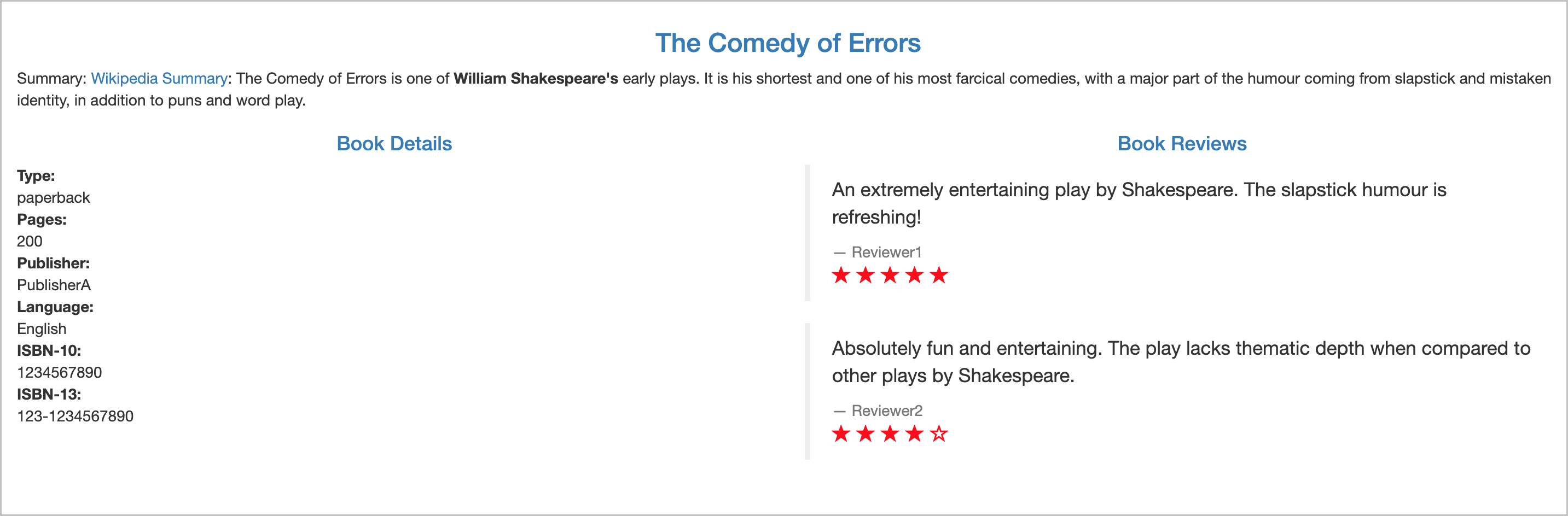
The v3 version of the reviews microservice displays ratings as red stars.
bookinfo-m1c2.yaml
# Details service
apiVersion: v1
kind: Service
metadata:
  name: details
  labels:
    app: details
    service: details
spec:
  ports:
  - port: 9080
    name: http
  selector:
    app: details
---
apiVersion: v1
kind: ServiceAccount
metadata:
  name: bookinfo-details
  labels:
    account: details
---
apiVersion: apps/v1
kind: Deployment
metadata:
  name: details-v1
  labels:
    app: details
    version: v1
spec:
  replicas: 1
  selector:
    matchLabels:
      app: details
      version: v1
  template:
    metadata:
      labels:
        app: details
        version: v1
    spec:
      serviceAccountName: bookinfo-details
      containers:
      - name: details
        image: docker.io/istio/examples-bookinfo-details-v1:1.15.0
        imagePullPolicy: IfNotPresent
        ports:
        - containerPort: 9080
---
# Ratings service
apiVersion: v1
kind: Service
metadata:
  name: ratings
  labels:
    app: ratings
    service: ratings
spec:
  ports:
  - port: 9080
    name: http
  selector:
    app: ratings
---
apiVersion: v1
kind: ServiceAccount
metadata:
  name: bookinfo-ratings
  labels:
    account: ratings
---
apiVersion: apps/v1
kind: Deployment
metadata:
  name: ratings-v1
  labels:
    app: ratings
    version: v1
spec:
  replicas: 1
  selector:
    matchLabels:
      app: ratings
      version: v1
  template:
    metadata:
      labels:
        app: ratings
        version: v1
    spec:
      serviceAccountName: bookinfo-ratings
      containers:
      - name: ratings
        image: docker.io/istio/examples-bookinfo-ratings-v1:1.15.0
        imagePullPolicy: IfNotPresent
        ports:
        - containerPort: 9080
---
# Reviews service
apiVersion: v1
kind: Service
metadata:
  name: reviews
  labels:
    app: reviews
    service: reviews
spec:
  ports:
  - port: 9080
    name: http
  selector:
    app: reviews
---
apiVersion: v1
kind: ServiceAccount
metadata:
  name: bookinfo-reviews
  labels:
    account: reviews
---
apiVersion: apps/v1
kind: Deployment
metadata:
  name: reviews-v1
  labels:
    app: reviews
    version: v1
spec:
  replicas: 1
  selector:
    matchLabels:
      app: reviews
      version: v1
  template:
    metadata:
      labels:
        app: reviews
        version: v1
    spec:
      serviceAccountName: bookinfo-reviews
      containers:
      - name: reviews
        image: docker.io/istio/examples-bookinfo-reviews-v1:1.15.0
        imagePullPolicy: IfNotPresent
        ports:
        - containerPort: 9080
---
apiVersion: apps/v1
kind: Deployment
metadata:
  name: reviews-v2
  labels:
    app: reviews
    version: v2
spec:
  replicas: 1
  selector:
    matchLabels:
      app: reviews
      version: v2
  template:
    metadata:
      labels:
        app: reviews
        version: v2
    spec:
      serviceAccountName: bookinfo-reviews
      containers:
      - name: reviews
        image: docker.io/istio/examples-bookinfo-reviews-v2:1.15.0
        imagePullPolicy: IfNotPresent
        ports:
        - containerPort: 9080
---
# Productpage services
apiVersion: v1
kind: Service
metadata:
  name: productpage
  labels:
    app: productpage
    service: productpage
spec:
  ports:
  - port: 9080
    name: http
  selector:
    app: productpage
---
apiVersion: v1
kind: ServiceAccount
metadata:
  name: bookinfo-productpage
  labels:
    account: productpage
---
apiVersion: apps/v1
kind: Deployment
metadata:
  name: productpage-v1
  labels:
    app: productpage
    version: v1
spec:
  replicas: 1
  selector:
    matchLabels:
      app: productpage
      version: v1
  template:
    metadata:
      labels:
        app: productpage
        version: v1
    spec:
      serviceAccountName: bookinfo-productpage
      containers:
      - name: productpage
        image: docker.io/istio/examples-bookinfo-productpage-v1:1.15.0
        imagePullPolicy: IfNotPresent
        ports:
        - containerPort: 9080
---
-
Deploy the Bookinfo application (without the v3 reviews microservice) to the m1c2 cluster:
kubectl apply -f bookinfo-m1c2.yaml
-
Save the following content to a file named bookinfo-m1c1.yaml.
bookinfo-m1c1.yaml
# Reviews service
apiVersion: v1
kind: Service
metadata:
  name: reviews
  labels:
    app: reviews
    service: reviews
spec:
  ports:
  - port: 9080
    name: http
  selector:
    app: reviews
---
apiVersion: v1
kind: ServiceAccount
metadata:
  name: bookinfo-reviews
  labels:
    account: reviews
---
apiVersion: apps/v1
kind: Deployment
metadata:
  name: reviews-v3
  labels:
    app: reviews
    version: v3
spec:
  replicas: 1
  selector:
    matchLabels:
      app: reviews
      version: v3
  template:
    metadata:
      labels:
        app: reviews
        version: v3
    spec:
      serviceAccountName: bookinfo-reviews
      containers:
      - name: reviews
        image: docker.io/istio/examples-bookinfo-reviews-v3:1.15.0
        imagePullPolicy: IfNotPresent
        ports:
        - containerPort: 9080
---
# Ratings service
apiVersion: v1
kind: Service
metadata:
  name: ratings
  labels:
    app: ratings
    service: ratings
spec:
  ports:
  - port: 9080
    name: http
  selector:
    app: ratings
-
Deploy the v3 reviews microservice and the ratings service to the m1c1 cluster:
kubectl apply -f bookinfo-m1c1.yaml
Step 4: Add a virtual service and an Istio gateway
-
Create a virtual service named bookinfo in the default namespace of the ASM instance. For more information, see Manage virtual services.
Virtual service YAML
apiVersion: networking.istio.io/v1alpha3
kind: VirtualService
metadata:
  name: bookinfo
spec:
  hosts:
  - "*"
  gateways:
  - bookinfo-gateway
  http:
  - match:
    - uri:
        exact: /productpage
    - uri:
        prefix: /static
    - uri:
        exact: /login
    - uri:
        exact: /logout
    - uri:
        prefix: /api/v1/products
    route:
    - destination:
        host: productpage
        port:
          number: 9080
-
Create an Istio gateway named bookinfo-gateway in the default namespace of the ASM instance. For more information, see Manage Istio gateways.
Istio gateway YAML
apiVersion: networking.istio.io/v1alpha3
kind: Gateway
metadata:
  name: bookinfo-gateway
spec:
  selector:
    istio: ingressgateway # use istio default controller
  servers:
  - port:
      number: 80
      name: http
      protocol: HTTP
    hosts:
    - "*"
-
Open a browser and go to http://{IP address of the serverless ingress gateway}/productpage. Refresh the page several times. Traffic distributes approximately 1:1:1 across the three versions of the reviews microservice (v1, v2, and v3). The v3 version works normally even though it runs in a different cluster than the other microservices.
(Optional) Step 5: Route all traffic to the v3 reviews microservice
Define a destination rule and a virtual service to route all requests to the v3 version of the reviews microservice.
-
Create a destination rule named reviews in the default namespace of the ASM instance. For more information, see Manage destination rules.
Destination rule YAML
apiVersion: networking.istio.io/v1alpha3
kind: DestinationRule
metadata:
  name: reviews
spec:
  host: reviews
  subsets:
  - name: v1
    labels:
      version: v1
  - name: v2
    labels:
      version: v2
  - name: v3
    labels:
      version: v3
-
Create a virtual service named reviews in the default namespace of the ASM instance. For more information, see Manage virtual services.
Virtual service YAML
apiVersion: networking.istio.io/v1alpha3
kind: VirtualService
metadata:
  name: reviews
spec:
  hosts:
    - reviews
  http:
  - route:
    - destination:
        host: reviews
        subset: v3
-
Open a browser and go to http://{IP address of the serverless ingress gateway}/productpage. Refresh the page several times. All requests now route to the v3 version of the reviews microservice. Ratings appear as red stars.