This topic answers common questions about PolarDB for MySQL.
Basic questions
Q: What is PolarDB?
A: PolarDB is a cloud-based relational database service. It is deployed across more than ten Alibaba Cloud regions worldwide and provides ready-to-use online database services. PolarDB supports three independent engines fully compatible with MySQL, fully compatible with PostgreSQL, and highly compatible with Oracle syntax. Its maximum storage capacity is up to 200 TB. For more information, see What is PolarDB for MySQL Enterprise Edition?.
Q: Why is the cloud-native database PolarDB better than traditional databases?
A: Compared with traditional databases, PolarDB supports massive data storage at the hundreds of TB scale. It delivers high availability and reliability, rapid elastic scaling, and lock-free backups. For more information, see Benefits.
Q: When was PolarDB released? When did it become commercially available?
A: PolarDB entered public preview in September 2017 and became commercially available in March 2018.
Q: What are clusters and nodes?
A: A PolarDBcluster edition uses a multi-node cluster architecture. Each cluster has one primary node and multiple read-only nodes. A single PolarDB cluster supports cross-zone deployment but not cross-region deployment. Clusters are managed and billed as units. For more information, see Glossary.
Q: What programming languages do you support?
A: PolarDB supports Java, Python, PHP, Golang, C, C++, .NET, and Node.js. Any programming language that supports native MySQL can directly use PolarDB for MySQL. For more information, see the MySQL website.
Q: Which storage engines does the system support?
A: PolarDB supports two product series. The supported storage engines vary by series:
All tables in PolarDB for MySQLcluster edition use the InnoDB storage engine. When you create a table, PolarDB for MySQL automatically converts non-InnoDB engines such as MyISAM, Memory, and CSV to InnoDB. Therefore, even if your source tables use other engines, they can still be migrated successfully to PolarDB for MySQL.
Q: Is PolarDB a distributed database?
A: Yes. PolarDB is a distributed storage cluster based on the Parallel Raft consistency protocol. Its compute engine consists of one to sixteen compute nodes distributed across different servers. Its maximum storage capacity is up to 200 TB, and its maximum configuration supports 88 vCPUs and 710 GB of memory. You can scale storage and compute resources online and dynamically without affecting business operations.
Q: After I purchase PolarDB, do I need to purchase the PolarDB-X database middleware if I want to shard databases and tables?
A: Yes.
Q: Does PolarDB support table partitioning?
A: Yes.
Q: Can I change the region after purchasing a PolarDB cluster?
A: No. You cannot change the region after purchasing a cluster.
Q: Does PolarDB include built-in partitioning?
A: PolarDB partitions data at the storage layer. This is transparent to users and requires no action.
Q: How does the single-node series ensure service availability and data reliability?
A: The single-node series provides a purpose-built database product based on a single compute node. Although it uses only one node, the single-node series ensures high service availability and high data reliability using technologies such as sub-second compute scheduling and distributed multi-replica storage.
Q: How do I purchase a PolarDB cluster in single-node mode?
A: The current single-node product series is no longer available, but you can purchase a single-node PolarDB cluster by setting the number of read-only nodes to 0 during cluster purchase.
Compatibility
Q: Is PolarDB for MySQL compatible with community MySQL?
A: PolarDB for MySQL is 100% compatible with community MySQL.
Q: Which transaction isolation levels does PolarDB for MySQL support?
A: PolarDB for MySQL supports READ_UNCOMMITTED, READ_COMMITTED (default), and REPEATABLE_READ. It does not support SERIALIZABLE.
Q: Does SHOW PROCESSLIST differ from community MySQL?
A: If you query using the primary endpoint, there is no difference. If you query using the cluster endpoint, results may differ slightly. Multiple rows with the same thread ID appear, each corresponding to a node in the PolarDB for MySQL cluster.
Q: Does the metadata lock (MDL) mechanism in PolarDB for MySQL differ from community MySQL?
A: The MDL mechanism in PolarDB for MySQL is consistent with community MySQL. However, because PolarDB for MySQL uses shared storage, read-only nodes may access intermediate data during DDL operations on the primary node, causing data inconsistency. To prevent this, PolarDB for MySQL synchronizes exclusive MDL locks involved in DDL operations to read-only nodes through redo logs. This blocks other user threads on read-only nodes from accessing table data during DDL operations. In some cases, this may block DDL operations. Run the
show processlistcommand to check the DDL execution status. If the status showsWait for syncing with replicas, this issue has occurred. For resolution steps, see View DDL execution status and MDL lock status.Q: Does the Binlog format differ from native MySQL?
A: No.
Q: Does PolarDB support the performance_schema and sys schema?
A: Yes.
Q: Does table statistics collection in PolarDB for MySQL differ from community MySQL?
A: Table statistics on the primary node of PolarDB for MySQL match those in community MySQL. To ensure consistent execution plans between the primary and read-only nodes, the primary node synchronizes updated statistics to read-only nodes. Read-only nodes can also load the latest statistics from disk using the
ANALYZE TABLEcommand.Q: Does PolarDB support XA transactions, and is there any difference compared to official MySQL?
A: Yes. There is no difference.
Q: Does PolarDB support full-text index?
A: Yes.
NoteWhen you use full-text indexes, read-only nodes may experience slight index cache latency. We recommend using the primary endpoint for all full-text index read and write operations to ensure you read the most recent data.
Q: Does PolarDB support the Percona Toolkit?
A: Yes. However, we recommend using online DDL.
Q: Does PolarDB support gh-ost?
A: Yes. However, we recommend using online DDL.
Billing
Q: What does PolarDB billing include?
A: Billing includes storage space, compute nodes, backup (with a free quota included), and SQL Explorer (optional). For more information, see Billing items overview.
Q: What does billed storage space include?
A: Billed storage space includes database table files, index files, undo log files, redo log files, Binlog files, slow log files, and a small number of system files. For more information, see Overview.
Q: How much does it cost to add a read-only node?
A: A read-only node costs the same as the primary node. For details, see Compute node pricing details.
Q: Does adding a read-only node double the storage capacity?
A: PolarDB uses a compute-storage decoupled architecture. A read-only node adds compute resources only. Storage capacity does not increase.
Storage uses a serverless model. You do not select a storage size when purchasing. Storage scales online and automatically as your data grows. You pay only for the actual amount of data stored. Each cluster specification has a maximum storage capacity. To increase the storage limit, upgrade the cluster specification.
Q: How do I stop incurring charges for a pay-as-you-go cluster?
A: If you no longer need the cluster, release the cluster. After release, no further charges apply.
Q: Can I change the configuration of a cluster during a temporary upgrade?
A: During a temporary upgrade (when the cluster status is Running), you can manually upgrade the cluster. However, manual downgrade, automatic scaling, and adding or removing nodes are not supported.
Q: What is the Internet bandwidth for PolarDB? Does it incur charges?
A: PolarDB has no Internet bandwidth limits. Bandwidth depends on the SLB service you use. PolarDB does not charge for public network connections.
Q: Why am I charged daily for a subscription cluster?
A: PolarDB billing items include compute nodes (primary and read-only nodes), storage space, data backup (charged only beyond the free quota), SQL Explorer (optional), and Global Database Network (GDN) (optional). For details, see Billing items overview. Subscription means you prepay for compute node fees when creating the cluster. Storage space, data backup, and SQL Explorer fees are not included. As your cluster uses storage space, hourly charges apply to your account. Therefore, even with a subscription, you may receive pay-as-you-go bills.
Q: Is there an extra charge for migrating from RDS to PolarDB with one-click migration?
A: One-click migration is free. You are charged only for the RDS instance and the PolarDB cluster.
Q: Why are storage fees still charged for PolarDB table data after you use the
DELETEcommand?A:
deletemarks rows for deletion but does not release tablespace.
Cluster access (read/write splitting)
Q: How do I implement read/write splitting for PolarDB?
A: Use the cluster endpoint in your application. Read/write splitting works automatically based on the configured read/write mode. For more information, see Configure the database proxy.
Q: How many read-only nodes can a PolarDB cluster support?
A: PolarDB uses a distributed cluster architecture. Each cluster has one primary node and up to 15 read-only nodes (at least one for high availability).
Q: Why is the load uneven across read-only nodes?
A: Load imbalance may occur because some read-only nodes have fewer connections or because custom cluster endpoints exclude certain read-only nodes.
Q: Why is the load on the primary node high or low?
A: High load on the primary node (primary database) may result from direct connections to the primary endpoint, reads directed to the primary database, heavy transaction traffic, high replication delay causing queries to route to the primary node, or read-only node failures routing reads to the primary node.
Low load on the primary node may occur if the primary database is configured to reject reads.
Q: How do I reduce the load on the primary node?
A: Use one or more of the following methods:
Connect to the PolarDB cluster using the cluster endpoint. For more information, see Configure the database proxy.
If high transaction volume causes heavy load on the primary node, enable transaction splitting in the console. This routes some queries in a transaction to read-only nodes. For more information, see Transaction splitting.
If replication delay causes queries to route to the primary node, lower the consistency level (for example, use eventual consistency). For more information, see Consistency level.
Accepting read requests can also place a heavy load on the primary node. You can enable the offload reads from primary node feature in the console to reduce the number of read requests routed to the primary node. For more information, see Offload reads from primary node.
Q: Why can't I read data I just inserted?
A: This issue may be caused by the consistency level configuration. The PolarDB cluster endpoint supports the following consistency levels:
Eventual consistency: Even within the same session (connection) or across sessions, eventual consistency does not guarantee immediate reads of newly inserted data.
Session consistency: You can always read data inserted in the same session.
Global consistency: Ensures you can read the latest data in both the same session and across sessions.
NoteHigher consistency levels reduce performance and increase load on the primary node. Choose carefully. Session consistency meets the needs of most applications. For statements requiring strong consistency, use the
/* FORCE_MASTER */hint. For more information, see Consistency level.Q: How do I force SQL to run on the primary node?
A: When using the cluster endpoint, add
/* FORCE_MASTER */or/* FORCE_SLAVE */before the SQL statement to force routing. For more information, see Hint syntax./* FORCE_MASTER */forces the request to route to the primary database. Use this for read requests that require high consistency./* FORCE_SLAVE */forces the request to route to a read-only node. Use this for cases where the PolarDB proxy requires specific syntax to route to read-only nodes for correctness (for example, stored procedure calls or multistatement usage, which default to the primary node).
NoteHints have the highest routing priority and override consistency level and transaction splitting settings. Evaluate their use before applying them.
Do not include GUC parameter modification commands in hints. For example, avoid /*FORCE_SLAVE*/ set enable_hashjoin = off;. Such commands may produce unexpected query results.
Q: Can I assign different endpoints to different business applications? Do these endpoints provide isolation?
A: You can create multiple custom endpoints for different business applications. If the underlying nodes differ, custom endpoints provide isolation and do not affect each other. For instructions on creating custom endpoints, see Add a custom cluster endpoint.
Q: If I have multiple read-only nodes, how do I create a single-node endpoint for a specific read-only node?
A: You can create a single-node endpoint only when the cluster endpoint read/write mode is read-only and the cluster has three or more nodes. For detailed steps, see Configure the cluster endpoint.
WarningAfter you create a single-node endpoint, the endpoint may be unavailable for up to one hour if the node fails. Do not use it in production environments.
Q: How many single-node endpoints can I create in a cluster?
A: If your cluster has three nodes, you can create a single-node endpoint for only one read-only node. If your cluster has four nodes, you can create single-node endpoints for two read-only nodes. The pattern continues accordingly.
Q: I use only the primary endpoint, but read-only nodes show load. Does the primary endpoint support read/write splitting?
A: The primary endpoint does not support read/write splitting. It always connects to the primary node. Small QPS on read-only nodes is normal and unrelated to the primary endpoint.
Management and maintenance
Q: How do I add columns and indexes online?
A: You can use native online DDL, pt-osc, and gh-ost. We recommend using native online DDL.
NoteWhen using pt-osc, do not use parameters related to master-slave detection, such as
recursion-method. pt-osc detects master-slave status using Binlog replication. However, PolarDB uses physical replication internally and does not provide Binlog-based replication information.Q: Does PolarDB support bulk insert?
A: Yes.
Q: If I write data only to write-only nodes, does PolarDB support bulk insert? What is the maximum number of values per insert?
A: Yes. The maximum number of values per insert is determined by the max_allowed_packet parameter. For details, see Replication and max_allowed_packet.
Q: Does PolarDB support bulk insert using the cluster endpoint?
A: Yes.
Q: Is there replication delay between the primary node (primary) and read-only nodes (standby)?
A: Yes. Replication delay is at the millisecond level.
Q: What causes increased replication delay?
A: Replication delay increases in the following cases:
High write load on the primary node generates excessive redo logs, overwhelming read-only nodes.
High load on read-only nodes consumes resources needed to apply redo logs.
I/O bottlenecks slow down reading and writing of redo logs.
Q: How do I ensure query consistency when replication delay exists?
A: Use the cluster endpoint and select an appropriate consistency level. Consistency levels, from highest to lowest, are global consistency (strong consistency), session consistency, and eventual consistency. For more information, see Consistency level.
Q: Can RPO be zero during a single-node failure?
A: Yes.
Q: How does upgrading specifications (for example, from 2 vCPUs and 8 GB to 4 vCPUs and 16 GB) work in the backend? What impact does it have on business?
A: Both the PolarDB proxy and database nodes must upgrade to the new configuration. Rolling upgrades across multiple nodes minimize business impact. Each upgrade takes about 10 to 15 minutes. Business impact lasts no more than 30 seconds, during which 1 to 3 transient disconnections may occur. For more information, see Manually change specifications.
Q: How long does adding a node take? Does it affect business?
A: Adding each node takes five minutes and has no business impact. For instructions, see Add a node.
NoteNew read/write splitting connections created after adding a read-only node forward requests to that node. Existing read/write splitting connections do not forward requests to the new node. You must disconnect and reconnect, for example, by restarting your application.
Q: How long does upgrading to the latest revision take? Does it affect business?
A: PolarDB uses rolling upgrades across multiple nodes to minimize business impact. Upgrades typically take no more than 30 minutes. During the upgrade, the database proxy or kernel engine restarts, possibly causing transient disconnections. Perform upgrades during off-peak hours and ensure your application has an automatic reconnection mechanism. For more information, see Minor version management.
Q: How does automatic failover work?
A: PolarDB uses an active-active high availability architecture. Automatic failover occurs between the readable/writable primary node and read-only nodes. The system automatically elects a new primary node. Each PolarDB node has a failover priority that determines its likelihood of being elected as the primary node. When priorities are equal, nodes have equal election chances. For more information, see Automatic or manual primary/standby node failover.
Q: What permissions are required to terminate connections in PolarDB for MySQL?
A: In MySQL, terminating a connection (using the
KILLcommand) requires specific permissions. To terminate another regular user's connection, you need thePROCESSpermission.NoteTerminating your own connection: Any user can terminate their own connection without additional permissions.
Terminating other sessions for the same user: Requires the
PROCESSpermission.Terminating other regular users' connections: High-privilege accounts should use the
KILLcommand cautiously in PolarDB for MySQL.
Q: Does the error
[ERROR] InnoDB: fil_space_extend space_name:xxxin operational logs affect existing business?A: This does not affect your existing business. This log message indicates that after the read/write node of a PolarDB cluster extends a file, the read-only nodes synchronize the file size information in memory. The log level for MySQL 5.7 clusters has not been adjusted from
ERROR. Therefore, on read-only nodes, this message can be considered anINFO-level message and does not affect your business.Q: What is the architecture of the database proxy? Does it support failover? How is high availability ensured?
A: The database proxy uses a dual-node high availability architecture. Traffic is evenly distributed 1:1 across the two proxy nodes. The system continuously checks proxy node health status. When a node fails, the system actively disconnects connections on that node. The remaining healthy node automatically handles all traffic, ensuring uninterrupted service. The system also automatically rebuilds and restores failed proxy nodes. This process usually completes within two minutes. During this time, the database cluster remains accessible.
In extreme cases, connections on a failed node may not disconnect promptly and become unresponsive. To address this, configure reasonable timeout policies on the client side (such as JDBC
socketTimeoutandconnectTimeout). This allows the application layer to detect and terminate hanging connections promptly, improving fault tolerance and response efficiency.Q: How do I view error logs for a PolarDB for MySQL cluster?
A: Go to the PolarDB console. In the left navigation pane of the target cluster details page, go to . Then, view error logs on the Operational Logs tab.
Q: Does PolarDB for MySQL automatically create an implicit primary key for tables without a primary key?
A: Yes. PolarDB for MySQL creates an implicit primary key for tables without a primary key by default.
How to view the implicit primary key
Log in to the cluster and run
SET show_ipk_info = 1. Then, useSHOW CREATE TABLEto view it.-- Set the parameter to display the implicit primary key SET show_ipk_info = 1; -- View the table structure SHOW CREATE TABLE t;The
__#alibaba_rds_row_id#__column is the implicit primary key.+-------+------------------------------------------------------------------------------------------------------------+ | Table | Create Table | +-------+------------------------------------------------------------------------------------------------------------+ | t | CREATE TABLE `t` ( `id` int(11) DEFAULT NULL, `__#alibaba_rds_row_id#__` bigint(20) NOT NULL AUTO_INCREMENT COMMENT 'Implicit Primary Key by RDS', KEY `__#alibaba_rds_row_id#__` (`__#alibaba_rds_row_id#__`) ) ENGINE=InnoDB DEFAULT CHARSET=utf8 | +-------+------------------------------------------------------------------------------------------------------------+Q: Why does my application report
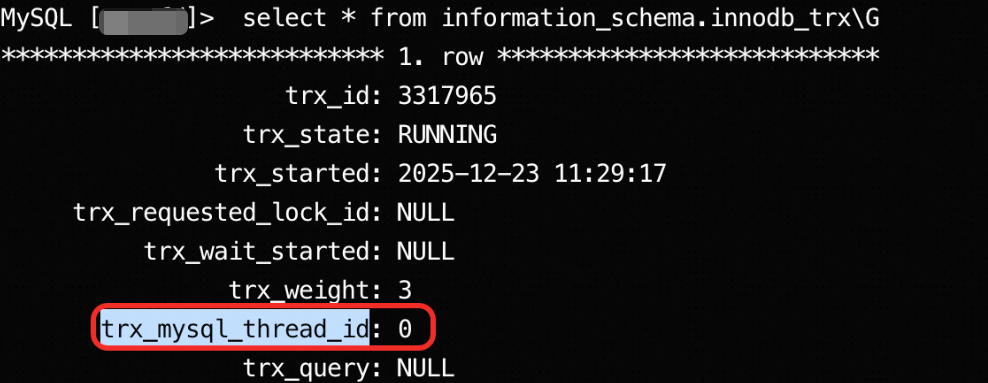
Lock wait timeout exceeded, and why do I find a transaction withtrx_mysql_thread_idequal to 0?A: When your application interacts with PolarDB for MySQL and encounters business interruptions caused by lock waits, and you observe a thread with
thread_idequal to 0 in the database, this usually means an unfinished XA (distributed) transaction is holding locks. This section guides you through troubleshooting.Symptoms
Your application or client receives the error
ERROR 1205 (HY000): Lock wait timeout exceeded; try restarting transactionwhen connecting to the database.After logging in to the database and running
SELECT * FROM information_schema.innodb_trx;, you find a transaction withtrx_mysql_thread_idequal to0. This transaction runs for a long time and blocks other transactions.
Cause
In the InnoDB storage engine,
trx_mysql_thread_idequal to0identifies an XA transaction. This commonly occurs during the two-phase commit process of an XA transaction. After the transaction successfully executesXA PREPAREand enters the prepared state, if the external transaction manager fails to sendXA COMMIT(commit) orXA ROLLBACK(rollback) due to network issues, program exceptions, or other reasons, the transaction remains in the prepared state. While in this state, the transaction holds its acquired locks, blocking other transactions that need those resources and eventually causing lock wait timeouts.Solution
You must manually intervene and either commit (COMMIT) or roll back (ROLLBACK) the prepared XA transaction based on your business context.
Find uncommitted XA transactions: Run the
XA RECOVER;command to list uncommitted XA transactions. Record theformatID,gtrid_length,bqual_length, anddatavalues for the transaction you need to handle. These values are critical for the next step.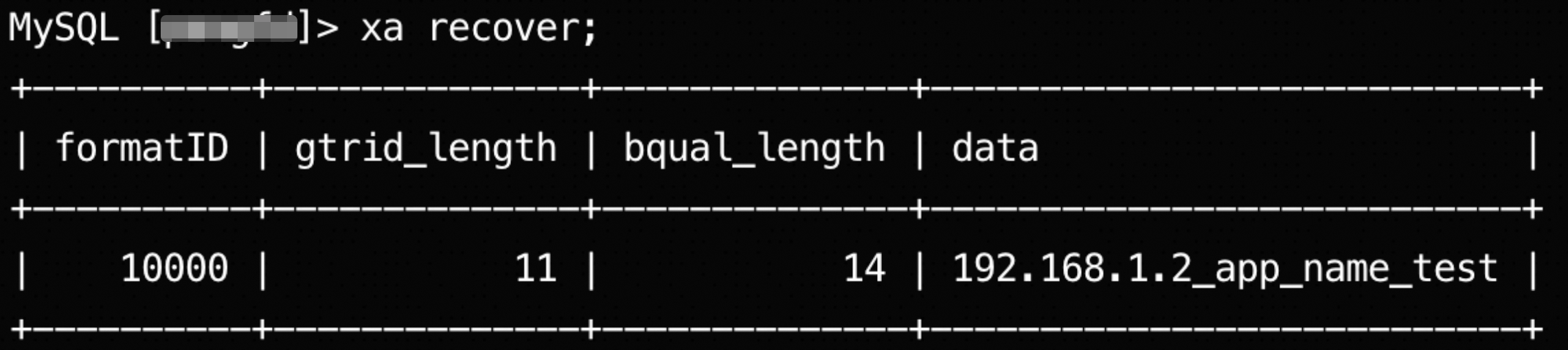
Manually commit or roll back XA transactions: After identifying the XA transaction, choose to commit or roll it back as needed.
Get the XA transaction identifier (
xid): Thexidconsists ofgtrid,bqual, andformatID. Construct thexidusing the values retrieved in the previous step.gtrid: Extract a string of lengthgtrid_lengthfrom the start of thedatafield.bqual: Extract a string of lengthbqual_lengthfrom the end of thedatafield.formatID: Use the value of theformatIDfield directly.
Using the previous step as an example, construct the three parts of the
xid. You can use thesubstringfunction to split thedatafield.SELECT substring('192.168.1.2_app_name_test',1,11) AS gtrid, substring('192.168.1.2_app_name_test',-14) AS bqual; +-------------+----------------+ | gtrid | bqual | +-------------+----------------+ | 192.168.1.2 | _app_name_test | +-------------+----------------+gtrid:'192.168.1.2'bqual:'_app_name_test'formatID:10000
Commit or roll back the XA transaction: Manually committing or rolling back an XA transaction may cause its final state to differ from the coordinator's original intent, risking data inconsistency. Before executing the following commands, fully understand the business context and confirm it is safe to proceed.
Commit: If you determine the transaction should be committed, run:
XA COMMIT '192.168.1.2', '_app_name_test', 10000;Roll back: If you determine the transaction should be rolled back, run:
XA ROLLBACK '192.168.1.2', '_app_name_test', 10000;
After successful execution, locks held by the uncommitted XA transaction are released, and database service returns to normal.
For more information about XA transaction syntax, see the MySQL documentation: XA Statements.
Why do different PolarDB for MySQL 8.0 clusters show inconsistent error handling behavior when comparing invalid date and time types?
Description: PolarDB for MySQL 8.0 clusters are divided into two versions: MySQL 8.0.1 and MySQL 8.0.2. These versions are fully compatible with MySQL 8.0.13 and MySQL 8.0.18, respectively. However, they handle invalid date and time types inconsistently.
Specifically, when comparing a string literal with a time type, the system attempts to convert the string to a time type. If the string is an invalid date, the conversion fails. The two versions behave differently on failure: MySQL 8.0.13 issues only a
WARNING, while MySQL 8.0.18 returns the error codeER_WRONG_VALUE. Therefore, these two versions of PolarDB for MySQL 8.0 clusters show inconsistent error behavior when comparing invalid date and time fields.Solution: To ensure consistent SQL execution results (either all succeed or all fail), use the same major engine version across multiple PolarDB for MySQL clusters—either all MySQL 8.0.1 or all MySQL 8.0.2.
Backup and recovery
Q: What backup method does PolarDB use?
A: PolarDB uses snapshots for backups. For more information, see Backup method 1: Automatic backup and Backup method 2: Manual backup.
Q: How fast is database recovery?
A: Recovery (cloning) from a backup set (snapshot) takes 40 minutes per TB. Point-in-time recovery requires applying redo logs, which takes about 20 to 70 seconds per GB. Total recovery time is the sum of both parts.
Performance and capacity
Q: Why is the performance improvement of PolarDB for MySQL over RDS for MySQL not obvious?
A: Before comparing the performance of PolarDB for MySQL and RDS for MySQL, review the following considerations to obtain accurate and reasonable comparison results.
Compare PolarDB for MySQL and RDS for MySQL with identical specifications.
Compare PolarDB for MySQL and RDS for MySQL with identical versions.
Different versions use different implementation mechanisms. For example, MySQL 8.0 optimizes for multi-core CPUs by abstracting threads such as Log_writer, log_fluser, log_checkpoint, and log_write_notifier. However, performance on systems with fewer CPU cores may be worse than MySQL 5.6 or 5.7. Avoid comparing PolarDB for MySQL 5.6 with RDS for MySQL 5.7 or 8.0 because MySQL 5.6 uses an older optimizer.
We recommend simulating real production workloads or using sysbench for performance comparisons. This yields results closer to real-world scenarios.
When comparing read performance, avoid using single SQL statements.
PolarDB uses a compute-storage decoupled architecture. Single statements suffer from network latency, reducing read performance compared to RDS. Production database cache hit rates are typically above 99%. Only the first read triggers I/O. Subsequent reads use the buffer pool and do not trigger I/O, resulting in equivalent performance.
When comparing write performance, avoid using single SQL statements. Instead, simulate production workloads.
To compare with RDS performance, compare PolarDB (primary node + read-only nodes) with RDS (primary instance + semi-synchronous read-only instances). PolarDB uses a quorum mechanism for writes, meaning writes succeed when written to a majority of the three replicas (two or more). PolarDB ensures data redundancy and strong synchronous replication at the storage layer. Comparing with RDS for MySQL's semi-synchronous replication (not asynchronous) is more appropriate.
For performance comparison results between PolarDB for MySQL and RDS for MySQL, see Performance comparison: PolarDB for MySQL vs. RDS for MySQL.
Q: What is the maximum number of tables? At what point might performance degrade?
A: The maximum number of tables is limited by the number of files. For details, see Limits.
Q: Can table partitioning improve PolarDB query performance?
Generally, performance can be improved if an SQL query is limited to a single partition.
Q: Does PolarDB support creating 10,000 databases? What is the maximum number of databases?
A: PolarDB supports creating 10,000 databases. The maximum number of databases is limited by the number of files. For details, see Limits.
Q: Is the maximum number of connections related to the number of read-only nodes? Can I increase the maximum number of connections by adding read-only nodes?
A: The number of read-only nodes does not affect the maximum number of connections. The maximum number of connections for PolarDB is determined by the node specifications. For details, see Limits. To increase the maximum number of connections, upgrade the specifications.
Q: How are IOPS restricted and isolated? Can multiple PolarDB cluster nodes compete for I/O?
A: Each node in a PolarDB cluster has IOPS set according to its specifications. IOPS is isolated between nodes and does not affect other nodes.
Q: Does degraded performance on read-only nodes affect the primary node?
A: High load or increased replication delay on read-only nodes may slightly increase memory consumption on the primary node.
Q: What is the performance impact of enabling Binlog?
A: Enabling Binlog does not affect SELECT performance. It affects INSERT, UPDATE, and DELETE performance. In a balanced read/write workload, enabling Binlog reduces performance by no more than 10%.
Q: What is the performance impact of enabling SQL Explorer (full SQL log auditing)?
A: None.
Q: What high-speed network protocol does PolarDB use?
A: PolarDB uses dual 25 Gbps RDMA technology between compute nodes and storage nodes, and between storage node replicas. This delivers low-latency, high-throughput I/O performance.
Q: What is the maximum bandwidth for PolarDB public network connections?
A: The maximum bandwidth for PolarDB public network connections is 10 Gbit/s.
Large table issues
Q: What advantages does PolarDB for MySQL offer for large table storage compared with traditional local-disk databases?
A: In PolarDB for MySQL, a table is physically split across multiple storage servers. Therefore, I/O for a table is distributed across multiple storage disks. Overall I/O throughput (not I/O latency) is far superior to centralized local-disk databases.
Q: How do I optimize large tables?
A: Use partitioned tables.
Q: When should I use partitioned tables?
A: Use partitioned tables when you need to control the amount of data accessed by queries through partition pruning and want this pruning to be transparent to your application code (no code changes required). For example, you can use partitioned tables to periodically clean historical business data (such as deleting the oldest month's partition and creating a new partition for the next month to retain only the last six months of data).
Q: What is the best way to copy a large table (for example, copying entire table A to table B) within the same PolarDB for MySQL database?
A: Use the following SQL statement:
create table B as select * from A
Stability
Q: Can I optimize short-lived PHP connections under high concurrency?
A: Yes. Enable the session-level connection pool in the cluster endpoint. For more information, see Configure the cluster endpoint.
Q: How do I prevent inefficient SQL statements from degrading overall database performance?
A: If your PolarDB for MySQL cluster runs version 5.6 or 8.0, use the concurrency control Concurrency Control feature to throttle specific statements.
Q: Does PolarDB support idle session timeout?
A: Yes. Modify the wait_timeout parameter to customize the idle session timeout period. For instructions, see Set cluster and node parameters.
Q: How do I identify slow SQL statements?
A: You can identify slow SQL statements in the following two ways:
Query slow SQL directly in the console. For more information, see Slow SQL.
After connecting to the database cluster, run
show processlist;to identify SQL statements with long execution times. For instructions on connecting to the database cluster, see Connect to a database cluster.
Q: How do I terminate slow SQL statements?
A: After identifying a slow SQL statement, check its ID and run
kill <Id>to terminate it.
Data lifecycle
Q: How does PolarDB for MySQL archive hot and warm data to cold storage?
A: PolarDB for MySQL supports archiving hot data from the InnoDB engine and warm data from the X-Engine engine in PolarStore. You can specify a DDL policy to archive the data to an OSS cold storage medium in CSV or ORC format. After the data is archived, storage space on PolarStore is released, and the overall database storage cost is effectively reduced. For more information, see Manually archive cold data.
Q: Does PolarDB for MySQL support automatic separation and archiving of hot, warm, and cold data? How does it work?
A: PolarDB for MySQL supports automatic separation and archiving of hot, warm, and cold data. Using specified DLM policies, data in PolarStore is automatically archived to low-cost OSS storage media, reducing database storage costs. For more information, see Automatically archive cold data.