By Shengyu
Pagination is one of the most common query patterns in online applications. For small tables, pagination rarely becomes a performance bottleneck. But on large order tables in a distributed database, pagination queries face a series of challenges: unstable index selection, expensive table lookups, and more. This post draws from real production cases to share several optimization insights for paginated queries on large order tables in PolarDB-X.
A few notes before we begin:
• Table schemas and SQL statements in this post have been anonymized and do not represent real business data.
• The optimization strategies described here are based on PolarDB-X's distributed architecture. Some ideas also apply to other distributed databases.
• Intermediate operators that do not affect understanding have been omitted from the diagrams.
In PolarDB-X's partitioning design [1], the most common approach for order tables is a two-level scheme: first-level KEY partitioning plus second-level RANGE partitioning:
• First-level KEY partitioning: Uses the user ID as the partition key, ensuring that all data for a given user lands in the same first-level partition. This satisfies per-user query requirements.
• Second-level RANGE partitioning: Uses a time field as the partition key, divided by date. Second-level partitions can integrate with TTL [2] for automatic expired data cleanup and partition rolling, or with cold data archiving [3] to move historical data to Object Storage Service (OSS) and then query across hot and cold storage via hybrid queries.
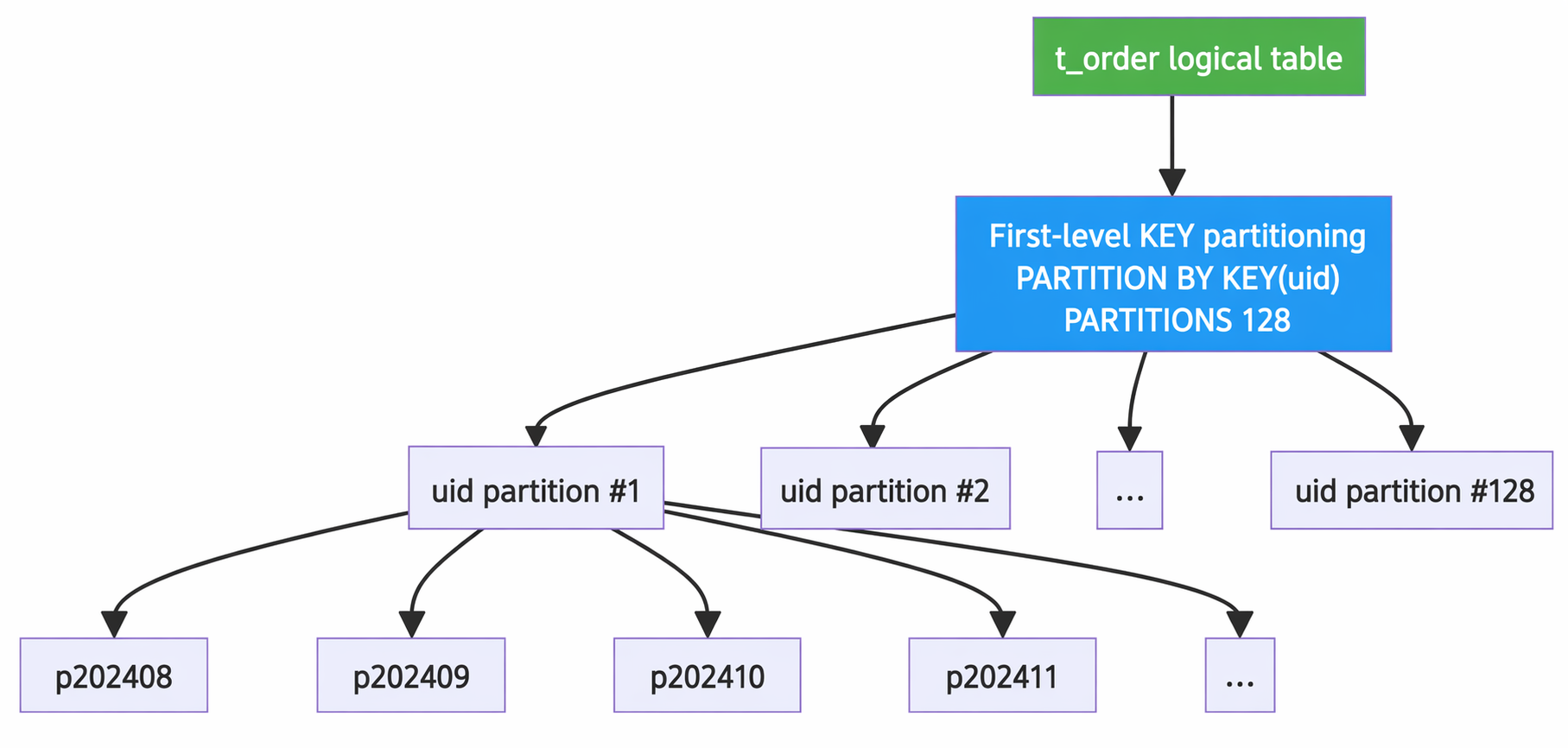
A typical order table DDL looks like this (anonymized):
CREATE TABLE `t_order` (
    `id` bigint NOT NULL,
    `uid` bigint NOT NULL,
    `channel_id` int NOT NULL DEFAULT '0',
    `sub_id` bigint DEFAULT '0',
    `biz_type` tinyint NOT NULL,
    `product_id` bigint NOT NULL,
    `type` tinyint NOT NULL,
    `sys_type` tinyint NOT NULL DEFAULT '0',
    `state` tinyint NOT NULL,
    `order_price` decimal(32, 16) NOT NULL DEFAULT '0.0000000000000000',
    `order_qty` decimal(32, 16) NOT NULL DEFAULT '0.0000000000000000',
    `filled_qty` decimal(32, 16) NOT NULL DEFAULT '0.0000000000000000',
    `origin` tinyint NOT NULL,
    `client_order_id` varchar(64) DEFAULT NULL,
    `pnl` decimal(32, 16) NOT NULL DEFAULT '0.0000000000000000',
-- ... Other business columns are omitted ...
    `pt` datetime(3) NOT NULL,
    `create_ts` timestamp(3) NOT NULL DEFAULT CURRENT_TIMESTAMP(3),
    `update_ts` timestamp(3) NULL DEFAULT CURRENT_TIMESTAMP(3),
    PRIMARY KEY (`id`),
    KEY `idx_update_ts` (`update_ts`),
    KEY `idx_composite_1` (`uid`, `id`, `channel_id`, `product_id`, `biz_type`,
        `type`, `sys_type`, `client_order_id`, `origin`,
        `create_ts`, `update_ts`, `pt`, `sub_id`),
    KEY `idx_composite_2` (`uid`, `biz_type`, `id`, `channel_id`, `product_id`,
        `type`, `sys_type`, `client_order_id`,
        `create_ts`, `update_ts`, `pt`, `sub_id`),
    KEY `idx_uid_biz_prod` (`uid`, `biz_type`, `product_id`, `id`, `channel_id`,
        `type`, `sys_type`, `update_ts`, `pt`, `sub_id`,
        `origin`, `state`)
) ENGINE = InnoDB
PARTITION BY KEY(`uid`)
PARTITIONS 128
SUBPARTITION BY RANGE(TO_DAYS(`pt`))
(SUBPARTITION `p202308` VALUES LESS THAN (739129),
 SUBPARTITION `p202310` VALUES LESS THAN (739190),
 SUBPARTITION `p202311` VALUES LESS THAN (739220),
 SUBPARTITION `p202312` VALUES LESS THAN (739251),
 SUBPARTITION `p202401` VALUES LESS THAN (739282),
 SUBPARTITION `p202402` VALUES LESS THAN (739311),
 SUBPARTITION `p202403` VALUES LESS THAN (739342),
 SUBPARTITION `p202404` VALUES LESS THAN (739372),
 SUBPARTITION `p202405` VALUES LESS THAN (739403),
 SUBPARTITION `p202406` VALUES LESS THAN (739433),
 SUBPARTITION `p202407` VALUES LESS THAN (739464),
 SUBPARTITION `p202408` VALUES LESS THAN (739495),
 SUBPARTITION `p202409` VALUES LESS THAN (739525),
 SUBPARTITION `p202410` VALUES LESS THAN (739556),
 SUBPARTITION `p202411` VALUES LESS THAN (739586));
This table has several design characteristics worth noting:
• Wide table design: 60+ columns with large per-row data volume, making table lookups expensive.
• Multiple covering indexes: idx_composite_1, idx_composite_2, and others include many columns, designed to cover common query patterns and reduce table lookups.
• Monthly second-level partitions: Each first-level partition has over a dozen subpartitions, growing continuously over time.
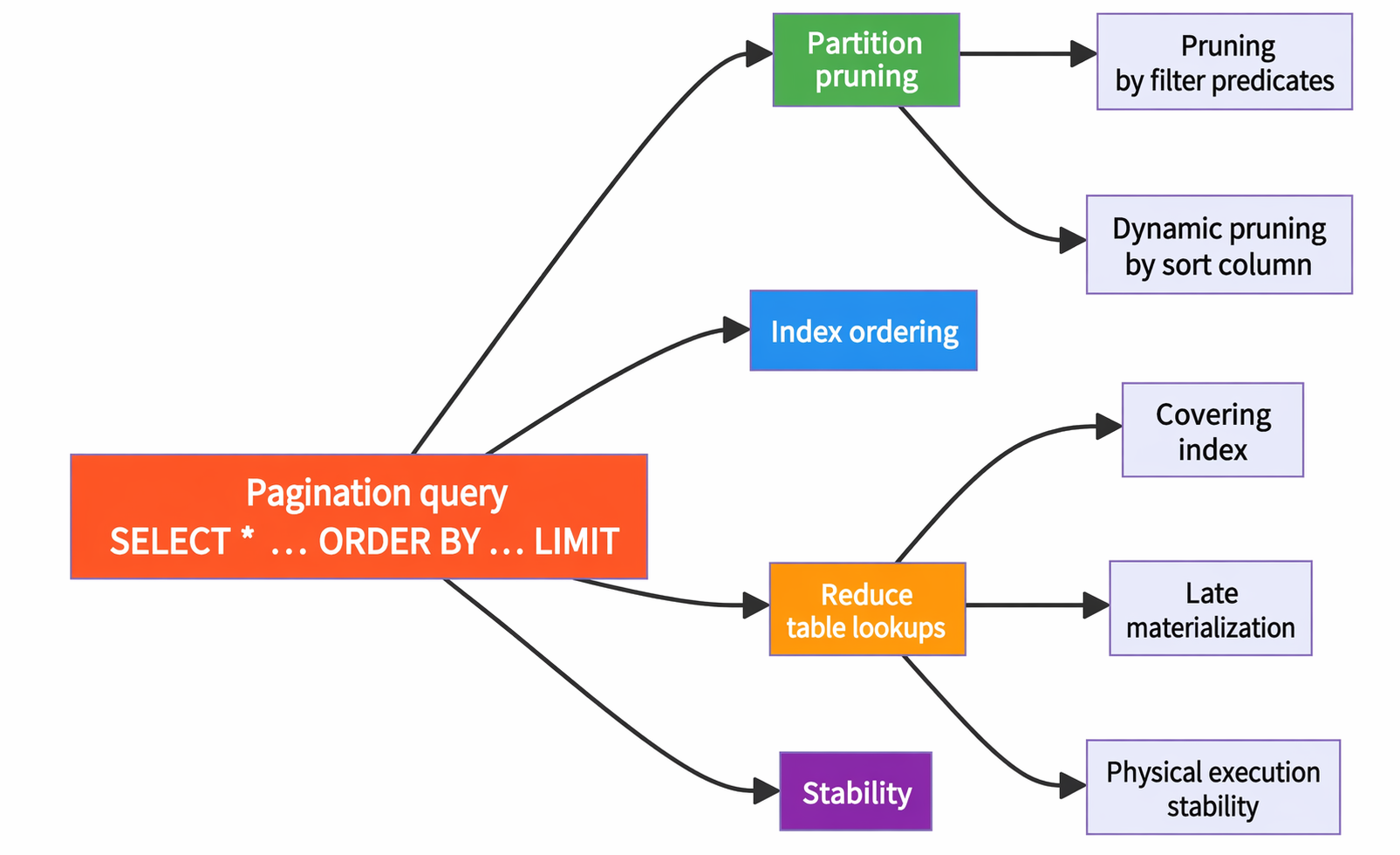
For paginated queries on large order tables, we have identified five key insights:
| Insight | Core idea | Problem solved |
|---|---|---|
| Partition pruning by filter predicates | Exploit correlation between non-partition-key columns and the partition key for pruning | Reduce wasted partition scans |
| Partition pruning by sort column | Exploit the roughly monotonic relationship between sort column and partition key for dynamic pruning | Avoid long-tail slow queries |
| Index ordering | Split OR/IN conditions into multiple ordered subqueries, then merge | Use early termination to avoid full table scans |
| Reduce table lookups | Covering index + late materialization + physical addressing optimization | Reduce random I/O |
| Stability | Index selection must follow a deterministic methodology | Prevent cascading failures from choosing the wrong index |
Users frequently query recently modified order details with queries like:
SELECT * FROM t_order
WHERE uid = 12345678
  AND pt >= '2024-08-01 00:00:00.000'
  AND update_ts > '2024-11-13 14:20:00.000'
  AND update_ts < '2024-11-13 14:25:00.000'
  AND origin != 33
ORDER BY id DESC
LIMIT 0, 100;
For small users, filtering by uid produces a small enough dataset that performance is not an issue. But for large tenants, this query becomes a slow query. Here is why:
The condition pt >= '2024-08-01' forces the query to scan four subpartitions: p202408, p202409, p202410, and p202411. However, the update_ts filter restricts the results to orders modified in the last few days, and recently modified orders tend to be recently placed orders — so the actual results all come from the p202411 partition. The other three partitions are scanned for nothing.
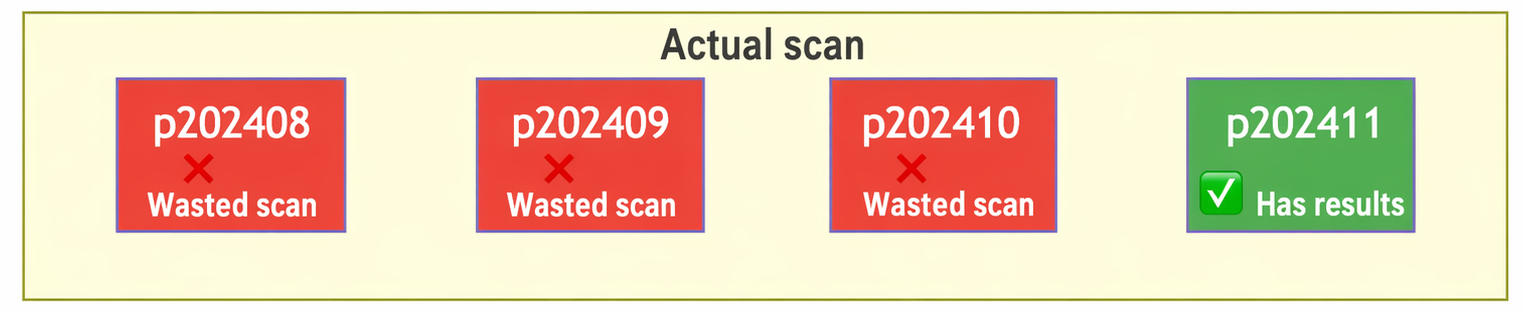
The cost of wasted scans is high: on a large tenant's partition, a wasted scan essentially reads through all the partition's data, becoming a long-tail slow query. Partition pruning by filter predicates is about avoiding exactly this kind of long tail.
The previous section discussed cases where a column in the filter predicate correlates with the partition key. A more common scenario is when the user's SQL contains only uid as a filter — no time-related predicates at all. In this case, partition pruning on pt is impossible, and the query must scan all subpartitions under the corresponding first-level partition.
SUBPARTITION `p202308` VALUES LESS THAN (739129),
SUBPARTITION `p202310` VALUES LESS THAN (739190),
...
SUBPARTITION `p202409` VALUES LESS THAN (739525),
SUBPARTITION `p202410` VALUES LESS THAN (739556),
SUBPARTITION `p202411` VALUES LESS THAN (739586))
Suppose the p202410 partition already satisfies the Top 100 requirement, and qualifying orders in the remaining dozen-plus partitions are not in the Top 100.
In a distributed database, a logical SQL is split into multiple physical SQL statements pushed down to individual partitions, with the results merged via merge sort. The problem is:
| Partition | Execution | Latency |
|---|---|---|
| p202410 / p202411 | Returns results quickly | Milliseconds |
| p202308 ~ p202409 | Scans through all data | Seconds (long tail) |
The overall query latency is determined by the slowest physical SQL — the partitions with wasted scans.
Under the original merge logic:
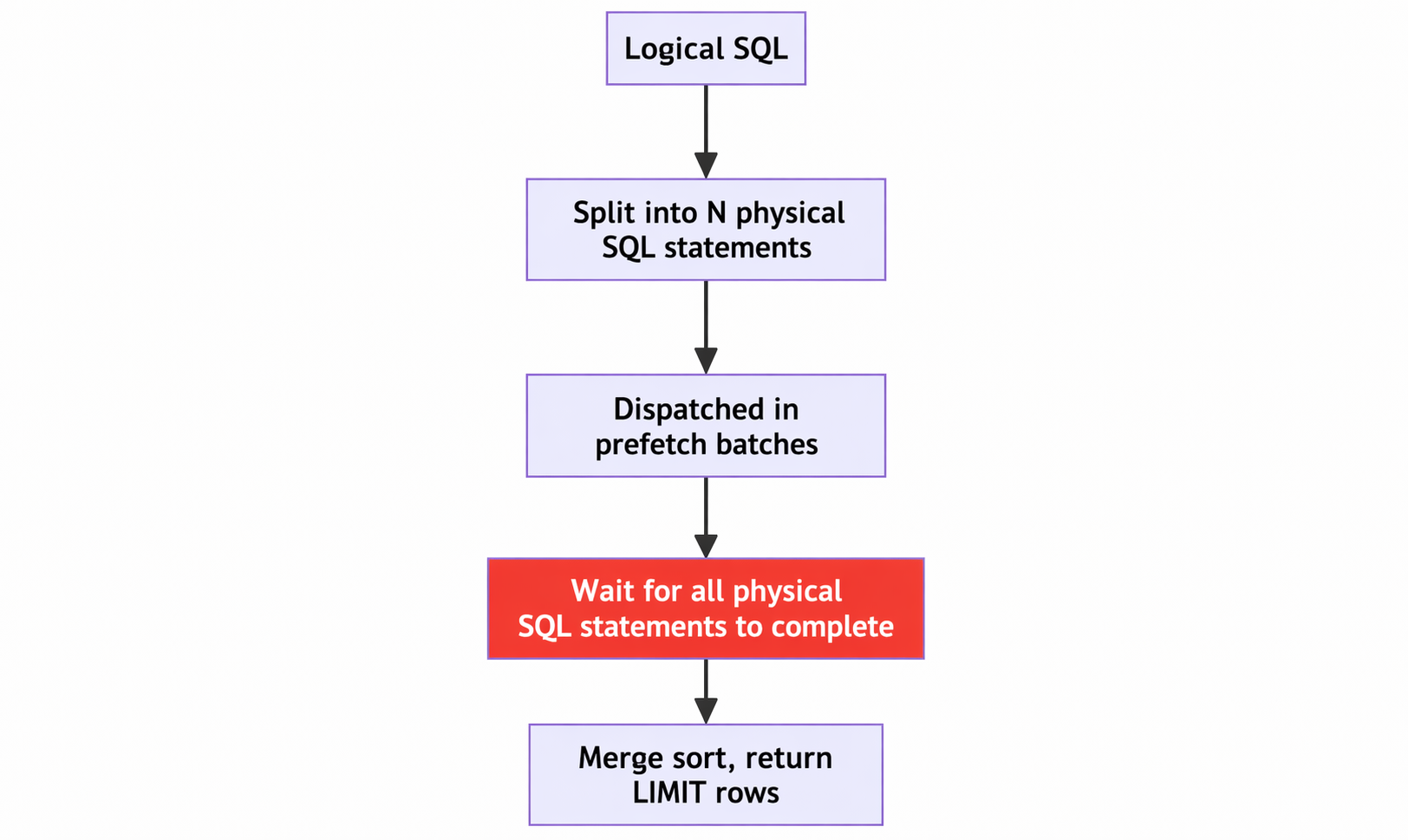
All partitions' physical SQL statements must complete before the merge sort can proceed. Long-tail partitions drag down the overall latency. Partition pruning by sort column addresses exactly this kind of long tail.
The key to fast pagination on row stores is early termination: rather than filtering first and then sorting to pick the top K, the query should exploit index ordering to filter and pick the top K simultaneously, stopping as soon as enough rows are found.
Equality predicates naturally exploit index ordering. But OR conditions break index ordering and prevent early termination.
SELECT * FROM t_swap
WHERE asset_a = 'TOKEN26' OR asset_b = 'TOKEN50'
ORDER BY id
LIMIT 100;
In the query above, asset_a and asset_b each have their own index. Splitting the OR condition allows each branch to exploit index ordering for early termination on ORDER BY id. IN conditions are a special case of OR and can be handled the same way.
SELECT * FROM (
    (SELECT * FROM t_swap WHERE asset_a = 'TOKEN26'
     ORDER BY id LIMIT 100)
    UNION
    (SELECT * FROM t_swap WHERE asset_b = 'TOKEN50'
     ORDER BY id LIMIT 100)
) t
ORDER BY id
LIMIT 100;For wide tables (60+ columns), SELECT * with table lookups is extremely expensive. The random I/O from table lookups is orders of magnitude slower than sequential scans, making it one of the primary performance bottlenecks for pagination queries.
If an index contains all the columns the query needs, no table lookup is required. The wide indexes like idx_composite_1 described above serve exactly this purpose. However, covering indexes come at a cost: the indexes themselves consume significant storage, and writes must maintain more indexes.
When covering indexes cannot cover SELECT *, late materialization can be used: first retrieve the list of qualifying primary keys through a covering index (fetching only the LIMIT number of rows), then do a primary-key lookup to get the full data.
Original SQL:
SELECT * FROM t_order
WHERE uid = 1
  AND channel_id = 0
  AND sub_id IN (0)
  AND id > 123456789
ORDER BY update_ts DESC
LIMIT 0, 20;
Rewritten with late materialization:
SELECT t_order0.*
FROM (
    SELECT id, uid, pt
    FROM t_order
    WHERE uid = 1
      AND channel_id = 0
      AND sub_id IN (0)
      AND id > 123456789
    ORDER BY update_ts DESC
    LIMIT 20
) AS t3
INNER JOIN t_order AS t_order0
  ON t3.id = t_order0.id
  AND t3.uid = t_order0.uid
  AND t3.pt = t_order0.pt
ORDER BY t_order0.update_ts DESC
LIMIT 20;
The inner query uses covering index idx_composite_1 to retrieve only the primary key and partition keys, avoiding massive random table-lookup I/O. The outer query performs pinpoint primary-key lookups for just those rows, reducing the number of table lookups from a full scan down to at most 20.
Beyond SQL-level optimizations, PolarDB-X also optimizes table lookups at the storage engine level, including Guess Primarykey Pageno (GPP) and physical addressing optimization4, which reduce I/O amplification during table lookups and improve cache hit rates.
For large order tables, memory is never enough. If the wrong index is chosen, large volumes of data are loaded into the buffer pool, polluting the cache and triggering a cascading failure. With the ever-changing filter predicates of pagination queries, index selection lacks determinism and can trigger a cascade at any time.
There is a well-established methodology for pagination query index design:
| Checklist item | Recommendation | Reason |
|---|---|---|
| Index the sort column | Required | Avoid Using filesort, which is the number one killer of slow paging |
| Composite index column order | WHERE equality columns -> ORDER BY columns -> SELECT columns | Follows the B+ tree leftmost-prefix matching principle and leverages index ordering |
| Covering index | Include all SELECT fields if possible | Reduces table lookups, especially critical at large offsets |
| High-selectivity columns first | Place high-selectivity columns first in WHERE conditions | Narrows the scan range quickly |
| Avoid functions on indexed columns | Do not apply functions to indexed columns | Causes index invalidation and triggers full table scans |
| Implicit type conversions | Ensure parameter types match column types | Passing a number to a string column causes index invalidation |
Today, users typically rely on AI to design SQL indexes. AI produces indexes that follow the methodology above. As long as the database's index selection behavior aligns with the AI-recommended index design, stability is ensured. In other words, the database's index selection must be consistent with the AI-recommended design to achieve deterministic performance in production.
To validate the actual benefits of each optimization, here is a side-by-side comparison from a real user scenario:
| Comparison | Another distributed database | PolarDB-X |
|---|---|---|
| SQL1 (partition pruning by filter predicates) | 5 s | 0.01 s |
| SQL2 (partition pruning by sort column) | 3 s | 0.05 s |
| SQL3 (index ordering) | 10 s | 0.001 s |
| SQL4 (late materialization) | 10 s | 0.6 s |
| Index selection stability | No guarantee | Stable |
| Peak QPS | 4K (crash, scaling up does not help) | 60K (linearly scalable) |
This post drew from real production cases to present five optimization insights for paginated queries on large order tables in PolarDB-X. These optimizations cover the full chain from partition pruning, index utilization, and table-lookup reduction to stability assurance. The core ideas can be summarized as:
[1] PolarDB-X partition design best practices
[2] PolarDB-X cold data archiving with TTL
[3] PolarDB-X creating archive tables
Core Technology of PolarDB-X Storage Engine | Secondary Prefix Compression
ApsaraDB - November 24, 2025
ApsaraDB - March 17, 2025
ApsaraDB - July 30, 2024
ApsaraDB - March 26, 2025
ApsaraDB - June 12, 2026
ApsaraDB - August 23, 2024
 PolarDB for PostgreSQL
Alibaba Cloud PolarDB for PostgreSQL is an in-house relational database service 100% compatible with PostgreSQL and highly compatible with the Oracle syntax.
Learn More
PolarDB for Xscale
Alibaba Cloud PolarDB for Xscale (PolarDB-X) is a cloud-native high-performance distributed database service independently developed by Alibaba Cloud.
Learn More
PolarDB for MySQL
Alibaba Cloud PolarDB for MySQL is a cloud-native relational database service 100% compatible with MySQL.
Learn More Database for FinTech Solution
Leverage cloud-native database solutions dedicated for FinTech.
Learn MoreMore Posts by ApsaraDB


