One API key, one CLI, every AI modality — managed from your terminal. The Model Studio Token Plan for Individual is a personal AI subscription that puts every text, image, video, and audio model on Alibaba Cloud Model Studio behind one credit pool, refreshed on a 5-hour + weekly dual reset.
The Model Studio CLI is what turns that subscription into a full multimodal AI workstation: check your credit balance, lift a rate limit, generate an image, and voice a video — all without ever opening the console. And you get two ways to drive it: type the bl commands yourself, or install the official agent skill and let an AI agent like Claude Code or Qwen Code run them for you from plain-English requests. If the plan is the fuel, the CLI is the engine.
This guide walks through a full working day on the plan, using nothing but the terminal.
Before you start: The commands in this guide require Model Studio CLI v1.10 or later — the core Token Plan features landed across v1.9.0–v1.10.1. Update first:
npm update -g @modelstudio/cliPicture a full-stack developer on the Standard tier ($18/mo early-bird). Their daily driver is Qwen3.8-Max — the flagship model debuting exclusively on the Token Plan — which they lean on for exactly what it was built for: full-stack development, data analysis, and Office workflow automation.
Their subscription gives them 3,000 credits every 5 hours and 10,000 credits every 7 days, covering every text, video, image, and audio model on the platform (see the full Token Plan tier breakdown for pricing details). What the CLI adds is control: every credit, quota, and model call becomes a one-line command.
Here's how that day unfolds.
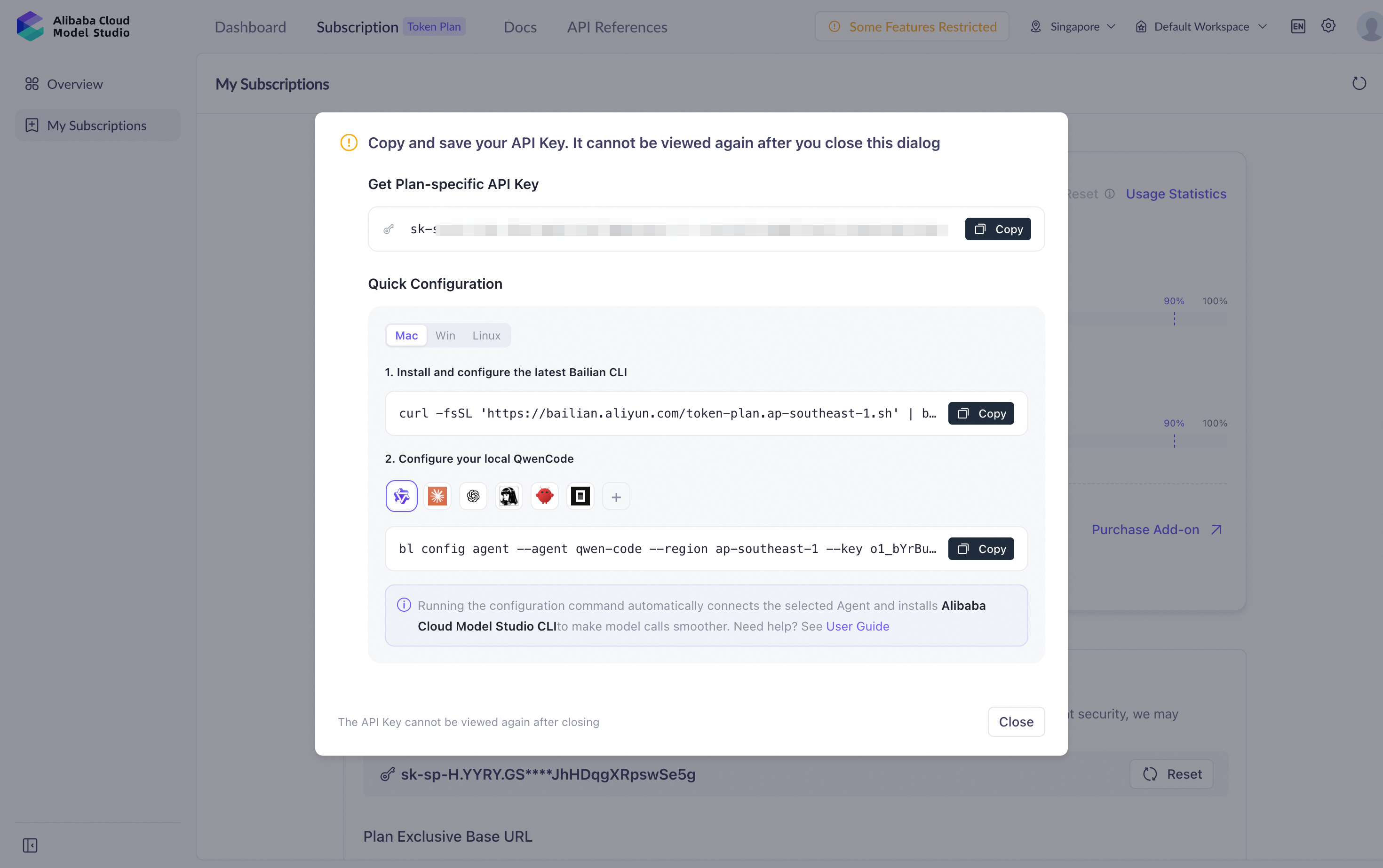
After subscribing, you receive a dedicated Token Plan API key in the sk-sp-xxxxx format. Linking it to the CLI takes one command:
bl auth login --config token-plan --api-key sk-sp-xxxxxThat's the entire setup. The CLI recognizes the sk-sp- prefix and routes every request to the correct Token Plan endpoints automatically — no base URLs to look up, no environment variables to export, no per-tool configuration.
Verify the connection:
bl auth statusYou'll see your active configuration, key status, and plan association. From this point on, every command in this guide draws from your Token Plan credit pool.
The CLI repository ships an official agent skill (skills/bailian-cli/). Install it once, globally:
npx skills add modelstudioai/cli --all -gWith the skill in place, AI agents like Claude Code, Qwen Code, and Codex can translate natural-language requests into the corresponding bl commands — one login, one skill install, and your AI agent speaks Model Studio. Agent-driven calls use the same sk-sp- key, the same credit pool, and the same pricing as commands you type yourself, and you can always drop down to the raw command. Throughout this guide, each scenario shows both tracks: what you'd ask your agent, and the command that runs underneath.
First coffee, first check — ask your agent, or run the command yourself:
In your agent: "How much Token Plan credit do I have left this cycle?"
bl usage summary --days 7This prints your credit consumption for the current week alongside what's remaining in your active windows. It's the terminal equivalent of glancing at your fuel gauge before a road trip.
The numbers make more sense once you know how the plan refills. Like Codex and other leading AI subscription products, the Token Plan uses a rolling reset model with two cycles running in parallel:
There's no flat monthly pool to ration or hoard — the 5-hour + weekly dual reset is built for sustained daily use. The bl usage summary output reflects both windows, so a quick morning check tells you exactly how much headroom today's work has.
Mid-morning, our developer kicks off a batch data-analysis job — hundreds of CSV-processing calls to Qwen3.8-Max. Before launching, a quick capacity check:
In your agent: "Am I close to my rate limit on qwen3.8-max?"
bl quota check --model qwen3.8-maxIntroduced in v1.8.0, this renders a live progress bar of your current RPM and TPM consumption against your limits. If the bar is already running hot, you'll know before the batch job starts throwing rate-limit errors — not after.
And when you can see a crunch coming, you don't have to file a ticket or hunt through console pages. Request a temporary limit increase right from the same terminal:
In your agent: "Request a temporary TPM bump on qwen3.8-max."
bl quota request --model qwen3.8-max --tpm 8000000The request is submitted, tracked, and applied without leaving your shell. Later, if you want a record of what was raised and when:
bl quota historyEvery quota adjustment, timestamped and auditable. To review the standing limits on any model, bl quota list --model qwen3.8-max has you covered.
Lunch break is a good moment for housekeeping. Three habits keep a Standard-tier subscription feeling much bigger than it is.
Model Studio grants free-tier quota on many models, and free credits have expiry dates. Find what's about to vanish:
In your agent: "Do I have any free-tier credits expiring soon?"
bl usage free --expiring 3This lists free-tier grants expiring within 3 days. Route today's non-urgent workloads there first — expired free credits are the only truly wasted ones.
Off-peak discounts (22:00–08:00 Beijing Time) stack with your Token Plan credits — during that window, supported models consume fewer credits per call, so the same allocation stretches further. The exact multiplier varies by model; check the current per-model off-peak rates before scheduling.
The practical move: queue batch jobs, long agent runs, and bulk generation for the off-peak window. For developers in US and EU time zones, that window overlaps most of the working day — this isn't a night-owl trick, it's your default operating mode.
Optimization without measurement is guesswork. Check your per-model trend:
bl usage stats --model qwen3.8-max --days 30Thirty days of consumption data for your flagship model, straight to the terminal. If your off-peak scheduling is working, you'll see it here.
Finally, if you want strict control over whether free-tier quota gets consumed at all, there's a global switch:
bl usage freetier --all --on    # allow free-tier consumption
bl usage freetier --all --off   # disable it entirely
Prefer finer control? Swap --all for --model <model> to toggle free-tier consumption per model. Useful when you're benchmarking real credit costs, or when you'd rather save free grants for a specific project.
Afternoon: a product launch needs copy, a hero image, a short video, and a voiceover. On most stacks that's four subscriptions and four API keys. Here it's four commands against one credit pool.
Write the copy with Qwen3.8-Max:
In your agent: "Draft the product launch copy with qwen3.8-max."
bl text chat --model qwen3.8-maxAn interactive session with the flagship model — draft the product description, punch up the headline, generate the landing-page FAQ.
Generate the hero image from the finished copy:
bl image generate --prompt "Minimalist product hero shot of a sleek developer terminal on a desk, soft studio lighting, launch-day banner style"Turn the image into a video. Since v1.10.1, the CLI accepts local files directly — image editing, image-to-video, reference-to-video, and vision understanding all take a path on your disk, no pre-uploading to a URL required:
bl video refPoint it at the hero image you just generated, and the video model uses it as the visual reference for the launch clip.
Add the voiceover:
In your agent: "Add a voiceover to the launch clip."
bl speech synthesizeCopy, image, video, narration — one afternoon, one terminal, and every call billed against the same Token Plan credit pool. No modality silos, no separate invoices, no key juggling.
The v1.10.1 local-file upgrade matters more than it sounds. Multimodal pipelines used to mean uploading intermediate assets somewhere public just to reference them. Now your working directory is the pipeline.
Evening wind-down: back to feature work in the IDE, with an AI coding agent handling the heavy lifting. There are two levels of integration here, and they build on each other.
Level one: your agent drives the CLI. If you installed the official skill during setup, agents like Claude Code, Qwen Code, and Codex can already run your entire Token Plan day in natural language — credit checks, quota requests, multimodal generation, all of it. You ask in plain English; the agent invokes the matching bl command, billed against the same sk-sp- key.
Level two: your plan becomes the agent's model backend. One fully-specified command connects your coding agent to the plan:
bl config agent --agent claude-code --base-url https://dashscope.aliyuncs.com/apps/anthropic --api-key sk-sp-xxxxx --model qwen3.8-maxSpell out all four pieces — the agent, the base URL, your sk-sp- key, and the model — and the CLI configures the agent to run through your Token Plan. That means the model answering inside your IDE is the same Qwen3.8-Max, burning the same credit pool you've been managing all day. Agents supported today include claude-code, qwen-code, opencode, openclaw, hermes, and codex.
For developers juggling multiple projects or environments, the CLI also supports named configuration profiles — keep your Token Plan setup, a work account, and an experimental sandbox isolated from each other, and switch between them cleanly instead of overwriting a single global config.
This is the full-circle moment: terminal chat, multimodal generation, and IDE-embedded coding agents all draw from one subscription, tracked by the same bl usage commands you ran at breakfast.
Everything from the day above, plus the rest of the toolkit. Use it two ways: as a typing reference, and as a map of what actually runs when an agent drives the CLI for you — these are the exact commands it executes under the hood.
| Command | What it does |
|---|---|
bl auth login --config token-plan --api-key sk-sp-xxxxx |
Link your Token Plan key; endpoints auto-routed |
bl auth status |
Verify active configuration and key status |
bl usage summary --days 7 |
Credit consumption and remaining balance |
bl usage stats --model qwen3.8-max --days 30 |
Per-model consumption trend |
bl usage free --model qwen3.8-max --expiring 3 |
Free-tier grants nearing expiry |
bl usage freetier --all --on / --all --off
|
Free-tier consumption switch (use --model <model> for per-model control) |
bl quota list --model qwen3.8-max |
Standing rate limits for a model |
bl quota check --model qwen3.8-max |
Live RPM/TPM progress bars |
bl quota request --model qwen3.8-max --tpm 8000000 |
Request a temporary limit increase |
bl quota history [--model <model>] |
Audit trail of quota adjustments, optionally filtered by model |
bl config agent --agent claude-code --base-url https://dashscope.aliyuncs.com/apps/anthropic --api-key sk-sp-xxxxx --model qwen3.8-max |
Wire a coding agent into your plan |
| Command | What it does |
|---|---|
bl text chat --model qwen3.8-max |
Interactive chat with the flagship model |
bl omni |
Omni-modal interactive session |
bl image generate --prompt "..." / bl image edit
|
Image generation and editing (local files supported) |
bl video generate / bl video edit / bl video ref
|
Video generation, editing, and reference-to-video |
bl vision describe |
Vision understanding on images (local files supported) |
bl speech synthesize / bl speech recognize
|
Text-to-speech and speech recognition |
bl search web --query <text> |
Built-in web search |
bl file upload --file <path> --model <model> |
Upload files to the platform |
bl app call |
Invoke a platform application |
bl mcp |
MCP server integration |
bl pipeline |
Chain multi-step multimodal workflows |
bl auth login --config token-plan --api-key sk-sp-xxxxx — the sk-sp- prefix auto-routes every request to the Token Plan endpoints.bl quota check renders live RPM/TPM progress bars; bl quota request raises limits without filing a ticket.bl config agent command runs your IDE coding agent on the same Qwen3.8-Max and the same credit pool.npx skills add modelstudioai/cli --all -g) lets Claude Code, Qwen Code, and Codex drive every command in natural language — same credit pool, same pricing, and you can always drop down to the raw command.The Model Studio Token Plan for Individual is a personal AI subscription that provides a shared credit pool covering every text, image, video, and audio model on Alibaba Cloud Model Studio. Credits reset every 5 hours and every 7 days, and early-bird pricing starts at $6/mo.
Run bl auth login --config token-plan --api-key sk-sp-xxxxx using the dedicated sk-sp- key you receive after subscribing. The CLI detects the prefix and routes all requests to the correct Token Plan endpoints automatically — no base URLs or environment variables required.
Credits follow a 5-hour + weekly dual reset: your short-window allocation refreshes every 5 hours, and your weekly ceiling resets every 7 days. Run bl usage summary --days 7 to see both windows at any time.
Qwen3.8-Max, the flagship model debuting exclusively on the Token Plan, built for full-stack development, data analysis, and Office workflow automation. Call it with bl text chat --model qwen3.8-max, or wire it into your IDE with bl config agent --agent claude-code --base-url https://dashscope.aliyuncs.com/apps/anthropic --api-key sk-sp-xxxxx --model qwen3.8-max.
Yes. Terminal chat, multimodal generation, and coding agents configured via bl config agent all draw from the same Token Plan credit pool, tracked with the same bl usage commands.
No. Install the official agent skill with npx skills add modelstudioai/cli --all -g, and AI agents like Claude Code, Qwen Code, and Codex will translate natural-language requests into the corresponding bl commands. That dramatically lowers the learning curve, and every agent-driven call bills against the same Token Plan credit pool. The raw commands are still there whenever you want to run them by hand — the cheat sheet above covers the full set.
The Model Studio Token Plan for Individual gives you predictable credits across every AI modality; the CLI turns those credits into a workflow you never have to leave the terminal to manage. Fuel and engine — that's the whole formula behind the platform's promise as the Foundation for AI Innovation.
npm update -g @modelstudio/cli to v1.10+bl auth login --config token-plan --api-key sk-sp-xxxxx
One API key, one CLI, every AI modality — managed from your terminal. Subscribe now →

1,501 posts | 510 followers
FollowAlibaba Cloud Community - August 10, 2026
JwdShah - March 27, 2026
Alibaba Cloud Community - June 3, 2026
Alibaba Cloud Community - April 2, 2026
Alibaba Cloud Community - January 30, 2026
Regional Content Hub - June 5, 2026
1,501 posts | 510 followers
Follow Token Plan
Build more, spend less. One plan, every modality.
Learn More
Alibaba Cloud Model Studio
A one-stop generative AI platform to build intelligent applications that understand your business, based on Qwen model series such as Qwen-Max and other popular models
Learn More Qwen
Qwen
Full-range, open-source, multimodal, and multi-functional
Learn More Log Management for AIOps Solution
Log into an artificial intelligence for IT operations (AIOps) environment with an intelligent, all-in-one, and out-of-the-box log management solution
Learn MoreMore Posts by Alibaba Cloud Community

