搶佔式執行個體具有被中斷的風險,如果您的業務對執行個體中斷敏感,則需要注意及時感知搶佔式執行個體的中斷事件,並對中斷做出合理的響應處理以免造成業務損失。本文以輕量訊息佇列(原MNS)為例向您介紹如何藉助輕量訊息佇列感知搶佔式執行個體中斷事件並進行響應處理。
整體流程
準備工作
建立AccessKey
由於阿里雲帳號(主帳號)擁有資源的所有許可權,其AccessKey一旦泄露風險巨大,所以建議您使用滿足最小化許可權需求的RAM使用者的AccessKey。擷取方法請參見建立AccessKey。
為RAM使用者授權
給RAM使用者授予操作輕量訊息佇列SMQ(原MNS)相關資源的許可權。本文提供的範例程式碼需要從輕量訊息佇列消費訊息,建議授予以下許可權:
雲產品
授予許可權
輕量訊息佇列SMQ(原MNS)
AliyunMNSFullAccess
配置訪問憑證和訪問網域名稱
本文範例程式碼會從系統內容變數中讀取存取憑證和訪問網域名稱:
配置訪問憑證,請參見在Linux、macOS和Windows系統配置環境變數。
配置訪問網域名稱,請參見配置訪問網域名稱。
安裝SMQ SDK
擷取SMQ SDK,本文通過添加Maven依賴的方式來安裝SMQ Java SDK。更多安裝方式,請參見安裝SMQ SDK。
操作步驟
建立輕量訊息佇列
建立輕量訊息佇列,用來接收CloudMonitor發送的搶佔式執行個體中斷通知訊息。
登入輕量訊息佇列(原 MNS)控制台,在左側導覽列,選擇。
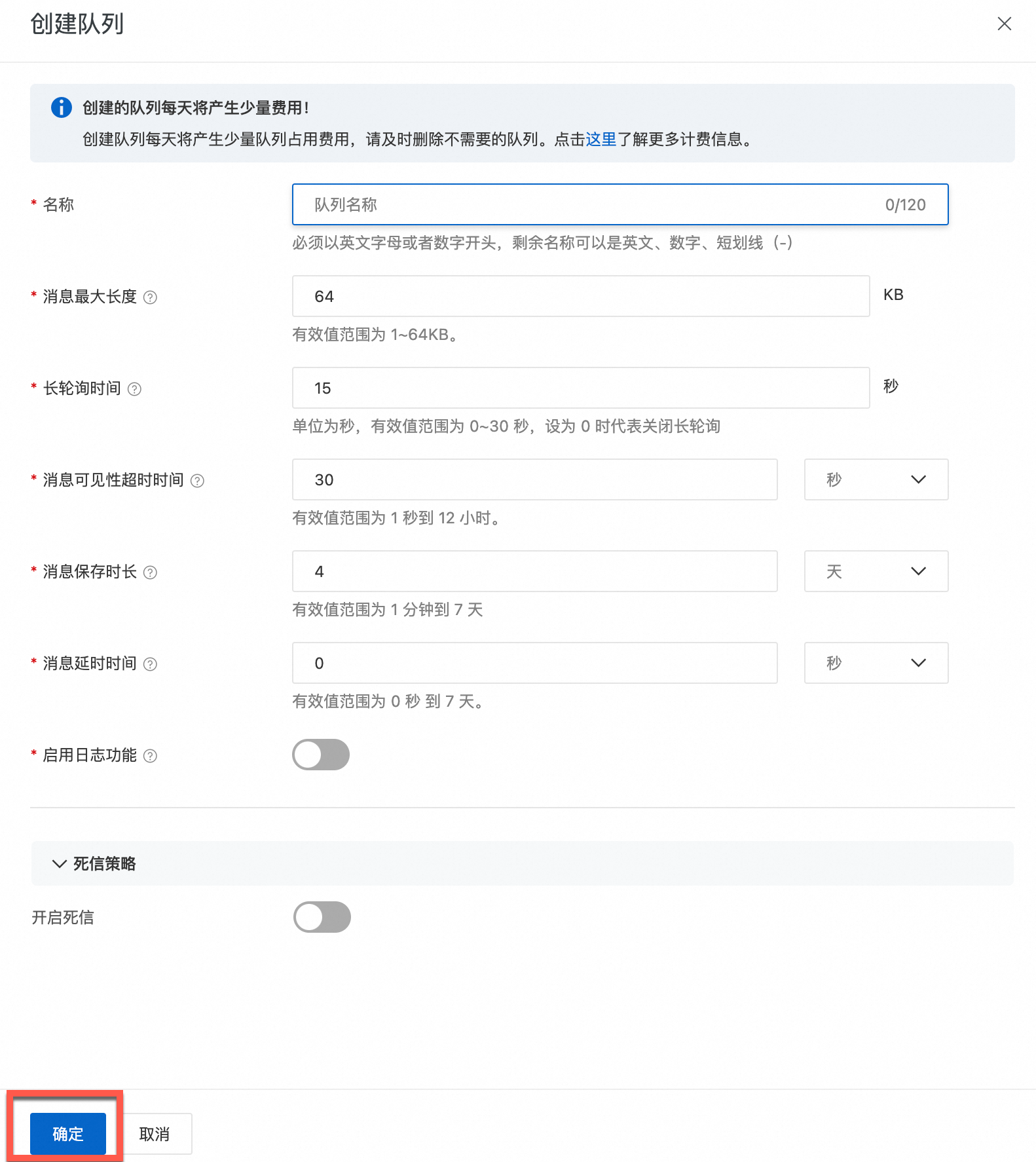
在頂部功能表列,選擇地區,在队列列表頁面,單擊创建队列。
在创建队列面板根據提示配置參數,單擊确定。
建立訂閱策略
CloudMonitor即時監控搶佔式執行個體的中斷事件,並在發生事件警示時通過訂閱策略中指定的推送渠道推送搶佔式執行個體中斷通知。
登入CloudMonitor控制台,在左側導覽列,選擇。
在訂閱策略頁簽,單擊建立訂閱策略,下一步,設定訂閱策略的相關參數。
本樣本僅說明訂閱搶佔式執行個體中斷事件所涉及的主要參數,其他參數可根據需要和提示進行填寫。更多參數說明,請參見管理事件訂閱(推薦)。
訂閱類型:選擇系統事件。

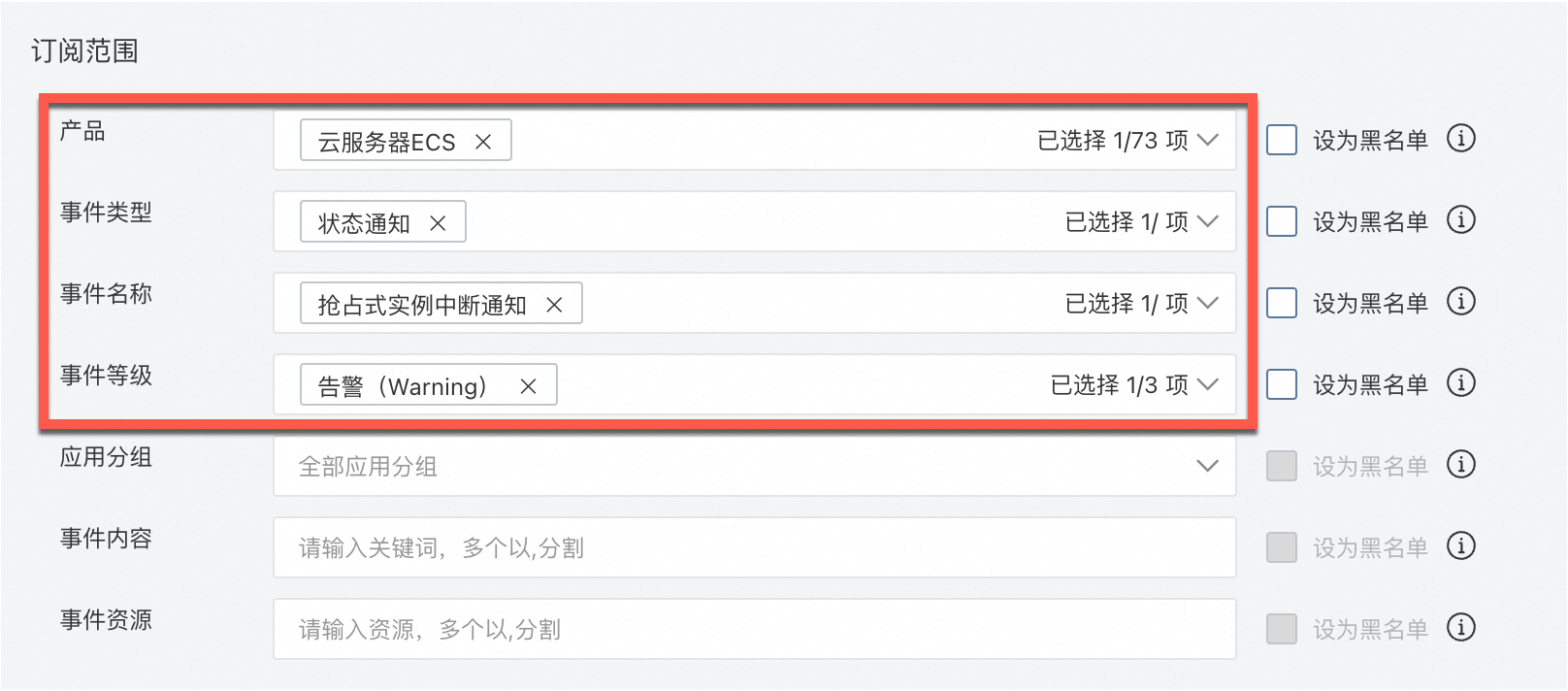
訂閱範圍:按照下圖進行填寫。
推送與整合:單擊+添加渠道,快顯視窗中單擊增加渠道,選擇第1步建立的輕量訊息佇列,其他參數根據提示完成填寫即可。更多推送渠道說明,請參見管理推送渠道。
類比中斷事件
搶佔式執行個體的中斷事件為被動觸發事件,當您在開發搶佔式執行個體中斷事件處理常式過程中,無法有效地進行代碼調試。您可以藉助調試事件訂閱類比搶佔式執行個體中斷事件。
在訂閱策略頁簽,單擊調試事件訂閱。
在建立事件調試面板,產品選擇Elastic Compute Service,名稱選擇搶佔式執行個體中斷通知。
系統自動產生JSON格式的調試內容,您需要將JSON檔案中資源相關的資訊替換為待類比中斷事件的搶佔式執行個體的資訊。
阿里雲帳號UID變數需要替換為當前登入的阿里雲帳號UID。<resource-id>以及<instanceId>需要替換為搶佔式執行個體的執行個體ID。<地區ID>需要替換為搶佔式執行個體所屬的地區ID。{ "product": "ECS", "resourceId": "acs:ecs:cn-shanghai:阿里雲帳號UID:instance/<resource-id>", "level": "WARN", "instanceName": "instanceName", "regionId": "<地區ID>", "groupId": "0", "name": "Instance:PreemptibleInstanceInterruption", "content": { "instanceId": "<instanceId>", "instanceName": "wor***b73", "action": "delete" }, "status": "Normal" }
單擊確定,系統提示操作成功,CloudMonitor自動向輕量訊息佇列發送一條警示測試通知訊息。
拉取並響應訊息
類比中斷事件處理常式,從輕量訊息佇列中拉取消費搶佔式執行個體中斷通知訊息,同時可以根據您的需求添加對應的業務處理邏輯。下面範例程式碼以一個圖片灰階轉換處理常式為例示範如何響應和處理中斷事件:
使用線程任務類比圖片轉換處理常式。
import com.aliyun.mns.client.CloudAccount;
import com.aliyun.mns.client.CloudQueue;
import com.aliyun.mns.client.MNSClient;
import com.aliyun.mns.common.utils.ServiceSettings;
import com.aliyun.mns.model.Message;
import org.json.JSONObject;

import javax.imageio.ImageIO;
import java.awt.image.BufferedImage;
import java.io.File;
import java.util.Base64;
import java.util.concurrent.atomic.AtomicBoolean;

/**
 * 可中斷的圖片處理器實作類別,支援灰階轉換
 * 中斷檢測機制(原子變數+線程中斷標誌)
 * 實現特性:
 * 1. 分塊處理自動儲存進度
 * 2. 搶佔式中斷立即響應
 * 3. 中斷後產生部分結果檔案
 */
public class InterruptibleImageProcessor implements Runnable {
    /**
     * 使用原子布爾值實現安全執行緒的狀態控制
     */
    private final AtomicBoolean running = new AtomicBoolean(true);
    /**
     * 儲存處理中的映像資料
     */
    private BufferedImage processedImage;
    /**
     * 處理進度百分比(0-100)
     */
    private int progress;
    /**
     * 線程執行入口
     * **中斷處理邏輯**:
     * 1. 捕獲中斷異常後儲存當前進度
     * 2. 恢複線程中斷狀態(保持中斷語義)
     */
    @Override
    public void run() {
        try {
            convertToGrayScale(new File("input.jpg"), new File("output.jpg"));
            // 類比運行後中斷
            Thread.sleep(5000);
            System.out.println("圖片處理完成");
        } catch (InterruptedException e) {
            System.out.println("處理中斷,已儲存進度至" + progress + "%");
            saveProgress(new File("partial_output.jpg"));
            Thread.currentThread().interrupt(); // 恢複中斷狀態
        } catch (Exception e) {
            System.err.println("處理錯誤: " + e.getMessage());
        }
    }

    /**
     * 外部中斷觸發方法
     * **協作機制**:
     * 與線程中斷標誌配合實現雙重中斷檢測
     */
    public void stop() {
        running.set(false);
    }
}
圖片灰階轉換方法。
/**
 * 將輸入圖片轉換為灰階圖並儲存
 * @param inputFile 原始圖片檔案對象
 * @param outputFile 輸出檔案對象
 * @throws Exception 包含IO異常和中斷異常
 *
 * **演算法說明**:
 * 使用加權平均法進行灰階轉換,係數符合人眼亮度感知公式:
 * Gray = 0.30*R + 0.59*G + 0.11*B
 * 參考:ITU-R BT.601標準
 */
public void convertToGrayScale(File inputFile, File outputFile) throws Exception {
    // 讀取原始映像資料
    BufferedImage original = ImageIO.read(inputFile);
    int width = original.getWidth();
    int height = original.getHeight();
    // 建立灰階模式映像緩衝區
    processedImage = new BufferedImage(width, height, BufferedImage.TYPE_BYTE_GRAY);

    // 分塊處理以支援進度儲存
    for (int y = 0; y < height && running.get(); y++) {
        // 逐像素處理
        for (int x = 0; x < width; x++) {
            // 第一重中斷檢測:檢查線程中斷標誌
            if (Thread.interrupted()) {
                throw new InterruptedException("影像處理被中斷");
            }
            /* 灰階轉換核心演算法 */
            int rgb = original.getRGB(x, y);
            // 分解RGB通道(ARGB格式)
            // 紅色通道
            int r = (rgb >> 16) & 0xFF;
            // 綠色通道
            int g = (rgb >> 8) & 0xFF;
            // 藍色通道
            int b = rgb & 0xFF;
            // 計算灰階值(加權平均法)
            int gray = (int)(0.3 * r + 0.59 * g + 0.11 * b);
            // 重構RGB值(灰階值複製到三個通道)
            processedImage.setRGB(x, y, (gray << 16) | (gray << 8) | gray);
            // 更新進度百分比(注意整數除法問題)
            progress = (y * width + x) * 100 / (width * height);
        }
        // 每處理50行自動儲存進度(檢查點機制)
        if (y % 50 == 0) {
            saveProgress(outputFile);
        }
    }
    // 最終儲存完整結果
    ImageIO.write(processedImage, "jpg", outputFile);
}
圖片處理進度儲存。
/**
 * 儲存處理進度到指定檔案
 * @param outputFile 輸出檔案對象
 *
 * **注意**:
 * 1. 使用靜默失敗策略避免中斷儲存過程
 * 2. 產生臨時檔案名稱為partial_output.jpg
 */
private void saveProgress(File outputFile) {
    try {
        // 使用臨時檔案名稱避免覆蓋最終檔案
        ImageIO.write(processedImage, "jpg", new File("partial_output.jpg"));
    } catch (Exception e) {
        System.err.println("自動儲存失敗: " + e.getMessage());
    }
}
響應處理測試。
測試圖片處理常式運行時,感知到搶佔式執行個體即將中斷回收並進行響應處理。
/**
 * 主方法(測試用)
 * **測試情境**:
 * 1. 啟動處理線程
 * 2. 拉取中斷事件通知訊息
 * 3. 等待線程終止
 */
public static void main(String[] args) throws InterruptedException {
    // 初始化帳號MNSClient
    CloudAccount account = new CloudAccount(
            ServiceSettings.getMNSAccessKeyId(),
            ServiceSettings.getMNSAccessKeySecret(),
            ServiceSettings.getMNSAccountEndpoint());
    MNSClient client = account.getMNSClient();
    //判斷是否匹配搶佔式執行個體中斷事件
    boolean isMatch = false;
    //啟動圖片處理常式
    InterruptibleImageProcessor processor = new InterruptibleImageProcessor();
    Thread processThread = new Thread(processor);
    processThread.start();
    try{
        //從訊息佇列擷取訊息
        CloudQueue queue = client.getQueueRef("spot-interruption");
        Message popMsg = queue.popMessage();
        if (popMsg != null){
            //訊息體預設Base64加密
            System.out.println("message body: " + popMsg.getMessageBodyAsRawString());
            //Base64解碼
            byte[] decodedBytes = Base64.getDecoder().decode(popMsg.getMessageBodyAsRawString());
            String decodedString = new String(decodedBytes);
            System.out.println("message content: " + decodedString);
            //json字串解析
            JSONObject json = new JSONObject(decodedString);
            // 擷取事件名稱 "name"欄位的值
            String name = json.getString("name");
            isMatch = "Instance:PreemptibleInstanceInterruption".equals(name);
            //響應搶佔式執行個體中斷事件處理
            if(isMatch){
                System.out.println("搶佔式執行個體即將被中斷回收");
                //終止圖片處理常式
                processor.stop();
                processThread.interrupt();
                System.out.println("程式終止");
                processThread.join();
                //刪除訊息
                queue.deleteMessage(popMsg.getReceiptHandle());
            }
        }
    }catch (Exception e){
        System.out.println("Unknown exception happened!");
        e.printStackTrace();
    }
    client.close();
}
完整範例程式碼如下:
import com.aliyun.mns.client.CloudAccount;
import com.aliyun.mns.client.CloudQueue;
import com.aliyun.mns.client.MNSClient;
import com.aliyun.mns.common.utils.ServiceSettings;
import com.aliyun.mns.model.Message;
import org.json.JSONObject;
import javax.imageio.ImageIO;
import java.awt.image.BufferedImage;
import java.io.File;
import java.util.Base64;
import java.util.concurrent.atomic.AtomicBoolean;

/**
 * 可中斷的圖片處理器實作類別,支援灰階轉換
 * 中斷檢測機制(原子變數+線程中斷標誌)
 * 實現特性:
 * 1. 分塊處理自動儲存進度
 * 2. 搶佔式中斷立即響應
 * 3. 中斷後產生部分結果檔案
 */
public class InterruptibleImageProcessor implements Runnable {
    /**
     * 使用原子布爾值實現安全執行緒的狀態控制
     */
    private final AtomicBoolean running = new AtomicBoolean(true);
    /**
     * 儲存處理中的映像資料
     */
    private BufferedImage processedImage;
    /**
     * 處理進度百分比(0-100)
     */
    private int progress;

    /**
     * 將輸入圖片轉換為灰階圖並儲存
     * @param inputFile 原始圖片檔案對象
     * @param outputFile 輸出檔案對象
     * @throws Exception 包含IO異常和中斷異常
     *
     * **演算法說明**:
     * 使用加權平均法進行灰階轉換,係數符合人眼亮度感知公式:
     * Gray = 0.30*R + 0.59*G + 0.11*B
     * 參考:ITU-R BT.601標準
     */
    public void convertToGrayScale(File inputFile, File outputFile) throws Exception {
        // 讀取原始映像資料
        BufferedImage original = ImageIO.read(inputFile);
        int width = original.getWidth();
        int height = original.getHeight();
        // 建立灰階模式映像緩衝區
        processedImage = new BufferedImage(width, height, BufferedImage.TYPE_BYTE_GRAY);

        // 分塊處理以支援進度儲存
        for (int y = 0; y < height && running.get(); y++) {
            // 逐像素處理
            for (int x = 0; x < width; x++) {
                // 第一重中斷檢測:檢查線程中斷標誌
                if (Thread.interrupted()) {
                    throw new InterruptedException("影像處理被中斷");
                }
                /* 灰階轉換核心演算法 */
                int rgb = original.getRGB(x, y);
                // 分解RGB通道(ARGB格式)
                // 紅色通道
                int r = (rgb >> 16) & 0xFF;
                // 綠色通道
                int g = (rgb >> 8) & 0xFF;
                // 藍色通道
                int b = rgb & 0xFF;
                // 計算灰階值(加權平均法)
                int gray = (int)(0.3 * r + 0.59 * g + 0.11 * b);
                // 重構RGB值(灰階值複製到三個通道)
                processedImage.setRGB(x, y, (gray << 16) | (gray << 8) | gray);
                // 更新進度百分比(注意整數除法問題)
                progress = (y * width + x) * 100 / (width * height);
            }
            // 每處理50行自動儲存進度(檢查點機制)
            if (y % 50 == 0) {
                saveProgress(outputFile);
            }
        }
        // 最終儲存完整結果
        ImageIO.write(processedImage, "jpg", outputFile);
    }

    /**
     * 儲存處理進度到指定檔案
     * @param outputFile 輸出檔案對象
     *
     * **注意**:
     * 1. 使用靜默失敗策略避免中斷儲存過程
     * 2. 產生臨時檔案名稱為partial_output.jpg
     */
    private void saveProgress(File outputFile) {
        try {
            // 使用臨時檔案名稱避免覆蓋最終檔案
            ImageIO.write(processedImage, "jpg", new File("partial_output.jpg"));
        } catch (Exception e) {
            System.err.println("自動儲存失敗: " + e.getMessage());
        }
    }

    /**
     * 線程執行入口
     * **中斷處理邏輯**:
     * 1. 捕獲中斷異常後儲存當前進度
     * 2. 恢複線程中斷狀態(保持中斷語義)
     */
    @Override
    public void run() {
        try {
            convertToGrayScale(new File("/Users/shaoberlin/Desktop/idea_workspace/aliyun/src/main/resources/input.jpg"), new File("output.jpg"));
            // 類比運行後中斷
            Thread.sleep(5000);
            System.out.println("圖片處理完成");
        } catch (InterruptedException e) {
            System.out.println("處理中斷,已儲存進度至" + progress + "%");
            saveProgress(new File("partial_output.jpg"));
            Thread.currentThread().interrupt(); // 恢複中斷狀態
        } catch (Exception e) {
            System.err.println("處理錯誤:" + e.getMessage());
        }
    }

    /**
     * 外部中斷觸發方法
     * **協作機制**:
     * 與線程中斷標誌配合實現雙重中斷檢測
     */
    public void stop() {
        running.set(false);
    }

    /**
     * 主方法(測試用)
     * **測試情境**:
     * 1. 啟動處理線程
     * 2. 5000ms後觸發中斷
     * 3. 等待線程終止
     */
    public static void main(String[] args) throws InterruptedException {
        // 初始化帳號MNSClient
        CloudAccount account = new CloudAccount(
                ServiceSettings.getMNSAccessKeyId(),
                ServiceSettings.getMNSAccessKeySecret(),
                ServiceSettings.getMNSAccountEndpoint());
        MNSClient client = account.getMNSClient();
        //判斷是否匹配搶佔式執行個體中斷事件
        boolean isMatch = false;
        //啟動圖片處理常式
        InterruptibleImageProcessor processor = new InterruptibleImageProcessor();
        Thread processThread = new Thread(processor);
        processThread.start();
        try{
            //從訊息佇列擷取訊息
            CloudQueue queue = client.getQueueRef("spot-interruption");
            Message popMsg = queue.popMessage();
            if (popMsg != null){
                //訊息體預設Base64加密
                System.out.println("message body: " + popMsg.getMessageBodyAsRawString());
                //Base64解碼
                byte[] decodedBytes = Base64.getDecoder().decode(popMsg.getMessageBodyAsRawString());
                String decodedString = new String(decodedBytes);
                System.out.println("message content: " + decodedString);
                //json字串解析
                JSONObject json = new JSONObject(decodedString);
                // 擷取事件名稱 "name"欄位的值
                String name = json.getString("name");
                isMatch = "Instance:PreemptibleInstanceInterruption".equals(name);
                //響應搶佔式執行個體中斷事件處理
                if(isMatch){
                    System.out.println("搶佔式執行個體即將被中斷回收");
                    //終止圖片處理常式
                    processor.stop();
                    processThread.interrupt();
                    System.out.println("程式終止");
                    processThread.join();
                    //刪除訊息
                    queue.deleteMessage(popMsg.getReceiptHandle());
                }
            }
        }catch (Exception e){
            System.out.println("Unknown exception happened!");
            e.printStackTrace();
        }
        client.close();
    }
}
商務邏輯如果涉及建立快照,請參考CreateSnapshot。
商務邏輯如果涉及建立自訂鏡像,請參考CreateImage。
相關文檔
如果您的搶佔式執行個體上儲存了重要資料或配置,建議您瞭解搶佔式執行個體資料保留和恢複的方法,並提前做好相關配置,避免資料丟失。更多資訊,請參見搶佔式執行個體資料保留和恢複。