Simple Log Service を使用すると、開発者はキーワードを使用してログを取得し、Scan 構文を使用して未加工のログファイルでコンテキストクエリを実行できます。これにより、サーバーにログインせずにログにアクセスできます。
コンテキストフィールドが返される Scan 構文
{インデックス検索クエリ} | {Scan クエリ} | with_pack_meta前提条件
手順
Java SDK
サンプルコード
pom.xml ファイルに次の依存関係を追加します。
<!-- https://mvnrepository.com/artifact/com.aliyun.openservices/aliyun-log -->
<dependency>
    <groupId>com.aliyun.openservices</groupId>
    <artifactId>aliyun-log</artifactId>
    <version>0.6.120</version>
</dependency>
次のコードを実行します。
project、logStore、endpoint、accessKeyId、およびaccessKeySecretを指定します。 詳細については、「エンドポイント」および「AccessKey ペアを作成する」をご参照ください。import com.aliyun.openservices.log.Client; import com.aliyun.openservices.log.common.QueriedLog; import com.aliyun.openservices.log.exception.LogException; import com.aliyun.openservices.log.response.GetLogsResponse; public class DoScanTest { // この例では、AccessKey ID と AccessKey シークレットは環境変数から取得されます。 static String accessKeyId = System.getenv("ALIBABA_CLOUD_ACCESS_KEY_ID"); static String accessKeySecret = System.getenv("ALIBABA_CLOUD_ACCESS_KEY_SECRET"); // Simple Log Service エンドポイントを指定します。 static String host = "ap-southeast-1.log.aliyuncs.com"; // Simple Log Service クライアントを初期化します。 static Client client = new Client(host, accessKeyId, accessKeySecret); public static void main(String[] args) throws LogException { String project = "test-project"; String logStore = "test-logstore"; int fromTime = 1740985125; // event-time、[from, to) int toTime = 1740985125 + 7200; // event-time、[from, to) // String query = "Status:404 | where http_host = 'www.yt.mock.com'"; // コンテキスト情報は返されません String query = "Status:404 | where http_host = 'www.yt.mock.com' | with_pack_meta"; // コンテキスト情報が返されます int totalCount = 0; // boolean reverse = false; // 前から後ろに検索 boolean reverse = true; // 後ろから前に検索 boolean forward = true; int offset = 0; while (true) { GetLogsResponse resp = client.GetLogs(project, logStore, fromTime, toTime, "", query, 100, offset, reverse, forward, "mode=scan;"); for (QueriedLog log : resp.getLogs()) { System.out.println(log.GetLogItem().ToJsonString()); } System.out.println("[このスキャンの応答]\t開始オフセット: " + resp.GetBeginOffset() + "\t終了オフセット: " + resp.GetEndOffset() + "\t結果ログ: " + resp.getLogs().size() + "\t完了: " + resp.IsScanAll()); totalCount += resp.getLogs().size(); if (resp.IsScanAll()) { break; } offset = forward ? (int) resp.GetEndOffset() : (int) resp.GetBeginOffset(); } System.out.println("スキャンされたログの合計\t: " + totalCount); } }返される結果は次のようになります。
{
    "referer": "www.xxx.xxx.xxx",
    "slbid": "slb-01",
    "scheme": "https",
    "vpc_id": "8c093000-9f68-2c0f-a904-5c612483505a",
    "upstream_addr": "125.36.xx.xx",
    "owner_id": "owner-01",
    "body_bytes_sent": "1733",
    "request_method": "GET",
    "http_host": "www.yt.mock.com",
    "http_user_agent": "Mozilla/4.0 (Windows NT 6.3; Win64; x64) AppleWebKit/537.36 (KHTML, like Gecko) Chrome/11.0.1245.0 Safari/537.36",
    "remote_user": "0iu9d",
    "upstream_status": "200",
    "vip_addr": "139.207.xxx.xxx",
    "request_time": "24",
    "__pack_meta__": "0|MTczNjkzNzIxNzg2NDA5NT****==|287|277",
    "__tag__:__pack_id__":"5253859C5169****-3",
    "host": "www.xxx.xxx.xxx",
    "client_ip": "58.19.XXX.XX",
    "user_agent": "Mozilla/5.0 (Windows NT 7.1) AppleWebKit/534.30 (KHTML, like Gecko) Chrome/12.0.742.112 Safari/534.30",
    "remote_addr": "183.70.XX.XXX",
    "__topic__": "nginx_access_log",
    "instance_name": "instance-01",
    "time_local": "03/Mar/2025:08:02:34",
    "request_uri": "/request/path-2/file-4",
    "instance_id": "i-01",
    "request_length": "4458",
    "http_x_forwarded_for": "103.96.xxx.xxx",
    "upstream_response_time": "30",
    "network_type": "vlan",
    "region": "ap-southeast-1",
    "logtime": 1740988954,
    "server_protocol": "HTTP/2.0",
    "status": "404"
}
[このスキャンの応答]\t開始オフセット: 0\t終了オフセット: 1\t結果ログ: 1\t完了: true
スキャンされたログの合計\t: 1

Process finished with exit code 0
コンテキスト情報を表示します。
Scan 構文が
{インデックス検索クエリ} | {Scan クエリ}の場合、返されるログ情報にはコンテキストフィールドは含まれません。コンテキストフィールドを含めるには、{インデックス検索クエリ} | {Scan クエリ} | with_pack_meta構文を使用します。提供されているサンプルコードでは、返されるログコンテキストフィールドは次のとおりです。
__pack_meta__: 0|MTczNjkzNzIxNzg2NDA5NT****==|287|277 __tag__:__pack_id__: 5253859C5169****-3このコンテキスト情報を使用して、GetContextLogs 操作を使用して、未加工のログファイルから前後のログを取得できます。
コンソール
Simple Log Service コンソールで、ターゲットのプロジェクトとログストアをクリックし、検索ボックスに次の Scan クエリ文を入力します。バックエンドリクエストの場合、
with_pack_metaはデフォルトでスキャン文に自動的に追加されます。Status:404 | where http_host = 'www.yt.mock.com'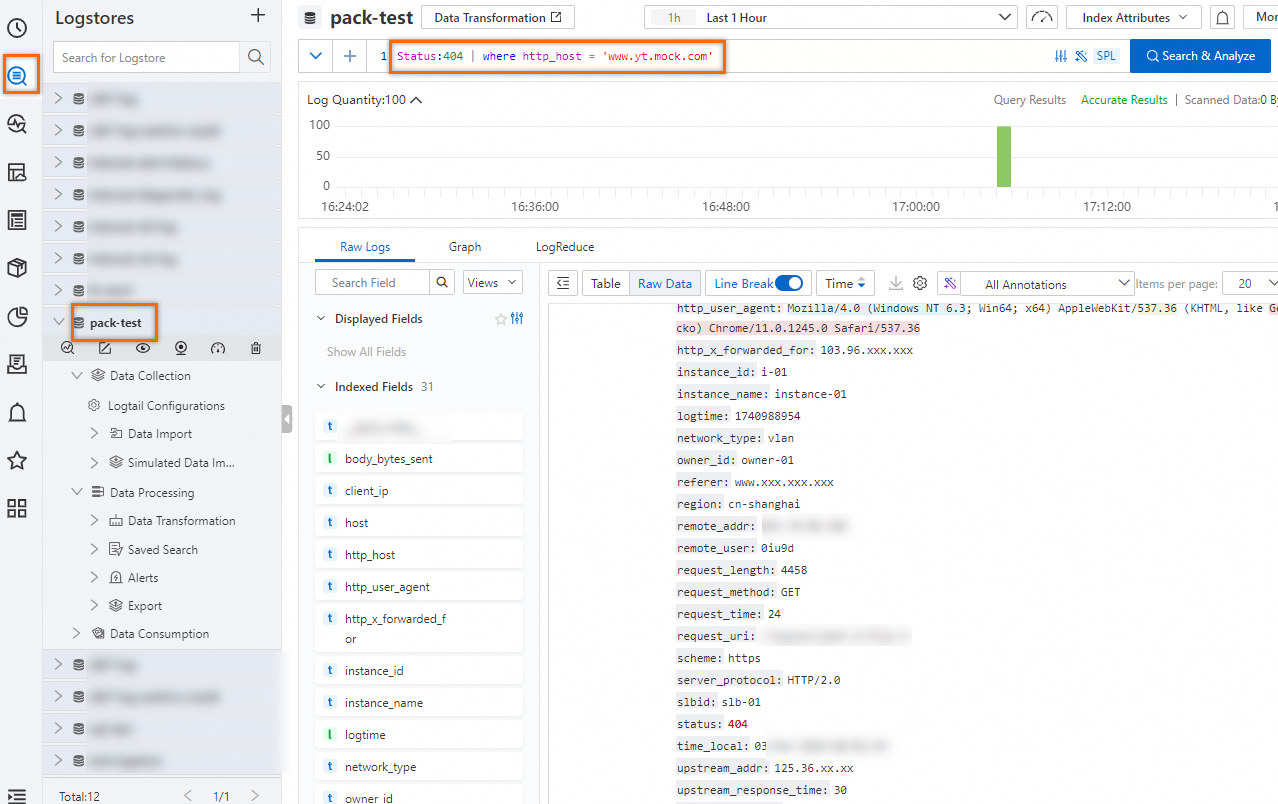
タブで、コンテキストをクエリするログを見つけ、
 アイコンをクリックします。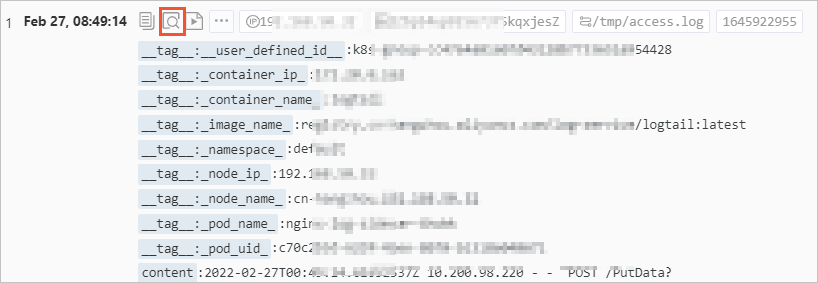
表示されたページで、上下にスクロールしてログのコンテキストを表示します。
上にスクロールするには、[前へ] をクリックします。
下にスクロールするには、[次へ] をクリックします。
フィールドを表示または非表示にするには、[すべてのフィールド] をクリックし、フィールド名のチェックボックスをオンまたはオフにします。デフォルトでは、すべてのフィールドが表示されます。
文字列でログをフィルタリングするには、[フィルター] フィールドに文字列を入力します。指定した文字列を含むログのみが表示されます。
文字列を強調表示するには、[ハイライト] フィールドに文字列を入力します。文字列が黄色で強調表示されます。
