You can enable or disable peak bandwidth monitoring for a domain name based on its actual usage.
Procedure
Configuring peak bandwidth monitoring does not affect the ApsaraVideo VOD service.
Peak bandwidth monitoring is not supported for wildcard domain names.
Log on to the ApsaraVideo VOD console.
In the navigation pane on the left, under Configuration Management, click CDN Configuration > Domain Names.
Find the domain name that you want to configure and click Configure.
Click Peak Bandwidth Monitoring.
Click Modify.
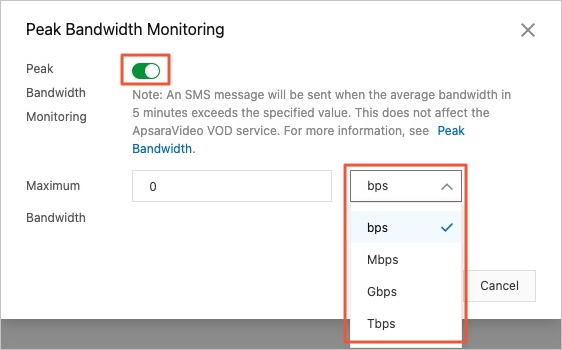
Turn on Peak Bandwidth Monitoring and set the Maximum Bandwidth.
The available units for bandwidth are bps, Mbps, Gbps, and Tbps.
 Note
NoteIf the average bandwidth over a 5-minute period exceeds the specified threshold, you will receive a text message notification.
Click OK.