This topic describes the tax calculation logic of invoices at the international site (alibabacloud.com).
Q: I multiply the pre-tax amount in an invoice by the tax rate and get a tax amount. Why does the calculated tax amount differ from the tax amount provided by Alibaba Cloud?
For example, in the following Alibaba Cloud invoice that is issued for a Singapore customer, the tax rate is 8% and the goods and services tax (GST) amount is 4719.66. However, the pre-tax amount multiplied by the tax rate equals 4719.7184, which is slightly different from the provided GST amount.
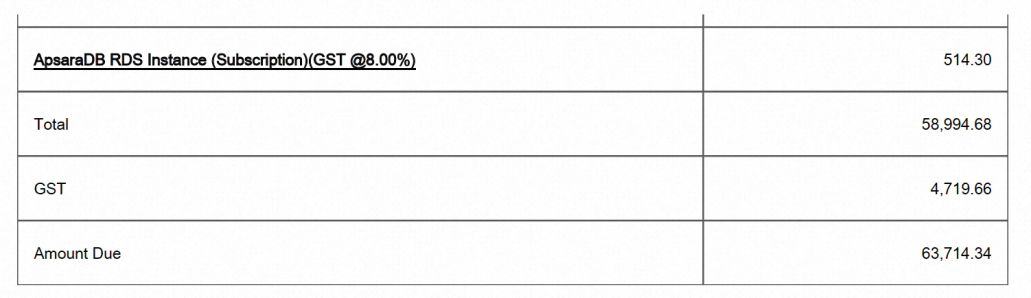
A:To calculate the total tax amount of a month, Alibaba Cloud first calculates the tax for each subscription order and pay-as-you-go bill of the month based on the amount of the order or bill, rounds the taxes to the nearest two decimal places, and then adds up the taxes.
Log on to the Billing Management console. In the left-side navigation pane, choose Bills > Bill Details. On the Consumption by Bill tab, you can view the tax of each subscription order and pay-as-you-go bill. The total tax amount in an invoice equals the sum of the tax of each order and bill involved in the invoice.