Tablestore vector search (KnnVectorQuery) uses numerical vectors to perform approximate nearest neighbor queries. It finds the most similar data items in large-scale datasets and is suitable for scenarios such as retrieval-augmented generation (RAG), recommendation systems, similarity detection, natural language processing, and semantic search.
Scenarios
Vector search is suitable for scenarios such as recommendation systems, image and video retrieval, and natural language processing and semantic search.
Retrieval-augmented generation (RAG)
RAG is an AI framework that combines retrieval capabilities with those of Large Language Models (LLMs). It uses retrieval to improve the accuracy of LLM outputs, especially for private or professional data. RAG is widely used in knowledge base scenarios.
Recommendation system
On platforms such as e-commerce, social media, and streaming media, you can encode user behaviors, preferences, and content features into vectors. Vector search can then quickly find products, articles, or videos that match user interests. This process enables personalized recommendations and improves user satisfaction and retention rates.
Similarity detection (images, videos, and voice)
In fields such as image, video, voice, voiceprint, and facial recognition, you can convert unstructured data into vector representations. Vector search can then be used to quickly find the most similar targets. For example, on an e-commerce platform, after a user uploads an image, the system can quickly find product images with similar styles, colors, or patterns.
Natural language processing and semantic search
In the natural language processing (NLP) field, you can convert text into vector representations, such as Word2Vec or Bidirectional Encoder Representations from Transformers (BERT) embeddings. Vector search can then be used to understand the semantics of a query and find the most semantically relevant documents, news, or Q&A pairs. This improves search result relevance and user experience.
Knowledge graph and AI chat
Knowledge graph nodes and relationships can be represented as vectors. Vector search can accelerate entity linking, relationship inference, and the response speed of AI chat systems. This allows the system to more accurately understand and answer complex questions.
Core advantages
Low cost
The core engine uses optimized DiskAnn technology. Compared to the Hierarchical Navigable Small World (HNSW) algorithm, it does not require loading all index data into memory. It uses less than 10% of the memory to achieve a recall rate and performance comparable to the HNSW graph algorithm. This significantly reduces the overall cost compared to similar systems.
Easy to use
Vector search is a serverless sub-feature of search index. You do not need to build or deploy a system. To get started, you can simply create an instance in the Tablestore console.
The feature supports the pay-as-you-go billing method. You do not need to manage usage levels or scale-out. The system supports horizontal scaling for both storage and compute resources. Vector search supports up to hundreds of billions of data entries, while non-vector search supports up to ten trillion data entries.
When you perform a vector search, the internal engine uses a query optimizer to automatically select the best algorithm and execution path. You can achieve a high recall rate and high performance without tuning many parameters. This significantly lowers the entry barrier and shortens the business development cycle.
You can use vector search through SQL, SDKs for multiple languages such as Java, Go, Python, and Node.js, and open source frameworks such as LangChain, LangChain4J, and LlamaIndex.
Function overview
A KnnVectorQuery finds the most similar data items in a large-scale dataset by performing an approximate nearest neighbor query on numerical vectors.
Vector search inherits all the features of a search index. It is a ready-to-use, pay-as-you-go service that requires no system deployment. It supports stream-based index building, allowing data to be queried in near-real-time after it is written to a table. It also supports high-throughput additions, updates, and deletions. The query performance is comparable to systems that use the HNSW algorithm.
When you use the KnnVectorQuery feature to query data, you must specify the query vector, the vector field to search, and the number of nearest neighbors (TopK) to retrieve. This process retrieves the TopK vectors from the specified vector field that are most similar to your query vector. You can also combine this query with other non-vector search features to filter the results.
Vector field description
Before you use the KnnVectorQuery feature, you must configure a vector field when you create a search index. You must specify the vector dimensions, vector data type, and distance measure algorithm.
The data type of the corresponding field in the data table must be String. The data type in the search index must be a Float32 array string. For more information about vector field configuration, see the following table.
Configuration item | Description |
dimension | The vector dimensions. The maximum supported dimension is 4096. The dimension value must match the vector dimension generated by the upstream embedding system. The array length of the vector field must equal the configured dimension parameter. For example, if the vector field value is the string Note Only dense vectors are supported. The data dimension of a vector field in a search index must be consistent with the dimension set in the schema when the index was created. If the dimension is larger or smaller, index building for that row will fail. |
dataType | The data type of the vector. Only Float32 is supported. Float32 does not support extreme values such as NaN and Infinite. The data type must be consistent with the vector data type generated by the upstream embedding system. Note To use vectors of other data types, submit a ticket to contact us. |
metricType | The algorithm to measure the distance between vectors. Valid values include euclidean, cosine, and dot_product. The distance measure algorithm must be consistent with the recommended algorithm of the upstream embedding system. For more information, see Distance measure algorithms. |
Different models or versions of an embedding system produce vectors with different properties, including dimension, data type, and distance measure algorithm. The properties of the vector field in the vector search system (dimension, data type, and distance measure algorithm) must match the properties of the vectors generated by the embedding system. For more information about how to generate vectors, see Two ways to generate vectors.
Distance measure algorithms
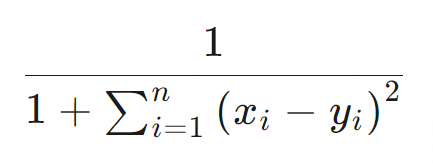
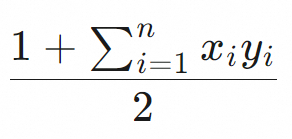
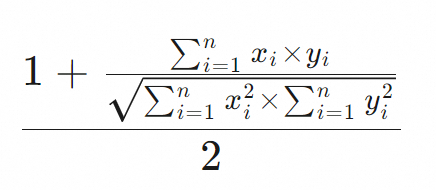
Vector search supports the following distance measure algorithms: euclidean, cosine, and dot_product. For more information, see the following table. A higher score indicates a greater similarity between two vectors.
MetricType | Scoring formula | Performance | Description |
Euclidean distance (euclidean) |
| High | Euclidean distance is the straight-line distance between two vectors in a multi-dimensional space. For performance reasons, the Euclidean distance algorithm in Tablestore omits the final square root calculation. A higher score indicates greater similarity between the two vectors. |
Dot product (dot_product) |
| Highest | Multiplies the corresponding coordinates of two vectors of the same dimension and then sums the results. A higher dot product score indicates greater similarity between two vectors. Important Float32 vectors must be normalized before being written to a table, for example, using the L2 norm. Otherwise, potential issues such as poor query results, slow vector index building, and poor query performance may occur. For a vector normalization example, see Appendix 2: Vector normalization example. |
Cosine similarity (cosine) |
| Low | The cosine of the angle between two vectors in a vector space. A higher cosine similarity score indicates greater similarity between two vectors. It is often used to calculate the similarity of text data. Because 0 cannot be a divisor, the cosine similarity calculation cannot be completed if the sum of squares of a Float32 vector is 0. Important Cosine similarity calculation is complex. We recommend that you normalize vectors before writing data to the table and then use dot_product as the distance measure algorithm. For a vector normalization example, see Appendix 2: Vector normalization example. |
Notes
When you use vector search, note the following:
Limits apply to the number of vector field types, dimensions, and other properties. For more information, see Search index limits.
The search index is partitioned on the server-side. Each partition returns its own TopK nearest neighbors, and the results are then aggregated at the client node. Therefore, if you use a token to paginate through all data, the total number of rows returned depends on the number of server-side partitions.
Currently, the vector search feature is available in the following regions: China (Hangzhou), China (Shanghai), China (Qingdao), China (Beijing), China (Zhangjiakou), China (Ulanqab), China (Shenzhen), China (Guangzhou), China (Chengdu), China (Hong Kong), Japan (Tokyo), Singapore, Malaysia (Kuala Lumpur), Indonesia (Jakarta), Philippines (Manila), Thailand (Bangkok), Germany (Frankfurt), UK (London), US (Virginia), US (Silicon Valley), SAU (Riyadh - Partner Region).
Procedure
Use open source models to convert data in Tablestore into vectors and store them.
Write vector data to Tablestore.
When you create a search index, configure the vector field.
Configure the vector field's type, dimensions, and distance measure algorithm.
Use vector search to query data.
Billing
During the public preview, you are not charged for billable items specific to the KNN vector query feature. You are charged for other billable items based on existing billing rules.
When you use a search index to query data, you are charged for the read throughput consumed. For more information, see Billable items of search indexes.
Appendix 1: Use with BoolQuery
You can combine KnnVectorQuery and BoolQuery in different ways to achieve different results. This section describes two common use cases. This example assumes a scenario where a filter matches a small amount of data.
Assume a table contains 100 million images. A user has 50,000 images in total, but only 50 of them were added in the last 7 days. The user wants to use search by image to find the 10 most similar images from those added in the last 7 days. The following table shows how using BoolQuery inside the KnnVectorQuery filter can meet this requirement.
Combined usage | Query condition diagram | Description |
Use BoolQuery inside the filter of KnnVectorQuery |
| KnnVectorQuery hits the rows that satisfy the BoolQuery condition and returns the TopK most similar rows. The SearchRequest response returns the first `Size` rows from the TopK results. In this example, KnnVectorQuery first uses the filter to select all 50 images belonging to user "a" from the last 7 days. Then, it finds the 10 most similar images from these 50 and returns them. |
Use KnnVectorQuery inside BoolQuery |
| Each subquery in BoolQuery is executed first, and then the intersection of all subquery results is calculated. In this example, KnnVectorQuery returns the top 500 most similar images from the 100 million images in the table. Then, it sequentially finds the 10 images for user "a" from the last 7 days. However, the top 500 images might not include all 50 of user "a"'s images from the last 7 days. Therefore, this query method may not find the 10 most similar images from the last 7 days, and might even find no data. |


Appendix 2: Vector normalization example
The following code shows an example of vector normalization:
  public static float[] l2normalize(float[] v, boolean throwOnZero) {
    double squareSum = 0.0f;
    int dim = v.length;
    for (float x : v) {
      squareSum += x * x;
    }
    if (squareSum == 0) {
      if (throwOnZero) {
        throw new IllegalArgumentException("can't normalize a zero-length vector");
      } else {
        return v;
      }
    }
    double length = Math.sqrt(squareSum);
    for (int i = 0; i < dim; i++) {
      v[i] /= length;
    }
    return v;
  }