CloudFlow is a fully managed cloud service that coordinates distributed tasks across functions, cloud service APIs, virtual machines (VMs), and containers. Define a flow once, and CloudFlow handles execution order, state tracking, and error recovery -- so you can focus on business logic instead of coordination plumbing.
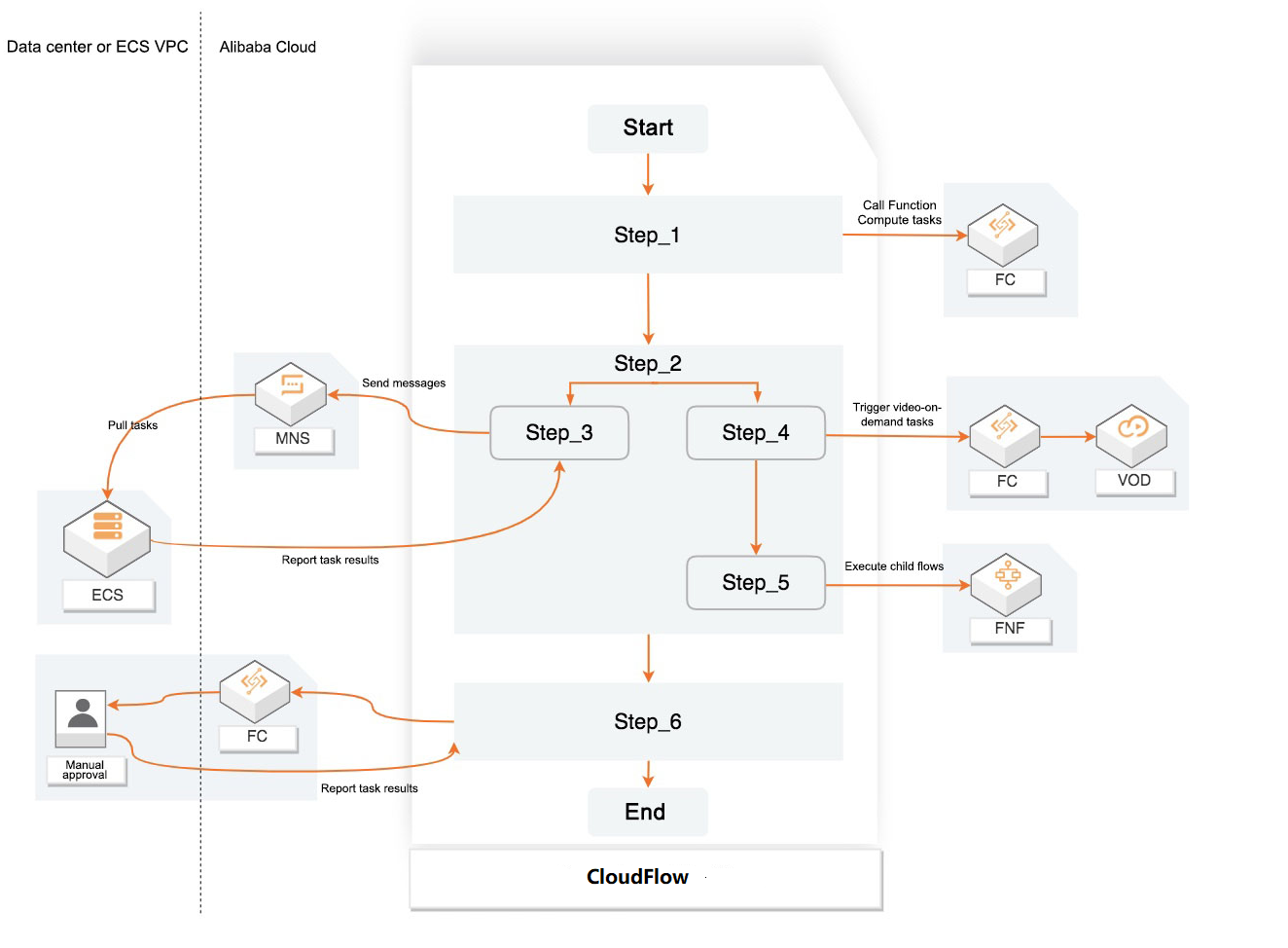
How it works
Define a flow using built-in control logic: Sequence, Choice, and Parallel.
CloudFlow executes each step, tracks state transitions, and passes data between steps automatically.
If a step fails or times out, CloudFlow retries it based on your retry policy or runs your fallback handler.
Logging and auditing capture every execution for monitoring and debugging.
Problems CloudFlow solves
Distributed applications require task coordination, state management, and error handling across multiple services. Without an orchestration layer, this logic lives in application code -- scattered, brittle, and hard to debug.
CloudFlow moves this burden to a managed platform:
Unreliable task chains -- Built-in checkpoints and playback track every step. If something fails midway, execution resumes from the last checkpoint rather than restarting from scratch.
Scattered orchestration logic -- Separate flow logic from task execution. Express branching, sequencing, and parallel execution through Sequence, Choice, and Parallel control types instead of writing coordination code.
Complex error handling code -- Define retry policies and fallback logic declaratively instead of coding them into each service. Failed or timed-out tasks retry automatically, different error types route to different handlers, and fallback steps run when retries are exhausted.
Opaque execution state -- Graphical monitoring interfaces allow you to define flows and view the execution state of each step, including inputs and outputs. Pinpoint where and why a flow failed without digging through logs.
Use cases
Orchestrate a task pipeline -- Run a series of steps in order. For example, invoke a face recognition function to detect a face in an image, crop the image based on the detected position, and send a notification with the result. CloudFlow provides a serverless solution to reduce your orchestration and O&M costs.
Branch based on data -- Use Choice logic to route execution based on step output. For example, approve a request automatically if it meets predefined criteria, or escalate it to a reviewer if it does not.
Run tasks in parallel -- Execute independent steps simultaneously with Parallel logic.
Run long-duration flows -- Track flows that run for hours, days, or months, such as O&M pipelines or email promotion flows. CloudFlow maintains state for the entire duration.
Bridge heterogeneous systems -- Coordinate applications built in different languages, architectures, and networks. CloudFlow serves as the orchestration layer when migrating from Apsara Stack to hybrid cloud (Apsara Stack and Alibaba Cloud) or Alibaba Cloud, or when evolving from a monolithic architecture to a microservices architecture.
Key concepts
| Term | Definition |
|---|---|
| Flow | A defined sequence of steps that CloudFlow executes. A flow can include branching, parallel execution, and error handling logic. |
| Step | A single unit of work in a flow, such as invoking a function, calling a cloud service API, or running a program on a VM or container. |
| Step transition | The movement from one step to the next. CloudFlow tracks each transition and uses the transition count for billing. |
| Checkpoint | A saved execution state that CloudFlow uses to resume a flow after a failure without restarting from the beginning. |
| Flow state management | CloudFlow tracks all states during flow execution, including step progress and data transfer between steps. No need to build state management into your tasks. |
Billing
CloudFlow charges based on the number of step transitions during flow execution. After the workflow is executed, you are not charged. Automatic scaling is built in, so there is no need to manage capacity.