Tair (Redis OSS-compatible) does not support adjusting the number of CPU cores. However, you can change the instance architecture or add more nodes or shards to improve the overall performance of an instance. If the CPU load remains high after you have identified and optimized factors such as CPU-intensive commands, hot keys, and large keys, and confirmed that no abnormal service access is affecting the instance, refer to this topic to improve the overall CPU performance of the instance.
Confirm the product type, deployment mode, and specifications of an instance
The supported CPU specifications vary based on the product type, deployment mode, and specifications of an instance. Before you upgrade the CPU specifications, confirm the information about the instance.
Log on to the console and go to the Instances page. In the top navigation bar, select the region in which the instance that you want to manage resides. Then, find the instance and click the instance ID.
On the Instance Information page, in the Basic Information and Configuration Information sections, view theEdition, Specifications, and Deployment Mode.
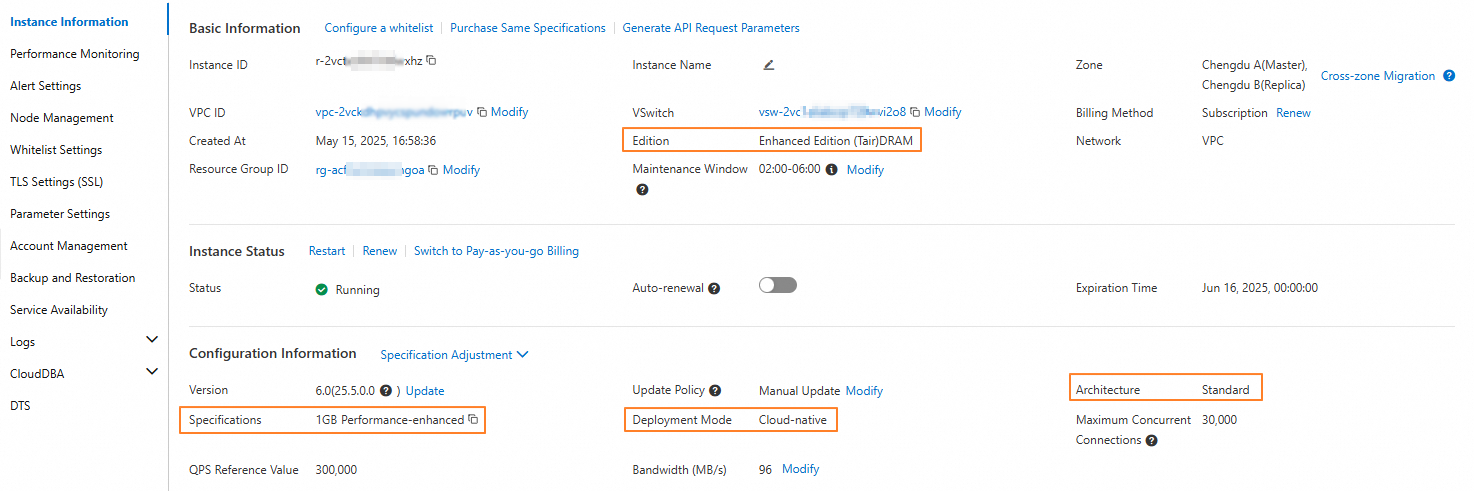 Note
NoteThe labels and locations for Product Type, Specifications, and Deployment Mode may vary slightly for different instances. Refer to the console for the actual user interface.
For cloud-native edition instances, you can click Node Management on the left to check if the Read/write Splitting switch is enabled.
Standard architecture instances
Redis Open-Source Edition, Tair memory-optimized, and persistent memory instances
Confirm the instance series and architecture
On the Instance Information page, confirm that the instance meets the following conditions:
The Architecture is Standard.
If the Edition is Tair (ApsaraDB for Redis Enhanced Edition)DRAM or Tair (ApsaraDB for Redis Enhanced Edition)Persistent Memory.
Methods to improve CPU configuration
The CPU specifications for a single shard of a standard architecture instance are fixed. You cannot add CPU cores. However, you can change the architecture to improve the overall performance of the instance:
For balanced read/write or write-intensive workloads, consider changing to the cluster architecture. You can increase the number of shards to improve the overall CPU performance of the instance. For more information, see Change the instance architecture.
For read-intensive workloads, consider enabling read/write splitting. You can enable read/write splitting and add read-only nodes to improve the overall CPU performance of the instance.
NoteSynchronization between the primary node and read-only nodes has some latency. Therefore, the read/write splitting architecture is suitable for services that can tolerate a certain degree of dirty reads. If your service cannot tolerate dirty reads, change the instance to the cluster architecture.
Tair disk-based (ESSD/SSD) instances
Confirm the instance series and architecture
On the Instance Information page, confirm that the Edition is Tair (ApsaraDB for Redis Enhanced Edition)ESSD.
Methods to improve CPU configuration
You can increase the CPU configuration by changing the Specifications. For more information, see Scale instance types.
Cluster architecture
Confirm the instance series and architecture
On the Instance Information page, confirm that the Architecture is Cluster.
Methods to improve CPU configuration
The CPU specifications for a single shard of a cluster instance are fixed. You cannot add CPU cores. However, you can add shards to improve the overall performance of the instance.
If you have upgraded the bandwidth plan for a cluster instance, monitor the instance traffic after you add shards to determine whether you also need to upgrade the bandwidth plan for the new shards.
Read/write splitting architecture
Confirm the instance series and architecture
On the Instance Information page, the Architecture is Standard(Read/Write Splitting) or Cluster (Read/Write Splitting). Alternatively, on the Node Management page, the Read/Write Splitting switch is turned on.
Methods to improve CPU configuration
The CPU specifications of a read/write splitting instance are fixed. You cannot add CPU cores. However, you can add read-only nodes to improve the overall performance of the instance.
References
For information about how to troubleshoot and resolve high CPU utilization, see Troubleshoot high CPU utilization of an instance.
For information about the performance of Redis Open-Source Edition and Tair (Enterprise Edition), see Performance white paper.
For information about the instance types, CPU cores, memory, bandwidth, and maximum connections of Redis Open-Source Edition and Tair (Enterprise Edition) instances, see Instance specifications and FAQ.