You can customize the logon suffix for Resource Access Management (RAM) users. The logon name follows the format <username>@<logon suffix>. A custom suffix creates a user-friendly logon experience and reinforces your brand identity. This topic describes two methods: using a default second-level domain (SLD) of Alibaba Cloud in the logon suffix (such as @my-company.onaliyun.com), or using your custom domain name for the logon suffix (such as @my-company.com).
Logon suffix options
The following table compares the two logon suffix options.
Suffix example | Use case | Key advantages | Prerequisites | |
Use a default domain name for the logon suffix (Recommended) |
| For organizations that do not require a custom domain name and prefer a quick setup. |
| An account alias is required. |
Use a custom domain name for the logon suffix |
| For organizations that want to use their corporate domain name for brand consistency and user convenience. | Aligns logon suffixes with corporate email addresses, reinforcing your brand. | You must own the domain name and be able to add a TXT record to its DNS settings. |
Method 1: Use a default domain name for the logon suffix
RAM automatically configures a logon suffix for your RAM users in the format <account-alias>.onaliyun.com.
Before you set an account alias, the default logon suffix is derived from your 16-digit account ID (
<account ID>.onaliyun.com), which can be difficult to remember. For more information, see View an Alibaba Cloud account ID.After you set an account alias, the suffix changes to
<your-alias>.onaliyun.com, which provides a more memorable logon experience.
The account alias must be globally unique within Alibaba Cloud.
After you set a new account alias, the original suffix (
<account ID>.onaliyun.com) that is based on your account ID remains valid. This ensures that existing RAM users can continue to log on without interruption.
Procedure
Console
Log on to the RAM console as a RAM administrator.
On the Settings page, in the Domain section, find the default logon suffix.
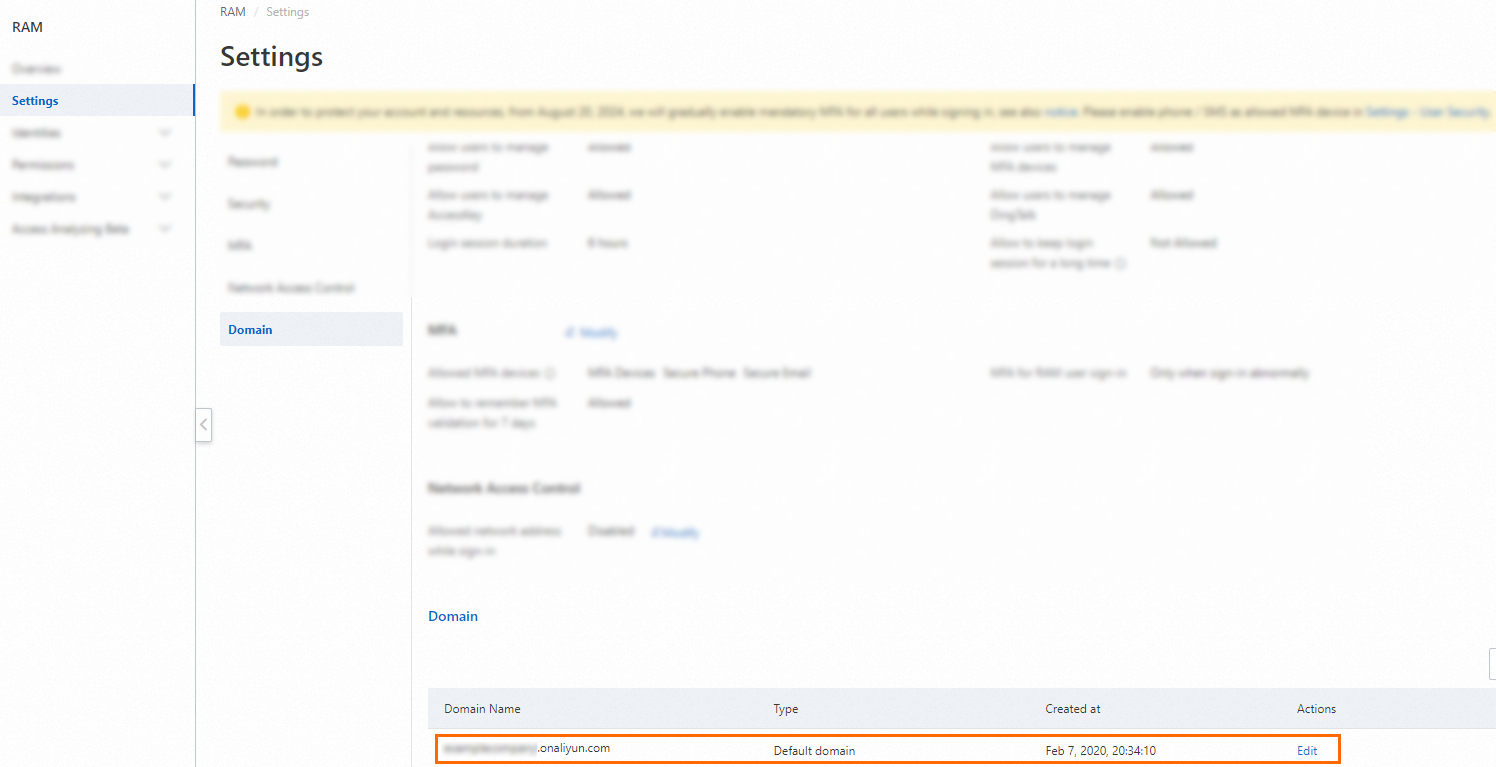
In the Actions column, click Edit and enter your preferred account alias.
NoteThe logon suffix can be up to 64 characters in length and can include letters, digits, periods (
.), hyphens (-), and underscores (_).
API
To get the current default logon suffix, call the GetDefaultDomain operation.
To set a new default logon suffix, call the SetDefaultDomain operation.
What to do next
Your RAM users can now log on to the RAM console using the new logon name format:
<username>@<account-alias>.onaliyun.com. For more information, see Log on to the Alibaba Cloud Management Console as a RAM user.If you use Security Assertion Markup Language (SAML) single sign-on (SSO), update the suffix of the
NameIDelement in your SAML assertions to use the new logon suffix. For more information, see Configure SAML for user-based SSO.
Method 2: Use a custom domain name for the logon suffix
If your organization owns a domain name, you can configure it as the logon suffix for your RAM users. This allows RAM users to log on with usernames that match their corporate email addresses, such as <username>@example.com. You can only configure one custom logon suffix for each Alibaba Cloud account.
Prerequisites
You must own the domain name that you want to use as the logon suffix.
Procedure
Step 1: Add a custom logon suffix
Log on to the RAM console as a RAM administrator.
On the Settings page, in the Domain section, click Create alias domain.

In the Create alias domain dialog box, enter the domain name, and click OK.
NoteThe logon suffix can be up to 64 characters in length and can include letters, digits, periods (
.), hyphens (-), and underscores (_).
Step 2: Verify domain name ownership
To verify that you own the domain name, you must add a TXT record to its DNS settings.
In the logon suffix list, find the logon suffix you created, click Verify domain.
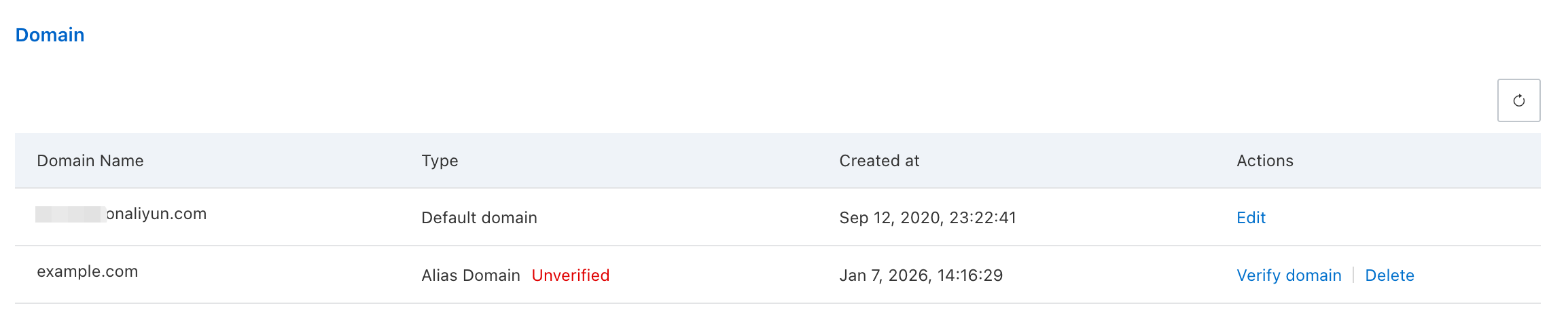
In the Verify domain dialog box, copy the TXT record value.
Log on to your DNS provider's console and add a TXT record for your domain name.
If you use Alibaba Cloud DNS, enter the TXT record value that you copied in the previous step into the Value field. For more information, see TXT record.
If you use a different DNS provider, refer to their documentation for instructions.
Wait a few minutes for the DNS record to propagate.
Return to the RAM console to check the verification result.
On the Settings page, in the Domain section, find the logon suffix and click Verify domain in the Actions column.
In the Verify domain dialog box, if the DNS record has propagated, a success message appears. Click OK.
What to do next
Your RAM users can now log on to the RAM console using the logon name format
<username>@<custom-logon-suffix>. For more information, see Log on to the Alibaba Cloud Management Console as a RAM user.If you use SAML SSO, update the suffix of the
NameIDelement in your SAML assertions to use the new custom logon suffix. For more information, see Configure SAML for user-based SSO.