Time Travel lets you query historical data in a transactional (Delta) table at any past transaction boundary within the configured retention window. You can read data as it existed at a specific timestamp or version ID, and you can restore a table to a previous state.
Use Cases
-
Error recovery: Query the table at a point before an incorrect write, failed pipeline, or accidental deletion, then use those results to correct downstream data.
-
Historical audits: Inspect the exact state of a dataset at any past transaction boundary for compliance checks and data lineage investigations.
-
Data comparison: Compare data at two different historical versions to understand how records changed between processing runs.
-
Point-in-time restore: Roll an entire table back to a specific historical version to undo a batch of changes.
Prerequisites
Time Travel is supported on transactional tables only. Non-transactional tables and external tables do not support this feature.
Historical data is available only within the configured retention window. You must configure the acid.data.retain.hours table property to retain historical data. See Configure data retention for details.
Query Historical Data
Query by timestamp
Use TIMESTAMP AS OF to read the table as it existed at a specific point in time.
The get_latest_timestamp function takes one parameter: the number of commits to look back. get_latest_timestamp(1) returns the timestamp of the most recently committed version.
Query by version ID
Use VERSION AS OF to read the table at a specific transaction version ID.
The get_latest_version function takes one parameter: the number of commits to look back. get_latest_version(2) returns the version ID that is two commits before the latest.
Restore a Table to a Historical Version
Use restore to overwrite the current table state with data from a historical version. This operation is irreversible.
Transaction Version Types
Time Travel supports two version types:
| Version type | Description | SQL clause |
|---|---|---|
| Time version | Identifies a transaction by timestamp | TIMESTAMP AS OF |
| ID version | Identifies a transaction by its internal version ID | VERSION AS OF |
Use get_latest_timestamp and get_latest_version when you need to refer to a version relative to the latest commit rather than by an absolute value. The second parameter of both functions indicates the number of times data was last committed, which MaxCompute uses to resolve the corresponding internal data version.
Configure Data Retention
The acid.data.retain.hours table property controls how long historical data is kept. Set it with ALTER TABLE:
The maximum retention period is seven days. Choose a value that matches your operational requirements. A longer retention period increases storage costs because MaxCompute must preserve historical Delta files.
To disable Time Travel and reduce storage costs, set acid.data.retain.hours to 0:
Setting the property to 0 stops retaining historical data and greatly reduces storage costs.
How It Works
The following diagram shows the internal query process for a Time Travel query on a transactional table.
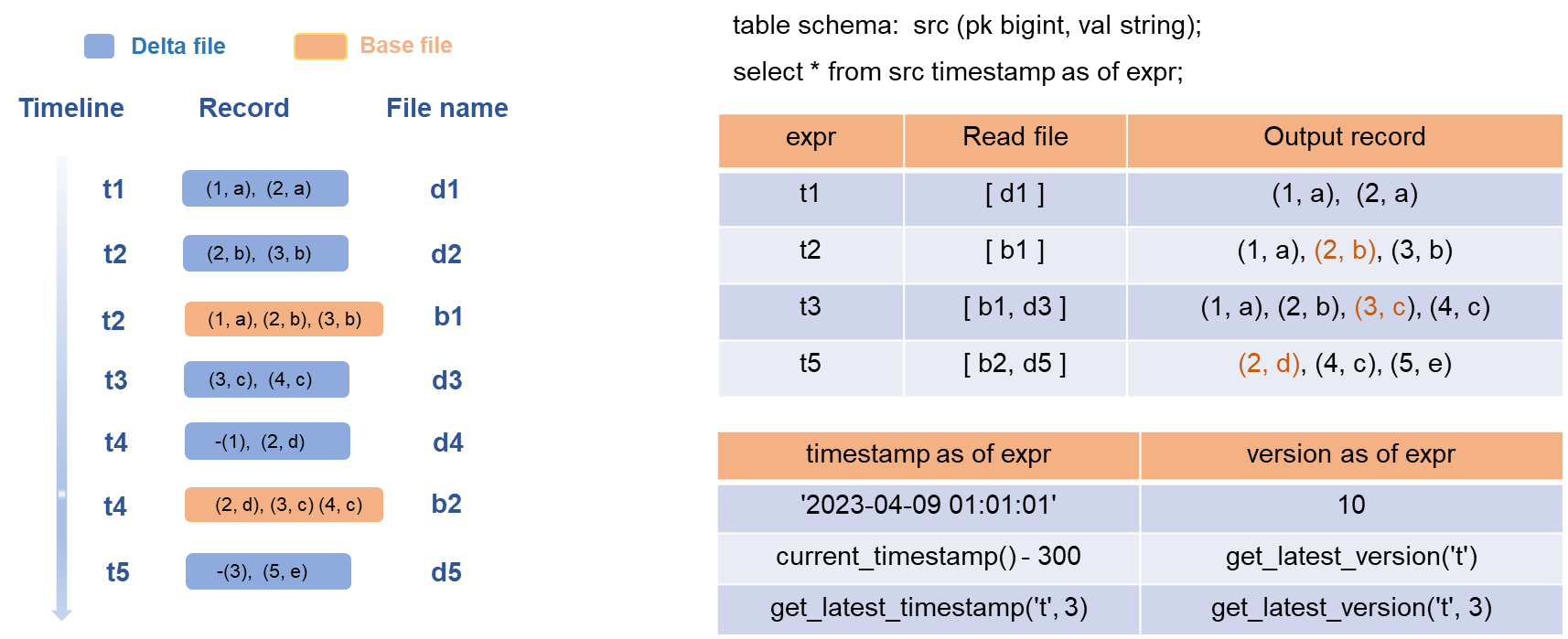
When you run a Time Travel query, MaxCompute:
-
Parses the SQL statement and identifies the target version (timestamp or version ID).
-
Locates the most recent base file that falls within the time range of that version.
-
Locates the delta files written after the base file was generated, up to the target version.
-
Merges the base file and the relevant Delta files to produce the query output.
Example: transactional table src
Consider a transactional table named src with columns pk and val. Five write transactions execute at time points t1 through t5, producing five Delta files. Compaction runs at t2 and t4, generating base files b1 and b2 respectively.
During compaction at t2, the historical intermediate state record (2,a) is deleted from base file b1, and only the most recent state record (2,b) is retained in b1.
| Query time point | Files read | Result |
|---|---|---|
| t1 | Delta file d1 only | Output from d1 |
| t2 | Base file b1 only | Three records |
| t3 | Base file b1 + Delta file d3 | Merged output |
| t4, t5 | Base file b2 + relevant Delta files | Merged output |
Base files improve query and read efficiency by providing a compact, merged snapshot of table state at a given point. However, queries of base files trigger compaction operations that consume a large number of resources. Choose a compaction trigger policy that fits your workload.
Limitations
-
Time Travel is supported only on transactional (Delta) tables. Non-transactional tables and external tables are not supported.
-
Historical data older than the configured retention window is no longer available for query or restore.
-
The maximum retention period is seven days, regardless of how
acid.data.retain.hoursis set. -
Setting
acid.data.retain.hoursto0disables Time Travel and removes historical data retention for the table.