This topic describes the account management features in the IDaaS portal, including operation guides and precautions for basic information, extended information, security settings, and third-party account binding.
Overview
After you log on to the portal, you can view and edit your personal information (such as basic information and security settings) on the My Account page. For more information about how to log on to the IDaaS portal, see Log on to the portal.
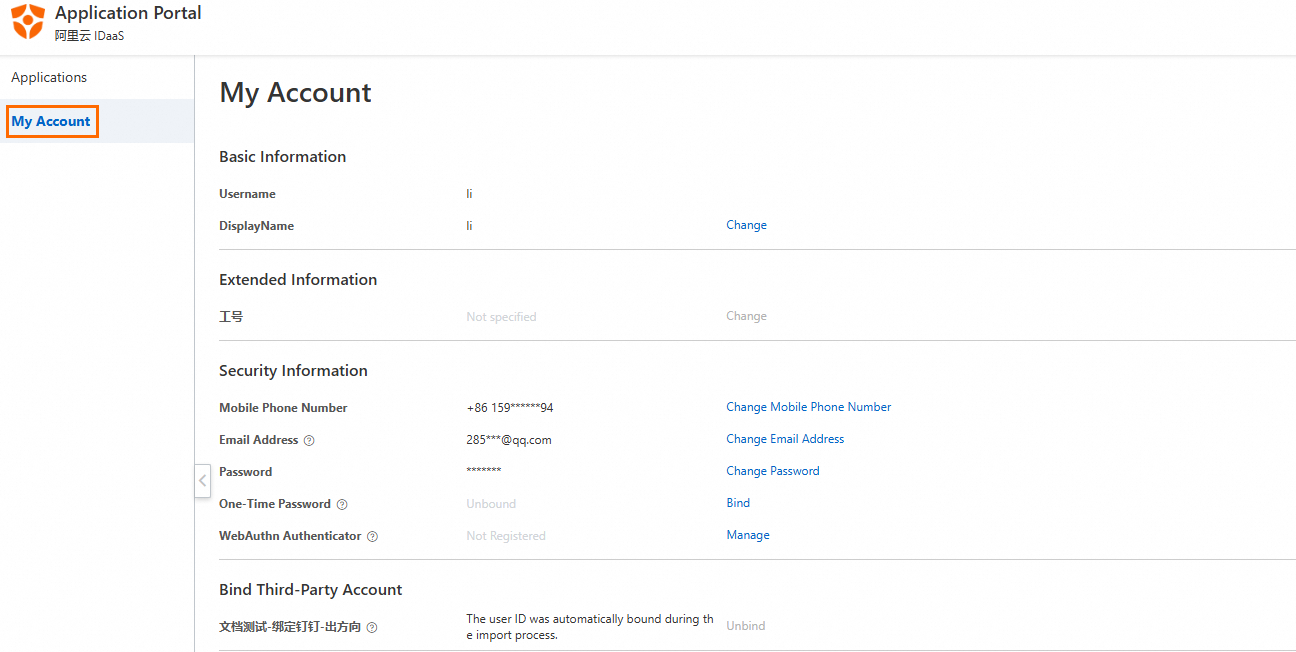
The My Account page is unavailable in the IDaaS application on DingTalk. You can open this page only in a browser on your PC.
Field description
Type | Field | Description |
Basic information | Account name | The name of the account that is used to log on to the portal. The account name uniquely identifies the account and can be changed later. Note The initial account name is left empty for an account that is imported from DingTalk. You must specify the account name when you create an account in IDaaS. |
Display name | The alias of the account. You can click the edit button to customize it. | |
Extended information | / | Fields created in in the console are displayed here. |
Security information | Mobile number | We recommend that you specify this parameter. This parameter is required in scenarios such as logon, password resetting, and two-factor authentication (2FA). If you bind neither a mobile phone number nor an email address, you cannot perform 2FA by default. We recommend that you bind a mobile phone number or an email address before you enable Bind Two-factor Authentication for Logons. For more information, see Two-factor authentication. |
Email address | We recommend that you specify this parameter. This parameter is required in scenarios such as logon, password resetting, and 2FA. If you bind neither a mobile phone number nor an email address, you cannot perform 2FA by default. We recommend that you bind a mobile phone number or an email address before you enable Bind Two-factor Authentication for Logons. For more information, see Two-factor authentication. | |
Password | The administrator can determine the password complexity. | |
Bind third-party account | / | Bind external enterprise identities that can be used to log on to the IDaaS portal. You can bind and unbind accounts. Accounts imported from an identity provider (IdP) are bound to IDaaS by default and cannot be unbound. Note You cannot bind IDaaS that is automatically bound to an IdP to another IdP. For example, you cannot bind IDaaS bound to a DingTalk IdP to a WeCom IdP. However, you can manually bind IDaaS to different IdPs. For example, you can scan a QR code by using WeCom to log on to IDaaS and use OpenID Connect (OIDC)-supported IdP federated authentication to log on to IDaaS. |
Bind OTP | After the administrator enables 2FA based on one-time password (OTP), the user can use this field to bind OTP. |