This topic provides a comprehensive guide on the entire process of handling service identification numbers for ICP filing. It focuses on the acquisition, usage, and troubleshooting of common issues related to service identification numbers. Specifically, this topic provides the frequently asked questions (FAQs) about obtaining and using service identification numbers, helping you better understand and resolve potential problems during the filing process.
What do I do if I am unable to select the service identification number?
First, confirm whether you have a cloud service that meets the ICP filing requirements. If not, please purchase one promptly. Otherwise, you will not be able to obtain a service identification number to complete the filing.
You have a cloud server eligible for filing:
Confirm whether the selected Alibaba Cloud service is correct, and log on to the ICP Filing console to check if the free filings have been used up.
Other scenarios:
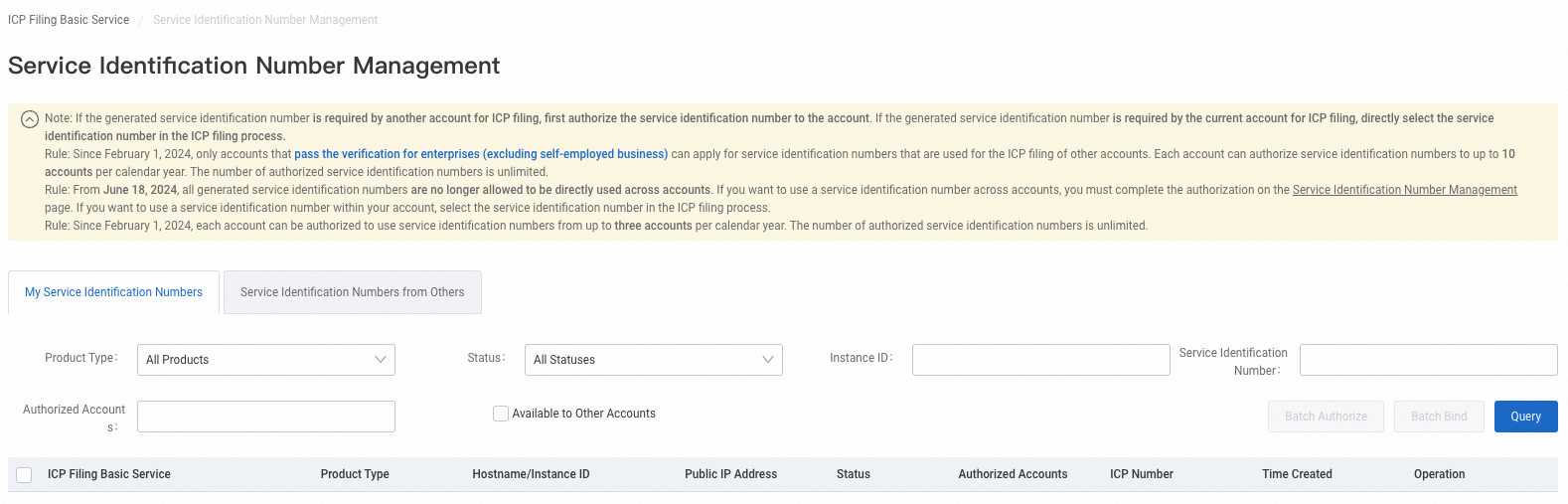
You have a service identification number given by another account: Log on to the ICP Filing console and check whether the service identification number given by another account has expired on the Service Identification Numbers from Others tab of the Service Identification Number Management page. For service identification number states, see How do I view the service identification number?
You have purchased a service identification number: A purchased service identification number needs to be attached to the corresponding cloud service.
If the identification number you purchased cannot be used for ICP filing, you need to purchase a corresponding cloud service that meets the filing requirements.
How do I obtain a service identification number?
Purchase a cloud service that meets the ICP filing requirements. Then, Alibaba Cloud will offer a certain number of free service identification numbers for filing.
How do I view the service identification number?
Log on to the ICP Filing console using the account purchasing the cloud service to view service identification numbers generated by this account and identification numbers given by another account.
| Service identification numbers have the following states:
|