Disclaimer: This article may contain information about third-party products. Such information is for reference only. Alibaba Cloud does not make any guarantee, express or implied, with respect to the performance and reliability of third-party products, or potential impacts of operations on the products.
Problem description
When you connect to an Elastic Compute Service (ECS) Linux instance over SSH, the connection fails with a host key verification error. The exact error message depends on the SSH client you are using.
Linux client
@@@@@@@@@@@@@@@@@@@@@@@@@@@@@@@@@@@@@@@@@@@@@@@@@@@@@@@@@@@
@    WARNING: REMOTE HOST IDENTIFICATION HAS CHANGED!     @
@@@@@@@@@@@@@@@@@@@@@@@@@@@@@@@@@@@@@@@@@@@@@@@@@@@@@@@@@@@
IT IS POSSIBLE THAT SOMEONE IS DOING SOMETHING NASTY!
Someone could be eavesdropping on you right now (man-in-the-middle attack)!
It is also possible that the RSA host key has just been changed.
The fingerprint for the RSA key sent by the remote host is
ae:6e:68:4c:97:a6:91:81:11:38:8d:64:ff:92:13:50.
Please contact your system administrator.
Add correct host key in /root/.ssh/known_hosts to get rid of this message.
Offending key in /root/.ssh/known_hosts:70
RSA host key for x.x.x.x has changed and you have requested strict checking.
Host key verification failed.
Windows client
X.X.X.X (Port: XX) does not match the host key saved in the local host key
database. The host key has been changed or someone is trying to listen to the
connection. If you are not sure, we recommend that you cancel the connection.
Cause
This error occurs when a Linux instance has been reinstalled, which causes its SSH public key to change. Because the public key fingerprint stored on the client no longer matches the key on the server, SSH authentication fails and the connection is denied.
When you first connect to a server over SSH, the client saves the server's public key fingerprint locally. On subsequent connections, the client compares the server's current fingerprint against the saved one. If the two do not match, the client displays a warning and blocks the connection to protect you from potential man-in-the-middle attacks.
Solution
To resolve this error, remove the outdated host key entry from your SSH client so that the client can accept the new key on the next connection.
The Linux configurations and descriptions in this article have been tested on CentOS 6.5 64-bit. Configurations on other operating systems may differ. For more information, refer to the official documentation of your operating system.
Solution 1: Windows client (PuTTY)
If you are connecting from a Windows client using PuTTY, follow these steps:
Start PuTTY.
On the logon page, click Delete to delete the saved logon session.
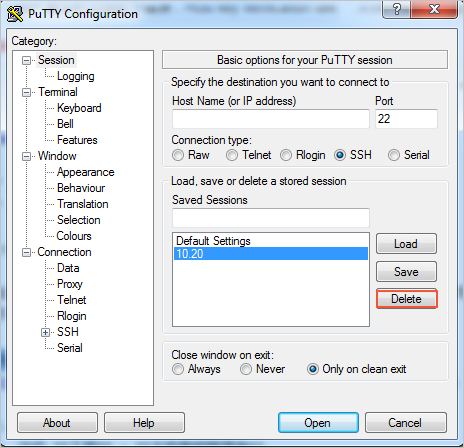
Log on to the instance again with your username and password, and confirm that the new public key fingerprint is saved.
Alternatively, you can click Receive and save to allow PuTTY to automatically update the saved key fingerprint, which lets you log on to the instance without manually deleting the session first.
Solution 2: Linux client
If you are connecting from a Linux client, follow these steps:
Run the following command to open the
known_hostsfile for your account:vi ~/.ssh/known_hostsPress the
Ikey to enter editing mode.Find and delete the line that corresponds to the IP address of the Linux instance you are connecting to.
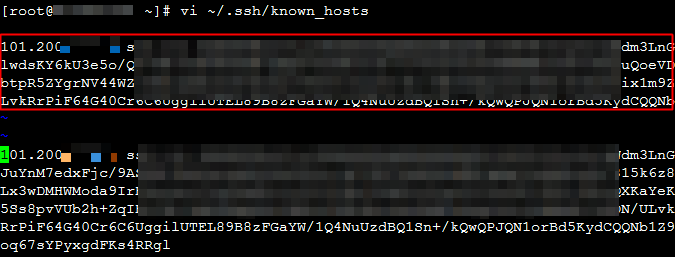
Type
:wqand press Enter to save and exit.Reconnect to the Linux instance. When prompted, confirm that you want to save the new public key fingerprint. You should then be able to log on successfully.
Background: public key fingerprints
A public key fingerprint is a shortened representation of a server's public key that makes verification easier. The public key itself is typically long -- up to 1024 bits when using the RSA algorithm. To simplify comparison, the client calculates an MD5 hash of the public key, producing a 128-bit string. This shorter value is the public key fingerprint, which is what SSH uses to verify server identity.
References
If the problem persists, refer to the following document for further troubleshooting:
Applicable scope
ECS