Backup and Disaster Recovery Center (BDRC) provides a dashboard for you to view the data protection scores of your Alibaba Cloud storage resources. This helps you understand the data security status of the resources. This topic describes the scoring principles and data protection scoring information in the BDRC console.
Star ratings for data protection scoring
Score range | Star rating | Message |
95 to 100 | ★★★★★ | Congratulations. Your data protection status is good. |
80 to 94 | ★★★★☆ | Your data protection status needs to be improved. We recommend that you optimize data protection based on your business requirements. |
70 to 79 | ★★★☆☆ | Your data protection score is low. We recommend that you optimize data protection at the earliest opportunity. |
61 to 69 | ★★☆☆☆ | Your data protection score is low. We recommend that you configure a data protection solution at the earliest opportunity. |
60 | ★☆☆☆☆ | Your data protection score is low. We recommend that you configure a data protection solution at the earliest opportunity. |
Scoring criteria
We recommend that you follow the gold data backup standard (3-2-1 backup rule) for a complete backup solution. Where,
3 indicates that at least three files are stored, including one raw data and two backup files.
2 indicates that the two backup files are stored in two media.
1 indicates that at least one backup file is stored in a different region that is physically separated.
Traditional backup software and cloud-native backup services on the public cloud use cost-effective and high-reliability Object Storage Service (OSS) to store backup data. Therefore, "2" can also be considered to indicate that two backup methods or solutions are used to back up data on the public cloud. Even if the two storage medium are OSS, the storage medium of backup data in different backup solutions are still isolated because the two backup solutions differ from the control link and different OSS buckets are used to store backup data.

BDRC combines various data backup solutions at the SaaS and IaaS storage layers and uses the following star ratings for scoring based on the preceding standard. The full score is 100. For more information about data backup solutions, see Data protection solutions of Alibaba Cloud.
Data protection solution | Message | Star rating | Score range |
Two backup solutions. At least one solution is configured with cross-region replication. | Congratulations. Your data protection status is good. | ★★★★★ | 95 to 100 |
A backup solution with cross-region replication configured. | Your data protection status needs to be improved. We recommend that you optimize data protection based on your business requirements. | ★★★★☆ | 80 to 94 |
A backup solution without cross-region replication configured. | Your data protection score is low. We recommend that you optimize data protection at the earliest opportunity. | ★★★☆☆ | 70 to 79 |
OSS cross-region replication or not configured. | Your data protection score is low. We recommend that you configure a data protection plan at the earliest opportunity. | ★★☆☆☆ | 61 to 69 |
Not configured. | Your data protection score is low. We recommend that you configure a data protection plan at the earliest opportunity. | ★☆☆☆☆ | 60 |
OSS cross-region replication is only available to the current version. You cannot use it to replica the previous version. Therefore, if you use only the OSS cross-region replication solution, your data protection still needs to be optimized.
Only cloud backup is available for Tablestore. Therefore, if you configure a backup solution with cross-region replication enabled for Tablestore, you can get five stars. The configuration indicates that you use cloud backup for Tablestore and replicate Tablestore backup vaults across regions.
Check item scores
BDRC checks and scores the data protection status of your Alibaba Cloud storage resources, such as Elastic Compute Service (ECS), OSS, File Storage NAS (NAS), and Tablestore. This helps you ensure the security of your data resources.
Resource type | Check item or data protection solution | Deducted score (if not configured) | Remarks |
ECS | Disk snapshots | 15 | If a disk is associated with an automatic snapshot policy or an ECS instance backup policy, no score is deducted. You are considered to understand the snapshot or ECS instance backup solution and start to use it. |
Cross-region snapshot replication | 5 | ||
Backup of ECS files and ECS-hosted self-managed databases | 15 | If you back up an ECS file or an ECS-hosted self-managed database, no score is deducted. You are considered to understand the backup solution and start to use it. | |
Cross-region replication of ECS file backup vaults | 5 | ||
OSS | OSS versioning | 15 | If OSS versioning is suspended, no score is deducted. You are considered to understand OSS versioning and start to use it. |
OSS cross-region replication | 5 | ||
OSS backup | 15 | If a backup plan is associated with an OSS bucket, no score is deducted. You are considered to understand the cloud backup solution and start to use it. | |
Cross-region replication of OSS backup vaults | 5 | ||
File Storage NAS | NAS recycle bin | 10 | |
NAS backup | 10 | If a backup plan is associated with NAS, no score is deducted. You are considered to understand the cloud backup solution and start to use it. | |
Cross-region replication of NAS backup vaults | 20 | ||
Tablestore | Tablestore backup | 15 | If a backup plan is associated with a table in a Tablestore instance, no score is deducted. You are considered to understand the cloud backup solution and start to use it. |
Cross-region replication of Tablestore backup vaults | 25 |
In scenarios that require the cloud backup solution, if a backup policy or plan is associated with resources, no score is deducted in the following situations. You are considered to understand the cloud backup solution and start to use it.
The backup policy or plan is suspended.
The backup policy or backup plan does not hit any data. For example, the prefix in an OSS backup plan does not hit objects, or the file directory in a NAS backup plan does not hit files.
Resource scoring
If a specific type of resource has multiple instances, the score of this type of resource is displayed in the Resource Risk section of the Overview page in the BDRC console. After scoring this type of resource based on the preceding principles, BDRC uses a specific weighting method to evenly score the resource. The final score is determined by using the following formula: (Average score + lowest score)/2. The lowest score is calculated twice to ensure that serious risks with a small occurrence frequency are adequately valued.
Example: A user ID (UID) is associated with eight ECS instances. An ECS instance scores 60 and the remaining ECS instances score 75. Calculation:
Average score: (60 + 7 × 75)/8 = 73.125. Lowest score: 60. Final score: (73.125 + 60)/2 = 66.56, which is displayed as " ".
".
Increase and update data protection scores
To increase your data protection scores, you can optimize the data protection solutions based on the check item scores in the preceding table. For example, you can configure disk snapshots or cloud backup solutions for more resources.
To avoid frequent API calls for scanning, BDRC daily refreshes data protection scores. If you configure a new data protection solution, the score improvement is not immediately reflected but is updated within 24 hours. To manually refresh scores, you can also click Check All Resource on the Overview page or Sync Resource on the Resource Center page.
Resource dashboard
This section provides data protection scores for storage resources, such as ECS, OSS, NAS, and Tablestore.
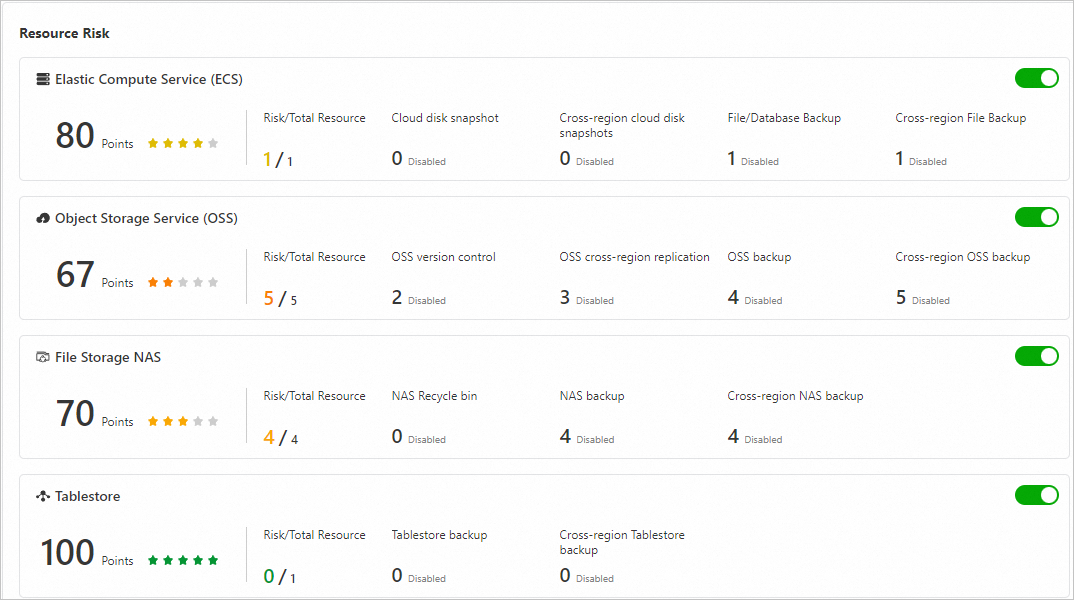
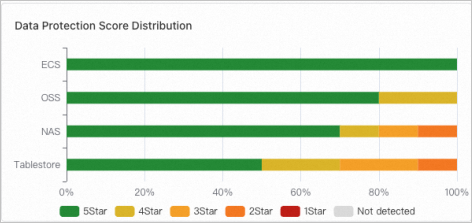
Distribution of data protection scores
This section displays the distribution of data protection scores for each type of storage resource within your account in a histogram.
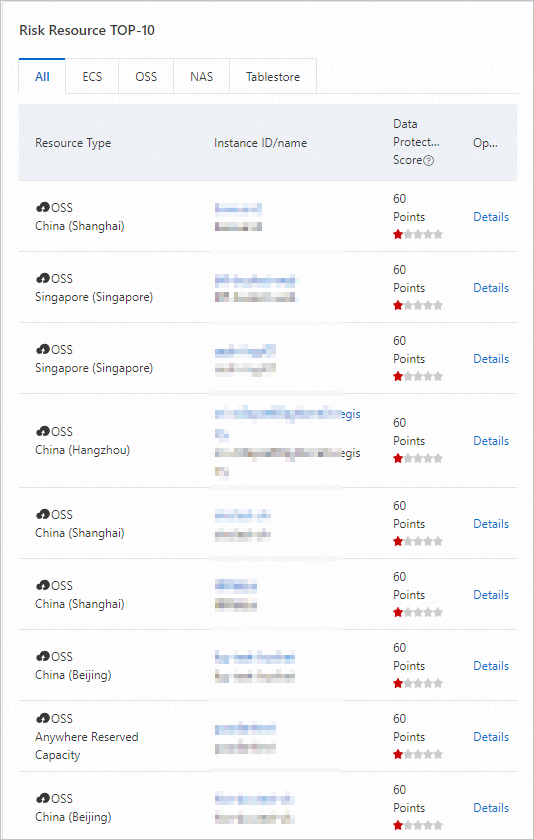
Top 10 risky resources
This section displays the top 10 risky resources.
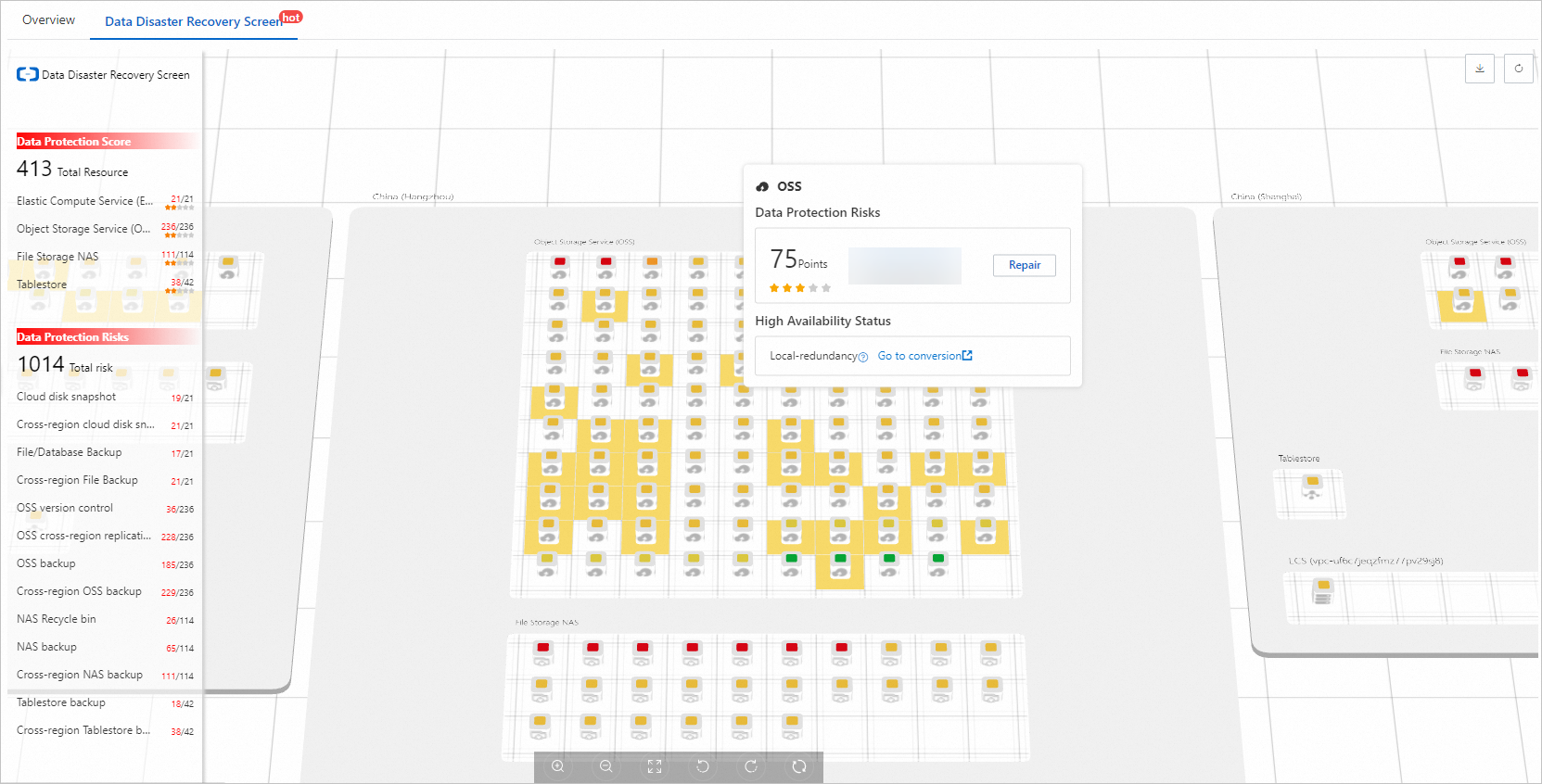
Data protection diagram
The data protection diagram displays the overall data protection status of each type of storage resource within your account in each region.