In a Service Mesh (ASM) environment, Envoy sidecar proxies intercept all pod traffic to provide mutual TLS (mTLS) authentication, traffic management, and distributed tracing. When specific traffic does not need these capabilities -- for example, high-throughput internal calls, health checks, or connections to known external endpoints -- bypassing the sidecar reduces latency and resource consumption.
ASM supports three bypass scenarios:
Exclude inbound ports -- Inbound traffic on specified ports reaches the application directly, skipping the sidecar.
Exclude outbound ports -- Outbound traffic on specified ports leaves the pod without passing through the sidecar.
Exclude outbound CIDR blocks -- Outbound traffic to specified IP ranges bypasses the sidecar.
Bypassed traffic loses ASM capabilities including mTLS encryption, load balancing, retry policies, and observability. Only bypass traffic that does not require these features.
Configuration scope and precedence
Bypass rules apply at three levels. More specific scopes override broader ones:
| Scope | Method | Overrides |
|---|---|---|
| Global | ASM console > Sidecar Proxy Setting > global tab | Baseline for all namespaces |
| Namespace | ASM console > Sidecar Proxy Setting > Namespace tab | Overrides global settings |
| Pod | Istio annotations on spec.template.metadata | Overrides namespace settings |
Prerequisites
Before you begin, make sure that you have:
An ASM instance. For more information, see Create an ASM instance
A Container Service for Kubernetes (ACK) managed cluster. For more information, see Create an ACK managed cluster
The cluster added to the ASM instance. For more information, see Add a cluster to an ASM instance
An ingress gateway. For more information, see Create an ingress gateway
Annotation reference
All bypass configurations map to Istio annotations on pod metadata. The ASM console sets these annotations automatically; pod-level annotations are added manually.
| Annotation | Effect | Value format |
|---|---|---|
traffic.sidecar.istio.io/excludeInboundPorts | Excludes specific inbound ports from sidecar interception. | Comma-separated port numbers, e.g. 7001,7002,7005 |
traffic.sidecar.istio.io/includeOutboundPorts | Redirects the specified outbound ports to the sidecar, regardless of the destination IP. | Comma-separated port numbers |
traffic.sidecar.istio.io/excludeOutboundIPRanges | Excludes specific outbound IP ranges from sidecar interception. | Comma-separated CIDR blocks, e.g. 47.XX.XX.144/32 |
Exclude inbound and outbound ports
Bypass sidecar interception for inbound traffic on specific ports while keeping outbound traffic on those ports routed through the sidecar. This is useful when services need low-latency inbound connections but still benefit from ASM load balancing on the outbound side.
The following example excludes inbound traffic on ports 7001, 7002, and 7005 while routing outbound traffic on the same ports through the sidecar:
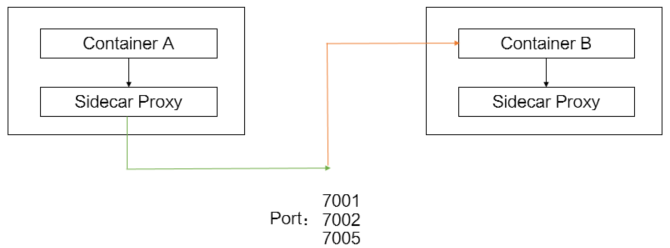
Option A: ASM console (namespace level)
Log on to the ASM console.
In the left-side navigation pane, choose Service Mesh > Mesh Management.
On the Mesh Management page, click the name of the target ASM instance, or click Manage in the Actions column.
In the left-side navigation pane, choose Data Plane Component Management > Sidecar Proxy Setting.
Click the Namespace tab and select default from the Namespace drop-down list.
Expand Enable/Disable Sidecar Proxy by Ports or IP Addresses and configure the following parameters:
Parameter Value Description Ports on Which Inbound Traffic Not Redirected to Sidecar Proxy 7001,7002,7005Inbound traffic on these ports bypasses the sidecar and reaches the application directly. Ports on Which Outbound Traffic Redirected to Sidecar Proxy 7001,7002,7005Outbound traffic on these ports is routed through the sidecar for load balancing and other ASM features. Click Update Settings.
Restart the affected pods for the new settings to take effect. For more information, see the "Restart pods for settings to take effect" section below.
Option B: Pod annotations (Deployment YAML)
Add Istio annotations to spec.template.metadata in the Deployment YAML:
annotations:
  traffic.sidecar.istio.io/excludeInboundPorts: '7001,7002,7005'
  traffic.sidecar.istio.io/includeOutboundPorts: '7001,7002,7005'
To apply the annotations through the ACK console:
Log on to the ACK console and click Clusters in the left-side navigation pane.
Click the name of the target cluster, then choose Workloads > Deployments in the left-side pane.
Find the target application and click Details in the Actions column.
In the upper-right corner, click View in YAML.
In the Edit YAML dialog box, add the annotations to
spec.template.metadataand click Update.Restart the affected pods for the new settings to take effect. For more information, see the "Restart pods for settings to take effect" section below.
For more annotation options, see Configure a sidecar proxy by adding resource annotations.
Exclude outbound CIDR blocks
Bypass sidecar interception for outbound traffic to specific IP ranges. For example, to exclude traffic to 47.XX.XX.144/32:
Option A: ASM console (global or namespace level)
Log on to the ASM console.
In the left-side navigation pane, choose Service Mesh > Mesh Management.
Click the name of the target ASM instance, or click Manage in the Actions column.
In the left-side navigation pane, choose Data Plane Component Management > Sidecar Proxy Setting.
Choose the configuration scope:
Global: Click the global tab.
Namespace: Click the Namespace tab and select default (or the desired namespace) from the drop-down list.
Expand Enable/Disable Sidecar Proxy by Ports or IP Addresses and set Addresses to Which External Access Is Not Redirected to Sidecar Proxy to
47.XX.XX.144/32.Click Update Settings.
Restart the affected pods for the new settings to take effect. For more information, see the "Restart pods for settings to take effect" section below.
Option B: Pod annotations (Deployment YAML)
Add the following annotation to spec.template.metadata in the Deployment YAML:
annotations:
  traffic.sidecar.istio.io/excludeOutboundIPRanges: 47.XX.XX.144/32
To apply the annotation through the ACK console:
Log on to the ACK console and click Clusters in the left-side navigation pane.
Click the name of the target cluster, then choose Workloads > Deployments in the left-side pane.
Click the name of the target application.
In the upper-right corner, click View in YAML.
In the Edit YAML dialog box, add the annotation to
spec.template.metadataand click Update.Restart the affected pods for the new settings to take effect. For more information, see the "Restart pods for settings to take effect" section below.
For more annotation options, see Configure a sidecar proxy by adding resource annotations.
Verify the bypass
To confirm that traffic bypasses the sidecar, set the outbound traffic policy to REGISTRY_ONLY. In this mode, if the traffic passes through sidecar proxies, the access to the destination CIDR block is blocked. If the traffic bypasses sidecar proxies, the access is successful.
Log on to the ASM console. Go to Sidecar Proxy Setting > global tab.
Expand Outbound Traffic Policy, select REGISTRY_ONLY, and click Update Settings.
Run the following command to access the
http://47.XX.XX.144/productpageURL:curl -I http://47.XX.XX.144/productpageIf the access is successful, the traffic bypassed the sidecar as expected. You can specify a CIDR block to which the traffic is forwarded to bypass sidecar proxies based on your business requirements.
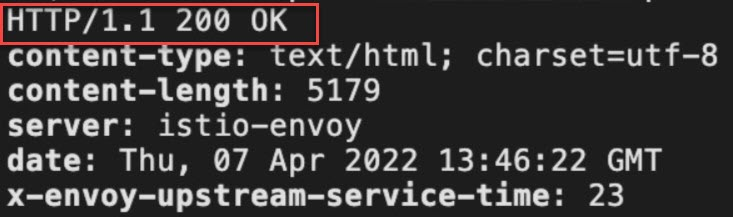
Restart pods for settings to take effect
Sidecar configuration is injected when a pod starts. After changing bypass settings, restart the affected pods to apply the new configuration.
Log on to the ACK console and click Clusters in the left-side navigation pane.
Click the name of the target cluster, then choose Workloads > Pods in the left-side pane.
Find the target pod and choose More > Delete in the Actions column.
Click OK. A new pod is created automatically with the updated sidecar configuration.