Managed Service for OpenTelemetry accepts trace data from OpenTelemetry, Jaeger, Zipkin, and SkyWalking clients. This guide walks you through activating the service, retrieving your authentication token, and connecting your application to start sending traces.
Prerequisites
An Alibaba Cloud account. If you do not have one, create an account.
Activate Managed Service for OpenTelemetry on the product page.
Retrieve your authentication token
After you activate the service, retrieve a token to authenticate the trace data your application sends. The steps differ between the new and old console versions.
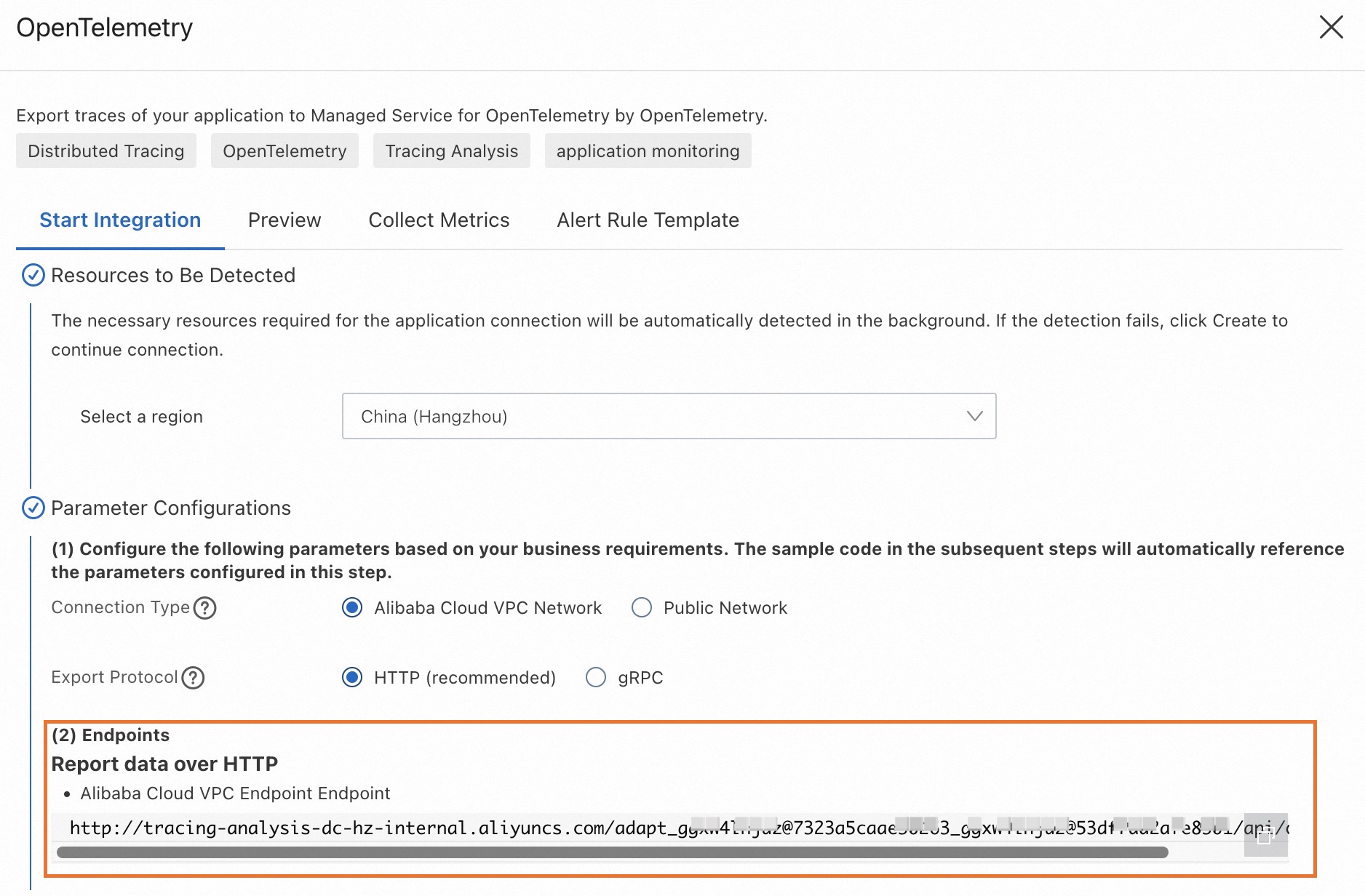
New console
Log on to the Managed Service for OpenTelemetry console.
In the left-side navigation pane, click Integration Center.
In the Open Source Frameworks section, click the OpenTelemetry card or the card for the client you want to use.
In the panel that appears, copy your token.
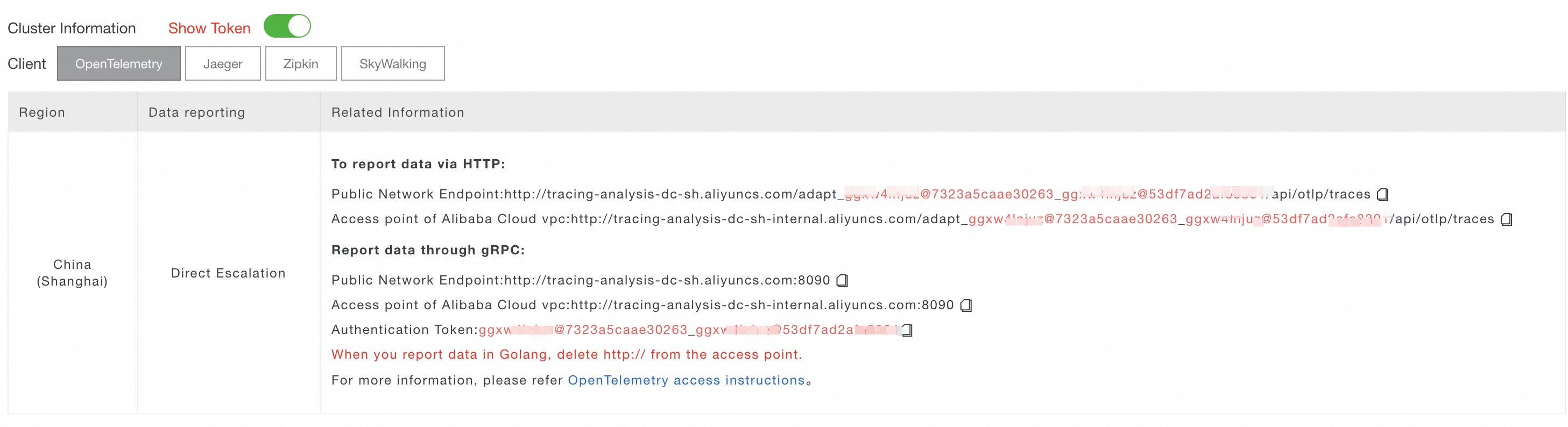
Old console
Log on to the Managed Service for OpenTelemetry console.
In the left-side navigation pane, click Cluster Configurations, then click the Access point information tab.
Select a region at the top of the page, then turn on the Show Token switch in the Cluster Information section.
In the Client section, select OpenTelemetry or the client you want to use.
Copy the endpoint from the Related Information column.
Token usage by protocol
How your application passes the token depends on the protocol:
HTTP-based protocols (OpenTelemetry HTTP, Jaeger HTTP, Zipkin HTTP): The token is embedded in the endpoint URL.
gRPC-based protocols (OpenTelemetry gRPC, Jaeger gRPC, SkyWalking gRPC): Set
Authentication=<token>in the gRPCmetadata.
Connect your application
Choose an endpoint
Each region provides two endpoint types:
Private endpoint: For applications deployed in an Alibaba Cloud production environment.
Public endpoint: For applications running outside Alibaba Cloud.
Supported protocols and ports
All protocols share the same endpoint domain. Port number and URL path distinguish each protocol.
| Port | Protocol | URL path |
|---|---|---|
| 8090 | OpenTelemetry gRPC | N/A |
| 80 | OpenTelemetry HTTP | /api/otlp/traces |
| 80 | Jaeger HTTP | /api/traces |
| 80 | Jaeger Remote Sampling | /api/sampling |
| 80 | Zipkin HTTP v1 | /api/v1/spans |
| 80 | Zipkin HTTP v2 | /api/v2/spans |
| 443 | OpenTelemetry HTTPS | /api/otlp/traces |
| 443 | Jaeger HTTPS | /api/traces |
| 443 | Jaeger Remote Sampling (HTTPS) | /api/sampling |
| 443 | Zipkin HTTPS v1 | /api/v1/spans |
| 443 | Zipkin HTTPS v2 | /api/v2/spans |
| 1883 | Jaeger gRPC | N/A |
| 1883 | SkyWalking gRPC | N/A |
| 8000 | SkyWalking v8 gRPC | N/A |
Regions and endpoints
For applications deployed in an Alibaba Cloud production environment, use a private endpoint. Otherwise, use a public endpoint.
| Region | Region ID | Private endpoint | Public endpoint |
|---|---|---|---|
| China (Hangzhou) | cn-hangzhou | tracing-analysis-dc-hz-internal.aliyuncs.com | tracing-analysis-dc-hz.aliyuncs.com |
| China (Shanghai) | cn-shanghai | tracing-analysis-dc-sh-internal.aliyuncs.com | tracing-analysis-dc-sh.aliyuncs.com |
| China (Qingdao) | cn-qingdao | tracing-analysis-dc-qd-internal.aliyuncs.com | tracing-analysis-dc-qd.aliyuncs.com |
| China (Beijing) | cn-beijing | tracing-analysis-dc-bj-internal.aliyuncs.com | tracing-analysis-dc-bj.aliyuncs.com |
| China (Zhangjiakou) | cn-zhangjiakou | tracing-analysis-dc-zb-internal.aliyuncs.com | tracing-analysis-dc-zb.aliyuncs.com |
| China (Hohhot) | cn-huhehaote | tracing-cn-huhehaote-internal.arms.aliyuncs.com | tracing-cn-huhehaote.arms.aliyuncs.com |
| China (Ulanqab) | cn-wulanchabu | tracing-cn-wulanchabu-internal.arms.aliyuncs.com | tracing-cn-wulanchabu.arms.aliyuncs.com |
| China (Shenzhen) | cn-shenzhen | tracing-analysis-dc-sz-internal.aliyuncs.com | tracing-analysis-dc-sz.aliyuncs.com |
| China (Heyuan) | cn-heyuan | tracing-cn-heyuan-internal.arms.aliyuncs.com | tracing-cn-heyuan.arms.aliyuncs.com |
| China (Guangzhou) | cn-guangzhou | tracing-cn-guangzhou-internal.arms.aliyuncs.com | tracing-cn-guangzhou.arms.aliyuncs.com |
| China (Chengdu) | cn-chengdu | tracing-cn-chengdu-internal.arms.aliyuncs.com | tracing-cn-chengdu.arms.aliyuncs.com |
| China (Hong Kong) | cn-hongkong | tracing-analysis-dc-hk-internal.aliyuncs.com | tracing-analysis-dc-hk.aliyuncs.com |
| Japan (Tokyo) | ap-northeast-1 | tracing-analysis-dc-jp-internal.aliyuncs.com | tracing-analysis-dc-jp.aliyuncs.com |
| Singapore | ap-southeast-1 | tracing-analysis-dc-sg-internal.aliyuncs.com | tracing-analysis-dc-sg.aliyuncs.com |
| Malaysia (Kuala Lumpur) | ap-southeast-3 | tracing-ap-southeast-3-internal.arms.aliyuncs.com | tracing-ap-southeast-3.arms.aliyuncs.com |
| Indonesia (Jakarta) | ap-southeast-5 | tracing-analysis-dc-indonesia-internal.aliyuncs.com | tracing-analysis-dc-indonesia.aliyuncs.com |
| Germany (Frankfurt) | eu-central-1 | tracing-analysis-dc-frankfurt-internal.aliyuncs.com | tracing-analysis-dc-frankfurt.aliyuncs.com |
| UK (London) | eu-west-1 | tracing-analysis-dc-lundun-internal.aliyuncs.com | tracing-analysis-dc-lundun.aliyuncs.com |
| US (Silicon Valley) | us-west-1 | tracing-analysis-dc-usw-internal.aliyuncs.com | tracing-analysis-dc-usw.aliyuncs.com |
| US (Virginia) | us-east-1 | tracing-us-east-1-internal.arms.aliyuncs.com | tracing-us-east-1.arms.aliyuncs.com |
| SAU (Riyadh - Partner Region) | me-central-1 | tracing-me-central-1-internal.arms.aliyuncs.com | tracing-me-central-1.arms.aliyuncs.com |
Network requirements for non-Alibaba Cloud applications
If your application runs outside Alibaba Cloud, make sure the following ports and domains are reachable from your network before sending trace data.
Ports to allow:
| Port | Protocol |
|---|---|
| 8090 | OpenTelemetry gRPC |
| 80 | OpenTelemetry HTTP, Jaeger HTTP |
| 443 | OpenTelemetry HTTPS, Jaeger HTTPS, Zipkin HTTPS |
| 1883 | Jaeger gRPC, SkyWalking gRPC |
| 8000 | SkyWalking v8 gRPC |
Domains to allow: Use the public endpoint domain for your region from the Regions and endpoints table above.