The API authorization feature is used to authorize an application to call an API. An application is an identity that is used to call an API. An application must be authorized before it can be used to call an API.
Prerequisites
The API authentication method is Alibaba Cloud App.
Application
An application is an identity that is used to call an API. Each application has a key pair that consists of an AppKey and an AppSecret. When you use an application to call an API, the AppKey of the application must be specified as a header in the request and the AppSecret must be used to calculate a signature string that is attached to the request. For information about how to calculate and pass a signature, see Use digest authentication to call an API.
Whoever obtains the AppKey and AppSecret pair of an application has all permissions on the application. You must keep AppKey and AppSecret pairs confidential. If you accidentally leak an AppKey and AppSecret pair, you can reset the pair in the API Gateway console.
You can create multiple applications and authorize them to call different APIs as needed. Note that only applications, instead of Alibaba Cloud accounts, can be authorized to call APIs.
In the API Gateway console, you can create, modify, or delete an application, view the details of an application, manage key pairs, and view the API that an application is authorized to call.
You can add new AppKey and AppSecret pairs to an application and view the added key pairs on the application details page. Each of the new key pairs has all permissions on the application. If you no longer require an added key pair, you can also delete the key pair. However, you cannot delete the default key pair of an application, which is generated when you create the application.
Create an application
Log on to the API Gateway console, in the navigation pane on the left, choose , and then click Create App in the upper-right corner.
In the Create App dialog box, configure the App Name parameter and click Confirm.
When creating an application, you can optionally set application tags, customize AccessKey information, and configure Extension Fields.
Set Tags: Use tags to mark applications.
Custom AccessKey Information: You can create a custom AccessKey pair and AppCode for the application. You can also modify the custom AccessKey pair and AppCode after creating the application. The modification takes effect immediately.
Extension Fields: You can configure an extended field for the application. The system passes the extended field as a system parameter named CaAppExtInfo to the backend service.
ImportantFor dedicated instances purchased before August 2023, if extension fields do not take effect, you must submit a ticket to have your instance upgraded.
Disable an application
Log on to the API Gateway console, in the navigation pane on the left, choose .
Click the target application to go to the Application Details page, and then click Disable App Authentication in the upper-right corner.
NoteAfter an application is disabled, the APIs authorized to this application cannot be called by this application. After the application is enabled again, it can continue to call the APIs.
ImportantFor dedicated instances purchased before July 2025, if the disable application feature does not take effect, you must submit a ticket to have your instance upgraded.
API authorization
Applications must be authorized before they can be used to call an API. Only authorized applications can call the API.
If you create your own application and API, you can authorize the application to call the API directly in the console.
If you purchase an API from Alibaba Cloud Marketplace, you can authorize your application to call the purchased API. If you do not have an application, Alibaba Cloud Marketplace creates an authorized application for you during the purchase. For more information, go to the Alibaba Cloud Marketplace console.
If you want to call an API of another Alibaba Cloud account, API authorization must be performed by that account, also known as the API provider. You must create an application and provide the ID of the application to the API provider. Then, the API provider can find your application using the application ID and authorize your application to call the API.
Procedure
Log on to the API Gateway console, in the navigation pane on the left, choose , and then choose Actions column >
 > Authorize for the API.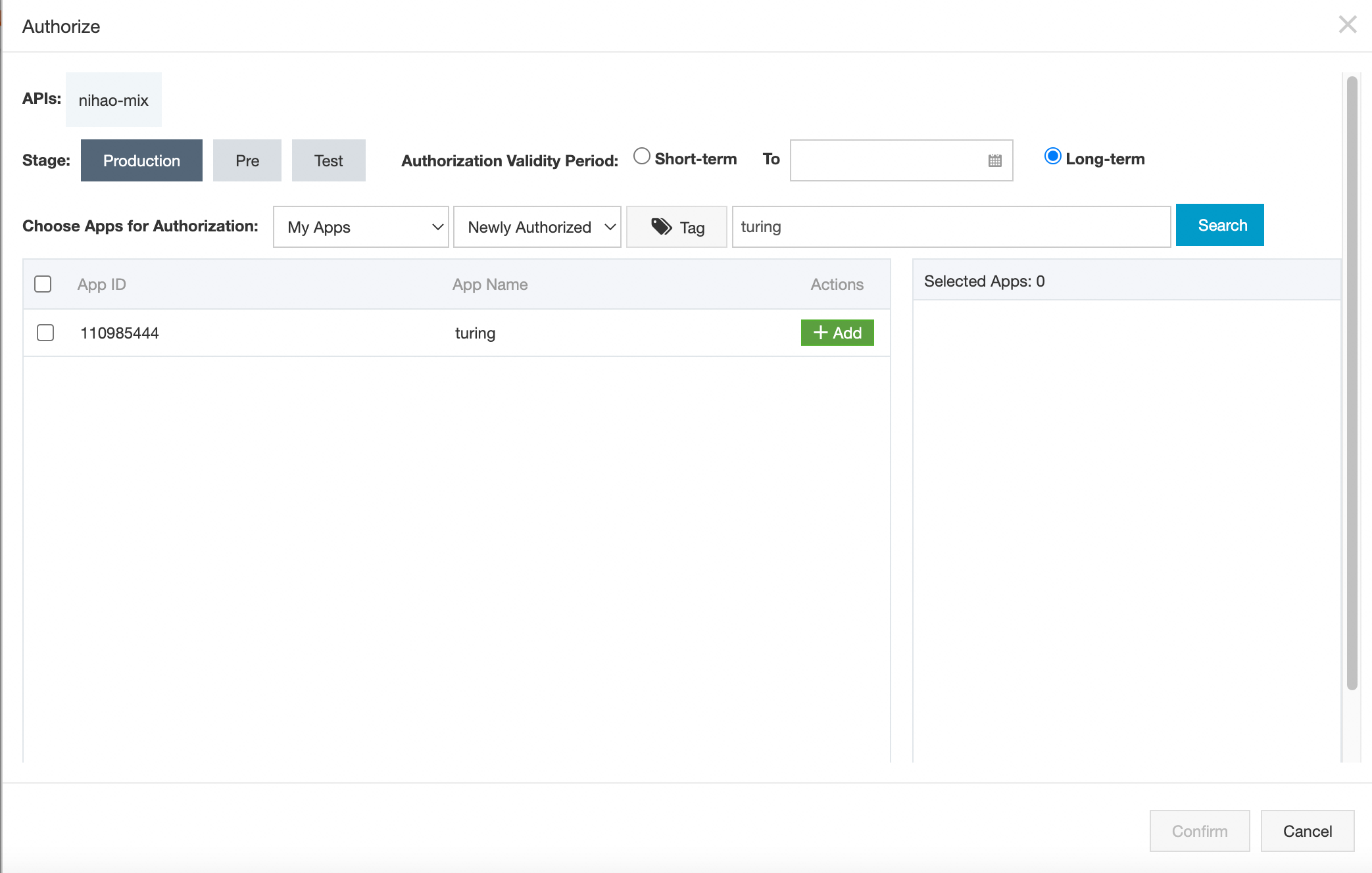
In the authorization page, select Stage, Authorization Validity Period, and Choose Apps for Authorization. In My Apps, click Search directly, and the applications under your account will be automatically loaded.
If you want to authorize an application that belongs to another account, select App ID from the Choose Apps for Authorization drop-down list, enter the ID of the application, and click Search. The application is displayed.
ImportantIf your dedicated instance was purchased before November 2023 and new key pairs that are added to applications do not take effect, you must submit a ticket to have your instance upgraded. Default key pairs that are generated when applications are created are not subject to version limits.