Billable item | Billable item code | Description | Supported billing methods |
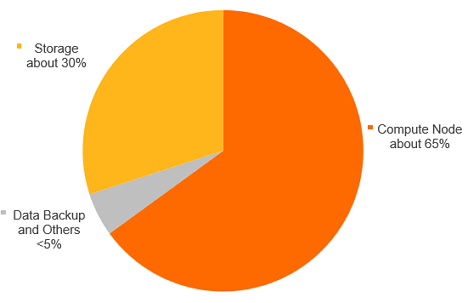
Compute nodes | master_spec | Compute nodes include primary and read-only nodes. The fees for compute nodes are related to the region, node specifications, and usage duration. The billing units for Serverless dynamic resources and fixed-specification resources are different. Serverless resources are billed per PCU per second, and bills are generated hourly.
Note PCU is the abbreviation for PolarDB Capacity Unit. One PCU provides the standard service capability of approximately 1 CPU core and 2 GB of memory. PCU is the unit used to manage the resource elasticity of a PolarDB Serverless cluster. The minimum unit for a single scaling event is 0.5 PCU.
| Subscription Pay-as-you-go
Note For more information about the billing rules for compute nodes, see Compute nodes. |
Storage space | | Storage space is the space occupied by data files, index files, log files (online logs and archived logs), and temporary files. You are charged for the occupied storage space. The fees for storage space are related to the data volume and storage duration.
| Subscription Pay-as-you-go
Note You can configure the billing method for the storage space of an Enterprise Edition cluster separately. The Pay-as-you-go method is based on actual usage and billed hourly. The Subscription method requires you to specify an upper limit for the storage space and pay upfront. The billing method for the storage space of a Standard Edition cluster follows the billing method of the compute nodes and cannot be set separately. For more information about the billing rules for storage space, see Storage space.
|
Backup storage (beyond the free quota) | | Backup files occupy storage space. PolarDB provides a free quota for storage space. You are charged for the storage space that exceeds the free quota. The fees for backup files are related to the capacity and retention period.
|
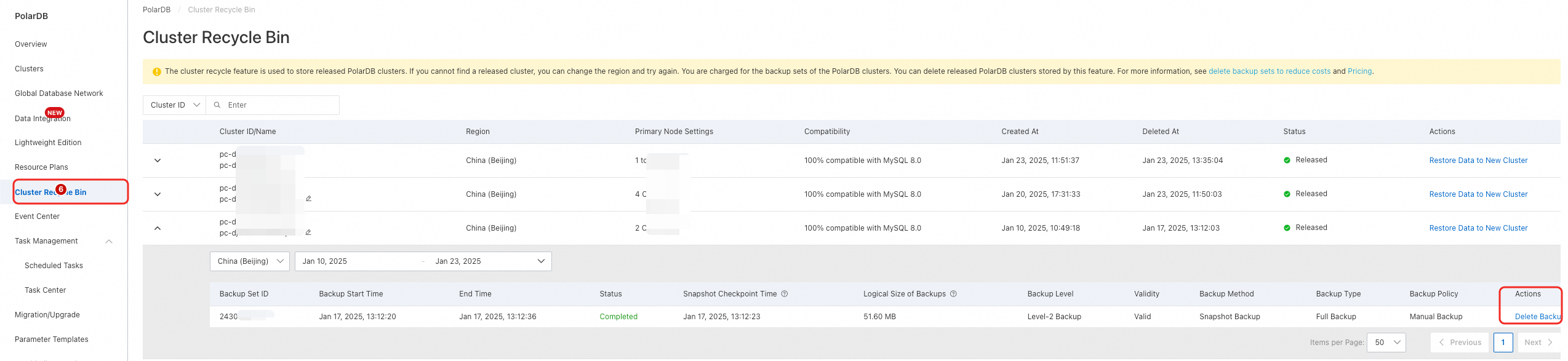
Note Backup storage is billed separately. If you select Subscription as the Billing Method when you purchase a cluster, this billing method applies only to compute nodes. Therefore, when your backup storage exceeds the free quota, fees are still incurred for the subscription cluster. When you unsubscribe from or release a cluster, if your Backup Policy is set to When the cluster is released, the cluster data is automatically backed up, and the latest backup set is retained for a long period of time., backup fees are incurred. You can delete these backup sets from the cluster recycle bin to avoid these fees. For more information, see Permanently delete a released cluster. For more information about the billing rules for backup storage, see Backup storage (beyond the free quota).
|
SQL Explorer (optional) | sql_explorer | The SQL Explorer feature of Database Autonomy Service (DAS) provides value-added services such as security audit and performance diagnostics. After you enable this feature, you are charged for the audit function. The SQL Explorer feature of DAS provides a free quota for storage space. You are charged for the storage space that exceeds the free quota. The fees for SQL Explorer are related to the storage capacity and retention period of audit logs.
|
Note SQL Explorer is billed separately. If you select Subscription as the Billing Method when you purchase a cluster, this billing method applies only to compute nodes. Therefore, when you use SQL Explorer, fees are still incurred for the subscription cluster. For more information about the billing rules of SQL Explorer, see SQL Explorer (optional).
|
Cold data archiving (optional) | colddata | PolarDB provides the cold data archiving feature. After you enable cold data archiving, you can easily separate cold data from source tables and archive it to OSS to significantly reduce data storage costs. The fees for cold data archiving are related to the capacity and retention period.
|
Note Cold data archiving is billed separately. If you select Subscription as the Billing Method when you purchase a cluster, this billing method applies only to compute nodes. Therefore, when you enable and use cold data archiving, fees are still incurred for the subscription cluster. For more information about the billing rules of the cold data archiving feature, see Cold data archiving (optional).
|
Global database network (GDN) (optional) | - | The cross-region data transmission feature is currently free of charge. You are charged only for each PolarDB cluster within the GDN. | Not applicable. |
Multi-zone (optional) | - | This feature is currently free of charge. | Not applicable. |