Create a PrivateLink endpoint to call model or application APIs directly from a virtual private cloud (VPC). It restricts all communication to the Alibaba Cloud internal network and not passing through the internet.
How it works
After you create an interface endpoint in a VPC, PrivateLink establishes a private, unidirectional connection between your VPC and Alibaba Cloud Model Studio. This connection only allows resources in your VPC to access Model Studio. Model Studio cannot access resources in your VPC.
When computing resources in the VPC access the endpoint, traffic is forwarded to the Model Studio service through PrivateLink and does not pass through the internet.

The endpoint must be in the same region as the Model Studio service. To use a VPC in another region, see Cross-region private access.
Model Studio service regions:
Public cloud: Singapore and China (Beijing).
Currently not supported in the US (Virginia) region.
Access APIs through PrivateLink endpoint
Step 1: Create an interface endpoint
Public cloud
Log on to the Endpoint console.
If this is your first time using an endpoint, follow the on-screen instructions to activate PrivateLink.
On the Interface Endpoint tab, click Create Endpoint. Configure the following and use the default values for the others.
Region: Select Singapore or China (Beijing) based on your Model Studio service region.
Endpoint Name: Enter a custom name, for example, modelstudio-privatelink-endpoint.
Endpoint Type: Select Interface Endpoint.
Endpoint Service: Select Alibaba Cloud Service. In the search box that appears, filter and select com.aliyuncs.dashscope.

VPC: Select the VPC that you plan to use. The endpoint will be created in the VPC. Resources in the VPC, such as ECS instances and containers, can then access Model Studio through the endpoint.
Zone and vSwitch: An endpoint elastic network interface (ENI) will be created in the zone that corresponds to the selected vSwitch. Select vSwitches in at least two different zones for high availability. If a zone fails, traffic will be automatically switched to an ENI in another zone to prevent service interruption.
Security Groups: Select a security group to associate with the endpoint ENI. Ensure that the security group allows inbound access on port 80 (HTTP) and port 443 (HTTPS).
Click Create to complete the process.
Step 2: Get the domain name
Public cloud
After you create the interface endpoint, obtain the service domain name from the details page of the interface endpoint.
The Default Domain Name supports only the HTTP protocol. The Custom Domain Name supports both HTTP and HTTPS.

Step 3: Verify the access
Replace the domain name in the Model Studio base_url with the domain name you got in the previous step. Then, make the call from the corresponding VPC.
Public cloud
The following example shows how to call a Qwen text model in the Singapore region in OpenAI-compatible mode:
Before replacement:
https://dashscope-intl.aliyuncs.com/compatible-mode/v1/chat/completionsAfter replacement:
Default service domain name:
http://ep-***.dashscope.ap-southeast-1.privatelink.aliyuncs.com/compatible-mode/v1/chat/completionsCustom service domain name:
https://vpc-ap-southeast-1.dashscope.aliyuncs.com/compatible-mode/v1/chat/completions
Example call:
HTTP
# Replace the original domain name with the domain name that you obtained in the previous step.
curl -X POST http://ep-***.dashscope.ap-southeast-1.privatelink.aliyuncs.com/compatible-mode/v1/chat/completions \
-H "Authorization: Bearer $DASHSCOPE_API_KEY" \
-H "Content-Type: application/json" \
-d '{
    "model": "qwen-flash",
    "messages": [
        {
            "role": "system",
            "content": "You are a helpful assistant."
        },
        {
            "role": "user",
            "content": "Who are you?"
        }
    ]
}'
OpenAI Python SDK
import os
from openai import OpenAI

client = OpenAI(
    api_key=os.getenv("DASHSCOPE_API_KEY"),
    # Replace the original domain name with the domain name that you obtained in the previous step.
    base_url="http://ep-***.dashscope.ap-southeast-1.privatelink.aliyuncs.com/compatible-mode/v1",
)
completion = client.chat.completions.create(
    model="qwen-flash",
    messages=[
        {'role': 'system', 'content': 'You are a helpful assistant.'},
        {'role': 'user', 'content': 'Who are you?'}],
)
print(completion.model_dump_json())
DashScope Python SDK
import os
from http import HTTPStatus
# We recommend that you use DashScope SDK V1.14.0 or later.
import dashscope
from dashscope import Generation

# Replace the original domain name with the domain name that you obtained in the previous step.
dashscope.base_http_api_url = "http://ep-***.dashscope.ap-southeast-1.privatelink.aliyuncs.com/api/v1"
dashscope.api_key = os.getenv("DASHSCOPE_API_KEY")
messages = [{
    'role': 'user', 'content': 'Who are you?'
}]
response = Generation.call(
    model="qwen-flash",
    messages=messages,
    result_format='message'
)
if response.status_code == HTTPStatus.OK:
    print(response)
else:
    print('Request id: %s, Status code: %s, error code: %s, error message: %s' % (
        response.request_id, response.status_code,
        response.code, response.message
    ))
DashScope Java SDK
// We recommend that you use DashScope SDK V2.12.0 or later.
import java.util.Arrays;

import com.alibaba.dashscope.aigc.generation.Generation;
import com.alibaba.dashscope.aigc.generation.GenerationParam;
import com.alibaba.dashscope.aigc.generation.GenerationResult;
import com.alibaba.dashscope.common.Message;
import com.alibaba.dashscope.common.Role;
import com.alibaba.dashscope.exception.ApiException;
import com.alibaba.dashscope.exception.InputRequiredException;
import com.alibaba.dashscope.exception.NoApiKeyException;
import com.alibaba.dashscope.protocol.Protocol;
import com.alibaba.dashscope.utils.JsonUtils;

public class Main {
    public static GenerationResult callWithMessage() throws ApiException, NoApiKeyException, InputRequiredException {
        // Replace the original domain name with the domain name that you obtained in the previous step.
        Generation gen = new Generation(Protocol.HTTP.getValue(), "http://ep-***.dashscope.ap-southeast-1.privatelink.aliyuncs.com/api/v1");
        Message systemMsg = Message.builder()
                .role(Role.SYSTEM.getValue())
                .content("You are a helpful assistant.")
                .build();
        Message userMsg = Message.builder()
                .role(Role.USER.getValue())
                .content("Who are you?")
                .build();
        GenerationParam param = GenerationParam.builder()
                .apiKey(System.getenv("DASHSCOPE_API_KEY"))
                .model("qwen-flash")
                .messages(Arrays.asList(systemMsg, userMsg))
                .resultFormat(GenerationParam.ResultFormat.MESSAGE)
                .build();
        return gen.call(param);
    }
    public static void main(String[] args) {
        try {
            GenerationResult result = callWithMessage();
            System.out.println(JsonUtils.toJson(result));
        } catch (ApiException | NoApiKeyException | InputRequiredException e) {
            // Print the error message.
            System.err.println("An error occurred while calling the generation service: " + e.getMessage());
        }
    }
}
Before you make the call, create and export an API key. To pass the API key directly, replace $DASHSCOPE_API_KEY with your API key.Cross-region private access
In the proceeding steps, you have accessed Model Studio from an endpoint in the same region. But if your VPC is in another region, complete the following steps:
Follow the previous sections to create a PrivateLink endpoint.
Use Cloud Enterprise Network (CEN) to connect VPCs in different regions. Note the following:
Select VPCs with non-overlapping CIDR blocks to prevent failures due to CIDR block conflicts.
To connect VPCs between Chinese mainland and oversea regions, your account must pass enterprise identity verification.
In the security group that is associated with the PrivateLink endpoint, add an inbound rule to allow traffic from the requester VPC on ports 80 and 443.
After the configuration is complete, when you access the default service domain name of the endpoint from the requester VPC, the transit router (TR) routes the traffic to the endpoint in the Model Studio service region.

By default, the default domain name can be directly accessed from interconnected VPCs across regions. However, a custom service domain name is valid only within VPCs of the same region. To use the custom domain name, create an authoritative zone that is the same as the custom domain name, and then resolve it to the default domain name using a CNAME record:
Add an authoritative zone that is the same as the custom domain name, such as
vpc-ap-southeast-1.dashscope.aliyuncs.com. For the Effective Scope section, select the requester VPC.To add a DNS record, set Record Type to CNAME, Hostname to
@, and Record Value to the default domain name. For example:ep-***.dashscope.ap-southeast-1.privatelink.aliyuncs.com.Note: When you configure internal domain name resolution, do not use underscores (_) in the host record or the full domain name because this can cause API calls to fail. A domain name can contain only letters, numbers, and hyphens (-). For example, use
test-for-dns.dashscope.aliyuncs.cominstead oftest_for_dns.dashscope.aliyuncs.com.
After the configuration is complete, you can access Model Studio APIs from the requester VPC using the custom domain name.
Billing
Using PrivateLink, CEN, and Private Zone may incur additional fees:
FAQ
Why can't my ECS instance access Model Studio APIs using PrivateLink?
Follow these steps to troubleshoot:
Confirm that the ECS instance and the endpoint are in the same VPC.
If the ECS instance and the endpoint are in different VPCs, connect the VPCs first.
Check the security group that is associated with the endpoint. Confirm that an inbound rule is added to allow traffic from the CIDR block of the source ECS instance on port 80 (HTTP) or 443 (HTTPS).
Confirm the domain name.
The default domain name supports only HTTP.
Can endpoints be accessed from the internet?
No. PrivateLink is used only to establish private connections within the Alibaba Cloud internal network. Endpoints do not have internet access, and endpoint ENIs cannot be associated with elastic IP addresses (EIPs).
Why do I receive an error when I call a model using my custom domain name with internal domain name resolution?
This issue usually occurs because the host record (or full domain name) used for internal domain name resolution contains invalid characters, such as an underscore (_). Domain names should only contain letters, numbers, and hyphens (-).
Configure the DNS record as follows:
Authoritative zone: Add a DNS record for the
dashscope.aliyuncs.comauthoritative zone.Host record: Set Record Type to CNAME, and enter your custom domain prefix, such as
test-for-dns-right. Note: Host records cannot contain underscores (_).Correct example
Incorrect example
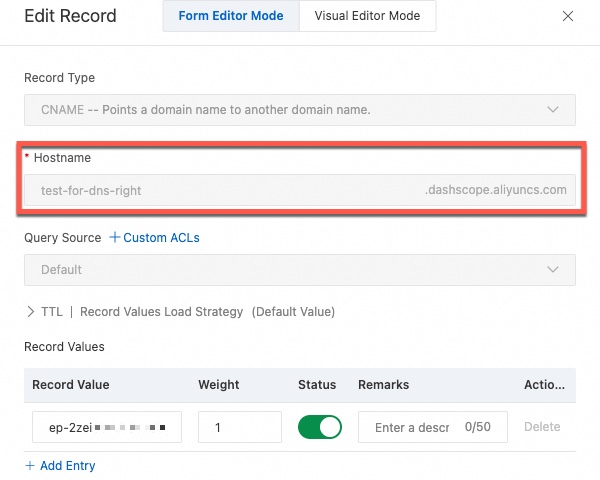
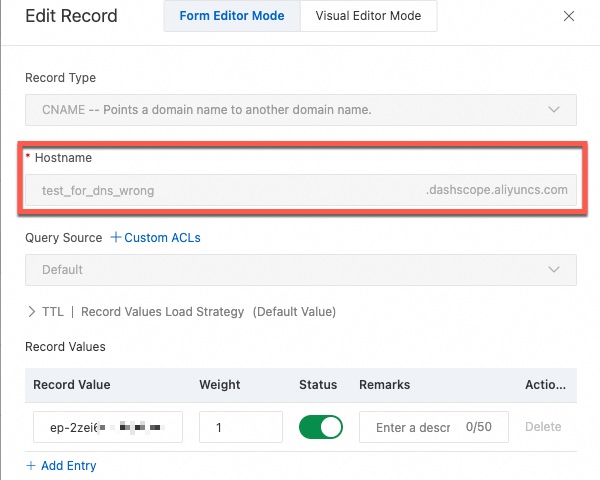
Record value: Enter the default service domain name of the Model Studio endpoint. For example:
ep-***.dashscope.ap-southeast-1.privatelink.aliyuncs.com.
After completing the configuration, you can call the model using
https://test-for-dns-right.dashscope.aliyuncs.com/api/v1. For OpenAI compatible mode, usehttps://test-for-dns-right.dashscope.aliyuncs.com/compatible-mode/v1/chat/completions.Using a domain name with an underscore, such as
https://test_for_dns_wrong.dashscope.aliyuncs.com/api/v1, will cause an error.