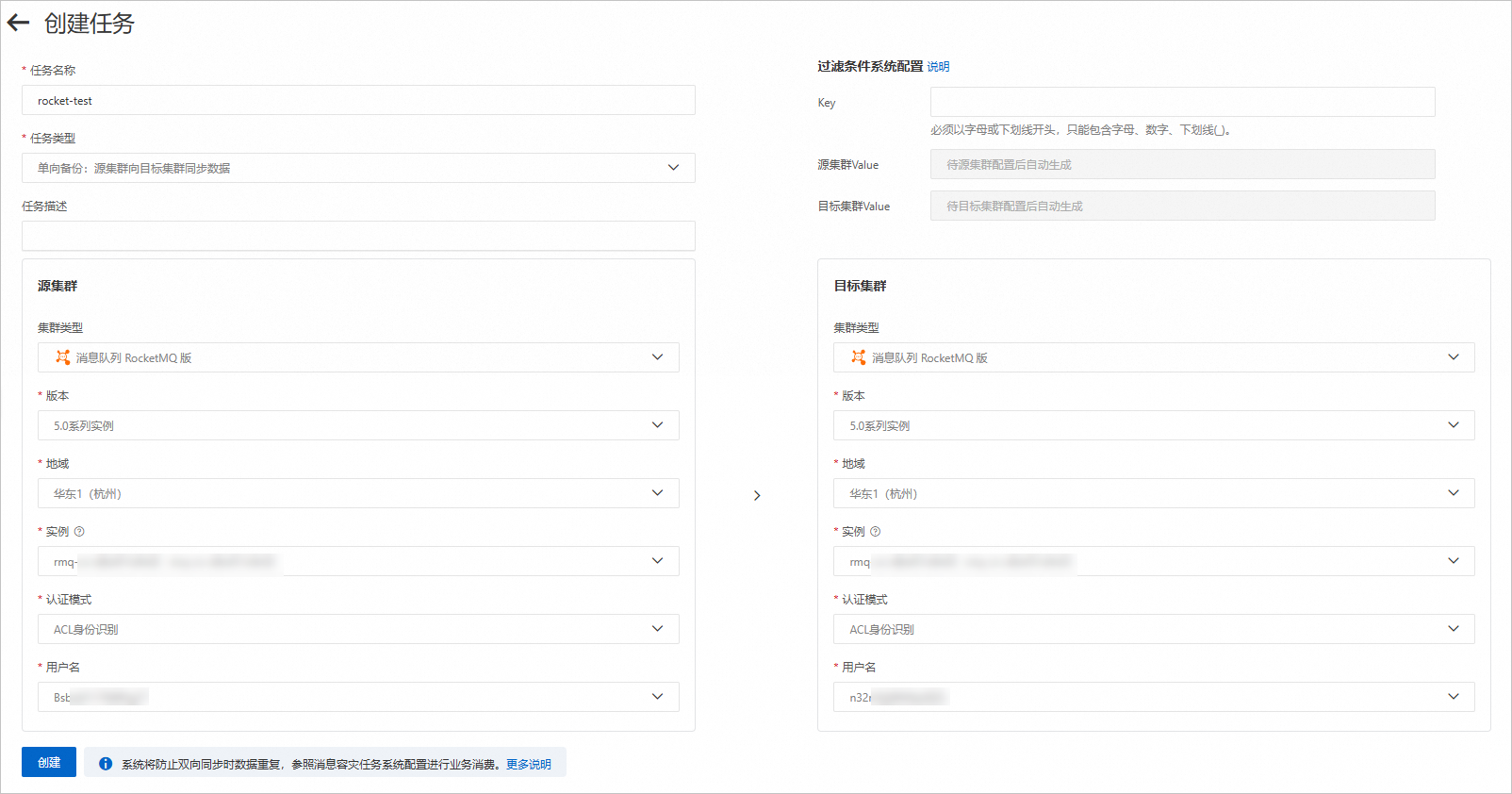
This topic describes how to create a Global Replicator task, and provides answers to frequently asked questions about Global Replicator to help you familiarize yourself with this feature.
Prerequisites
ApsaraMQ for RocketMQ instances are created. Applicable editions:
ApsaraMQ for RocketMQ V4.0 series instances.
NoteThe Standard Edition of V4.0 series instances supports only one-way synchronization.
ApsaraMQ for RocketMQ V5.0 series instances.
In this topic, ApsaraMQ for RocketMQ 5.0 instances are used as the source and destination instances.
Suggestions on computing specifications
When using Global Replicator for message synchronization, additional transactions per second (TPS) overhead will be consumed. Ensure that both the source and destination ApsaraMQ for RocketMQ instances can accommodate the peak messaging TPS requirements.
Recommended TPS configurations:
For example, before synchronization, a source ApsaraMQ for RocketMQ instance may have a peak message send TPS of 10,000 and a receive TPS of 10,000.
During synchronization, we recommend allocating the following TPS resources for both the source and destination instances.
Task type | Source instance | Destination instance | ||||
Peak messaging TPS | Peak message send TPS | Peak message receive TPS | Peak messaging TPS | Peak message send TPS | Peak message receive TPS | |
One-way synchronization | 30000 | 10000 | 20000 | 20000 | 10000 | 10000 |
Two-way synchronization | 40000 | 20000 | 20000 | 40000 | 20000 | 20000 |
View the peak messaging TPS of an instance on the Instance Details page in the ApsaraMQ for RocketMQ console. For information about the peak messaging TPS of different instance types, see Specification limits.
You can modify the peak message receive TPS based on the message processing rate.
Create a Global Replicator task
The first time you use Global Replicator, an Alibaba Cloud Service Authorization - RocketMQ Global Replicator dialog box appears. After you click OK, the system automatically creates the AliyunServiceRoleForRMQDisasterRecovery service-linked role. ApsaraMQ for RocketMQ can assume this role to implement the Global Replicator feature. For more information, see Service-linked roles.
Step 1: Create a task
- Log on to the ApsaraMQ for RocketMQ console.
In the left-side navigation pane, click Global Replicator. On the page that appears, click Create Task.
On the Create Task page, follow the on-screen instructions to configure the parameters and click Create.

The following tables describe the parameters.
ApsaraMQ for RocketMQ
Parameter
Description
Example
Version
The version of the ApsaraMQ for RocketMQ instance.
ApsaraMQ for RocketMQ 4.0 Instance
ApsaraMQ for RocketMQ 5.0 Instance
Region
The region where the ApsaraMQ for RocketMQ instance resides.
China (Hangzhou)
Instance
The ApsaraMQ for RocketMQ instance.
rmq-cn-778***
Authentication Mode
No Configuration Required
ACL-based Authentication
User Name
The username.
yS8x01****
Security Group ID
The security group of the Elastic Compute Service (ECS) instance with which the ApsaraMQ for RocketMQ instance is associated. This parameter is required only if you set Version to ApsaraMQ for RocketMQ 5.0 Instance.
Inbound: no requirements.
Outbound:
Action: Allow
Protocol: Custom TCP
Destination: The specified CIDR blocks must include all CIDR blocks of the cluster vSwitches. The specified ports must include 8080 and 8081.
sg-2ze4jlbqy2s40pc4****
System Configurations of Filter Conditions
(Optional) You can add custom attributes (UserProperty) to a message. Consumers can define subscription policies based on the SQL-92 syntax to filter messages.
Key: the key of UserProperty
Source Cluster Value: the value of UserProperty added to the message from the source cluster
Destination Cluster Value: the value of UserProperty added to the message from the destination cluster
Sample code for defining subscription policies based on the SQL-92 syntax:
String sqlStr = "{Key} IS NOT NULL AND {Key} = {Source/Destination Cluster Value}"; consumer.subscribe(MqConfig.TOPIC, MessageSelector.bySql(sqlStr));None
Apache RocketMQ
Parameter
Description
Example
Access Point
The access point. Format:
{Domain name/IP address}:{Port number}.XX.XX.XX.XX:8080
Authentication Mode
No Configuration Required
ACL-based Authentication
User Name
The username. Specify the value based on the actual scenario.
yS8x01****
Password
The password. Specify the value based on the actual scenario.
F17R4to****
Network Settings
Internet
VPC
Internet
Region
The region of the ECS instance with which the Apache RocketMQ cluster is associated. This parameter is required only if you set Network Settings to VPC. The region where the Elastic Compute Service (ECS) instance on which the Apache RocketMQ cluster is deployed is located. This parameter is required only if you set Network Settings to VPC.
China (Hangzhou)
VPC
The VPC of the ECS instance with which the Apache RocketMQ cluster is associated. This parameter is required only if you set Network Settings to VPC. The virtual private cloud (VPC) of the ECS instance on which the Apache RocketMQ cluster is deployed. This parameter is required only if you set Network Settings to VPC.
vpc-bp17fapfdj0dwzjkd****
vSwitch
The vSwitch of the ECS instance with which the Apache RocketMQ cluster is associated. This parameter is only required if you set Network Settings to VPC. The vSwitch of the ECS instance on which the Apache RocketMQ cluster is deployed. This parameter is required only if you set Network Settings to VPC.
vsw-bp1gbjhj53hdjdkg****
Security Group ID
The security group of the ECS instance with which the Apache RocketMQ cluster is associated. This parameter is required only if you set Network Settings to VPC. The security group of the ECS instance on which the Apache RocketMQ cluster is deployed.
Inbound: no requirements.
Outbound:
Action: Allow
Protocol: Custom TCP
Destination: The specified CIDR blocks must include all CIDR blocks where the Apache RocketMQ broker resides. The specified ports must include all ports of the Apache RocketMQ broker. The default ports are 9876, 10911, and 10909. If you changed the nameserver or the ports of the broker, specify the changed ports.
sg-2ze4jlbqy2s40pc4****
System Configurations of Filter Conditions
(Optional) You can add custom attributes (UserProperty) to a message. Consumers can then define subscription policies based on the SQL-92 syntax to filter messages.
Key: the key of UserProperty
Source Cluster Value: the value of UserProperty added to the message from the source cluster
Destination Cluster Value: the value of UserProperty added to the message from the destination cluster
Sample code for defining subscription policies based on the SQL-92 syntax:
String sqlStr = "{Key} IS NOT NULL AND {Key} = {Source/Destination Cluster Value}"; consumer.subscribe(MqConfig.TOPIC, MessageSelector.bySql(sqlStr));None
Step 2: Configure topic mappings
In the left-side navigation pane of the Basic Task Information page, click Message Synchronization.
Click Batch Mapping or Add Mapping. In the dialog box that appears, configure the topic mappings.
Batch Mapping: Select the topic mappings. Then, click OK.
Add Mapping: Configure the topic mapping. Then, click OK.
NoteIf the source cluster is an Apache RocketMQ cluster, you must specify a group that is not in use for message synchronization.
Messages are synchronized only after you configure topic mappings.
(Optional) Step 3: Enable consumer progress synchronization
You can enable consumer progress synchronization to synchronize the consumer progress of a group to the destination cluster. For more information, see Consumer progress synchronization.
Description of consumer clients
In this example, a two-way synchronization task is created. In the task, an ApsaraMQ for RocketMQ instance in the China (Shanghai) region is used as the source cluster, and an ApsaraMQ for RocketMQ instance in the China (Hangzhou) region is used as the destination cluster. The Key parameter is set to Region, the Source Cluster Value parameter is set to Shanghai, and the Destination Cluster Value parameter is set to Hangzhou.
In normal cases, consumer clients residing in the China (Shanghai) region consume only messages from the ApsaraMQ for RocketMQ instance residing in the China (Shanghai) region. You need to specify only one custom attribute to match the messages. For more information, see Event patterns.
Subscribe to messages matching a single custom attribute
String topic = "topic";
// Subscribe to messages only in the current region.
FilterExpression filterExpression = new FilterExpression("Region IS NOT NULL", FilterExpressionType.SQL92);
// The on-premises producer client did not specify a key whose value is Region in UserProperty during message sending. The custom attribute for the key whose value is Region is NULL.
simpleConsumer.subscribe(topic, filterExpression);Subscribe to all messages in the topic
String topic = "topic";
// Subscribe to all messages.
FilterExpression filterExpression = new FilterExpression("True", FilterExpressionType.SQL92);
simpleConsumer.subscribe(topic, filterExpression);