This topic describes how to use X-Engine.
Change the storage engine of a table from InnoDB to X-Engine
You can execute the following command to change the storage engine of a table from the InnoDB engine to X-Engine.
ALTER TABLE <database_name>.<table_name> ENGINE xengine;When you use the ALTER command to change the storage engine of a table from InnoDB to X-Engine, Data Manipulation Language (DML) and Data Definition Language (DDL) write operations to the table are blocked.
Create a table in X-Engine
To create a table that uses X-Engine in a cluster that uses both the InnoDB and X-Engine storage engines, you must specify X-Engine when you create the table. The syntax is as follows:
CREATE TABLE t1(c1 int primary key , c2 int) ENGINE=xengine;Adjust the memory resource ratio
On the X-Engine (Warm Data) tab of the page for your cluster, you can adjust the memory resource ratio at any time to meet your requirements.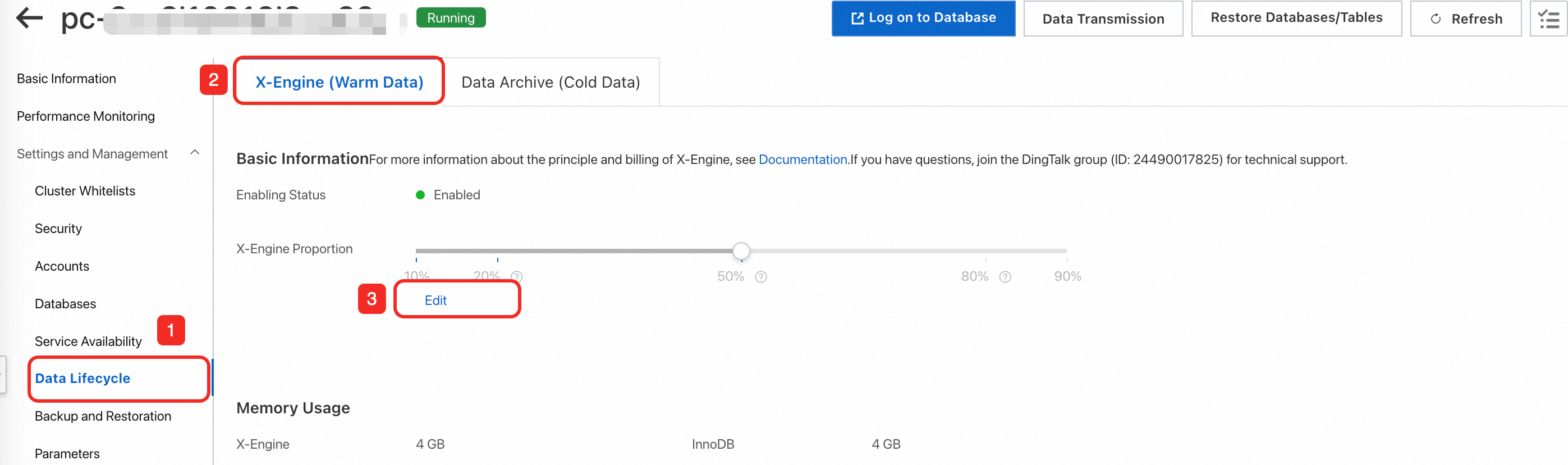
The following table provides the recommended proportion for three typical scenarios. You can set your proportion based on your business requirements.
Scenario | InnoDB (%) | X-Engine (%) |
Use InnoDB for hot data and X-Engine for cold data. The cold data is classified as seldom accessed data. | 80 | 20 |
Use InnoDB for hot data and X-Engine for cold data. The cold data is still updated and can be queried. | 50 | 50 |
Use InnoDB for small amounts of data and X-Engine for large amounts of data that require to be updated or queried. | 20 | 80 |
Limits
X-Engine has limits on its features and on large transactions.
Engine feature limits
Category | Feature | Description |
SQL features | Foreign keys | Not supported |
Temporary tables | Not supported | |
Generated Column | Not supported | |
Handler API | Not supported | |
Columns and column properties | Maximum number of columns in a table | 10,000 |
Maximum record length | 256 MB | |
GIS data types | All GIS-related data types are not supported, including geometry, point, linestring, polygon, multipoint, multilinestring, multipolygon, and geometrycollection. | |
Indexes | Hash indexes | Not supported |
Spatial indexes | Not supported. The creation and use of full-text indexes are not supported. | |
Transactions | Transaction isolation level | The following two isolation levels are supported:
|
Maximum amount of data supported by a single transaction | A single transaction supports up to 100,000 rows by default. You can adjust this value using the | |
Savepoint | Not supported | |
XA transactions | Internal XA transactions are supported. | |
Locks | Lock granularity |
|
Skip Locked | Not supported | |
Lock Nowait | Not supported | |
Character sets | Character sets supported by non-indexed columns | All character sets (collation rules) are supported for non-indexed columns. |
Character sets supported by indexed columns |
| |
Primary/secondary replication | Binary logging format | The following three formats are supported:
Note The default format is row. The stmt and mixed formats may cause data security issues in specific concurrent scenarios. |
By default, X-Engine features that are not listed in this table are the same as those of the InnoDB engine.
Limits on large transactions
X-Engine does not support large transactions. If a transaction modifies 10,000 or more rows, X-Engine enables the commit in middle feature. This feature allows X-Engine to internally commit the transaction and start a sub-transaction to continue the original transaction. However, commit in middle does not strictly adhere to the principle of transaction atomicity. Take note of the following points when you use this feature:
If you start a transaction to insert a large amount of data, a portion of the data may be committed during the insertion process because of the
commit in middlefeature. As a result, other requests can access the committed data before the entire transaction is complete.If you start a transaction to modify a large amount of data, any part of the transaction that is committed by the
commit in middlefeature cannot be rolled back.DROP TABLE t1; CREATE TABLE t1(c1 int primary key , c2 int)ENGINE=xengine; BEGIN; call insert_data(12000); // Insert 12,000 rows to trigger commit in middle. The first 10,000 rows are committed. rollback;// The rollback operation can only roll back the last 2,000 rows. SELECT COUNT(*) FROM t1; // You can still query the 10,000 rows. +----------+ | COUNT(*) | +----------+ | 10000 | +----------+ 1 row in set (0.00 sec)If you start a transaction to insert and then delete a large amount of data, the
commit in middlefeature may prevent the DELETE operation from reading the rows that were just inserted within the same transaction. As a result, the newly inserted data is not deleted.DROP TABLE t1; CREATE TABLE t1(c1 int primary key , c2 int)ENGINE=xengine; call insert_data(10000); BEGIN; INSERT INTO t1 VALUES(10001,10001), (10002,10002); DELETE FROM t1 WHERE c1 >= 0;// The DELETE operation triggers commit in middle, which prevents the operation from reading the rows inserted in the current transaction. commit; SELECT * FROM t1; +-------+-------+ | c1 | c2 | +-------+-------+ | 10001 | 10001 | | 10002 | 10002 | +-------+-------+ 2 rows in set (0.00 sec)
Parameter description
You can modify the parameters in the following table based on your requirements. For more information, see Set cluster parameters and node parameters.
The method for modifying PolarDB cluster parameters differs between the console and a database session. The differences are as follows:
In the PolarDB console
Compatibility: Some cluster parameters in the PolarDB console have the loose_ prefix for compatibility with MySQL configuration files.
Procedure: Find and modify the parameters that have the
loose_prefix.
In a database session (using the command line or a client)
Procedure: When you connect to the database and use the
SETcommand to modify a parameter, remove theloose_prefix and use the original parameter name.
Category | Parameter | Description | Modifiable | Restart required after modification |
Performance | xengine_batch_group_max_group_size | The maximum number of groups in a transaction pipeline. | No | N/A |
xengine_batch_group_max_leader_wait_time_us | The maximum wait time of a transaction pipeline. | No | N/A | |
xengine_batch_group_slot_array_size | The maximum batch size of a transaction pipeline. | No | N/A | |
xengine_parallel_read_threads | The number of concurrent parallel scans. | Yes | No | |
xengine_parallel_wal_recovery | Parallel recovery. | No | N/A | |
Memory | xengine_block_cache_size | The size of the block cache used to cache table data and indexes. | Yes | No |
xengine_row_cache_size | The size of the row cache. | No | N/A | |
xengine_write_buffer_size | The maximum size of a single Memtable. | No | N/A | |
xengine_block_size | The size of a data block on the disk. | No | N/A | |
xengine_db_write_buffer_size | The total size limit for active Memtables of all subtables. | No | N/A | |
xengine_db_total_write_buffer_size | The total size limit for active and immutable Memtables of all subtables. | Yes | No | |
xengine_scan_add_blocks_limit | The number of blocks that can be added to the BlockCache for each range scan request. | Yes | No | |
compaction | xengine_flush_delete_percent_trigger | The total number of records that triggers a Memtable switch. When the number of records in a Memtable reaches the specified value, a Memtable switch is triggered. | No | N/A |
Locks | xengine_max_row_locks | The maximum number of rows that can be locked in a single SQL request. | No | N/A |
xengine_lock_wait_timeout | The lock wait timeout period. | Yes | No |