This topic describes how to change the session directory when you use an HTTP trigger in the PHP runtime of Function Compute.
Due to the serverless nature of Function Compute, common content, such as web application files and temporary caches, is stored in NAS directories by default. If you want to change the session directory to a public directory of NAS when you use the PHP runtime, you can use the method described in this topic.
- Create the extension directory in the same directory as the function entry file. The following sample code describes the directory structure:
. |____extension | |____my_ext.ini |____index.php - Edit the my_ext.ini file, set the storage directory of the session and start the session automatically.
In the following sample code, the last two lines of code are used to set the session storage directory and automatically start the session.
extension=session.so extension=ftp.so extension=shmop.so extension=bcmath.so extension=gettext.so extension=pcntl.so extension=simplexml.so extension=xmlreader.so extension=bz2.so extension=gmp.so extension=pdo.so extension=soap.so extension=xmlrpc.so extension=calendar.so extension=iconv.so extension=pdo_mysql.so extension=sockets.so extension=xmlwriter.so extension=ctype.so extension=imagick.so extension=phar.so extension=sysvmsg.so extension=dom.so extension=json.so extension=posix.so extension=sysvsem.so extension=exif.so extension=mbstring.so extension=protobuf.so extension=sysvshm.so extension=fileinfo.so extension=mysqli.so extension=redis.so extension=zip.so extension=memcached.so extension=tokenizer.so session.save_path=/mnt/www session.auto_start=1 - Create a function based on the code package in the preceding directory. For more information, see Create a function.
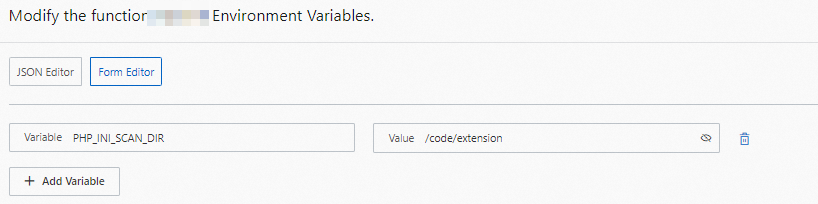
- Add environment variables to the function, PHP_INI_SCAN_DIR points to my_ext.ini under the code directory. For more information, see Update a function.