Parameter tuning is an efficient method to improve the performance of your ApsaraDB RDS for MySQL database instances. Database Autonomy Service (DAS) provides the parameter diagnostics feature that allows you to diagnose the modifiable parameters of your instance in the ApsaraDB RDS console and view the parameter optimization solutions and parameter modification records within the previous seven days. This topic describes how to use the parameter diagnostics feature.
Background information
Database performance optimization is one of the most important researches in industry and academia. In addition to SQL optimization such as index optimization and business code optimization, parameter tuning also proves to be effective to optimize database performance.
Prerequisites
The target database engine is:
ApsaraDB RDS for MySQL
PolarDB for MySQL
The target database's cloud instance is connected to DAS and in an Accessed state. For more information about the connection method, see Connect a database instance to DAS.
Limits
Only one parameter diagnostics and analysis task can be triggered within three minutes.
You can use the parameter diagnostics feature only to analyze the parameters that can be modified in the console and view the diagnosis. You are not allowed to directly modify these parameters in the DAS console.
If the interval between two consecutive parameter diagnostics and analysis tasks is short, the returned results may be the same.
How it works
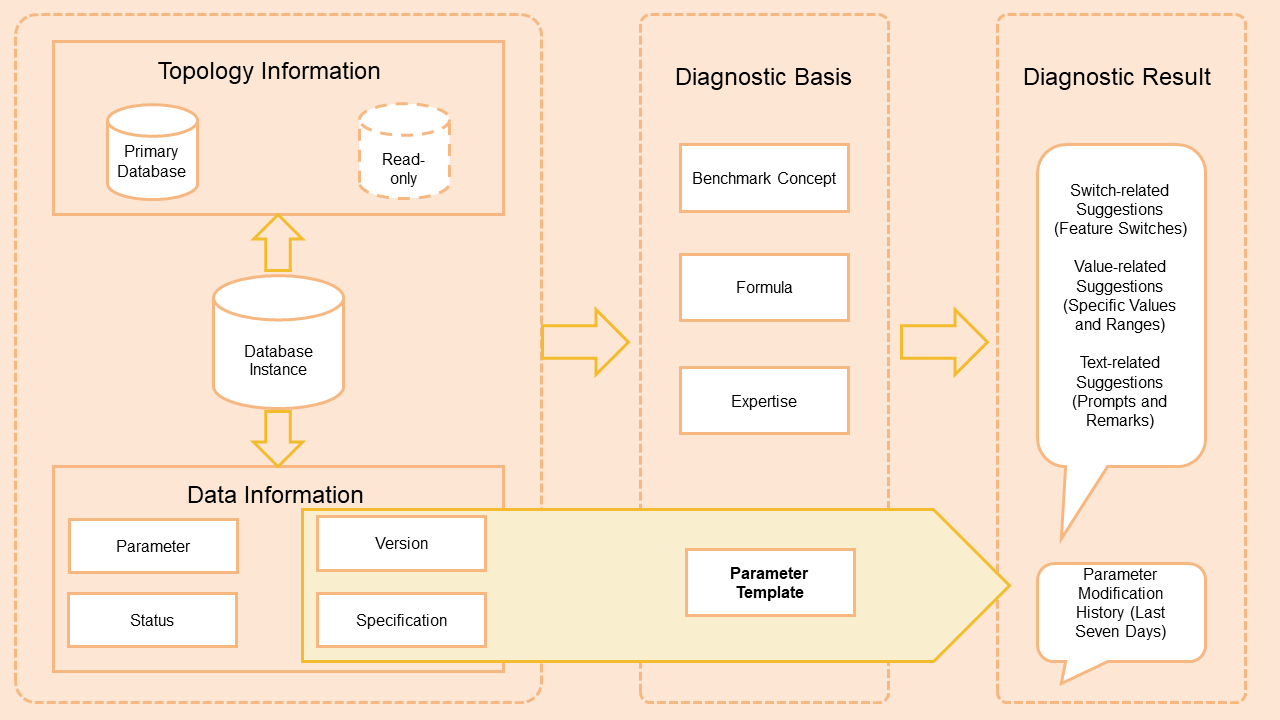
Obtains the topology information of the database instance, and analyzes the primary instance and read-only instances.
Analyzes the parameter settings of the database instance based on the status of the instance, parameter templates, benchmark concepts related to additional parameters, calculation formulas, and expertise.
Provides diagnostics and analysis results. The results contain the static parameter diagnosis of the database instance and the parameter modification records within the previous seven days.
Usage notes
When you modify parameters in the ApsaraDB RDS console based on the diagnosis, you may need to restart the database instance to apply the modification. We recommend that you perform this operation during off-peak hours and make sure that your application supports automatic reconnection.
Parameter diagnostics analyzes only modifiable parameters in the console and does not alter their values. For ApsaraDB RDS for MySQL, see Set instance parameters. For PolarDB for MySQL, see Configure cluster and node parameters.
Billing
No fees are involved.
Procedure
Log on to the DAS console.
In the navigation pane on the left, click .
Find the target instance and click the instance ID to open the instance details page.
In the left-side navigation pane, click Diagnostics.
On the page that appears, click the Parameter Diagnostics tab.
Create a parameter diagnostics and analysis task
On the Parameter Diagnostics tab, click Analyze to create a parameter diagnostics and analysis task. You can view the created task in the Parameter Diagnostics section.
View the parameter diagnosis
In the Parameter Diagnostics section, find the task whose result you want to view and click Details in the Actions column.
You can specify a time range within which you want to view the parameter diagnostics records.
NoteTo modify parameters based on the analysis results, click Parameter Settings on the analysis results page to open the console and modify the parameters. For ApsaraDB RDS for MySQL, see Set instance parameters. For PolarDB for MySQL, see Configure cluster and node parameters.
Recommendation Level in the diagnosis:
Critical: We recommend that you immediately modify this parameter.
Warn: We recommend that you modify this parameter based on your business requirements.
Notice: The value of this parameter is different from that in the default parameter template of the instance.