Table of Contents
Is routing every single request to your single best-performing model really the optimal choice?
Adding an LLM to a service is no longer the hard part. The difficulty shows up once you move into day-to-day operations, and most teams end up facing a very similar set of concerns.
The questions I heard most often in recent customer meetings all pointed in the same direction.
"We adopted an LLM, but our AI spend is growing faster than we expected."
"Even simple requests like translation or summarization are being handled by our top-tier model."
"Is there a way to cut cost without giving up quality?"
As a Technical Account Manager supporting a range of generative AI projects, I kept arriving at the same conclusion. An architecture that caused no trouble during a PoC becomes a very different challenge in production, where cost, performance, and reliability all have to be weighed together.
What matters is not picking the single best model. It is automatically selecting the model that fits the characteristics of each request, and building a structure that can run that selection reliably in production.
In this article, I take one approach to that problem: using Alibaba Cloud AI Gateway together with Model Studio to implement a Self-Routing Multi-LLM architecture that picks a model automatically based on request difficulty. I also walk through a realistic production setup — authentication, AI Fallback, and operational monitoring included — in five console-driven steps.
The Self-Routing pattern described here is not meant to be presented as the one correct answer. Please read it as one example of how these operational patterns can be implemented with AI Gateway.
Real-service traffic ranges from simple FAQ lookups to code generation and complex reasoning. Send everything to the top-tier model and the quality gain is marginal while the bill keeps climbing; use only a lightweight model and quality collapses on the hard questions. On top of that, even within the same model family, the per-token price of the lightweight model and the flagship model differ by orders of magnitude. An architecture that ignores the difficulty distribution of your traffic is, in itself, generating cost.
The goal is not the single best model — it is using the right model for the right request.
As generative AI services move past PoC and into production, more teams are managing quality and cost together by combining multiple models rather than sending every request to a single LLM. Four operational patterns are widely used:
Model Routing itself can be implemented in several forms, depending on when and how the decision is made. Cascade routing calls the low-cost model first and promotes to a higher tier only when needed. Classifier-based routing uses a separate classifier to judge request difficulty before inference. Semantic routing analyzes the meaning or intent of the question and dispatches it to a task-specific model. On the research side, FrugalGPT explores the cascade approach, and RouteLLM selects models using a trained router.
The Self-Routing described in this article is closest to the cascade approach. Instead of training a separate classification model, I had Qwen-Flash return a difficulty assessment alongside its answer, so the whole thing can be started with AI Gateway configuration plus a small amount of application logic.
These operational patterns are not specific to any one cloud. Alibaba Cloud AI Gateway likewise supports implementing them through routing, AI Fallback, authentication, and monitoring.
These approaches describe how routing decisions are made. A separate architectural consideration is where those decisions are made — within a managed service, at the gateway layer, or inside the application itself. Chapter 7 compares these three approaches and their operational trade-offs.
AI Gateway is a managed gateway for LLM traffic. It does not run models itself — it handles model operations. Inference belongs to Model Studio; authentication, monitoring, and failover belong to AI Gateway.
Self-Routing on its own is fairly simple logic. In production, though, you have to account for everything around it. If API key management, authentication, logging, rate limiting, and failure handling are all implemented inside the application, the operational layer can easily end up more complex than the routing logic itself.
In this example, AI Gateway takes on those operational functions so the application can focus solely on the Self-Routing decision.
The list of required capabilities is long, but the actual configuration is mostly a handful of console steps. I walk through it hands-on in Chapter 4.
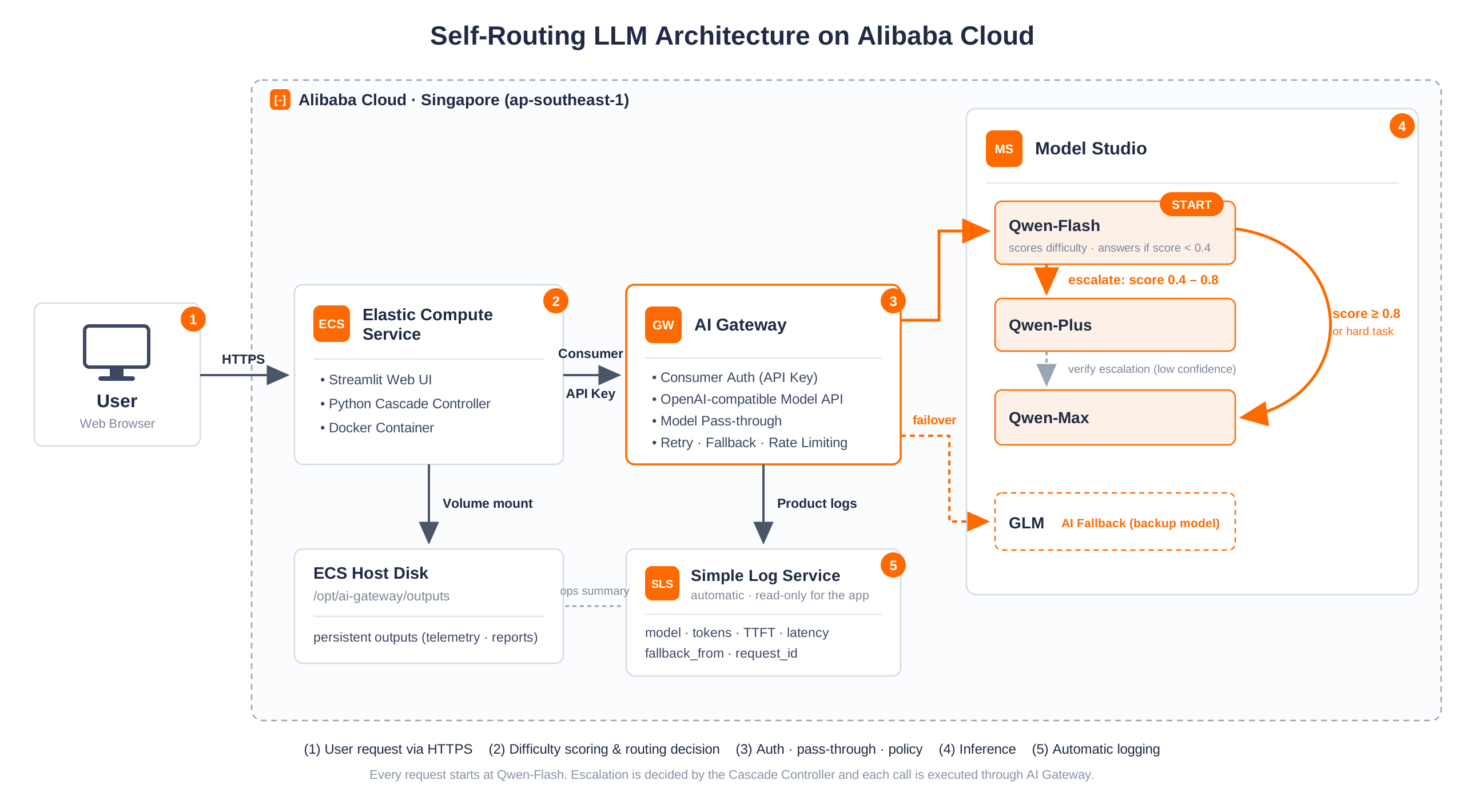
Services used
(1) User → ECS: the user opens the Streamlit app. No API key is passed to the client.
(2) Cascade Controller: asks Flash for a difficulty rating and decides whether to promote to Plus or Max. This is the application's only core logic.
(3) AI Gateway: every call passes through it, and it owns authentication, pass-through, logging, and rate limiting.
(4) Model Studio: performs the actual inference, and switches automatically to GLM if the primary model errors.
(5) SLS: automatically records model, tokens, latency, and fallback_from.
The result is a clean separation of concerns: the application focuses on the business logic of model selection, while authentication, API management, observability, and failure handling sit with AI Gateway.
Every request goes to Qwen3.7-Flash first. Flash is designed to return a difficulty score and a confidence score along with its answer.
{
  "answer": "...",
  "difficulty_score": 0.72,
  "difficulty_band": "medium",
  "confidence_score": 0.91,
  "reason_code": "..."
}
If difficulty_score is below 0.4, the Flash answer is accepted; below 0.8, the request is promoted to Plus; above that, to Max. There is no separate classification model — Flash scores its own difficulty.
def select_stage_for_score(score: float, config: CascadeConfig) -> str:
    if score < config.plus_scoring.score_min or score > config.plus_scoring.score_max:
        raise PlusParseError(f"difficulty_score out of range: {score}")
    if score < config.thresholds.flash_upper_exclusive:
        return "flash"
    if score < config.thresholds.plus_upper_exclusive:
        return "plus"
return "max"Trusting a single score can lead to misjudgments, so I added three safeguards.
confidence_score falls below min_confidence(0.70), the low score is not trusted and the request is promoted to a higher-tier model anyway.sql, debug, legal, or medical, it goes straight to Max without scoring.def _hard_task_heuristic_triggered(self, question: str) -> bool:
if not self.cascade.self_route.hard_task_heuristics.enabled:
return False
normalized = question.lower()
return any(term in normalized for term in HARD_TASK_HEURISTIC_TERMS)All resources were created in the Singapore (ap-southeast-1) region, and nearly everything was configured in the console.
A gateway with authentication, logging, and failover — and all it took was the five steps below, in about 20 minutes.
In the Model Studio console, confirm your workspace and issue an API key. While you are there, note the workspace API host, the Qwen model IDs you plan to use, and their pricing.
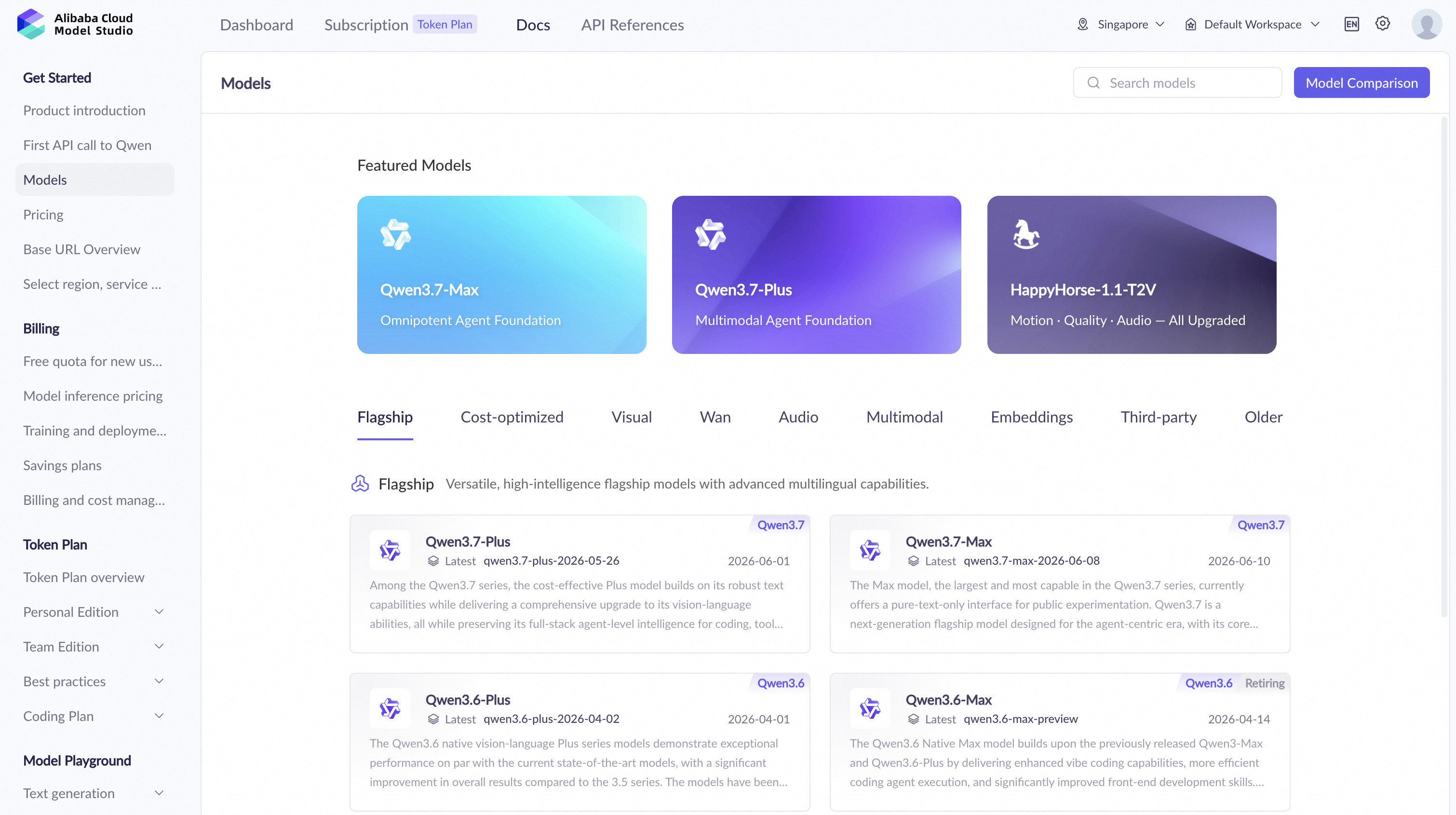
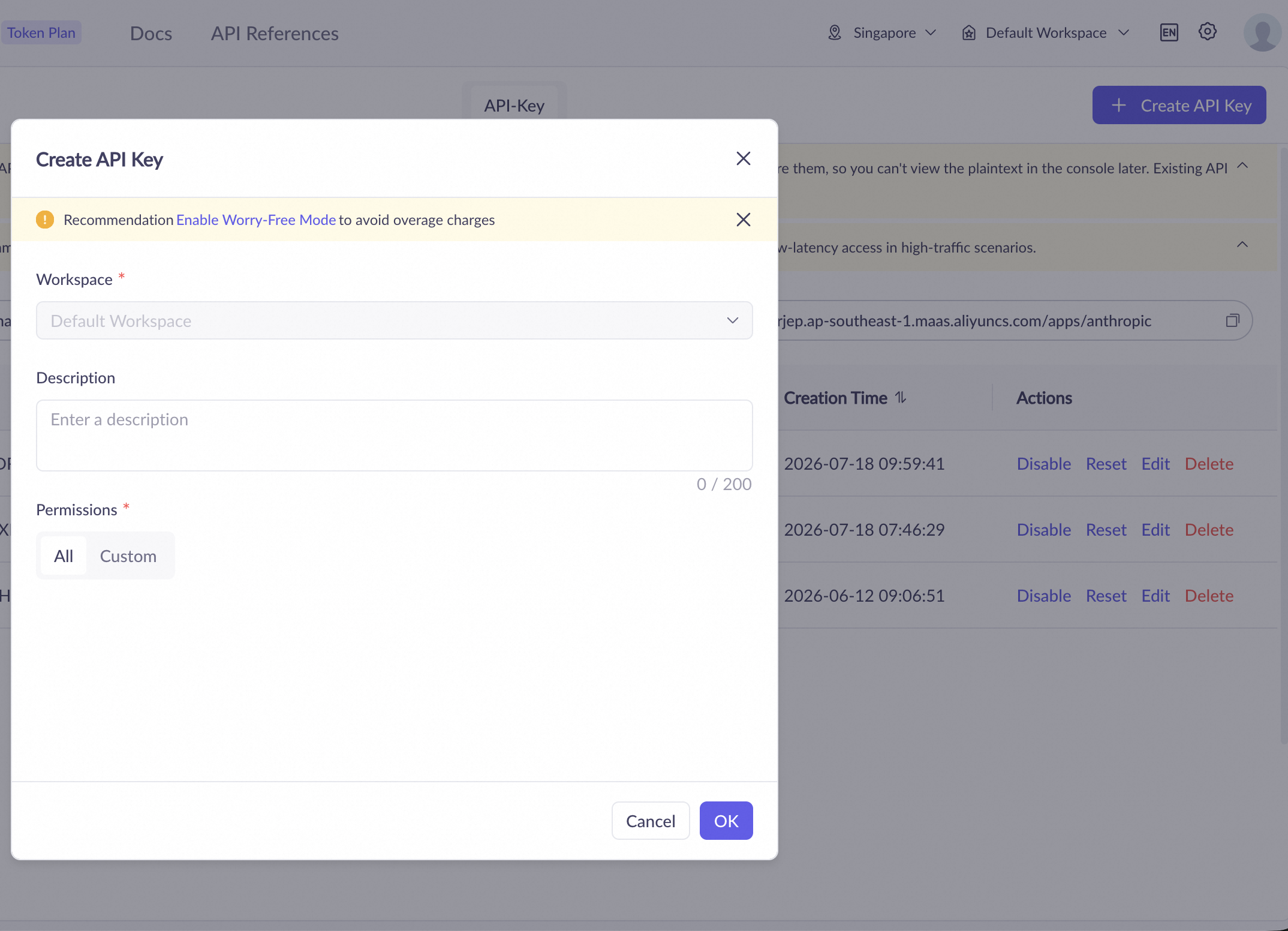
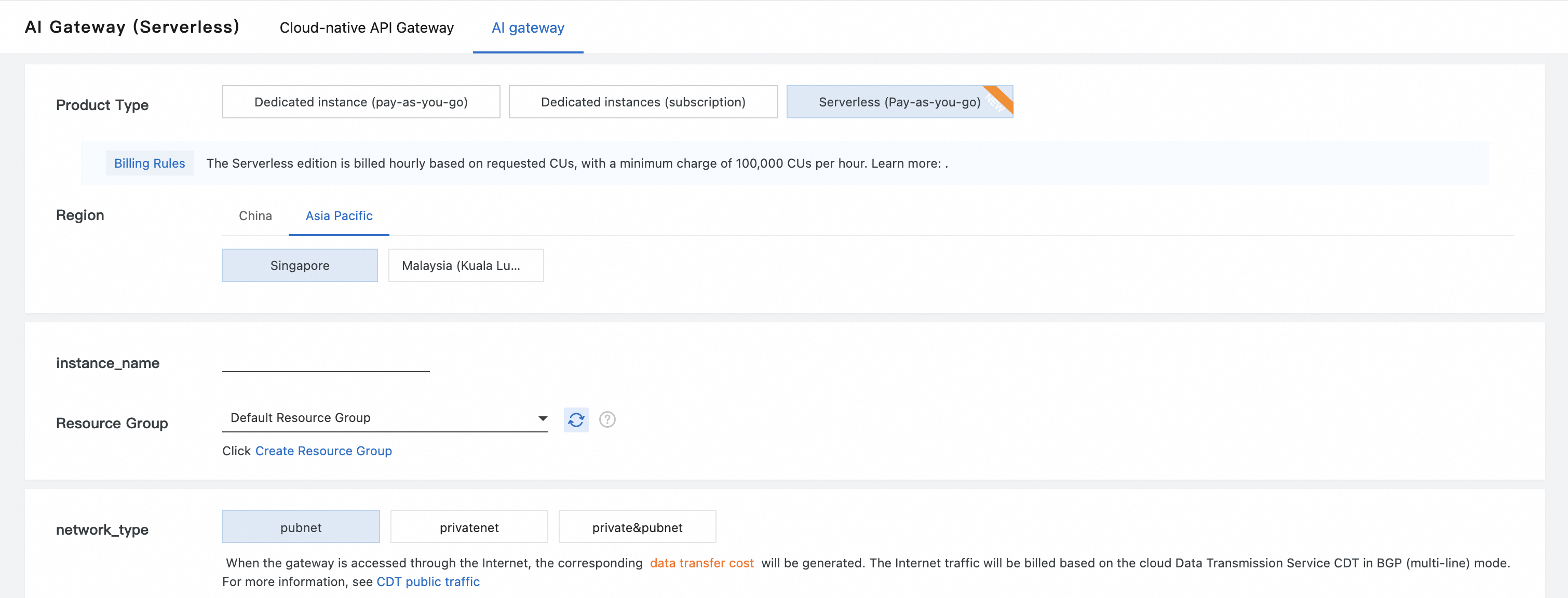
https://{WorkspaceId}.ap-southeast-1.maas.aliyuncs.com/compatible-mode/v1.In the AI Gateway console, click Create Instance.
Register the backend that the gateway will forward requests to. In the Service menu, click Create Service.
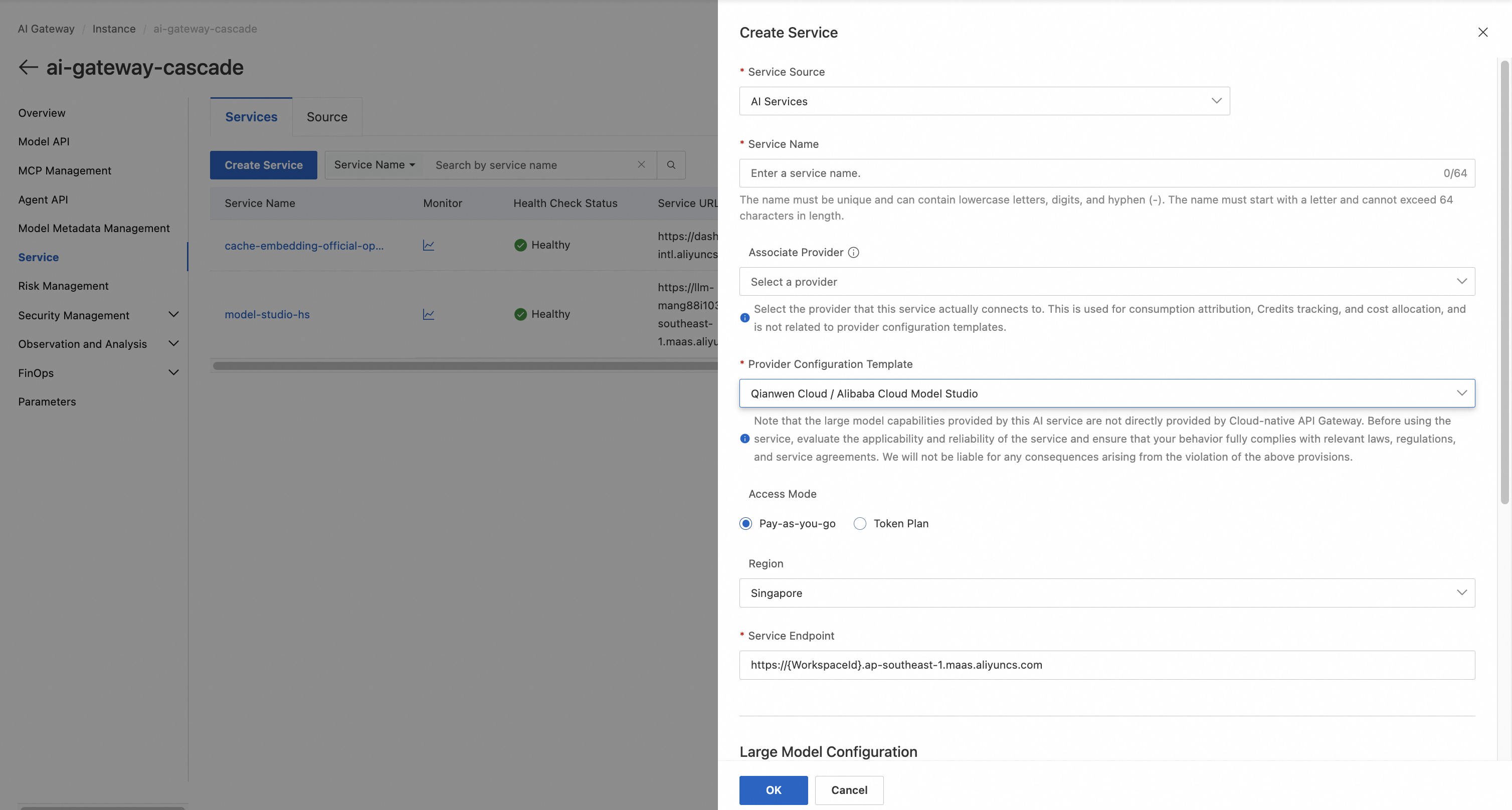
The important point here is that the Model Studio API key is registered only in the gateway and is never used by the application.
In the Model API menu, click Create Model API to publish an OpenAI-compatible API.
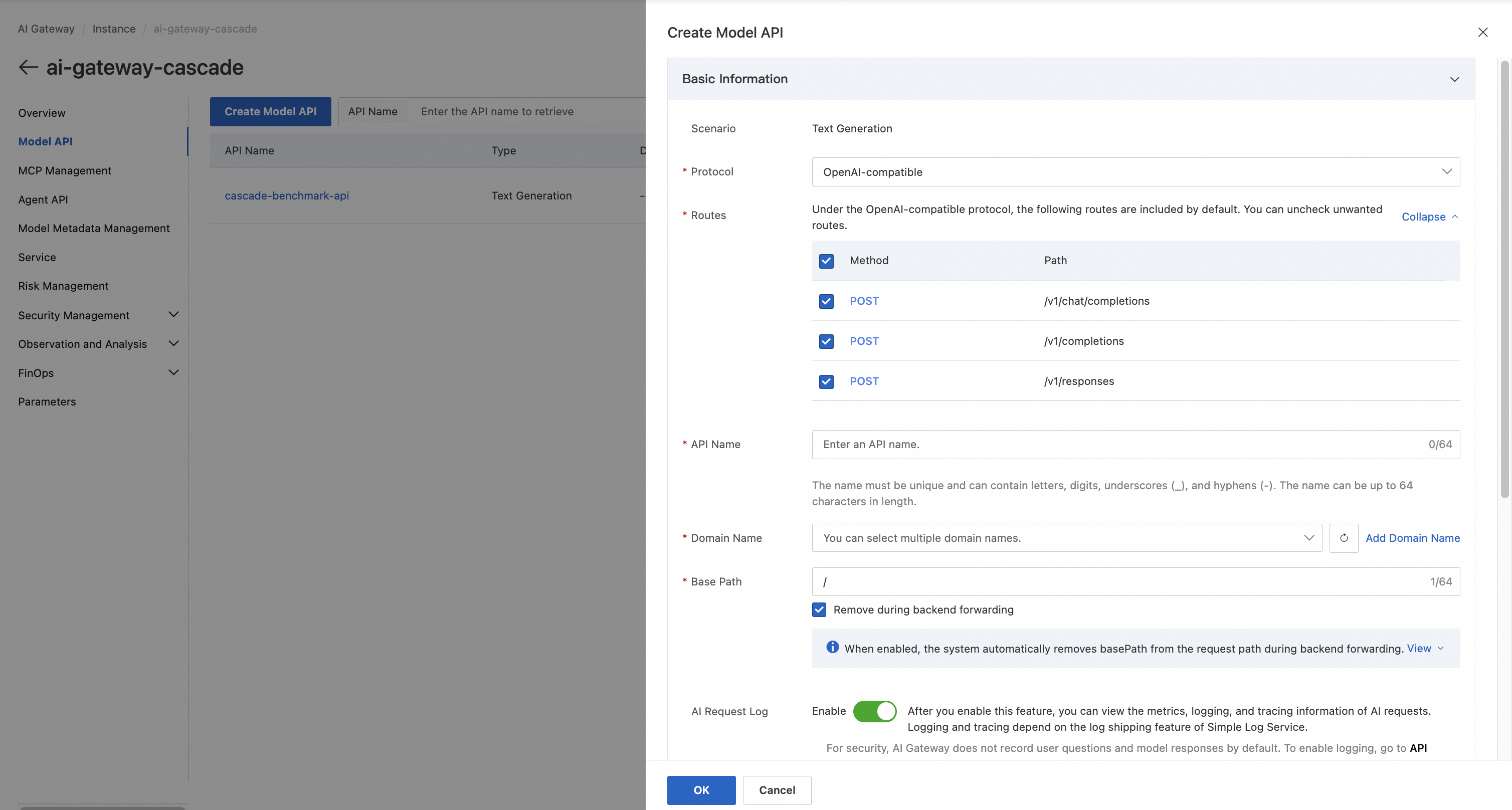
The single most important option here is Pass-through. With it enabled, the model=qwen3.7-flash / qwen3.7-plus / qwen3.7-max value the application sets in the request body is forwarded to Model Studio as-is. That is what lets a single API endpoint serve multiple models, and it is the point at which Self-Routing becomes possible.
Finally, create the consumer that the application will use. Enable Consumer Authentication (API key mode) on the Model API, create a consumer, and authorize it for that API.
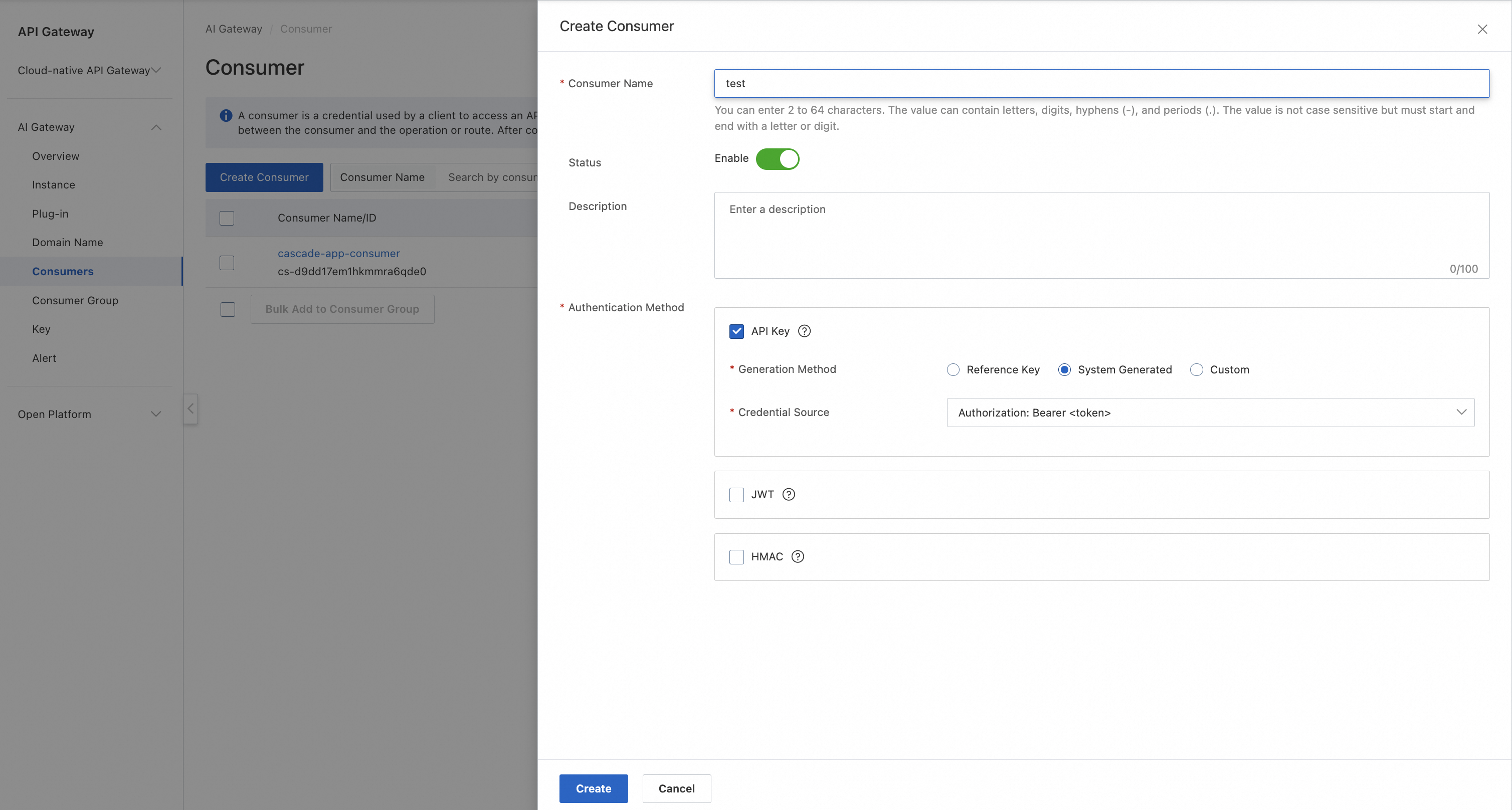
The application then uses only the issued consumer key. There is no need to expose the Model Studio key, and revoking or rotating keys can be done immediately from the console.
The application can keep using the OpenAI SDK as-is. The only difference is pointing the base URL at AI Gateway.
client = OpenAI(
    api_key="<CONSUMER_KEY>",
    base_url="https://<AI_GATEWAY_DOMAIN>/v1"
)
From there, calls work exactly like the standard OpenAI API — only the model value changes, according to the routing decision.
In production you also have to plan for model outages and transient errors. AI Gateway's AI Fallback feature lets you configure an automatic switch to a backup model when the primary model returns an error.
In this example I configured Qwen as the primary model and GLM 5.2 as the backup. The application needs no extra exception-handling code — the gateway calls the backup model on its own.
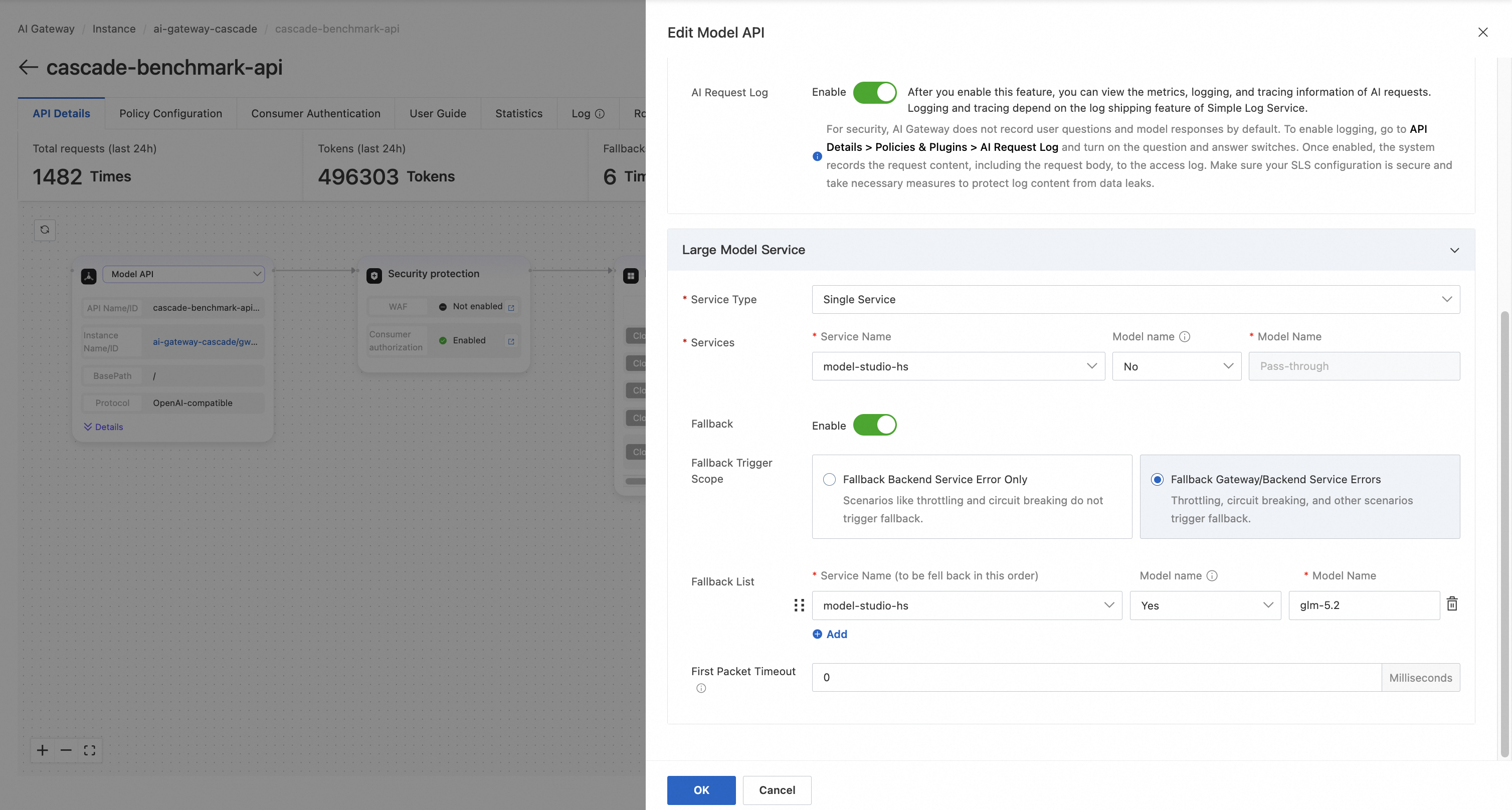
There are two pieces of evidence left behind: the verification result JSON, and the fallback_from field in the SLS logs. Both confirm the switch to GLM.
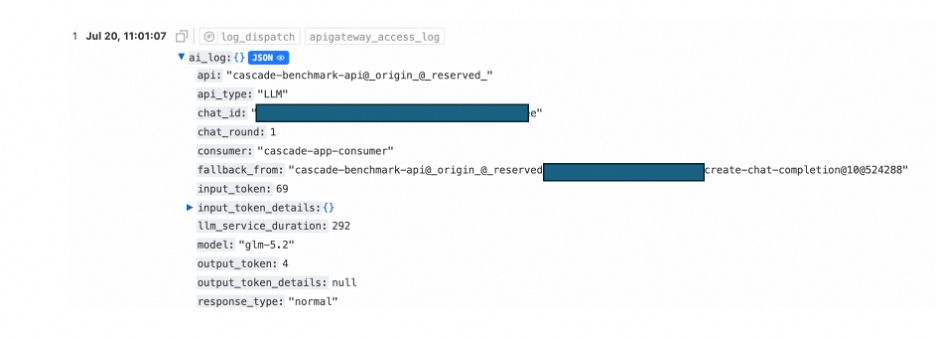
Since it only activates during failures, it has no impact on normal-day cost.
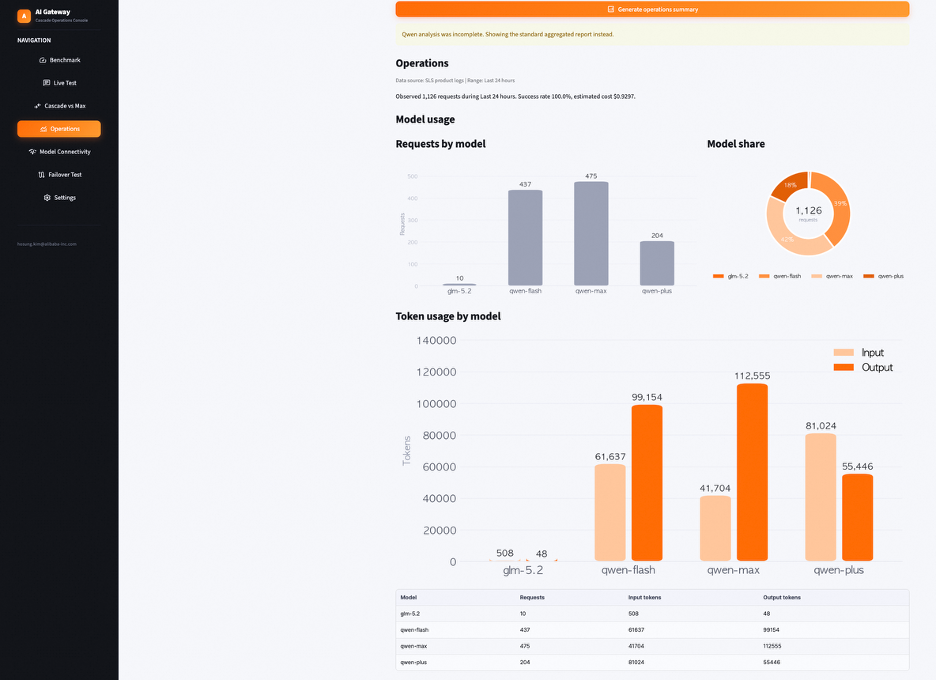
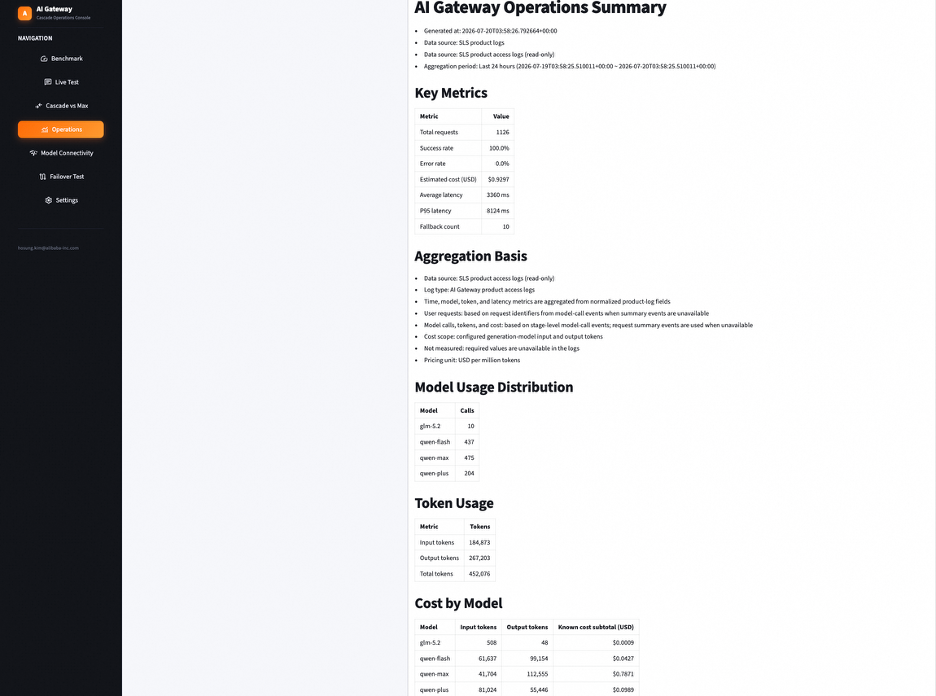
AI Gateway writes call information to SLS automatically. Without writing any logging code, you can immediately inspect:
model)input_token, output_token)llm_first_token_duration)llm_service_duration)fallback_from)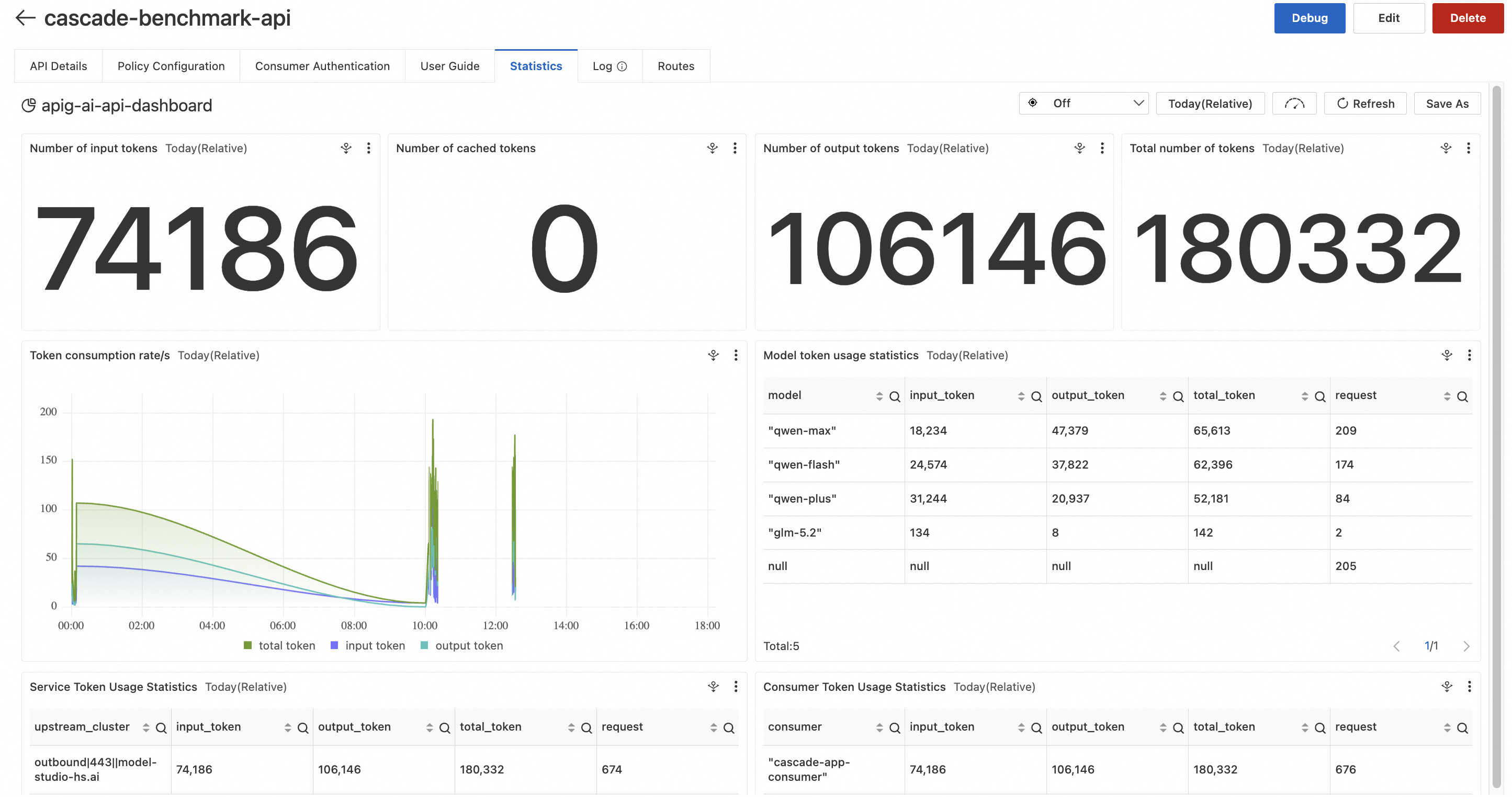
In this article the application makes the difficulty judgment itself, but there is also an approach that delegates the routing decision to a service.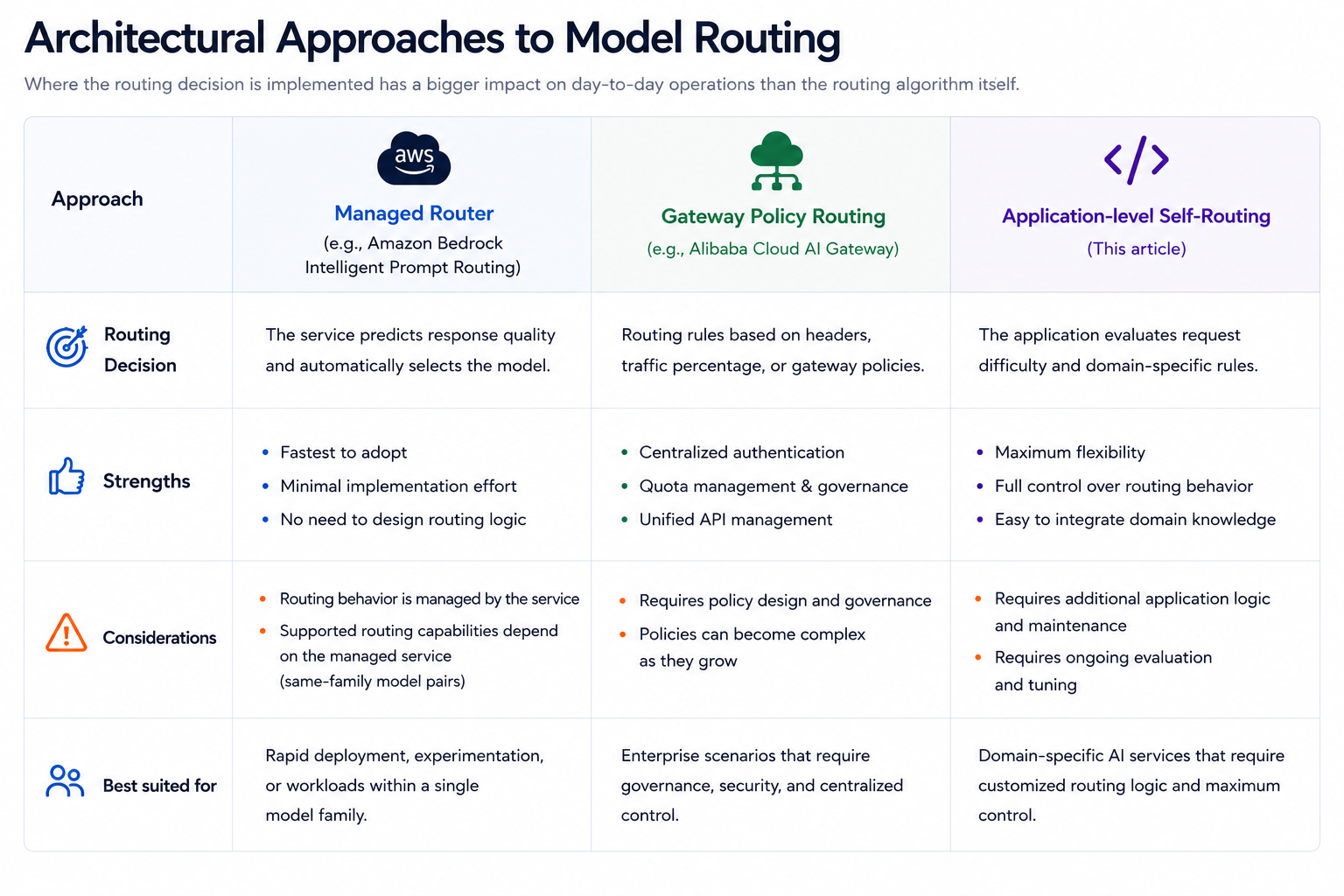
AWS made Amazon Bedrock Intelligent Prompt Routing, generally available in April 2025. It accepts requests through a single serverless endpoint and routes them within the same model family, weighing each model's expected response quality against its cost.
When you create a router, you specify the models to use and a baseline fallback model, and you set responseQualityDifference as the routing criterion. If you configure the application to call the prompt router instead of individual models, per-request model selection can be delegated to a managed service — that is the main advantage.
That said, the Considerations section of the official documentation notes that routing is optimized for English prompts, that it cannot adjust its judgments based on application-specific performance data, and that routing quality depends on the initial training data. It is worth validating the supported model combinations, regions, and per-language or per-use-case quality against your actual workload in advance. If your environment needs domain-specific criteria or detailed reasoning behind each decision, evaluate carefully whether a managed router alone is sufficient.
Alibaba Cloud AI Gateway is closer to designing the routing criteria yourself, through gateway policies or application logic. Beyond the pass-through mode used in Chapter 4, you can build policies around request characteristics such as traffic ratios or headers, and version 2.1.15 and later also offers Intelligent Routing, which classifies request intent through semantic analysis and forwards it to a suitable model.
In practice these three are not mutually exclusive. Using the gateway as the front door and running Self-Routing in the application on top of it is exactly the combination covered in this article.
Product capabilities and supported scope change frequently. Please treat the official documentation at the time of your implementation as the final reference.
AI Gateway is not just a proxy that connects multiple LLMs. It is an operations platform that unifies authentication, model routing, AI Fallback, and operational monitoring. Combined with a Self-Routing architecture, it lets you pursue cost optimization and operational efficiency at the same time, while building a foundation for serving a variety of LLMs reliably.
In this article I implemented a Self-Routing Multi-LLM architecture that automatically selects a Qwen model based on question difficulty using Alibaba Cloud AI Gateway and Model Studio, and walked through a practical setup including AI Fallback and operational monitoring.
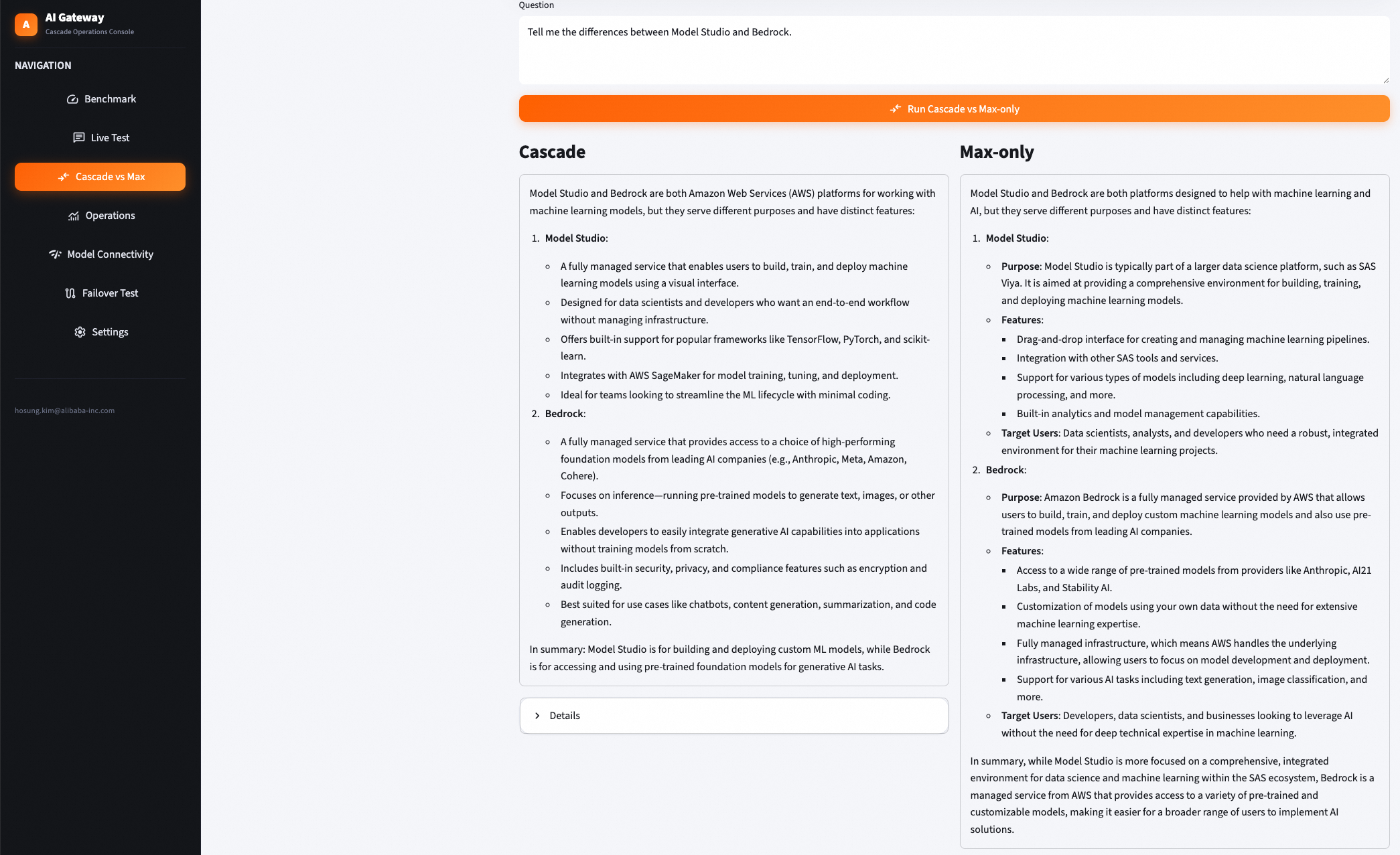
I also built a UI so you can see the structure in action. It compares Max-only and Cascade pricing side by side, and produces SLS-based monitoring and reports. Qwen is used to analyze those monitoring reports as well, so the results are easy to read at a glance.
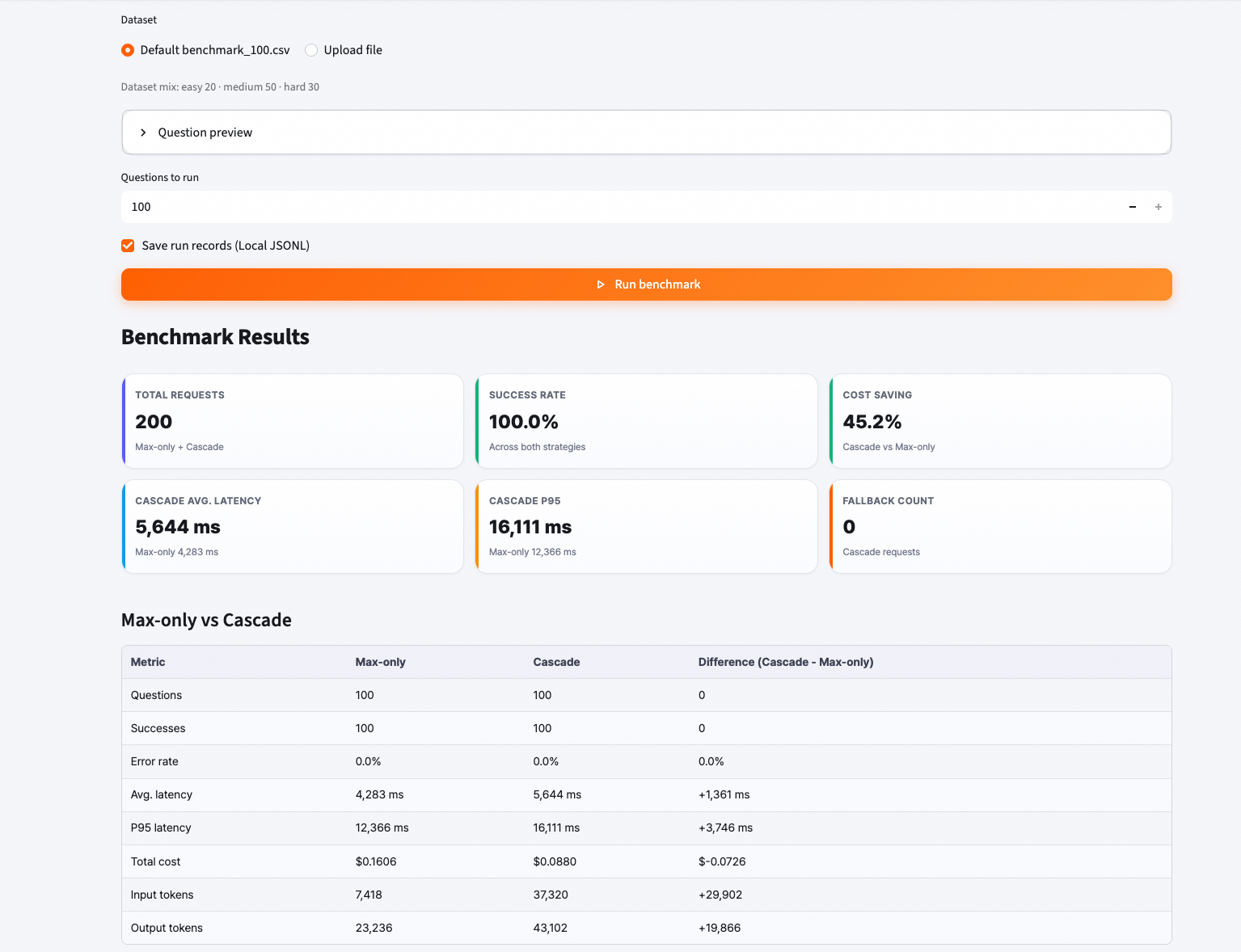
The two results below were measured under different conditions. The first is an estimated cost comparison between Cascade and Max-only for individual demo requests; the second is a cumulative measurement using a benchmark dataset organized by difficulty.
Individual demo request comparison
For the selected demo requests, the cost reduction versus Max-only came out to roughly 70%. The savings rate will vary depending on request difficulty and the model ultimately selected.
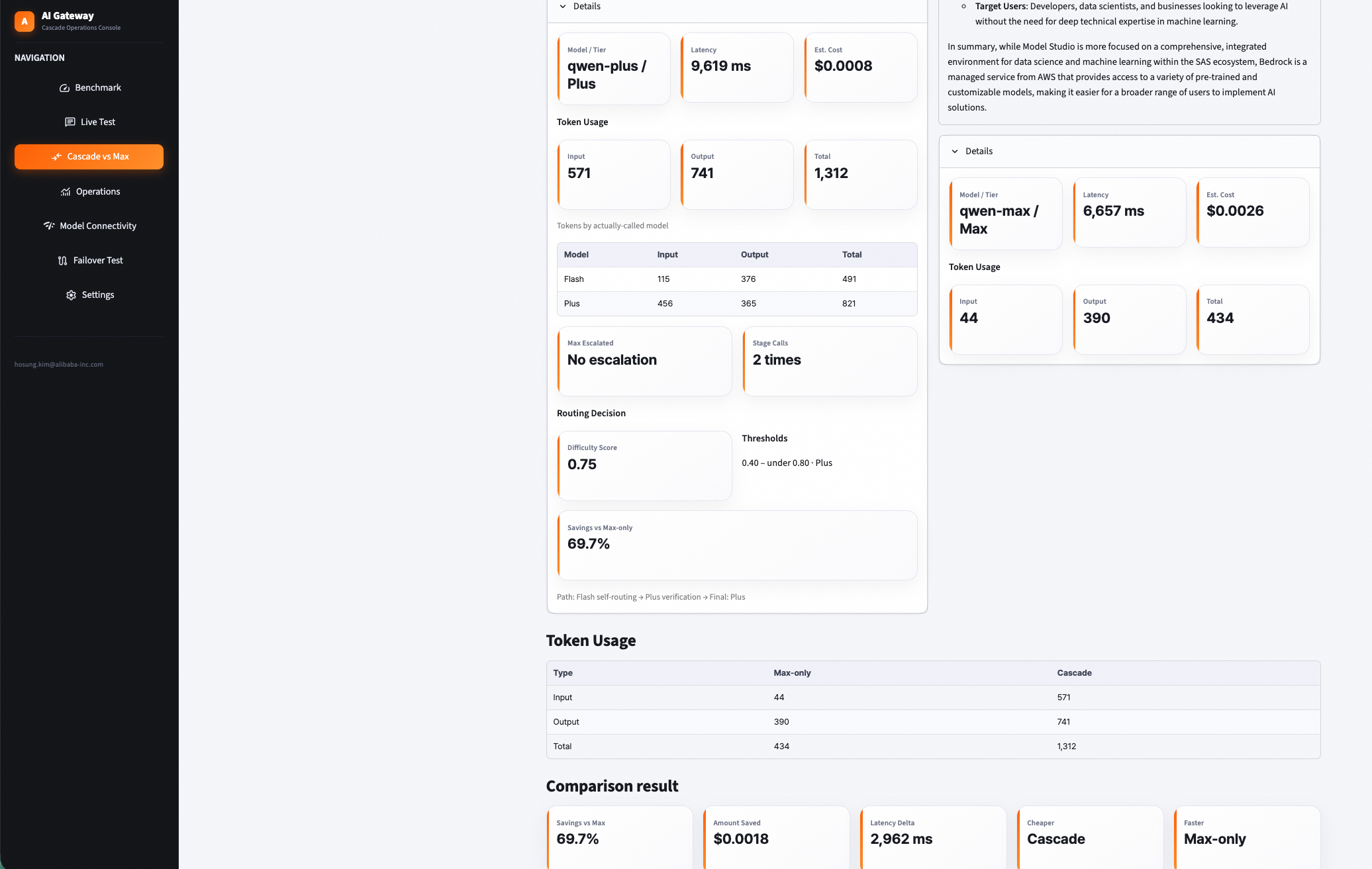
Cumulative benchmark results
The benchmark dataset consisted of 100 questions in total: 20 easy, 50 medium, and 30 hard. Running all 100 through Max-only and then through Cascade, the Cascade approach recorded roughly 45% lower cost in this test environment. This figure is the outcome of one experiment shaped by the prompts used, model pricing, response lengths, and routing thresholds, and it does not guarantee the same savings rate for every workload.
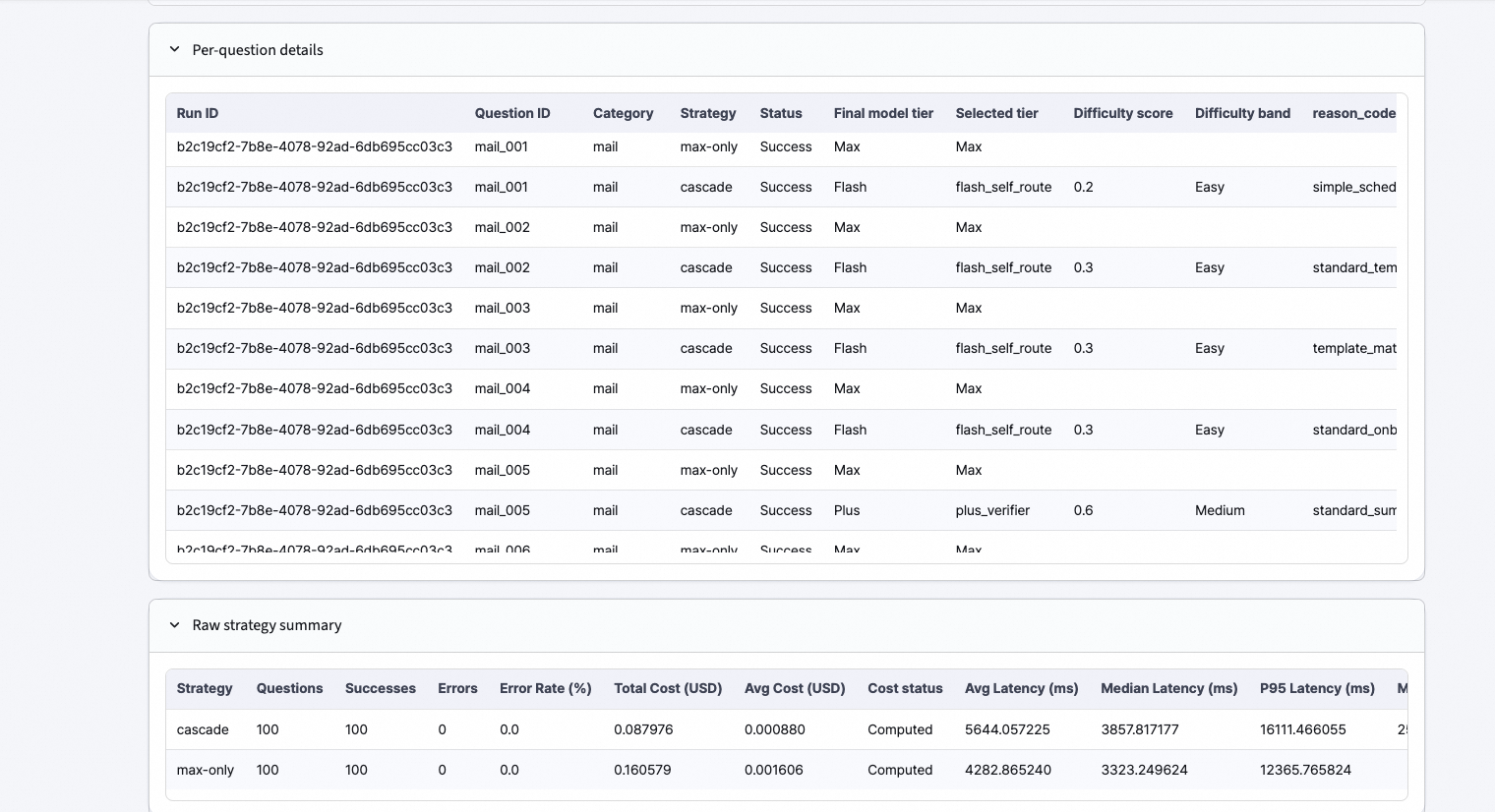
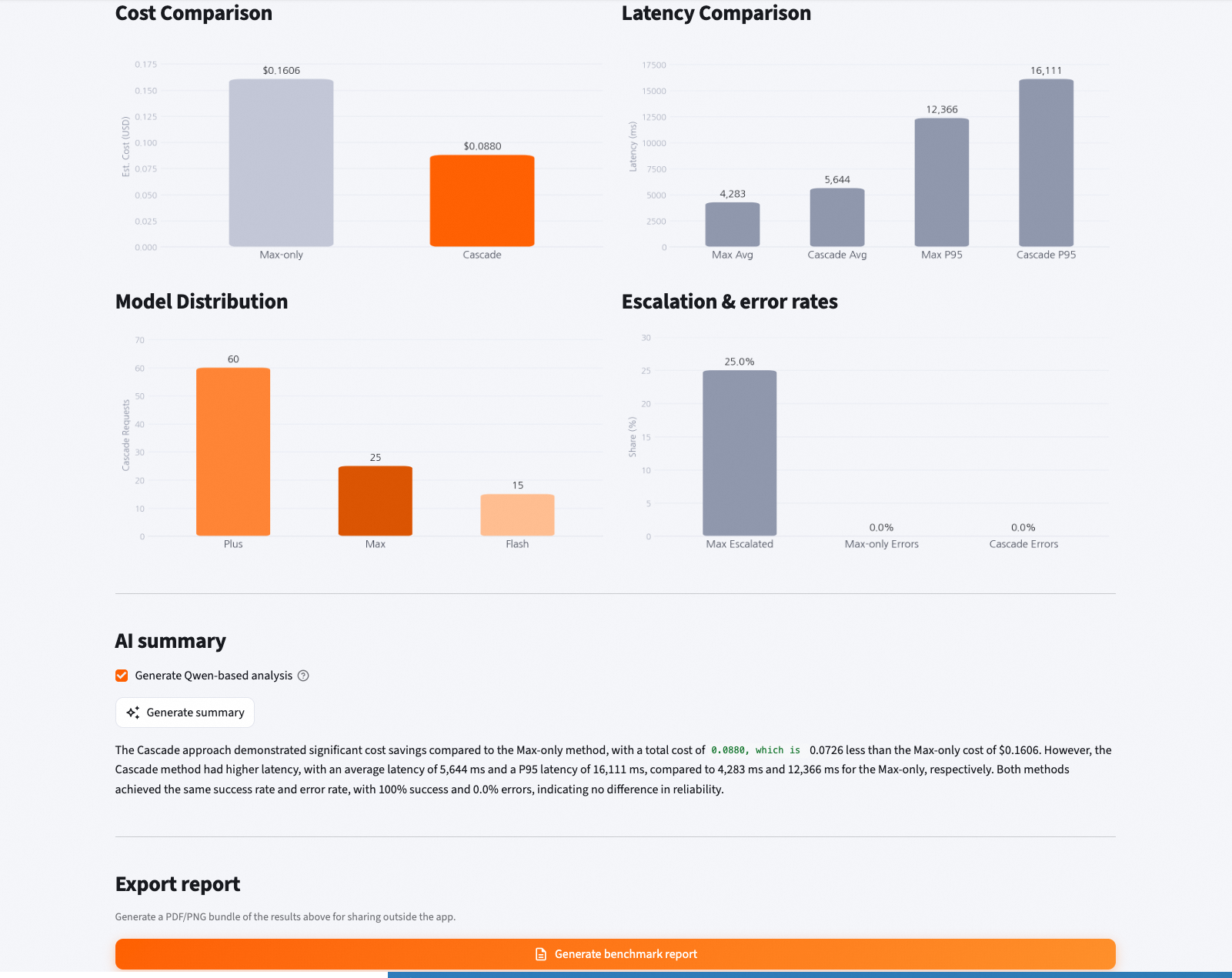
SLS log operational analysis images: (24 hours)
I encourage you to adapt the routing policy and model configuration to your own environment, and to make use of AI Gateway's broader feature set to build a stable and efficient LLM service.
That covers implementing a Self-Routing LLM architecture with Alibaba Cloud AI Gateway and Model Studio. If you would like more detail or want to discuss a specific use case, please feel free to reach out.
Alibaba Cloud
Hosung Kim | Sr. Technical Account Manager
Building an LLM Security Layer with Alibaba Cloud AI Gateway

4 posts | 1 followers
FollowHosung Kim - July 20, 2026
Alibaba Cloud Native Community - June 4, 2025
Muhamad Miftah - February 23, 2026
Alibaba Cloud Native Community - July 24, 2025
Alibaba Cloud Native Community - April 15, 2025
Alibaba Cloud Native Community - October 22, 2025
4 posts | 1 followers
Follow Qwen
Qwen
Full-range, open-source, multimodal, and multi-functional
Learn More Alibaba Cloud Model Studio
A one-stop generative AI platform to build intelligent applications that understand your business, based on Qwen model series such as Qwen-Max and other popular models
Learn More
Token Plan
Build more, spend less. One plan, every modality.
Learn More Alibaba Cloud for Generative AI
Accelerate innovation with generative AI to create new business success
Learn More
