Answers to common questions about Elastic Compute Service (ECS) image operations, including creating, copying, encrypting, sharing, importing, exporting, and deleting images.
Creating images
Copying images
Encrypting images
Sharing images
Importing images
Exporting images
Deleting images
Can I create a custom image from a data disk snapshot?
No. Custom images can only be created from system disk snapshots. However, when creating a custom image from a system disk snapshot, you can include data disk snapshots alongside it. For more information, see Create a custom image from a snapshot.
How do I check image creation progress, and how long does it take?
Check the progress on the Images page of the ECS console. Creation time depends on the total size of disks on the instance. The image becomes available after a snapshot is created for each disk. For more information, see Create a custom image from an instance.
When do I need to copy a custom image?
Each custom image is tied to a region and can only be used in that region. Copy a custom image to:
Deploy applications across multiple regions.
Migrate an instance to another region.
Use a custom image in a different region.
Change the encryption status of a custom image, or encrypt system disk or operating system data.
For more information, see Copy a custom image.
Which images can be copied?
Only custom images. Public images and Alibaba Cloud Marketplace images cannot be copied.
How long does it take to copy an image?
Copy time depends on the network transfer rate and the number of queued transfer tasks, since the image file is transmitted from the source region to the destination region.
For large images (over 2 TiB), copying the associated snapshots to the destination region first, then creating a custom image from those snapshot copies, is faster than copying the image directly. For more information, see Copy a snapshot and Create a custom image from a snapshot. Copying snapshots incurs snapshot storage fees and data transfer fees for snapshot replication. For more information, see Snapshot billing.
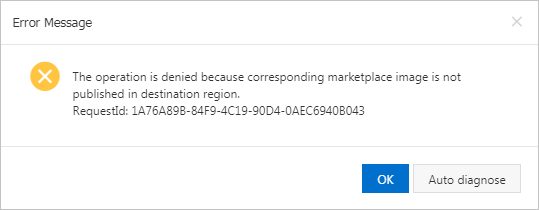
Can I copy a custom image derived from an Alibaba Cloud Marketplace image across regions?
Only if the Alibaba Cloud Marketplace image exists in the destination region. If it does not, the copy fails with an error similar to the one shown below.
Can I encrypt ECS instance system disks with Key Management Service (KMS) keys? How do I use Terraform or Packer?
Yes. System disks can be encrypted with default service keys or custom keys in KMS. For more information, see Encrypt a system disk.
Packer: Set the
image_encryptedparameter. For more information, see Alicloud Image Builder.Terraform: Set the
encryptedparameter. For more information, see alicloud_disks.
What are the requirements for Copy and Encrypt?
To use the Copy and Encrypt feature:
Activate KMS. For more information, see Activate KMS.
Set Copy Mode to Copy and Encrypt.
To use a custom KMS key, create a CMK (Customer Master Key) first. For more information, see Create a CMK.
What permissions are required to share an encrypted image?
Create a Resource Access Management (RAM) role named AliyunECSShareEncryptImageDefaultRole and grant the required permissions before sharing an encrypted image with other Alibaba Cloud accounts or within your organization based on resource directories. For more information, see Share an encrypted custom image.
Can I share images between China site and international site accounts?
No. Images cannot be shared between accounts on the China site and accounts on the international site.
What are the risks of sharing images?
Data leakage and software theft. Before you share an image, make sure that the image does not contain sensitive or important data and software. When you share an image, recipients can use it to create ECS instances, which can then generate additional custom images. Data can spread through this chain, creating a leakage risk.
Security of received images. Alibaba Cloud does not guarantee the integrity or security of images shared by other accounts. Use only images shared by trusted accounts. After creating an instance from a shared image, log on to the instance to check the security and integrity of the image.
Impact of deletion. If the image owner deletes a shared image, the system disks of instances created from that image can no longer be re-initialized.
Can I re-share an image that was shared with me?
No. To share it with another account, copy the shared image to create your own custom image, then share that custom image.
How do I share an image across regions?
Two approaches:
Share the image first, then have the recipient copy it to the destination region.
Copy the image to the destination region first, then share the copy.
For more information, see Copy a custom image and Share a custom image.
How do I check import progress, and how long does it take?
Select the region and check the Images page or the Task Logs page in the ECS console.
Import time depends on the image size and the number of queued import tasks. For more information, see Import a custom image.
My Bring Your Own License (BYOL) image licenses have expired. How do I switch to Alibaba Cloud licenses?
Replace the BYOL image with an Alibaba Cloud image by replacing the operating system of the instance:
Windows Server: Use Alibaba Cloud public images. For more information, see Overview of public images.
SQL Server and Red Hat: Use Alibaba Cloud Marketplace images. For more information, see Alibaba Cloud Marketplace images.
Can I use an Object Storage Service (OSS) internal endpoint to import custom images?
No. Use the public URL of the image object generated when you share it. Importing with an internal endpoint returns an error.
To get the public URL, see Share objects.
For details on internal endpoints, see Obtain the internal endpoint of OSS.
How do I convert ISO files to ECS-supported image formats?
ISO files must be converted before import:
Use a tool such as VirtualBox to create an image from the ISO file on premises.
Convert the image to a supported format: RAW, Virtual Hard Disk (VHD), QEMU Copy-On-Write version 2 (QCOW2), or Virtual Machine Disk (VMDK).
For more information, see Import a custom image.
Which image formats can be used in ECS?
How do I upload on-premises image files to ECS?
For more information, see Import a custom image.
What permissions are required to upload image files to OSS?
Alibaba Cloud account: Upload directly. For more information, see Upload objects.
RAM user: Ask the Alibaba Cloud account owner to grant permissions on the relevant OSS buckets. For more information, see Grant permissions for different scenarios.
How do I download image files to an on-premises device?
Use the image export feature. For more information, see Export a custom image.
Can an exported ECS image boot on other platforms?
Images exported from ECS may not start on other platforms. To retrieve disk data, attach the disks from the downloaded images to on-premises devices.
Can I delete a shared or in-use image? What happens if I do?
A shared image or an image used to create instances can only be force deleted.
If you delete Image M after sharing it with Account A:
Account A can no longer query Image M in the ECS console or through API operations.
Account A can no longer use Image M to create instances or replace system disks.
The system disks of instances that Account A created from Image M can no longer be re-initialized.
For more information, see Delete a custom image.
Why do I see "The specified image cannot be deleted because it is associated with instances"?
The image was used to create ECS instances. Select Forcefully Delete Image to proceed. After force deletion, existing instances remain available, but their system disks can no longer be re-initialized. For more information, see Re-initialize a system disk (reset the operating system) and Delete a custom image.